Next-Level Code. Nexuvibe Style ...
Hrs
Min
Sec

Gravity Forms handles most form-building needs exceptionally well. But collecting dynamic, repeatable, multi-row data has always been the gap in its core feature set. The moment a user needs to add “one more row” of grouped information, whether that is another team member, another line item, or another address, standard Gravity Forms runs out of good options.
The plugin ecosystem has responded to this gap with several different approaches. Some are free, some are premium, some are maintained actively, and some have been abandoned. Some use a child-form architecture, others use inline repeating sections, and others try to stretch the native List field beyond its design limits.
This guide compares the actual options available in 2026. We tested each one on a real Gravity Forms installation, looked at frontend UX, admin entry display, notification output, export quality, and overall reliability. The goal is to help you choose the right tool for your specific use case, not just the one with the best marketing page.
Before diving into each option individually, here is the high-level comparison. This table covers the features that matter most for practical dynamic list and complex data collection scenarios.
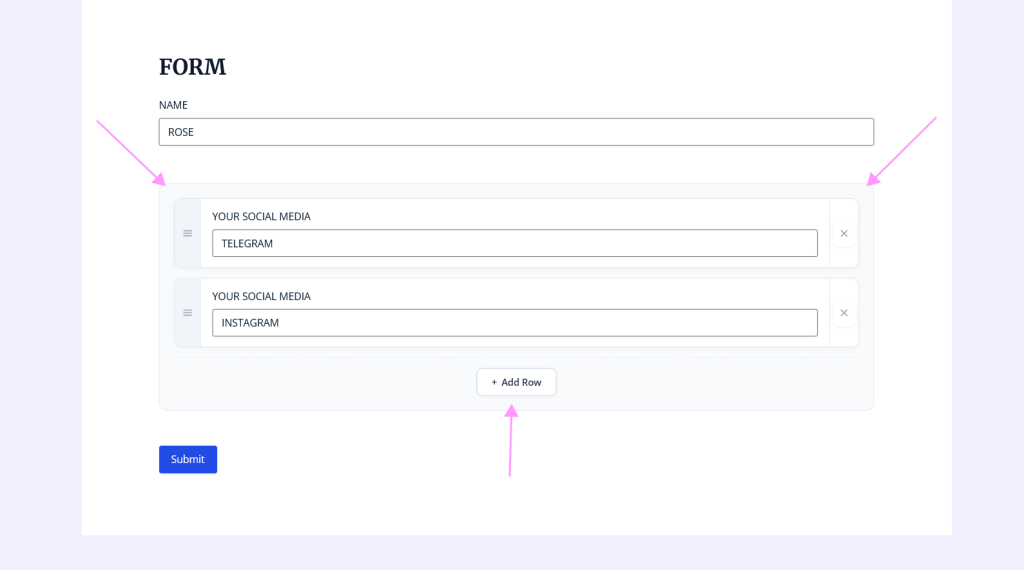
The NEXU Advanced Repeater plugin for Gravity Forms with nested fields and dynamic row management takes the inline-section approach. You add a Repeater Start and Repeater End marker in the Gravity Forms editor, and everything between them becomes a repeatable row template. No code, no separate child forms, no modals.
What sets it apart from other inline repeater plugins is the combination of features that actually work together reliably. Per-row calculations compute correctly even when users add or remove rows dynamically. File uploads stay associated with their specific row through submission, entry display, and export. The entry view displays repeated data as a readable table rather than a JSON dump or serialized string. Merge tags generate structured output for notification emails. These are not individual features to check off a list. They are the specific things that break in most competing solutions.
The frontend UX is notably polished. Rows appear with smooth animations, each row has clear add and remove controls, and the form adapts to the user’s actual data rather than forcing them through a predetermined layout. For users who need to add two rows or twenty, the form feels equally natural.
For the vast majority of dynamic list and repeatable data scenarios, this is the most practical and cost-effective option. It covers the features that matter for real-world forms without the overhead of managing multiple forms or paying for a large bundle you might not need.
Gravity Wiz Nested Forms is the most established third-party solution for repeatable data in Gravity Forms. It uses a fundamentally different architecture: you create a separate child form, then embed it inside a parent form using a Nested Form field type. When users add a row, they fill out the child form in a modal popup, submit it, and the child entry appears as a row in the parent form.
This architecture has a significant advantage: each child row creates its own independent entry. This means you can trigger separate feeds per row, such as registering each team member as a WordPress user, creating a CRM record per line item, or sending individual notifications per row. If your workflow genuinely requires per-row processing, this is the feature that makes Nested Forms the right choice.
It is part of the Gravity Perks suite, which includes over 48 add-ons for Gravity Forms. You cannot purchase Nested Forms individually; you buy the full Gravity Perks license. This is excellent value if you use many Gravity Perks add-ons, but it means the entry price for just the repeater functionality is significantly higher than standalone options.
If you already use Gravity Perks or your project specifically requires per-row entry processing, this is a proven and reliable choice. For simpler repeater needs where you just want grouped fields that users can repeat, the overhead of the child-form architecture and the suite pricing may be more than you need.
The Yee Add-ons Repeater is available on WordPress.org with a free version and a paid Pro upgrade. It uses an inline approach where you define repeatable sections in the form editor. The free version provides basic repeating with minimum and maximum row limits, and the Pro version adds conditional logic support.
In our testing, the basic repeating functionality works for straightforward scenarios. However, there are known reliability concerns with file upload fields, where making the upload required has no effect and the form can submit without files. Several WordPress.org reviews report that plugin updates have occasionally caused critical errors or disabled forms entirely. The export format puts all repeated data into a single cell, which limits its usefulness for structured data processing.
This option works for simple repeater needs where you do not need calculations, file uploads, or structured exports. For anything beyond basic text field repeating, the reliability concerns and feature gaps become relevant.
The getButterfly Repeater is a free, open-source plugin maintained by a single developer. It uses start and end markers in the form editor, similar to the NEXU approach. The developer has been actively working on the plugin, with updates for WordPress 6.8+ compatibility and JSON-based entry storage.
This plugin has earned respect in the community for its honest, developer-focused approach. It does not pretend to solve everything. File uploads work after significant rework by the developer to handle the Gravity Forms file processing pipeline correctly. Time fields and date pickers are reinitialized properly on row cloning. Entry detail views convert repeated groups into readable tables.
The main limitation is that it does not support calculations inside repeater rows, Ajax-enabled forms, or nested repeaters (a repeater inside a repeater). It is also maintained by a single person, which means the development pace and support capacity are naturally more limited than a commercial product.
A solid free option for developers who want a no-frills repeater and do not need calculations or Ajax forms. If you are comfortable with open-source software and do not need commercial support, this is worth evaluating.
Gravity Forms introduced a native Repeater field type in version 2.4. It supports nested repeaters, a range of field types, and is built into the Gravity Forms core. On paper, this sounds like the obvious choice. In practice, it has been in beta for years and remains a developer-only feature with no visual editor support.
To use the native repeater, you need to build the field structure programmatically in PHP. There is no drag-and-drop interface. The official documentation explicitly states that it is intended for developers who can build forms programmatically. Additionally, conditional logic, calculations, dynamic population, CSS Ready classes, file uploads, and several other commonly-needed features are not implemented.
Worth knowing about for developers who want to experiment or have very specific requirements that align with its current capabilities. Not a practical solution for site owners, agencies, or anyone who needs a visual builder or the features listed as unsupported.
The right choice depends on what your project actually needs. Here is a practical decision framework.
This is the most common scenario: event registrations, order line items, team lists, application histories. You want users to add rows, you want structured entry data, and you want clean notification emails. The NEXU Advanced Repeater with dynamic lists and per-row calculations for Gravity Forms covers this scenario completely at the lowest price point among commercial options.
If each repeated row needs to trigger its own workflow, such as registering each team member as a WordPress user or creating a separate CRM contact for each line item, you need the child-form architecture. Gravity Wiz Nested Forms is the right choice here. The added complexity and cost are justified by the per-row processing capabilities.
The getButterfly Repeater is a respectful free option for developers who need basic repeating without calculations or Ajax support. If you just need text fields and dropdowns to repeat, and you are comfortable with open-source software, it is a viable starting point.
The native Gravity Forms Repeater API gives you direct access to the core field type without a third-party dependency. If you are building a custom solution and can work around the current limitations, it keeps your dependency count low. Just be aware that it has been in beta for years with no public graduation timeline.
Dynamic lists and complex data collection in Gravity Forms require a plugin. The native options, whether the List field or the beta Repeater API, do not cover the needs of most real-world projects. The third-party ecosystem fills this gap with approaches that range from enterprise-grade child-form architectures to lightweight open-source repeaters.
For most sites and agencies, the practical choice comes down to two strong options. If you need per-row independent processing, go with Gravity Wiz Nested Forms and invest in the Gravity Perks ecosystem. If you need a complete inline repeater with calculations, file uploads, structured entries, and clean notifications at a straightforward price, the NEXU Advanced Repeater for Gravity Forms with nested fields and structured data export delivers the most complete feature set for the broadest range of use cases.
Visual builder setup, per-row calculations, file uploads, structured entry tables, clean notification output, and a price that respects your budget. From $19/year.






Hey, finally a fair comparison!
Wished rows could trigger separate actions.
Hey, the admin view looks great but those