Next-Level Code. Nexuvibe Style ...
Hrs
Min
Sec

Affiliate tracking in WooCommerce comes down to a deceptively simple question: how does your store know which affiliate sent a particular buyer? The answer involves two fundamentally different mechanisms — cookie-based tracking (which works through a URL parameter and a browser cookie) and coupon-based tracking (which works through a discount code entered at checkout). Both are valid, both are used in real programs, and both have scenarios where they work brilliantly and scenarios where they fail entirely.
Most WooCommerce affiliate programs set up one method and assume it covers everything. It does not. Cookie tracking misses buyers who arrive through channels where links cannot be clicked or where browsers block cookies. Coupon tracking misses buyers who clicked a link but never used a code. Running both methods simultaneously — with a clear priority rule for when both signals are present — is the approach that provides genuinely complete affiliate attribution.
This guide walks through how to configure both tracking methods in Affiliate Engine, a WooCommerce affiliate and referral tracking plugin, explains the specific settings that matter for each method, and covers the priority configuration that handles overlap between them.
Cookie-based affiliate tracking is the standard method used by most WooCommerce affiliate programs. It works by appending a URL parameter to the affiliate’s referral link, detecting that parameter when a visitor arrives on your store, and storing the affiliate identity in a browser cookie that persists until the cookie expires or is cleared.
The URL parameter (ref=sarah) identifies the affiliate. The parameter name is configurable in settings.
The plugin detects the parameter on page load and immediately sets a first-party cookie (affiliate_ref=sarah) in the visitor’s browser. This cookie survives navigation within your store and persists for the configured cookie lifetime.
When the visitor completes a purchase, the plugin reads the cookie at the WooCommerce order completion hook. If the cookie is present and the affiliate identifier matches a valid affiliate in the database, the order is attributed and a commission record is created. If the cookie is absent, expired, or the visitor has cleared their browser data, no attribution occurs.
The cookie tracking settings live in the General settings tab. There are four key settings that determine how cookie tracking behaves in your program, and each one requires a deliberate decision rather than just accepting the default.
This is the query string key that appears in your referral links (for example, the ref in ?ref=sarah). The default is typically “ref” or “aff” — both work, and your choice is primarily about aesthetics and compatibility with your existing URLs. One practical consideration: if you have any existing marketing links or redirects that use these parameter names for other purposes, use something distinct to avoid conflicts. Whatever you choose, configure it once and document it in your affiliate terms, because changing it later breaks existing referral links that affiliates are actively sharing.
The identifier inside the URL parameter can be the affiliate’s username, a unique numeric ID, or a custom slug. Username-based links (ref=sarah) are more readable and feel more personal, which can improve click-through rates when affiliates share them. ID-based links (ref=247) are less guessable and slightly more private. Either works technically. For programs where affiliates share their links publicly, username-based links also function as a light brand presence — the affiliate’s name in the URL is a minor but real trust signal for the person clicking.
The number of days the attribution cookie remains valid after a referral link click. A 30-day cookie is the most common starting point and suits the majority of WooCommerce product categories. If your products have a longer consideration cycle — furniture, expensive electronics, custom-order items — a 60 or 90 day window gives affiliates credit for the research-to-purchase journey that characterizes these categories. Setting it too short means affiliates lose credit for sales they genuinely drove. Setting it too long is generous to affiliates but rarely creates practical problems since the buyer’s intent was established by the affiliate’s promotion regardless of when they finally bought.
This setting controls whether the tracking cookie is set via an AJAX call on page load (JavaScript-based) or only via server-side PHP when the page first loads. AJAX-based cookie setting is more reliable in environments where page caching is active, because the JavaScript runs after the cached page has been served — even if the server never processes the URL parameter due to caching. Enable AJAX cookie setting if your store uses a page caching plugin such as WP Rocket, W3 Total Cache, or LiteSpeed Cache.
Understanding the failure modes of cookie tracking is what makes the case for also running coupon-based tracking. These are not edge cases — they are regular real-world scenarios that affect a measurable proportion of affiliate-referred sales in any active program.
Coupon-based tracking does not depend on cookies, URL parameters, or browser behavior at all. The mechanism is entirely different: a unique coupon code is linked to a specific affiliate in the plugin’s database. When that coupon is used at checkout — by anyone, on any device, through any channel — the order is automatically attributed to the linked affiliate and a commission record is created.
The coupon code used for affiliate tracking is a standard WooCommerce coupon, which means it can also provide a discount to the buyer. This dual-purpose function is what makes coupon tracking particularly valuable for affiliate programs: the buyer gets an incentive (the discount), the affiliate gets attribution (the commission), and the store gets a trackable conversion signal that does not depend on browser state.
Coupon tracking settings live in the Commission settings tab alongside the commission rate configuration. There are five settings that control how coupon tracking behaves in your program.
The master toggle that activates coupon-based tracking. When enabled, the plugin monitors WooCommerce orders for coupon codes that are linked to affiliates. Enabling this does not break link-based tracking — both methods run in parallel once this is turned on.
The format used to automatically generate coupon codes for new affiliates. A format like {USERNAME} creates a code identical to the affiliate’s username (SARAH). Adding a number suffix creates {USERNAME}10 (SARAH10 — indicating 10% off). The best formats for affiliate programs are memorable and personal: they incorporate the affiliate’s name or handle, which makes them feel like a personal recommendation rather than a generic code. Avoid purely random alphanumeric codes — they are hard to share verbally and less likely to be remembered by the affiliate’s audience.
When the plugin auto-generates coupons for affiliates, the discount attached to those coupons is configured here. You choose whether the coupon offers a percentage discount, a fixed cart discount, or no discount at all (tracking-only). A 10–15% discount for the buyer alongside the affiliate’s commission for the referral is the standard dual-incentive structure. Tracking-only coupons (with no discount) work but convert at lower rates because the buyer has less incentive to use the code actively.
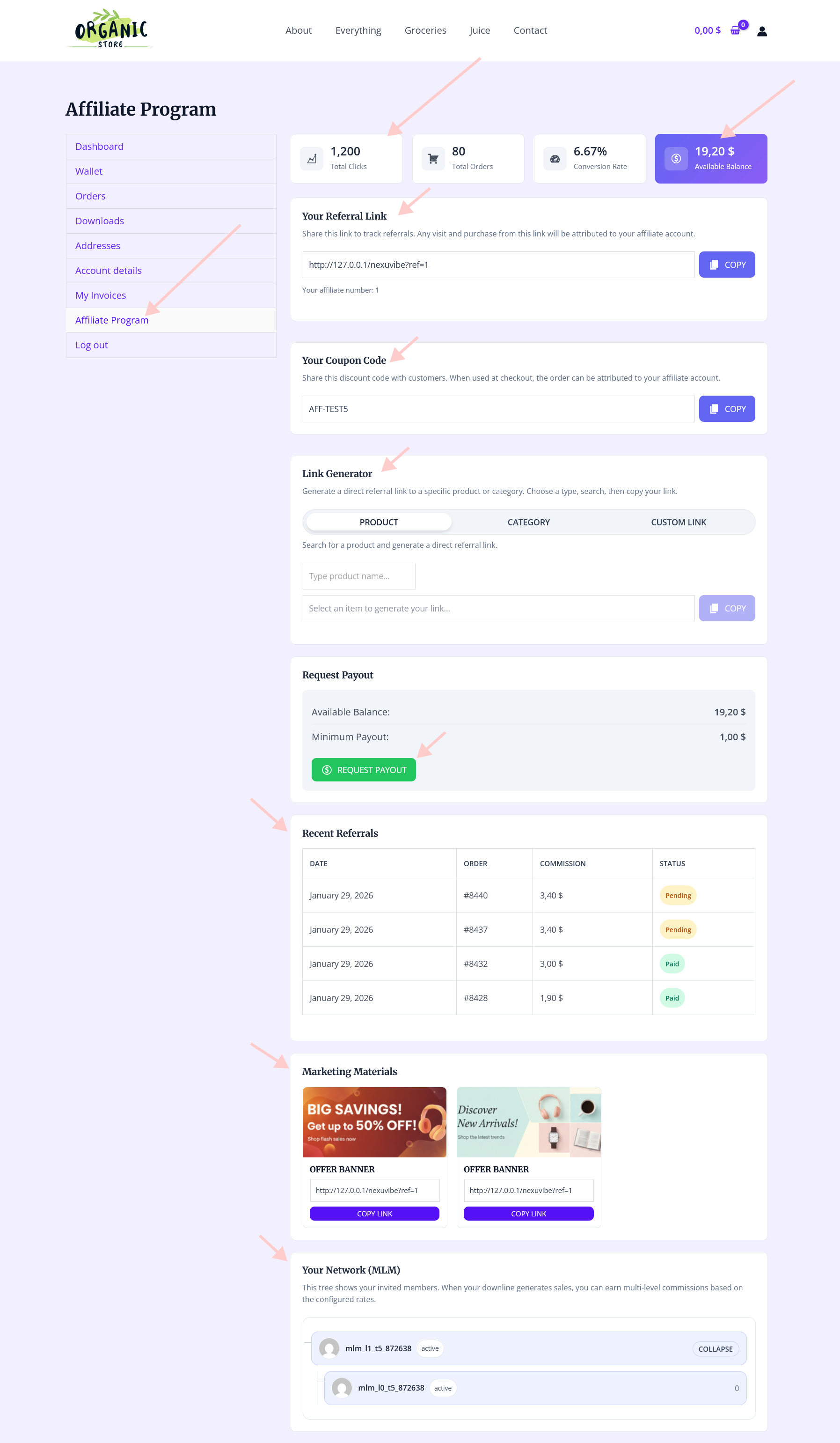
Controls whether the affiliate can see their coupon code in their dashboard. Always enable this. Affiliates who can see their code will share it. Affiliates who cannot find their code will not share it and will eventually ask you for it. The coupon code should appear prominently in the affiliate’s dashboard with a one-click copy button, identical to how the referral link is presented.
When enabled, if an affiliate does not yet have a coupon assigned — because they were approved before coupon tracking was configured, or because the auto-generation missed their account — the system can generate one automatically when the affiliate’s dashboard is visited. This prevents the situation where older affiliates lack coupon codes and have to request them manually.
When both cookie tracking and coupon tracking are active, there will inevitably be orders where both methods have captured attribution for the same order. A buyer clicks the affiliate’s link (cookie set), then uses the affiliate’s coupon code at checkout. Both signals point to the same affiliate — but the attribution priority setting determines which signal is treated as the authoritative record.
In most cases, the same affiliate is identified by both signals, so the priority setting does not affect which affiliate gets credited — only which signal type the record is logged as. The priority setting becomes genuinely important in a specific edge case: when two different affiliates are identified by the two signals. For example, a buyer clicked Affiliate A’s link last week (cookie present) but used Affiliate B’s coupon code at checkout today. Which affiliate gets the commission?
When the coupon code takes attribution priority over the cookie, Affiliate B (who provided the coupon) gets credited. This is the recommended setting because the coupon represents a deliberate, active promotion decision by the affiliate — they created or shared that code specifically to drive this conversion. It also rewards the affiliate whose direct incentive closed the sale.
When the cookie takes priority, Affiliate A (who drove the original visit) gets credited regardless of whose coupon was used. This approach favors the affiliate who introduced the buyer to the store. It is less commonly used but can make sense in programs where the initial referral visit is considered the more significant contribution.
Different promotion channels have different attribution characteristics. Understanding which tracking method each channel depends on helps you ensure your configuration provides full coverage across the channels your affiliates actually use.
When both tracking methods are configured and active, the affiliate’s dashboard provides a complete picture of all attribution — whether it came from a link click or a coupon code. They see their referral link and link generator for cookie-tracked promotions, their coupon code for coupon-tracked promotions, and a unified commission history that shows all attributed orders regardless of which tracking method captured them.
This unified experience — where the affiliate has both tools visible in the same dashboard and does not need to think about which tracking method is being used — is what makes dual-method tracking practical rather than complicated. The technical complexity of running two attribution systems simultaneously is entirely invisible to the affiliate. They see a link, they see a code, and they can use whichever one fits the promotion they are doing at that moment.
Testing is not optional. Running through a complete tracking test for both methods before approving real affiliates confirms that everything is working as configured and prevents the scenario where affiliates report missing commissions that turn out to be a configuration error you could have caught in ten minutes of testing.
Running both cookie-based and coupon-based tracking simultaneously is not a complex setup — it is two groups of settings configured in the same plugin. The payoff is comprehensive affiliate attribution across every promotion channel your affiliates use, from blog posts with embedded links to podcast mentions of coupon codes. Nothing falls through the cracks, and affiliates get credit for every sale they genuinely drive.
Affiliate Engine’s WooCommerce referral link and coupon attribution tracking plugin handles both methods natively — configurable cookie lifetime, referral URL parameter customization, AJAX-based cookie setting for cache compatibility, coupon code auto-generation, coupon visibility in the affiliate dashboard, and a priority setting for dual-attribution overlap. All of it running on your WordPress installation, with data that belongs to you, and a fixed license cost that does not increase as your tracking volume grows.
Affiliate Engine runs cookie-based and coupon-based tracking simultaneously, with configurable priority for dual-attribution overlap — giving your program complete coverage across every channel your affiliates promote on.








Just wanted to drop a note about how your coupon tracking setup fixed a huge headache for us. We kept losing conversions from our email campaigns because cookie blockers were wiping out our referral links, but using discount codes instead totally sidesteps that problem.
Just got both cookie and coupon tracking set up thanks to this guide. That tip about testing before going live was a total lifesaver I caught a couple little issues I'd have totally missed.
Okay, I grabbed this guide because I was totally lost on how affiliate tracking even works in WooCommerce. Turns out, I was missing a big piece of the puzzle. The part about cookie tracking not catching every sale? blew my mind.