With amazing plugins and exceptional support, we guarantee an unparalleled experience taking your success to new heights with every click and celebrating your satisfaction!
WPML AI Translator for WordPress
Connect Your WPML Site to AI Translation Services
Manual translation often steals time from publishing and product work. WPML AI Translator connects your multilingual WordPress site to AI translation services, processes WPML translation jobs in the background, and keeps your primary-language workflow unchanged.
Why Manual Translation Slows You Down
Managing a multilingual WordPress site often means writing content once, only to face the daunting task of translating it multiple times. Whether you’re managing a blog, online store, or business website, manual translation becomes a time-consuming bottleneck that delays your content publishing and limits your reach.
Time Drain on Content Creation
Every time you publish content, you face hours of translation work ahead. Copy the text, translate it manually or use basic tools, format everything again, check links, update images. Each language adds more hours to your workflow, turning a simple blog post into a day-long project.
Publishing a product page in English takes one hour. Translating it to three languages manually adds six more hours. By the time translations are live, you could have created six more products instead.
- Content publishing delayed by days instead of hours
- Translation work interrupts your content creation flow
- Each new language multiplies your workload
- Content updates require retranslating everything again
Translation Quality Problems
Relying on free online translators often results in awkward, robotic text that makes your business look unprofessional. While professional human translators deliver better quality, they can cost hundreds or thousands of dollars per project, which isn’t always scalable. Either way, maintaining consistent brand voice across languages becomes nearly impossible.
An online store uses free translation for product descriptions. Customers complain that descriptions sound robotic and confusing. Return rates increase because products don’t match expectations set by unclear translations.
- Free translators produce low-quality, awkward text
- Professional translators cost too much for regular content
- Brand voice gets lost across different languages
- Technical terms and industry language translate incorrectly
WPML Workflow Bottleneck
WPML provides the multilingual structure, but translation jobs pile up waiting for manual processing. You create content, assign translation jobs, then wait. The workflow works great with dedicated translators, but becomes overwhelming when you handle translations yourself.
A news site publishes breaking stories in English but readers in other languages wait days for translations. By the time translated content goes live, the news is old and engagement drops significantly.
- Translation jobs queue up waiting for manual work
- Content goes live at different times per language
- Coordinating multiple translation jobs becomes complex
- Checking and approving translations adds more delays
Meet Your Translation Solution
WPML AI Translator bridges your content workflow and multilingual publishing. It plugs into your existing WPML setup, detects translation jobs, and processes them through your chosen AI service in the background.
How This Changes Your Workflow
You Create Content
Write and publish content in your primary language exactly as you always do. Nothing changes in your content creation process. The plugin works quietly in the background, watching for translation opportunities.
Plugin Detects Jobs
When you mark content for translation in WPML, the plugin automatically detects these translation jobs and adds them to its processing queue. No manual intervention needed from you at all.
AI Processes Translations
Your connected AI service receives the content, translates it according to your settings, and sends back professional-quality translations. Large content gets intelligently split into chunks for reliable processing.
Content Goes Live
Translations complete automatically and get applied to your WPML translation jobs. Your multilingual content publishes without you lifting a finger. Check the queue dashboard if you want to monitor progress.
The result: You publish once in your default language, and translations move through the queue for your other active languages—without turning translation into a second job.

Settings & Configuration
Simple Setup in Minutes
Getting started usually takes a few minutes: connect your AI provider, set model and batch options, then let the queue pick up WPML jobs.
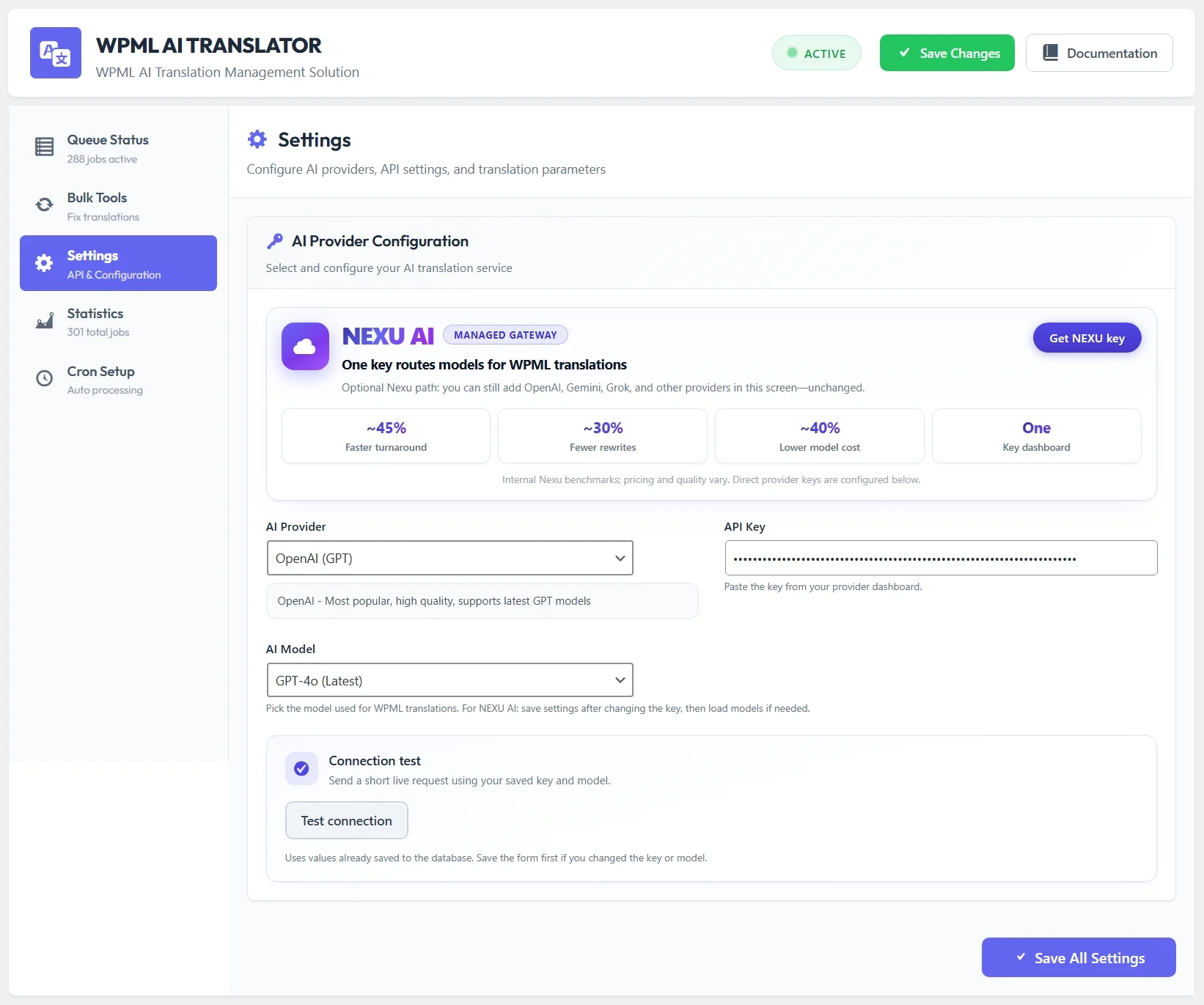
WPML AI Translator Settings – Configure your AI translation service and preferences
Connect AI Service
Add your AI service API key so the add-on can send jobs securely. Multiple providers are supported so you can match cost, speed, and quality to your site.
Choose Translation Model
Select the AI model that matches your content type and quality requirements. Different models excel at different tasks, giving you flexibility to optimize translation quality and speed for your specific needs.
Configure Processing
Tune chunk sizes for long posts, batch limits for cron-friendly throughput, and other processing rules so large sites stay stable under load.
Queue Status & Monitoring
Watch Your Translations Process Live
The queue status dashboard shows exactly what’s happening with your translations in real-time. See pending jobs, monitor processing progress, and track completion status all from one convenient location.
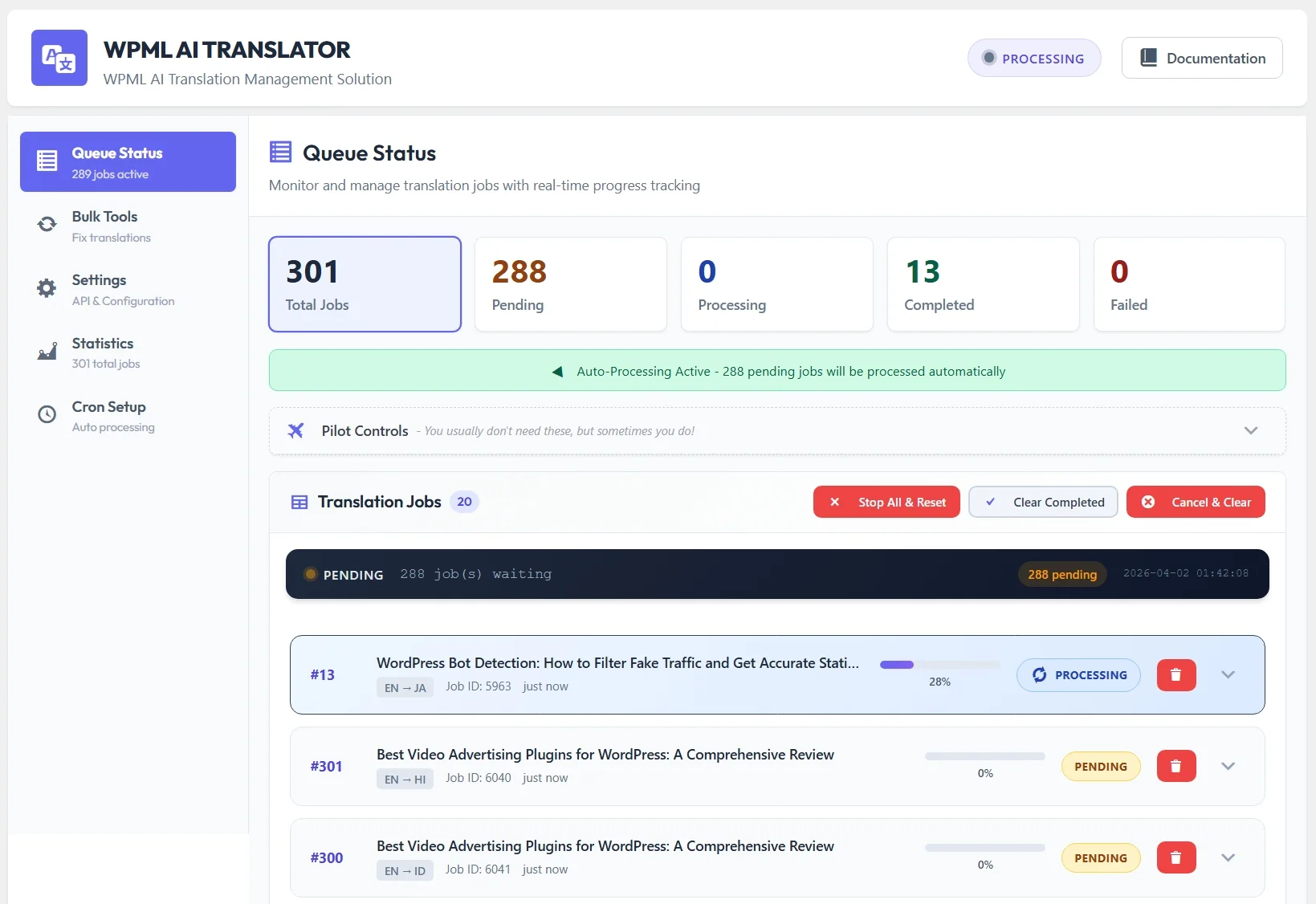
WPML Auto Translator Queue Status – Real-time translation job monitoring and progress tracking
Live Processing Updates
Watch translation jobs process in real-time. The queue status page updates automatically, showing you exactly which jobs are translating right now and how much progress each job has made.
Filter and Search
View pending jobs, completed translations, or failed attempts separately. Filter the queue by status to focus on what matters most to your current workflow and quickly find specific translation jobs.
Job Management Actions
Open any job for full detail, retry failures in one click, or reset stuck items. You keep control without babysitting every request.
Translate Any Language Pair Automatically
It respects every language pair you enable in WPML—RTL scripts, mixed alphabets, and extended character sets follow the same job flow as Western European pairs.

English to multiple languages translation with WPML AI translator

Hindi to multiple languages translation example using AI translation plugin
Global Reach
Translate into any language your WPML setup supports. Different writing systems, right-to-left layouts, and complex character sets use the same queue—you do not maintain separate “modes” per script.
Natural Translations
AI translation services understand context and nuance, producing natural-sounding translations that maintain your content’s meaning and tone. Your translated content reads smoothly to native speakers of each language.
Consistent Results
Every translation maintains consistent quality and terminology across your entire site. Industry terms, brand names, and technical language stay accurate throughout all your multilingual content.
Bulk Translation Tools
Fix and Update Content in Bulk
Occasionally, you may need to update existing translations or fix issues across multiple posts to ensure the best user experience. The bulk tools help you re-translate titles, categories, and content elements efficiently without manually handling each item.

Bulk translation tools – Re-translate multiple posts, titles and categories at once
Single Post Re-translation
Select individual posts or products and re-translate their titles across all active languages. Perfect for fixing specific translations that need improvement or updating older content to better quality.
Bulk Title Updates
Update post titles across multiple posts and languages simultaneously. Great for refreshing older translations with improved AI models or fixing translation issues discovered across your content library.
Category Translation
Re-translate categories, tags, and custom taxonomies quickly. Keep your content organization consistent and professional across all languages on your multilingual site.
WPML String Translation
Translate WPML string translations and menu items using AI. Perfect for updating interface text, navigation labels, and other translatable strings across your site with just a few clicks.
Elementor Template Translation
Translate Elementor templates and page builder content automatically. Keep your professionally designed templates consistent across all languages without manually rebuilding layouts.
Statistics & Analytics
Track Your Translation Activity
The statistics dashboard provides insights into your translation workflow. See how many jobs processed, track completion rates, and understand your translation patterns over time.

Translation statistics and analytics dashboard showing job completion rates and performance
Translation Metrics
View total jobs processed, completion rates, and success percentages at a glance. Use the numbers to spot slowdowns, retries, or seasonal spikes in volume.
Visual Charts
Interactive charts display translation trends, language pair statistics, and processing patterns. Spot opportunities to optimize your multilingual workflow.
Time-based Analytics
See translation activity over specific time periods. Track daily, weekly, or monthly patterns to understand when your site needs the most translation capacity.
Real Benefits for Your Business
Practical outcomes you should expect on a busy multilingual site.
Reclaim Your Time
Stop spending hours on manual translation work. Publish content in your primary language and let AI handle everything else. Your translation workload drops to nearly zero while content reaches all your audiences.
Faster Publishing
Content goes live in all languages simultaneously instead of waiting days for manual translations. Your publishing schedule stays consistent and audiences in every language get fresh content at the same time.
Professional Quality
AI translations maintain consistent quality and terminology across your entire site. Your brand voice stays professional and natural in every language, building trust with international audiences.
Stay in Control
Monitor translation progress anytime, retry failed jobs with one click, and fix issues as needed. You maintain complete oversight of your multilingual content strategy without drowning in manual work.
Scale Without Limits
As your content grows, translations keep pace automatically. Expand to new markets and languages without worrying about translation becoming a bottleneck. Your multilingual reach grows with your business.
Getting Started is Simple
WPML AI Translator sits beside your existing WPML configuration. You need a working WPML install, a provider key, and reliable WordPress cron (or server cron) for background runs.
WPML Installed
You need the official WPML multilingual plugin installed and activated on your WordPress site. This add-on works with WPML to detect translation jobs and process them automatically using your AI service.
WPML provides the multilingual structure. This plugin adds automatic AI translation processing to your workflow.
AI Service Account
Get an API key from your chosen AI translation service. This connects the plugin to professional translation capabilities that power your automatic translations.
API keys store securely in your WordPress database and only get used for translation requests. Your content stays private and secure.
WordPress Cron Active
The plugin uses WordPress cron for background processing. Make sure cron works on your server for automatic translation processing without manual intervention.
Most WordPress hosts have cron enabled by default. The plugin includes diagnostic tools to verify cron status if needed.
Once API credentials are saved and WPML jobs point at this translator, the queue begins processing on the next cron cycles—usually within a few minutes on a healthy host.
What pairs well with this workflow
Beyond page and post translation, many teams also localize plugin strings (PO/MO), theme labels, and editor-built templates. Plan those tasks alongside WPML so every surface of the site stays consistent in each language.
Plugin and theme strings
Use WPML String Translation (or your preferred string workflow) for admin labels, theme text domains, and small UI phrases. AI-assisted PO workflows can speed up bulk string work when you maintain many plugins or custom packages.
Editorial content
For marketing copy, FAQs, and long-form posts, keep a clear source language, then route jobs through WPML. AI translation fits high-volume publishing; sensitive or legal copy may still deserve a human pass.
How the Background Processing Actually Works
Background processing is what keeps the admin experience calm: cron wakes the worker, the queue drains in order, and failures surface with retry—not silent drops.
WordPress Cron Integration
Our plugin leverages the built-in WordPress cron system to automatically check for pending translation jobs, ensuring a smooth and hands-free process. Every few minutes, the system wakes up and processes waiting jobs without any action from you.
Smart Queue Management
Translation jobs get organized by priority in a processing queue. The system processes jobs in order, handling one at a time to ensure reliable results and proper tracking of each translation.
Automatic Recovery
If processing gets interrupted for any reason, the plugin automatically detects stuck jobs and resets them for retry. Your translations complete reliably even if temporary issues occur.
Smart Content Handling for Large Posts
Long articles and rich product pages are split at safe boundaries, translated in pieces, and reassembled so providers stay within token limits and you still get one coherent job in WPML.
Intelligent Content Chunking
Large content gets automatically split into manageable chunks at natural break points like paragraph endings or sentence boundaries. This ensures AI services receive content in sizes they can process effectively.
The system finds natural breaks between paragraphs, never splitting mid-sentence or mid-paragraph to maintain context and translation quality.
Seamless Reassembly
After each chunk gets translated, the plugin automatically combines them back into complete, flowing content. The final result reads naturally as if it was translated all at once.
Chunk boundaries disappear in the final translation. Your content maintains its original structure and flow across all languages.
Resume System for Reliable Processing
If processing gets interrupted for any reason, the plugin remembers exactly where it stopped and continues from that point. No translation work gets lost or duplicated.
Each completed chunk saves immediately to the database
Processing continues from the last completed chunk automatically
No translation work ever gets lost or needs redoing
What Makes This Plugin Different
These behaviors matter most when you run high volume: structure-safe chunking, queue visibility, and recovery paths when networks or providers hiccup.
Context-Aware Translation
The plugin sends content to AI services that understand context, maintaining natural flow and proper terminology throughout your translations instead of translating word by word.
HTML Structure Preserved
Your carefully formatted content keeps its HTML structure intact during translation. Links, images, formatting, and styling all remain exactly as you designed them.
Active Health Monitoring
The system continuously monitors its own health, automatically detecting and fixing stuck processes to ensure your translation queue keeps moving smoothly.
Real User Scenarios
How Different Businesses Use This Plugin
Typical ways teams fold automatic WPML jobs into their publishing rhythm.
Online Stores
An ecommerce site adds new products daily. Instead of manually translating product descriptions into five languages, they publish once and translations happen automatically. Products go live in all languages simultaneously, reaching international customers faster.
Result: Product launch time reduced from days to hours across all markets
News Websites
A news platform publishes breaking stories that need immediate translation. The plugin processes articles in the background while editors focus on the next story. International audiences get timely news without waiting for manual translation.
Result: News goes live in multiple languages within minutes instead of hours
Educational Platforms
An online learning platform creates course content in English for students worldwide. The plugin translates course materials into local languages automatically, making education accessible to non-English speakers without hiring translation teams.
Result: Course reach expanded to international students without translation costs
Content Creators
A blogger publishes detailed guides and tutorials. Instead of limiting content to one language, they reach global audiences by letting the plugin handle translations. More readers discover their content in their native languages.
Result: Audience reach expanded globally without sacrificing content quality
Understanding AI Translation Quality
Modern models handle most marketing and informational copy well. Expect to invest human time where nuance, compliance, or brand voice is non‑negotiable.
What AI Does Well
- General content and blog posts
- Product descriptions and features
- Standard business communication
- Technical documentation
- Common phrases and expressions
- Maintaining consistent terminology
What Needs Attention
- Highly creative or poetic content
- Culturally specific idioms
- Brand-specific terminology
- Legal or medical documents
- Humor and wordplay
- Marketing slogans
Best Practice
- Review important pages initially
- Build confidence with test content
- Use for bulk content translation
- Combine with human review for critical content
- Monitor translation patterns
- Adjust settings as needed
For everyday pages, posts, and catalog text, machine translation is often publication-ready after a light scan. For legal, medical, or highly idiomatic copy, treat the output as a draft and route it through your review process.
Common Questions About the Plugin
Straight answers about how this add-on behaves next to WPML, WooCommerce, and manual edits.
Does this replace WPML or work with it?
The plugin works alongside WPML, not instead of it. WPML provides the multilingual structure and manages your language setup. This plugin adds automatic AI translation processing to WPML translation jobs, making the workflow faster and more efficient.
Can I still edit translations manually?
Yes, absolutely. The plugin creates translated content in WPML just like manual translation would. You can edit, refine, or completely rewrite any translated content through WordPress editor. The AI translation provides the initial version which you control completely.
What happens if translation fails?
Failed jobs appear in the queue with error details. You can retry them with one click. The plugin automatically attempts to process failed jobs again. If issues persist, you can reload the content from WPML and try again or translate that specific item manually.
Does it work with WooCommerce products?
Yes, WooCommerce products translate just like posts and pages. Product titles, descriptions, short descriptions, and product attributes all process through the translation system. The plugin handles WPML translation jobs regardless of content type.
How long does translation take?
Processing time depends on content length and queue size. Short posts translate in seconds, longer articles take a few minutes. The system processes jobs in the background, so you continue working while translations complete. Check the queue dashboard to monitor progress.
Can I choose which posts to translate?
You control translation through WPML as usual. When you mark content for translation in WPML and assign it to the AI translator, the plugin processes it. Content you don’t mark for translation or assign to different translators remains unaffected by the plugin.
Advanced Features You’ll Appreciate
Beyond sending text to a model, the toolset covers logging, retries, cleanup, and diagnostics so operators can trust long-running queues.
Activity Logging
Every translation job gets detailed activity logs showing each processing step, timing, and results. When you need to understand what happened with a specific translation, the logs provide complete visibility.
Progress Tracking
Watch translation progress in real-time with percentage completion and step-by-step status updates. You know exactly what’s happening with each job at any moment.
One-Click Retry
If a job fails or produces unexpected results, retry it with a single click. No need to recreate translation jobs or manually reprocess content.
Automatic Cleanup
Completed jobs clean up automatically after a set time, keeping your queue organized without manual maintenance. The system handles housekeeping so you don’t need to.
Priority Management
Urgent content needs translation first? Adjust job priority to control processing order. Important translations jump to the front of the queue automatically.
Health Diagnostics
Built-in diagnostic tools check system health, verify cron functionality, and test AI service connections. Issues get identified before they affect your workflow.
Setting Up AI Translator in WPML
Once you install and configure the plugin, you need to tell WPML to use the AI translator for your translation jobs. Here’s how the integration works in practice.

Adding AI Translator to WPML translation management settings
WPML Integration Steps
Find AI Translator in WPML
After plugin activation, WPML automatically recognizes the AI translator as an available translator. It appears in your translator list with a clear identifier.
Create Translation Jobs
When creating translation jobs in WPML, select the AI translator as the assigned translator. WPML creates the job and the plugin detects it automatically.
Monitor Processing
Translation jobs process automatically. Check progress in the plugin queue dashboard. Completed translations appear in WPML ready for review and publishing.
Pro Tip
You can mix translation methods in WPML. Some content goes to AI translator, other content goes to human translators. The plugin only processes jobs assigned to the AI translator.
This flexibility lets you use AI for bulk content while keeping human translation for critical pages.

Creating translation job in WPML and assigning to AI translator
Your Multilingual Publishing Workflow
A before/after view of the same publishing day with WPML jobs assigned to this translator.
Before: Manual Translation
Write content in primary language
Copy content to translation service
Wait for translations to complete
Copy translations back to WordPress
Format and fix broken HTML
Update for each language separately
Publish translations days later
Time: Hours per post
After: Automatic Translation
Write content in primary language
Mark for translation in WPML
Assign to AI translator
Continue with next task
Translations complete automatically
Review if needed
Content live in all languages
Time: Minutes per post
The Time You Save
Jobs continue while you edit elsewhere: the queue advances on cron, and you dip in only for exceptions or approvals.
Making the Most of Your Plugin
Practical habits that keep quality high and the queue predictable.
Start with Test Content
Translate a few test posts first to see translation quality and understand the workflow. This builds confidence before translating your entire content library.
Review Critical Pages
Important pages like your homepage, about page, or key product descriptions benefit from a quick review after translation. Most translations work perfectly, but reviewing critical content ensures quality.
Monitor the Queue
Check the queue dashboard periodically to see processing status and catch any failed jobs early. Most jobs complete successfully, but occasional monitoring helps catch issues quickly.
Batch Similar Content
Translate similar content types together. Process all your product descriptions at once, or all blog posts together. This helps you establish patterns and review similar content more efficiently.
Clean Completed Jobs
Use the bulk cleanup tool to clear completed jobs periodically. This keeps your queue dashboard focused on active and pending work without clutter from finished translations.
Use Bulk Tools Wisely
The bulk re-translation tools help fix older translations or update content translated with previous AI models. Use them when you need to refresh specific content types across your site.
Keep multilingual publishing on schedule
WPML AI Translator is built for teams that outgrow copy‑paste workflows: assign jobs in WPML, watch the queue, and ship updates across languages without blocking the editorial calendar.
Ship the same story or SKU update across locales in one push
Editors stay in WordPress; the worker handles provider round‑trips
Add languages without linear growth in headcount
In one line: Connect WPML to your AI provider, assign translation jobs as usual, and let the queue clear them in the background while you keep publishing.