With amazing plugins and exceptional support, we guarantee an unparalleled experience taking your success to new heights with every click and celebrating your satisfaction!
Nexu AI Cross-Post for Dev.to & Hashnode With Rewritten Markdown and Canonical Links
Ship your story once in WordPress. Let the workflow handle the rewrite, formatting, and publishing where developers already read.
If you care about showing up on developer communities without living inside copy-paste tabs, this is the kind of setup that keeps your site as the source of truth while your articles still feel native on each platform. You stay focused on the WordPress side; the heavy lifting of turning your content into clean Markdown and pushing it through the right APIs happens in the background.
That matters for discoverability in a practical way. When your ideas also live where people search and browse tech content, you widen the surface area for your brand without turning every publish day into a manual chore. On Hashnode, your WordPress link can travel with the post as the canonical reference, which helps search engines understand the original home of the article. On Dev.to, you still get a polished article that fits how that community reads and shares.
Why cross-posting by hand quietly costs you momentum
Most teams do not struggle with writing once. They struggle with the second and third step: reformatting, retitling for a new audience, remembering tags, and actually hitting publish on another site when the WordPress workflow is already “done.” That delay is where consistency dies, and consistency is what makes compound visibility possible over time.
A workflow that treats WordPress cross-post to Dev.to as a repeatable action instead of a side project helps you show up where developers already are. The same goes when you want to publish WordPress posts to Hashnode without treating Hashnode like a separate editorial system. You keep one editorial home, and you still earn presence on both channels.
That is the mindset behind automate developer content syndication from WordPress: fewer manual hops, fewer abandoned drafts, and a cleaner line from “published in WordPress” to “visible on community platforms.” The plugin is built around that flow, not around buzzwords.
Reformatting fatigue
Community platforms want Markdown-friendly structure. If you are doing that conversion by hand every time, you will eventually skip it on busy weeks. That is exactly when your visibility flatlines.
Inconsistent presence
Search and discovery on developer hubs reward showing up regularly. When publishing elsewhere depends on willpower, the pattern gets uneven. Automation is how you make the habit stick without burning out.
Tone and structure mismatch
A long product page in WordPress is not always a great Dev.to article as-is. A rewrite pass helps the piece read like it belongs in a developer feed, while still reflecting what you actually ship.
See the flow before you touch settings
This animation is the “so what” moment. It shows the editor-side publish path: you stay inside WordPress, trigger the syndication workflow, and watch the handoff happen without opening Dev.to or Hashnode in another tab. That is the practical meaning of automatic publishing in day-to-day work, not a promise of magic rankings.
When the motion finishes, the idea you already approved in WordPress is on its way to being a community-ready article. Combined with scheduling options in the plugin, you can also line this up for batch days so your cadence stays steady even when your calendar is noisy.

Editor workflow: syndicate from WordPress without juggling separate publish screens for each network.
From an SEO perspective, the win is steadier distribution and clearer canonical signaling where the platform supports it, not a shortcut around good content. Your WordPress URL remains the home base you control; the rewritten Markdown article is what travels outward. That is how you get leverage from AI rewrite WordPress article for developer blog workflows without turning your site into a duplicate of every mirror post.
One source, many surfaces
You keep writing and storing the canonical story in WordPress. The plugin prepares the outward version so Dev.to and Hashnode each get content that fits how those sites work.
Built for recurring work
Overview-style screens, activity history, and scheduling-friendly options exist so you are not guessing what ran last week or what still needs a retry.
If you want the full picture of how runs are behaving, the next natural step is the settings area. The screenshot below is the high-level dashboard inside the plugin: it is there to give you confidence that the pipeline is alive, not to drown you in charts.
More on configuration and safety controls continues in the next parts. If you are already using other tools from NEXU WP, this plugin sits in the same admin family so the experience feels familiar.
A calm overview before you dive into networks and models
This screen is the “is everything wired up?” view. It is useful when you are onboarding a new site or when you just want to confirm that syndication activity is moving without opening each network separately.
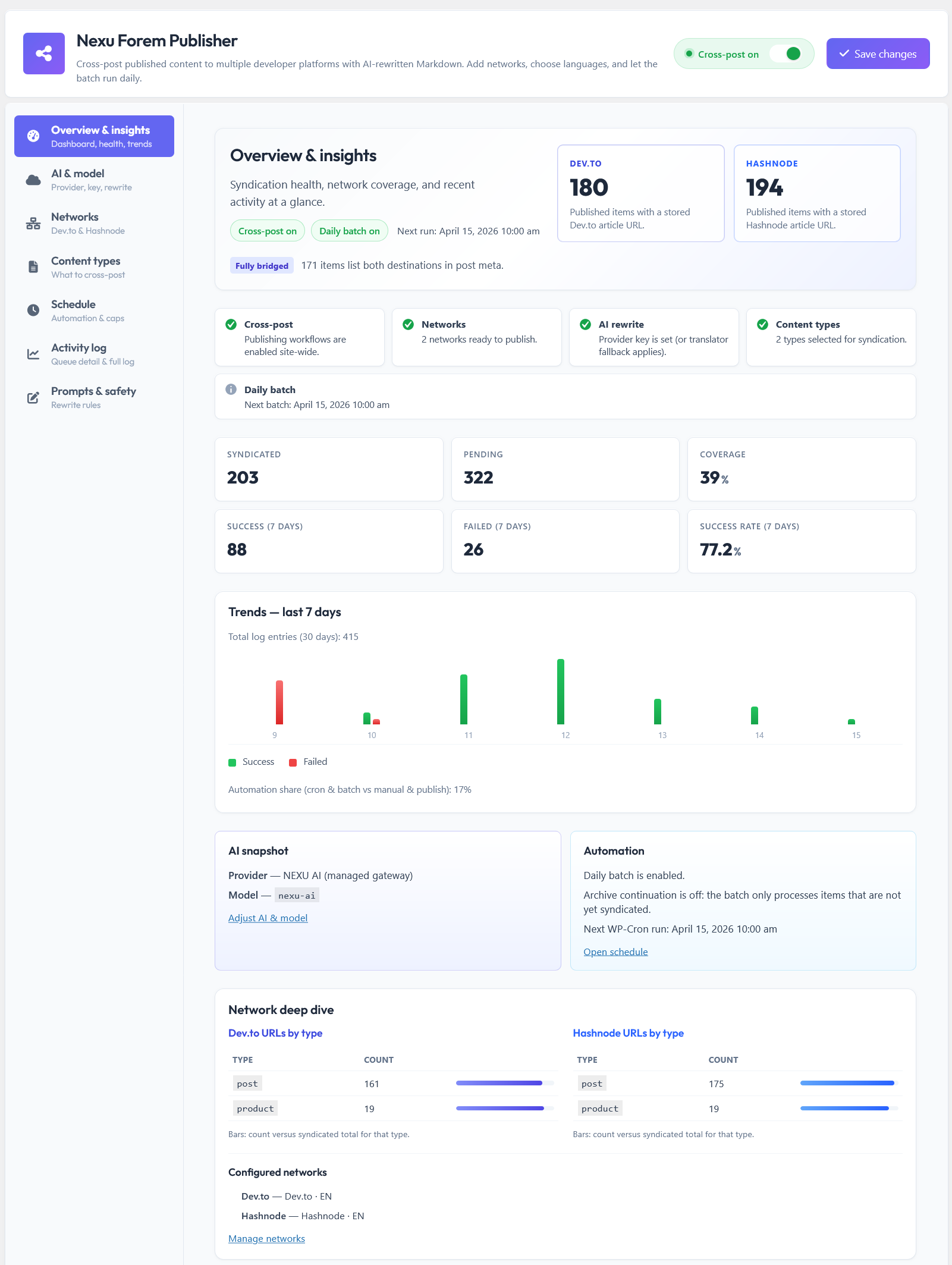
Overview and insights: a single place to sanity-check setup and recent activity before publishing.
Nexu AI Cross-Post for Dev.to & Hashnode With Rewritten Markdown and Canonical Links is meant to reward consistency: you get a repeatable pipeline, cleaner Markdown, and room to grow on developer hubs without abandoning WordPress as your home base. Part two picks up with a tighter feature snapshot for readers who already know what syndication is and just want the shape of the product in one glance.
The moving pieces, without the mystery
If you already know why syndication matters, this part is the quick map for Nexu AI Cross-Post for Dev.to & Hashnode With Rewritten Markdown and Canonical Links. You will see how the plugin separates “choose the brain,” “choose the destinations,” and “choose what leaves WordPress,” so you are not guessing which screen controls which outcome.
Nothing here is about replacing your site. It is about making a Dev.to API WordPress plugin style integration feel boring and reliable, and making WordPress to Hashnode GraphQL publish feel like one more checkbox in your workflow instead of a second CMS to babysit.
Icon box · at a glance
For readers who already run WordPress at scale and just want the shape of the tool.
AI rewrite pass
Connect your chosen model and provider so each run produces fresh title and Markdown body for the networks.
Network accounts
Add Dev.to and Hashnode credentials so publishing goes through the official APIs instead of copy-paste.
Content types
Decide which kinds of WordPress items are allowed to syndicate so the queue stays intentional.
Schedule and logs
Batch-friendly timing plus an activity trail so you can trust what ran and retry when something fails.
Pick the brain once, reuse it on every run
The AI and model screen is where you decide who generates the JSON article: title plus Markdown body. The benefit is consistency. You are not hand-editing tone on every network every week. You are approving a pipeline that produces a community-ready draft from your WordPress source content.
If another Nexu tool already stores gateway credentials on the site, the plugin can lean on that pattern when fields here are left empty, so you are not maintaining duplicate secrets in every product. That is the kind of quality-of-life detail teams notice after the first month, not the first hour.
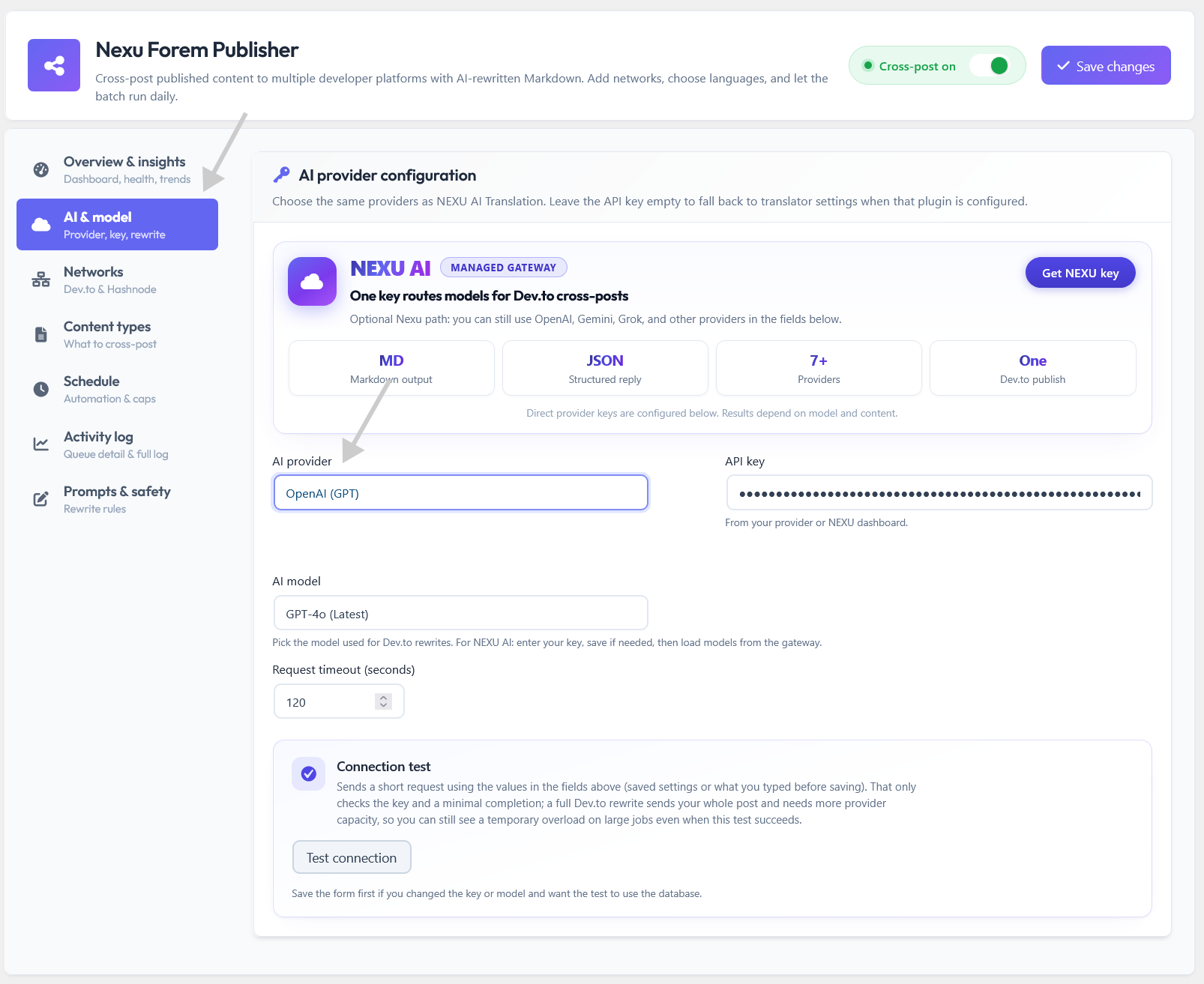
AI and model: where the rewrite pass is configured so each syndication run speaks the language of developer platforms.
Where destinations come from
Networks are the outbound doors. This is how you support multi-account Dev.to publishing WordPress workflows without sharing one API key across unrelated brands. Each saved profile is a real account on the platform, ready when the queue picks it.
The win for you is operational clarity. Marketing can syndicate to one Dev.to org, product engineering to another, and your personal brand to Hashnode, without mixing credentials in a spreadsheet. The plugin keeps the boundaries in the admin UI where they belong.
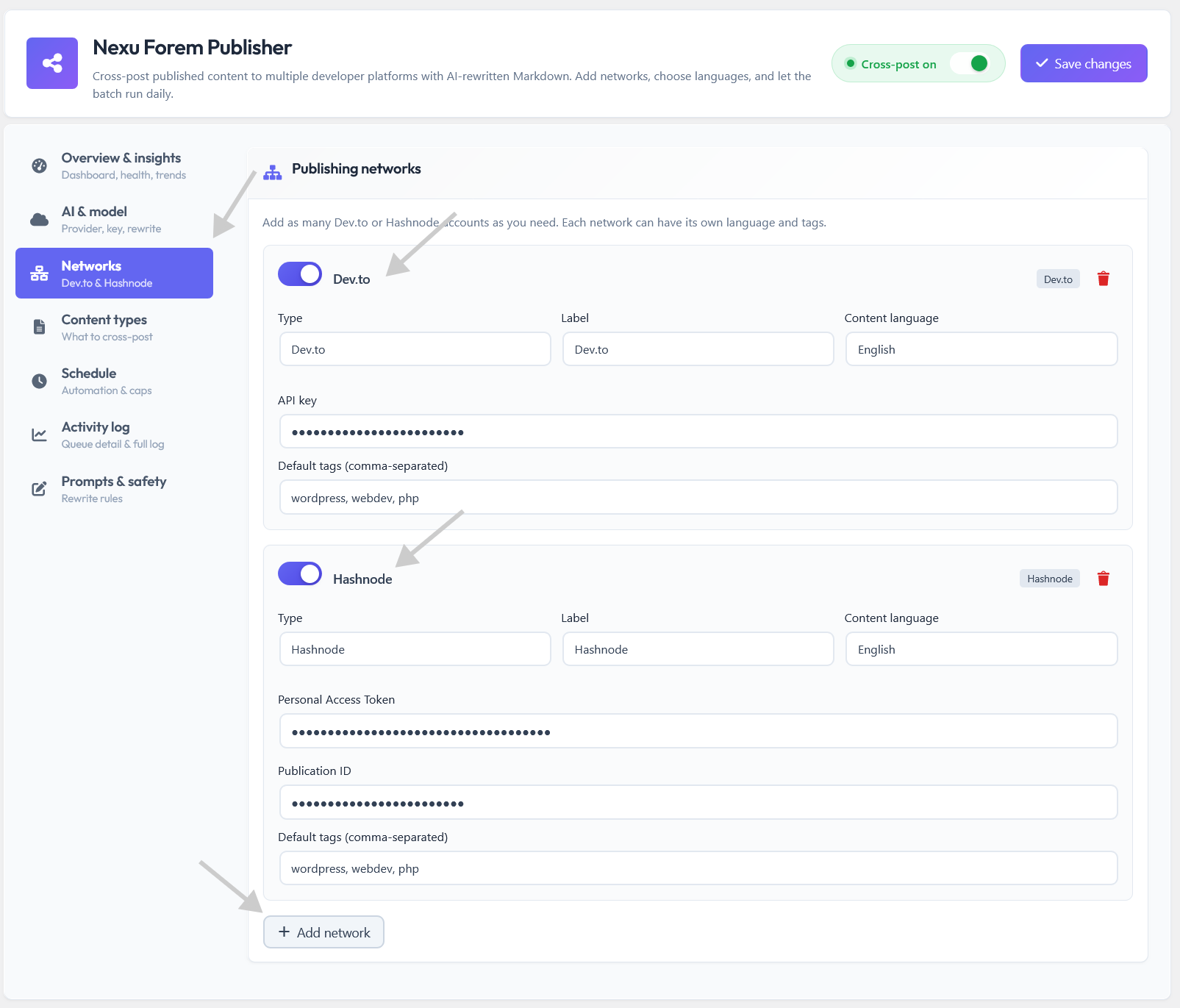
Networks: connect Dev.to and Hashnode so publishes are real API calls, not manual tabs.
Decide what is allowed to leave WordPress
Content types are the guardrail. Not every post type should become a Dev.to essay. Here you keep syndication aligned with what your team actually wants to promote. That is especially useful when you also want paths like syndicate WooCommerce products to Dev.to for launch posts without opening the floodgates on internal note types.
Nexu AI Cross-Post for Dev.to & Hashnode With Rewritten Markdown and Canonical Links stays honest about the contract: WordPress remains authoritative, and only the types you enable become candidates for markdown export WordPress to Dev community style output on the other side.
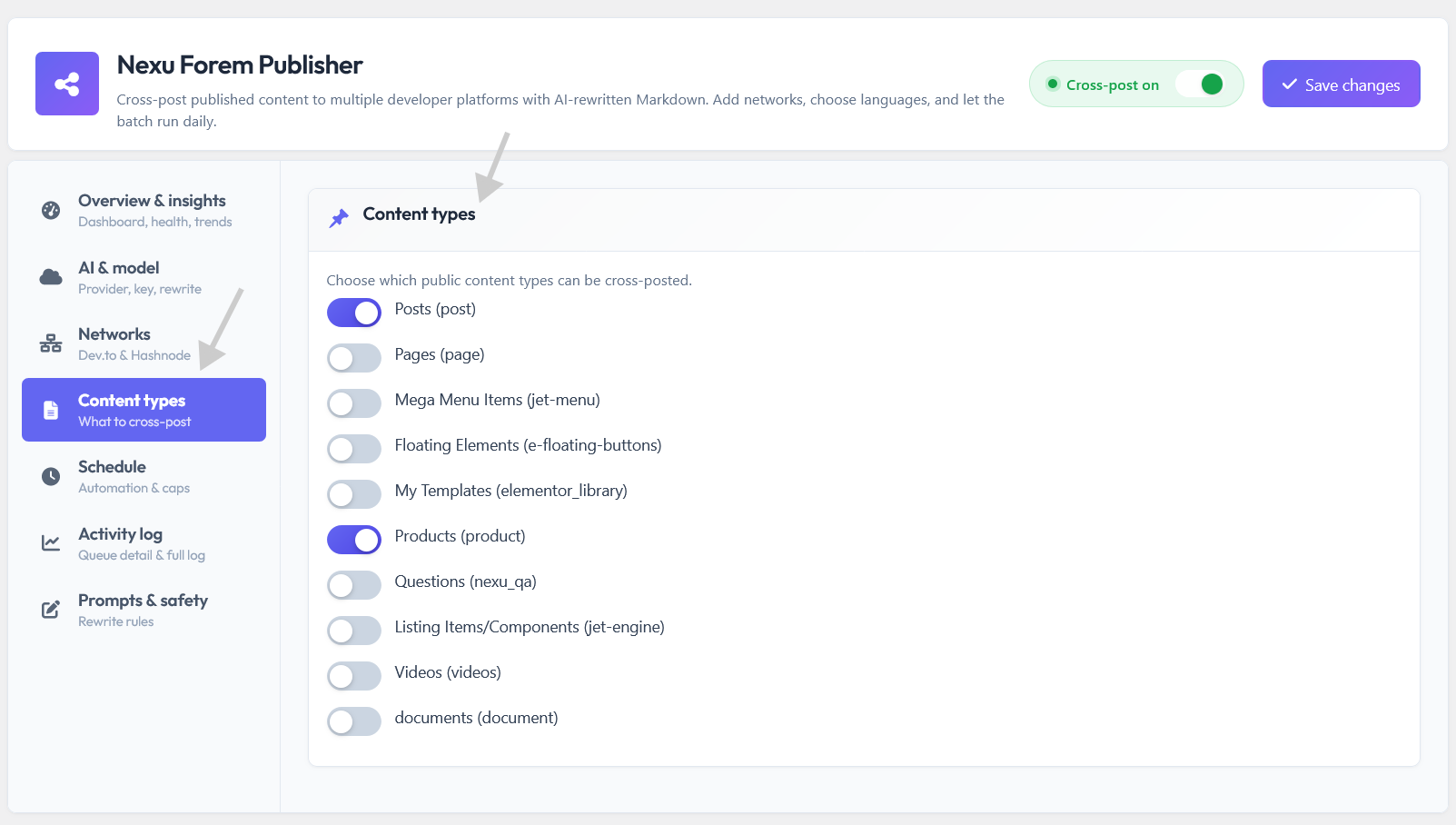
Content types: narrow the syndication queue to the WordPress items that match your public story.
Why this order matters
Model first, networks second, content types third. If you flip the order in your head, you end up with keys saved before you know what is allowed to publish. The UI matches a sensible onboarding story.
What comes next
Part three covers timing and visibility: how schedule WordPress posts to Dev.to and Hashnode fits next to activity history and safer prompt defaults. Same calm tone, fewer surprises.
Teams already standardizing on NEXU WP plugins will recognize the settings rhythm here: one screen per concern, no maze.
Make syndication predictable instead of heroic
The middle of the story is not sexy, but it is where teams win or quit. If publishing to developer hubs only happens when someone remembers, you get spikes of silence. If it happens on a rhythm you control, you get compounding presence. This part is about the screens that create that rhythm, prove what ran, and keep the rewrite pass aligned with your brand voice.
Think of it as the operational layer on top of everything you saw in part two. You already chose the model, the networks, and the content types. Now you decide when work fires, how you audit it, and how much room you leave for human judgment in the prompts.
Cadence without calendar chaos
Scheduling is how you turn syndication from a mood into a system. When you can schedule WordPress posts to Dev.to and Hashnode as part of a batch mindset, you stop treating community publishing like a side quest. The screen is there to match how your team actually works: some days are launch days, some weeks are quiet, and you still want the pipeline alive.
The practical payoff is fewer “we forgot to cross-post” moments. The emotional payoff is calmer marketing. You are not begging people to do manual steps. You are trusting a workflow that lines up with how automate developer content syndication from WordPress is supposed to feel: repeatable, boring in a good way, and easy to hand off between teammates.
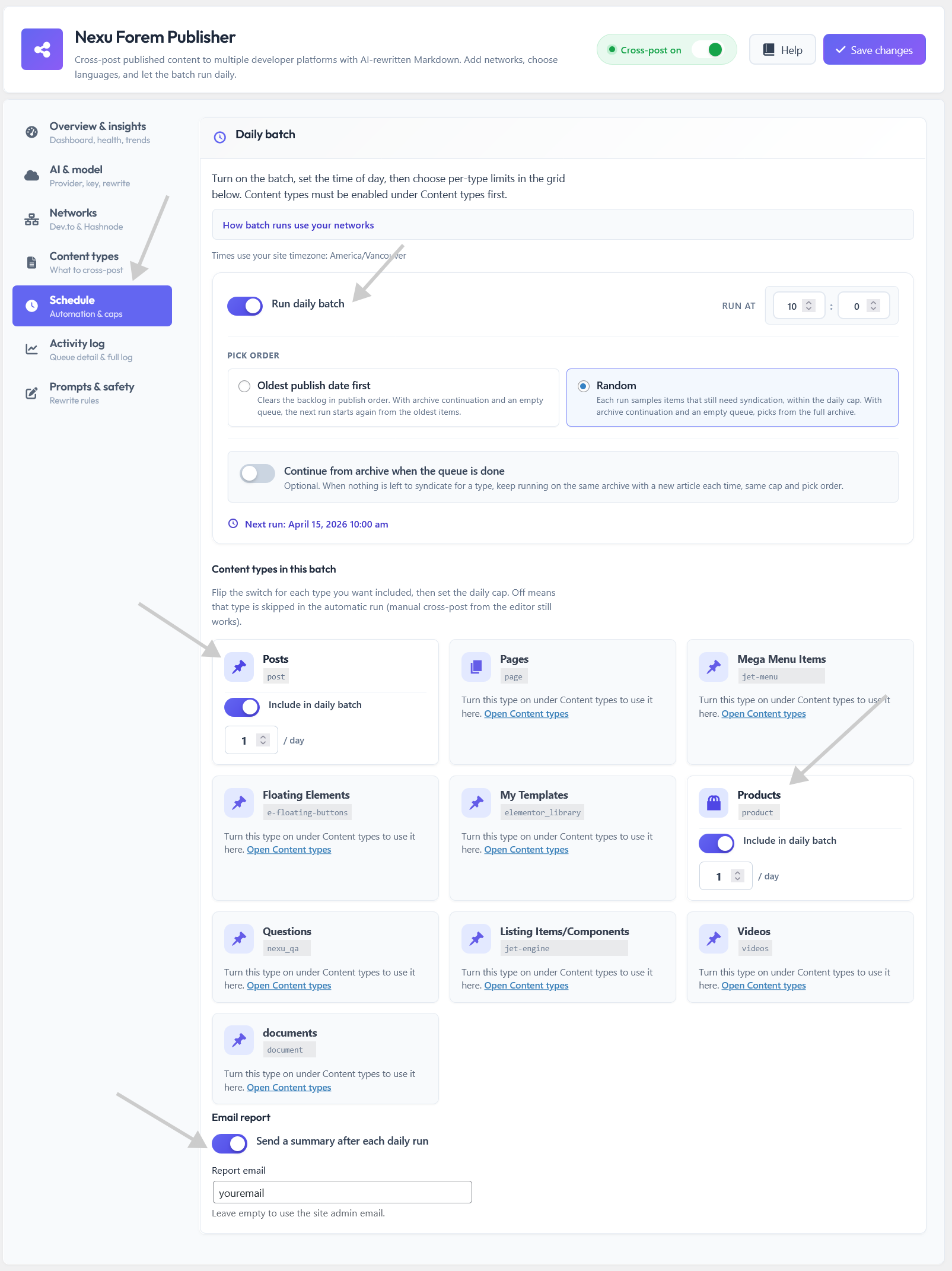
Schedule: set the rhythm so syndication keeps moving even when the team is underwater.
A trail you can actually trust
Activity history matters because APIs fail, tokens expire, and humans misclick. When you have a readable log of attempts, you do not waste time replaying mysteries. You see what succeeded, what did not, and you can retry without starting from zero. That is the difference between a toy integration and something you run on a live site.
For teams who treat Dev.to and Hashnode as real channels, this is also how you defend the workflow internally. You can point to the same record your developer would ask for. Nexu AI Cross-Post for Dev.to & Hashnode With Rewritten Markdown and Canonical Links is built around that honesty: your WordPress item is the source, and the log tells the story of what happened after you pressed go.
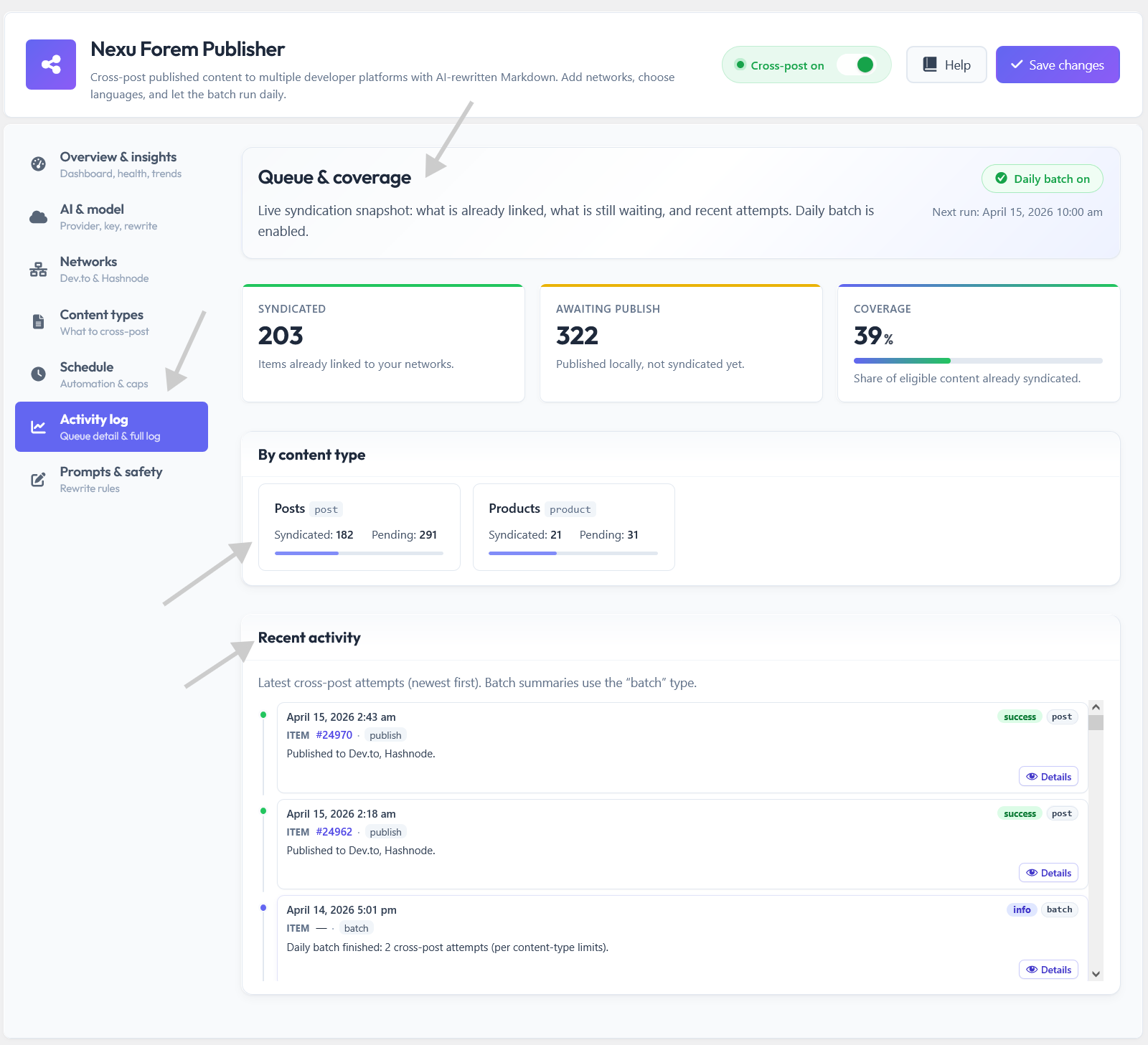
Activity log: see runs, outcomes, and what to retry without guessing.
Prompts and guardrails
The rewrite pass only helps if it stays on topic. Prompts and safety settings exist so you are not locked into a black box. You can keep shipped defaults when you want simplicity, and you can tighten language rules when your brand needs tighter boundaries. That balance matters for long-term use, especially when more than one author touches WordPress.
This is also where markdown export WordPress to Dev community stops being a gimmick and becomes a contract: the model is instructed to output structure that platforms expect, while you stay responsible for what the site actually claims. The plugin gives you knobs; you keep editorial judgment.
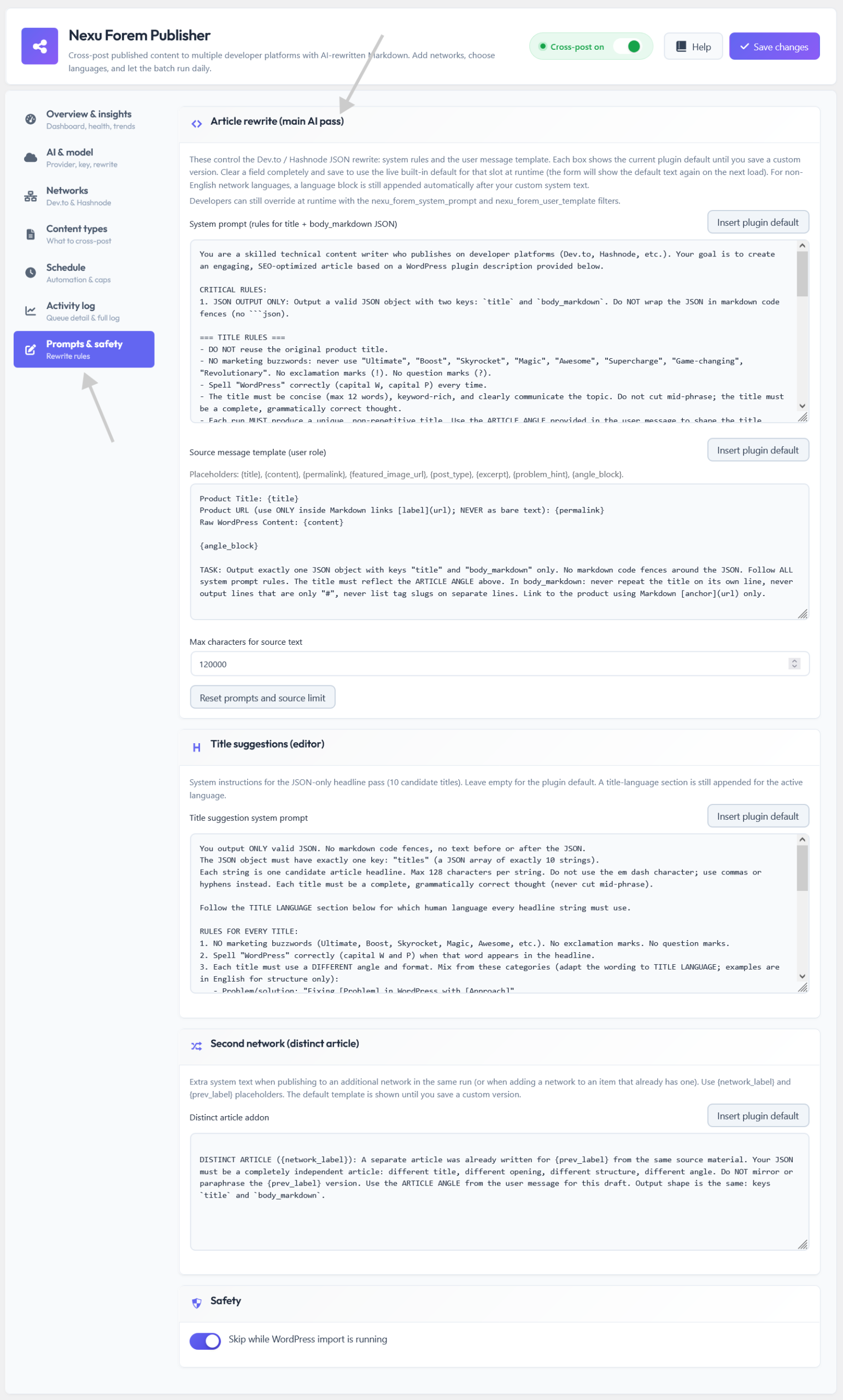
Prompts and safety: shape the rewrite pass without pretending the machine replaces your standards.
Rhythm beats talent
A steady schedule beats a brilliant article that never ships. The goal is to make the second publish as easy as the first.
Logs build trust
When something fails, you want a clear next step. Activity history turns panic into a checklist.
Prompts are ownership
Defaults get you started. Editable prompts keep you in control as your product story evolves.
Where NEXU WP fits
This plugin is one piece of a consistent admin philosophy: powerful automation, plain language screens, and room for advanced users to tune behavior without breaking beginners.
What is next
Part four zooms out: who this is for, how to adopt it without overpromising to your audience, and how to keep publish WordPress posts to Hashnode and Dev.to aligned with the story your site already tells.
Nexu AI Cross-Post for Dev.to & Hashnode With Rewritten Markdown and Canonical Links is not a replacement for good writing. It is a way to respect your time while still showing up where developers read.
Same story everywhere, without doubling your workload
This plugin is for teams that already treat WordPress as home base, but also know that many developers discover tools through feeds and search on community platforms. The gap is not ambition. The gap is friction. If every cross-post requires a fresh context switch, the work stops. If the workflow lives next to publish in WordPress, the work continues.
That is the adoption idea in plain language. You are not building a second editorial team. You are making WordPress cross-post to Dev.to feel like a checkbox that respects your calendar, your approvals, and your standards.
Who gets the most from this
If you ship plugins, themes, or dev-adjacent products, you already publish updates somewhere. The people who benefit most are the ones who want those updates to also exist where practitioners hang out, without turning every release into a manual reposting project. Agencies with multiple brands benefit when credentials and networks stay separated per client profile. Small teams benefit when one person can run the pipeline without becoming the “syndication person” forever.
Product-led teams
You want launch posts and explainers to travel beyond the product page. A steady feed on developer hubs supports discovery without abandoning WordPress as the source.
Agencies and multi-brand setups
Different accounts, different voices, same tool. The admin stays organized so you are not mixing keys or guessing which site posted where.
Lean marketing crews
You do not have time for repetitive formatting. You need a pipeline that produces Markdown-shaped articles and sends them through real APIs, with logs when something needs attention.
Start small, then widen the net
The least stressful adoption path is boring on purpose. Wire up the model, connect one network you trust, enable one content type you are proud to share, and run a single item end to end. Read the activity log. Adjust prompts if the tone drifts. Then add the second network when the first path feels stable.
That sequence protects your reputation. You are not promising readers magic. You are promising a consistent story. When you later scale into paths like syndicate WooCommerce products to Dev.to for launch content, you already trust the pipeline because you proved it on simpler posts first.
Keep claims grounded
The rewrite pass is only as honest as your source content. Use it to clarify and format, not to invent capabilities your product does not have. Your readers will compare the article to the site anyway.
Align voice with prompts
If your WordPress copy is technical and calm, tune prompts so the community article stays in that lane. If your brand is playful, reflect that in the instructions. The plugin gives you the knobs; you set the personality.
Why NEXU WP keeps admin tools feeling coherent
Plugins that share the same mental model are easier to train on. When settings are grouped by concern, when logs are readable, and when scheduling is explicit, new teammates do not need a private wiki to contribute. Nexu AI Cross-Post for Dev.to & Hashnode With Rewritten Markdown and Canonical Links follows that same idea: one item in WordPress, clear outcomes on the networks, evidence in the activity trail.
If your goal is to publish WordPress posts to Hashnode while keeping canonical credit pointed at your site where the platform allows it, you are not fighting the tool. You are using a workflow that matches how modern publishing stacks are supposed to behave.
Part five closes the loop: habits that keep syndication useful over months, a honest look at what automation cannot fix, and a simple checklist you can reuse before every campaign season.
Nexu AI Cross-Post for Dev.to & Hashnode With Rewritten Markdown and Canonical Links works best when you treat community platforms as part of your distribution strategy, not a replacement for the site you own.
The boring habits that make syndication worth it
You are not buying a fireworks show. You are buying a workflow. The first successful publish feels great, but the real value shows up months later when your feed still moves, your logs still make sense, and your team still trusts the process. This closing part is about the small disciplines that protect that trust.
Nexu AI Cross-Post for Dev.to & Hashnode With Rewritten Markdown and Canonical Links is strongest when you treat the rewrite pass as a teammate, not a magician. The plugin handles the mechanical work: turning your WordPress source into structured Markdown, routing through the right APIs, and leaving evidence in the activity trail. You still own the facts, the promises, and the product story.
What automation will not do for you
It will not invent a better product. It will not replace reading the draft before you ship. It will not remove the need for accurate source content in WordPress. What it can do is reduce the drag between “we published” and “developers can see it,” especially when AI rewrite WordPress article for developer blog outputs are guided by prompts that match how you actually talk.
The same honesty applies on the network side. When you rely on WordPress to Hashnode GraphQL publish and Dev.to’s API paths, you are choosing official integration behavior instead of fragile hacks. That is a stability benefit, not a hype benefit. Treat it that way and your expectations stay grounded.
A calm preflight you can repeat
Use this as a mental checklist, not a rigid ritual. The point is to catch easy mistakes before they become public mistakes. If you run multi-account Dev.to publishing WordPress setups, the preflight is even more valuable, because the cost of posting to the wrong profile is emotional as well as technical.
Source content sanity
Skim the WordPress item like a stranger would. If a claim is vague, fix it before syndication amplifies it.
Network and model spot check
Confirm the right account is selected for the brand you are posting under, and that the model path still matches your policy.
Prompt drift review
If outputs feel off, adjust prompts and safety text before you scale volume. Small wording changes often beat big drama later.
Log literacy
When something fails, read the log before you retry blindly. Most issues are credentials, timing, or content rejection, and the trail helps you narrow it fast.
Where this leaves you
You now have the full picture: outcomes and animation in part one, the core settings map in part two, operations and prompts in part three, adoption and audience fit in part four, and habits in part five. The through-line is simple. WordPress stays the home. Developer hubs become a disciplined extension, not a second job.
If you standardize on NEXU WP admin products, this plugin should feel familiar: clear tabs, readable logs, and controls that respect both beginners and people who tune prompts for a living. Nexu AI Cross-Post for Dev.to & Hashnode With Rewritten Markdown and Canonical Links is built for that middle path, serious enough for production, calm enough to actually use.
Keep the promise small
Promise a steady presence, not viral miracles. Small promises age better, and they match what a workflow tool can responsibly deliver.
Iterate in public, carefully
Syndication is a conversation. Listen to reactions, adjust your prompts, and keep your WordPress source aligned with what you learn.