With amazing plugins and exceptional support, we guarantee an unparalleled experience taking your success to new heights with every click and celebrating your satisfaction!
Stop Paying Monthly Fees for Automation Middleware
Connect your forms directly to your spreadsheets. No third-party services, no recurring costs, and no data limits. Just pure, direct synchronization between your website and Google Cloud.
Managing data shouldn’t be a constant battle with subscription plans or complex workflows. When you collect information through your website, you want it exactly where you can use it—instantly. The NEXU G-Sheets: Gravity Forms to Google Sheets Connector (No Zapier) was built with a single philosophy: direct communication is better than using a middleman. By establishing a secure link between your WordPress site and Google’s infrastructure, you gain full control over your data flow without the “tax” of automation platforms.
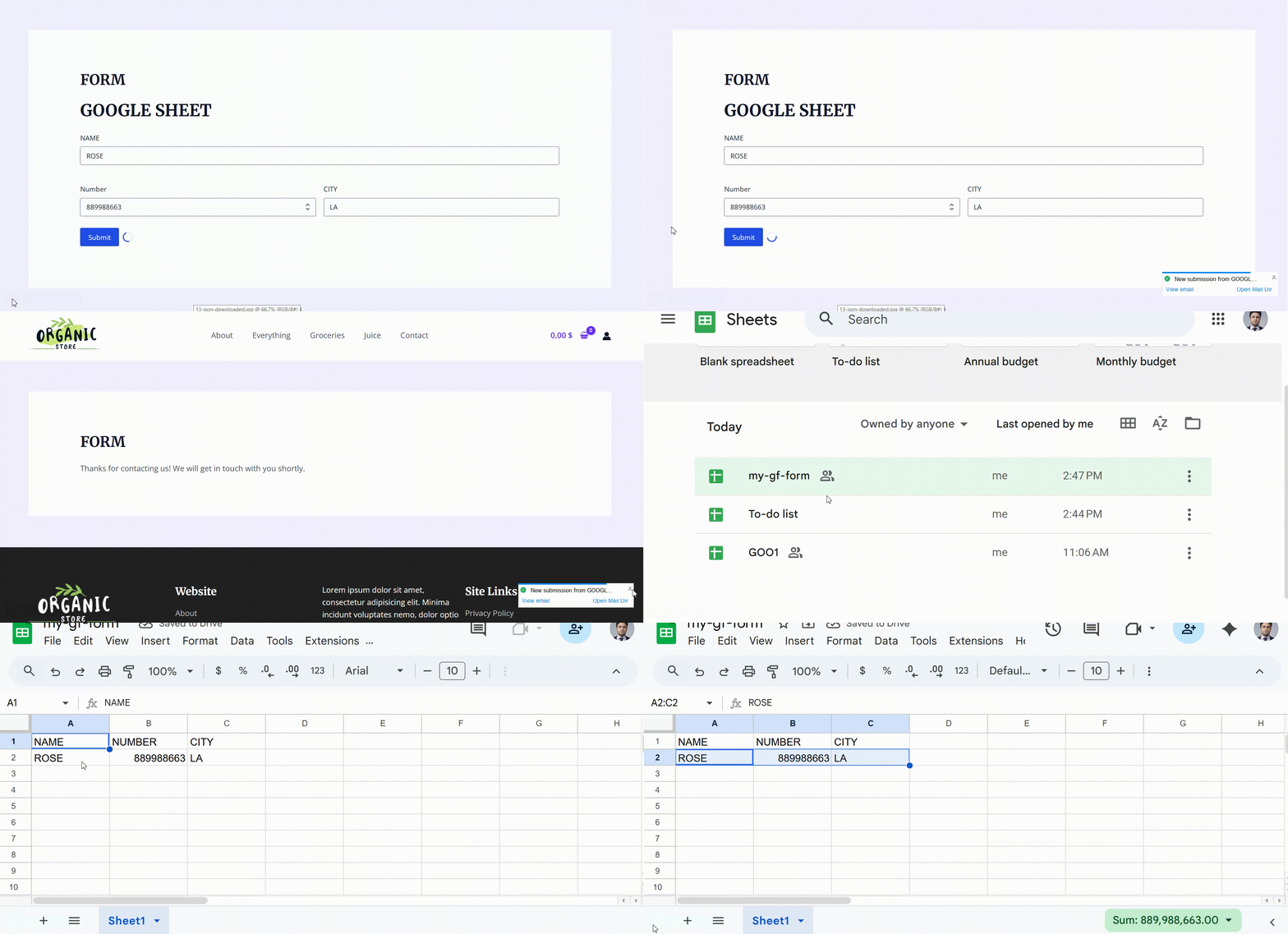
Watch your form entries flow directly into your spreadsheet the moment a user clicks submit.
Why Direct Integration Wins
Most users turn to platforms like Zapier because they seem easy, but they quickly realize the hidden costs. Every time a user submits a form, you use a “task.” If you have a busy site, those tasks run out fast, forcing you into expensive monthly tiers. With our Gravity Forms to Google Sheets without Zapier approach, your only limit is the Google API itself, which is incredibly generous for standard business use. You aren’t just saving money; you’re reducing the number of points where your data could potentially fail or be delayed.
The Middleware Way
- Monthly subscription fees
- Strict limits on monthly tasks
- Data passes through extra servers
- Complex multi-step setup
The NEXU Direct Way
- One-time setup, zero recurring fees
- Unlimited data processing
- Direct server-to-server security
- Native WordPress integration
Seamless Data Mapping
Setting up your connection shouldn’t require a degree in computer science. Our interface allows you to Auto Export Gravity Forms Entries to Google Spreadsheet by simply picking your fields and matching them to your sheet columns. Whether you are collecting simple contact info or complex multi-page surveys, the mapping system handles the heavy lifting. It even supports advanced data types like file uploads, which are converted into accessible URLs within your cells.

The intuitive mapping interface lets you decide exactly where each piece of information lands.
This level of precision ensures that your spreadsheets stay organized and ready for analysis. If you’re already using other tools like the Unique ID & Barcode Generator for Gravity Forms, you can map those unique serial numbers directly to your sheet to build a professional inventory or ticketing log. The integration is designed to be a team player within your Gravity Forms ecosystem.
Beyond Simple Submissions
The real magic happens when your data changes. Unlike basic tools that only send data once, this system can Update Google Sheet Row on Entry Edit. If an administrator corrects a typo or updates a status in the WordPress dashboard, the corresponding row in your Google Sheet reflects that change automatically. This keeps your external records perfectly synced with your website’s database at all times.
For those who need to manage high-traffic forms, combining this with the Gravity Forms Submission Firewall ensures that only clean, legitimate data reaches your spreadsheets. You can also pair it with the NEXU Inventory & Capacity manager to track stock levels in real-time as entries are logged. If your forms require visual choices, the NEXU Image Choices plugin works perfectly alongside this connector, sending the selected labels straight to your columns.

Manage all your spreadsheet connections from a single, centralized location.
Finally, if you have a form with a location requirement, using the Gravity Forms Geolocation plugin allows you to send precise coordinates or addresses directly to your sheet. Every piece of data, from text to maps, finds its home automatically.
Effortless Onboarding with a Guided Setup
We believe that powerful technology should be accessible to everyone. That is why the NEXU G-Sheets: Gravity Forms to Google Sheets Connector (No Zapier) features a completely redesigned, step-by-step visual wizard. Instead of guessing which settings to fill, you are guided through a logical flow that handles the complex parts of the Google Cloud configuration for you. From creating your service account to verifying the final connection, every action is explained with clear instructions. This guided approach ensures that even users with minimal technical background can establish a professional-grade integration in just a few minutes.
One of the biggest hurdles in modern integrations is the initial handshake between platforms. Our Gravity Forms to Google Sheets without Zapier solution simplifies this by focusing on Service Account authentication. This method is far more stable than traditional login flows because it doesn’t expire and doesn’t require you to re-authorize your website every few months. Once the secure link is established, it remains active, ensuring that your data synchronization never skips a beat. By removing the need for constant maintenance, you can focus on what truly matters: growing your business and analyzing the data you collect.
Handling Historical Data with Bulk Export
What happens to the entries you collected before installing the plugin? Most connectors only look forward, leaving your past data stranded in the WordPress database. Our system allows you to Bulk Send Old Gravity Forms Data to Sheets using a dedicated export tool. It processes your entries in smart batches to prevent server timeouts, showing you a real-time progress bar as it moves thousands of rows into your Google Spreadsheet. This is perfect for migrating data or creating comprehensive annual reports without manual copy-pasting. The batch engine is designed to be gentle on your server resources, making it suitable for shared hosting and high-performance dedicated environments alike.
Batch Processing
Sends data in controlled groups to ensure 100% reliability on any hosting environment without timeouts.
Live Progress
Track exactly how many entries have been exported with a visual progress indicator that updates in real-time.
Conditional Export
Respects your feed logic, ensuring only the data that meets your criteria is sent to the sheet during bulk runs.
This bulk capability is a game-changer for businesses that need to sync their entire history. When paired with the Gravity Forms Submission Firewall, you can be confident that your historical export only includes high-quality, verified data. The integration is robust enough to handle large datasets while keeping your WordPress admin fast and responsive. By automating the migration of thousands of entries, you eliminate the risk of human error and data loss.
Advanced Field Support
Data comes in many forms, and our connector is ready for all of them. The Gravity Forms Google Sheets Integration with File Upload Links ensures that even your attachments are handled professionally. Instead of trying to cram binary files into a spreadsheet, the plugin generates clean, clickable URLs for every uploaded file. This allows your team to view resumes, receipts, or photos directly from the sheet without ever logging back into WordPress. It transforms your spreadsheet into a powerful management dashboard where every piece of information is just a click away.
Smart Data Normalization
To ensure your data is always ready for analysis, the plugin automatically normalizes values before they reach Google Cloud. Checkboxes are converted into comma-separated strings, and dates are formatted into standard, sortable timestamps. This attention to detail means your spreadsheet filters and pivot tables will work perfectly from the very first entry. We handle the formatting so you can focus on the insights.
If you are building a complex workflow, you might also be using the Unique ID & Barcode Generator to tag your entries. These IDs are sent alongside your other fields, creating a perfect audit trail. For those managing limited resources, the NEXU Inventory & Capacity plugin can help you monitor stock while this connector logs every transaction. And if your forms use the NEXU Image Choices extension, the visual selections are exported as clear text labels for easy reading.
Every feature in the NEXU G-Sheets ecosystem is designed to work in harmony. Whether you are using Gravity Forms for simple leads or advanced business logic, your data is always just a heartbeat away from your spreadsheets. The direct connection eliminates the lag and uncertainty of third-party platforms, giving you a reliable foundation for your data-driven decisions.
Effortless Onboarding with a Guided Setup
We believe that powerful technology should be accessible to everyone. That is why the NEXU G-Sheets: Gravity Forms to Google Sheets Connector (No Zapier) features a completely redesigned, step-by-step visual wizard. Instead of guessing which settings to fill, you are guided through a logical flow that handles the complex parts of the Google Cloud configuration for you. From creating your service account to verifying the final connection, every action is explained with clear instructions. This guided approach ensures that even users with minimal technical background can establish a professional-grade integration in just a few minutes.
One of the biggest hurdles in modern integrations is the initial handshake between platforms. Our Gravity Forms to Google Sheets without Zapier solution simplifies this by focusing on Service Account authentication. This method is far more stable than traditional login flows because it doesn’t expire and doesn’t require you to re-authorize your website every few months. Once the secure link is established, it remains active, ensuring that your data synchronization never skips a beat. By removing the need for constant maintenance, you can focus on what truly matters: growing your business and analyzing the data you collect.
Handling Historical Data with Bulk Export
What happens to the entries you collected before installing the plugin? Most connectors only look forward, leaving your past data stranded in the WordPress database. Our system allows you to Bulk Send Old Gravity Forms Data to Sheets using a dedicated export tool. It processes your entries in smart batches to prevent server timeouts, showing you a real-time progress bar as it moves thousands of rows into your Google Spreadsheet. This is perfect for migrating data or creating comprehensive annual reports without manual copy-pasting. The batch engine is designed to be gentle on your server resources, making it suitable for shared hosting and high-performance dedicated environments alike.
Batch Processing
Sends data in controlled groups to ensure 100% reliability on any hosting environment without timeouts.
Live Progress
Track exactly how many entries have been exported with a visual progress indicator that updates in real-time.
Conditional Export
Respects your feed logic, ensuring only the data that meets your criteria is sent to the sheet during bulk runs.
This bulk capability is a game-changer for businesses that need to sync their entire history. When paired with the Gravity Forms Submission Firewall, you can be confident that your historical export only includes high-quality, verified data. The integration is robust enough to handle large datasets while keeping your WordPress admin fast and responsive. By automating the migration of thousands of entries, you eliminate the risk of human error and data loss.
Advanced Field Support
Data comes in many forms, and our connector is ready for all of them. The Gravity Forms Google Sheets Integration with File Upload Links ensures that even your attachments are handled professionally. Instead of trying to cram binary files into a spreadsheet, the plugin generates clean, clickable URLs for every uploaded file. This allows your team to view resumes, receipts, or photos directly from the sheet without ever logging back into WordPress. It transforms your spreadsheet into a powerful management dashboard where every piece of information is just a click away.
Smart Data Normalization
To ensure your data is always ready for analysis, the plugin automatically normalizes values before they reach Google Cloud. Checkboxes are converted into comma-separated strings, and dates are formatted into standard, sortable timestamps. This attention to detail means your spreadsheet filters and pivot tables will work perfectly from the very first entry. We handle the formatting so you can focus on the insights.
If you are building a complex workflow, you might also be using the Unique ID & Barcode Generator to tag your entries. These IDs are sent alongside your other fields, creating a perfect audit trail. For those managing limited resources, the NEXU Inventory & Capacity plugin can help you monitor stock while this connector logs every transaction. And if your forms use the NEXU Image Choices extension, the visual selections are exported as clear text labels for easy reading.
Every feature in the NEXU G-Sheets ecosystem is designed to work in harmony. Whether you are using Gravity Forms for simple leads or advanced business logic, your data is always just a heartbeat away from your spreadsheets. The direct connection eliminates the lag and uncertainty of third-party platforms, giving you a reliable foundation for your data-driven decisions.
Enterprise-Grade Security and Reliability
When it comes to your business data, security is not optional. The NEXU G-Sheets: Gravity Forms to Google Sheets Connector (No Zapier) utilizes Google’s own Service Account infrastructure, providing a direct server-to-server connection that bypasses common vulnerabilities. By using a private JSON key, your website communicates directly with Google Cloud without requiring user-level permissions or exposing your personal Google account. This architecture ensures that your Gravity Forms to Google Sheets without Zapier integration is both highly secure and incredibly resilient, maintaining a persistent link that works silently in the background.
Reliability is the backbone of any automation. Our plugin includes a robust error-logging system that integrates directly with the native WordPress and Gravity Forms logging frameworks. If a connection issue occurs—such as a spreadsheet being deleted or a project being disabled—the plugin captures the exact error message from Google and logs it for your review. This transparency means you are never left wondering why a row didn’t appear. You have the tools to diagnose and fix issues instantly, ensuring that your Auto Export Gravity Forms Entries to Google Spreadsheet workflow remains uninterrupted.
Dynamic Feed Configuration
Flexibility is key to managing diverse data needs. The plugin allows you to create multiple feeds for a single form, each pointing to a different spreadsheet or even different sheets within the same file. This is perfect for complex organizations where sales data needs to go to one department while support requests go to another. The Gravity Forms Google Sheets Integration with File Upload Links mapping system is dynamic; it fetches your sheet’s header row in real-time, allowing you to map fields with surgical precision. You can even use conditional logic to ensure that only “Paid” orders or “High Priority” leads are sent to specific spreadsheets.
Private Key Auth
Uses secure JSON keys for server-level authentication, removing the need for fragile OAuth tokens.
Conditional Logic
Full support for native Gravity Forms logic to control exactly when data should be synced.
Two-Way Thinking
While data flows to sheets, the plugin remembers row IDs to allow for future updates on entry edits.
By keeping your data synchronization local to your server, you avoid the latency and privacy concerns of third-party processors. When combined with the Gravity Forms Submission Firewall, your Google Sheets will only ever contain high-quality, human-verified data. If your business relies on tracking physical goods, the NEXU Inventory & Capacity plugin can work as your front-end gatekeeper, while this connector serves as your back-end ledger.
The Power of Edit-Sync
One of the most requested features in modern data management is the ability to Update Google Sheet Row on Entry Edit. Traditional integrations often duplicate rows when an entry is modified, leading to messy spreadsheets and incorrect totals. Our plugin intelligently tracks the specific row associated with each entry. When you make a change in WordPress, it doesn’t create a new row—it finds the existing one and updates it. This ensures your external data is always a perfect mirror of your website’s records.
This seamless workflow is further enhanced when using specialized fields. For example, if you use the Unique ID & Barcode Generator for Gravity Forms, those persistent IDs make cross-referencing between your site and your spreadsheet effortless. If your form captures locations via the Gravity Forms Geolocation plugin, those coordinates are sent as clean text, ready for mapping or routing. Even visual choice data from the NEXU Image Choices plugin is exported as readable labels, maintaining the integrity of your surveys and store orders.
The NEXU G-Sheets connector is more than just a plugin; it’s a bridge to better business intelligence. By removing the middlemen and the monthly fees, you empower your team to work directly with the data they need, exactly where they need it. Whether you are a small business owner or managing a large-scale enterprise site, this integration provides the stability and security required for modern web operations. Trust your data to a direct connection and experience the freedom of a middleware-free workflow with Gravity Forms.