
Most WooCommerce store owners spend significant time configuring commission rates, payout rules, and fraud settings when setting up an affiliate program — and comparatively little time thinking about what the affiliate actually sees when they log in. That imbalance is a mistake, because the affiliate dashboard is the primary interface through which affiliates experience your program. It shapes their perception of how professional the program is, whether their referrals are being tracked correctly, and whether the earnings are worth continuing to promote.
A well-designed affiliate dashboard does three things: it confirms that the system is working (tracking is happening, commissions are accumulating), it gives affiliates the tools to do their job (links, codes, creatives), and it provides feedback that motivates continued effort (visits, conversion data, earnings trajectory). When any of these three functions is missing or unclear, affiliate engagement drops — not dramatically or immediately, but steadily, as affiliates gradually deprioritize a program they do not feel connected to.
This guide breaks down every component of an effective WooCommerce affiliate dashboard, explains the psychology behind why each element keeps affiliates active, and shows how Affiliate Engine, a WooCommerce affiliate and referral management plugin, delivers each of these elements inside the WooCommerce My Account area.
Why the affiliate dashboard is your program’s retention engine
Think about the last time you participated in any reward program — a loyalty card, a referral incentive, or a cashback offer — and gradually stopped using it. The most common reason was not that the rewards were too small. It was that you stopped feeling connected to the progress. You could not see your points accumulating, you forgot you had a referral link, or the experience of checking your balance felt like too much effort.
Affiliate program disengagement follows the same pattern. Affiliates who share a link once and then have no visible feedback on whether it worked — whether anyone clicked, whether anyone bought, whether any commission accumulated — have no reason to share again. The dashboard is the feedback loop. It is the mechanism that converts a one-time sharing event into an ongoing promotional relationship.
Behavioral research on incentive programs consistently shows that visible progress toward a reward is more motivating than the size of the reward itself. An affiliate who can log in, see three referrals in the past week, and watch their payable balance growing toward the payout threshold has a clear, concrete reason to keep promoting. An affiliate who sees an empty dashboard or a confusing list of numbers has no such feedback. The dashboard is where the psychological connection between sharing behavior and financial outcome is made visible — and that visibility is what sustains the behavior.
The seven essential elements of an effective affiliate dashboard
Not all dashboard elements are equally important. Some are foundational — without them, affiliates cannot function. Others are motivational — they make affiliates want to perform better. And some are operational — they reduce the support questions you receive. Here is what every WooCommerce affiliate dashboard must include, and why each element earns its place.
The affiliate’s unique referral link should be the most visible element on the dashboard. It should have a one-click copy button. It should never be buried below other information or require navigation to find. This sounds obvious, but many plugins either make the link too small, require the affiliate to generate it manually before it appears, or bury it in a submenu. Every time an affiliate has to hunt for their link, there is a real chance they give up and do not share that day. Friction kills promotion frequency.
Affiliates need to see three numbers clearly differentiated: pending commissions (earned but waiting for the order to complete), approved commissions (order completed, past the hold period, payable), and total paid (historical earnings). Showing a single combined “earnings” number is not enough. An affiliate who sees $240 in total earnings but $200 of that is from six months ago and already paid — while $40 is pending from this week — has a very different mental picture than if all $240 appeared together. Clarity about what is pending, what is ready to pay out, and what has already been paid keeps the earnings picture honest and prevents the support tickets that come from confusion.
Visit data — how many people clicked the affiliate’s link — is motivational even when those visits have not converted to sales yet. An affiliate who can see “47 people clicked your link this week” knows their promotion is working at the traffic level. It gives them confidence to keep sharing while they wait for conversions. Without visit data, affiliates who send traffic but have not yet generated a commission have no way to tell whether the program is broken or whether their links are simply in front of the wrong audience at the wrong time. This data point prevents unnecessary “is my tracking working?” support questions.
A list of the orders attributed to the affiliate — showing order date, commission amount, and current commission status — is the audit trail that builds trust in your program. When an affiliate sees a specific order they know they referred appearing in their commission list at the right amount, the program’s reliability is confirmed. When they cannot see individual orders, they have no way to verify that attribution is working correctly. Transparent referral records reduce disputes and increase confidence significantly — affiliates who trust the tracking promote more aggressively.
A single generic referral link to the homepage is the minimum viable affiliate tool. A link generator that lets affiliates create tracking links to any specific product, category, or page on your store is a meaningful upgrade. It enables affiliates to create targeted promotions: a YouTuber reviewing a specific product links directly to that product’s page. A blogger writing about a category links to that category. These direct-destination links convert at dramatically higher rates than links that drop visitors on a homepage and leave them to find the relevant product themselves. Affiliates who use the link generator are visibly more effective, and effective affiliates are more engaged affiliates.
If coupon tracking is enabled in your program, the affiliate’s coupon code should be displayed in their dashboard with a copy button. Affiliates who can instantly see and copy their code will use it. Affiliates who have to ask for it, search their approval email, or contact support will not. The coupon is particularly valuable for social media sharing — an Instagram caption with “use my code SARAH15 for 15% off” is more personally resonant and more memorable than a URL. Make it impossible to miss in the dashboard.
The payout tools section of the dashboard needs to show: the current payable balance, the minimum threshold (and how close they are to it), and a clear request button that becomes active when the threshold is met. After submitting, affiliates should see the request as pending in their dashboard so they know it was received. After you process it, they should see it as paid. This closed feedback loop — request made, payment confirmed — is what makes affiliates feel like participants in a trustworthy professional program rather than passive contributors to an opaque system.
What the complete dashboard looks like in practice
Understanding the components individually is useful. Seeing them as a coherent experience is what allows you to evaluate whether a plugin actually delivers on the promise of a complete affiliate dashboard. Here is how Affiliate Engine presents all seven elements inside the WooCommerce My Account area.
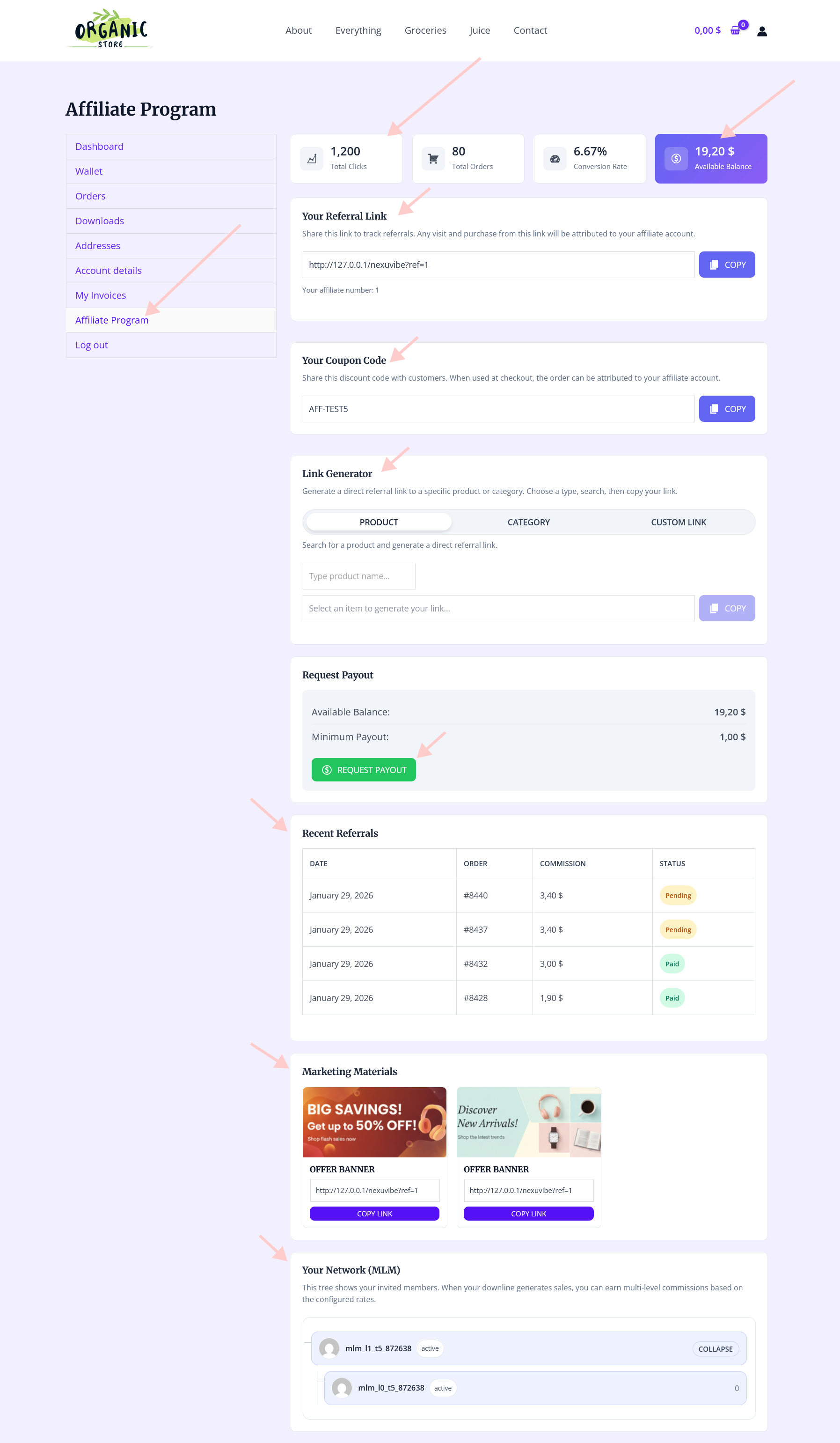
The dashboard presents the affiliate’s referral link and coupon code at the top — the most frequently needed elements — followed by the earnings summary with pending, approved, and paid commissions clearly differentiated. The referral history below shows individual orders attributed to the affiliate. Visit data is accessible from the same area. The link generator is available for creating targeted tracking links to specific pages. Payout request tools are visible with the current balance and threshold progress.
Everything an affiliate needs to share, track, and get paid is accessible from a single account area they are already familiar with. This structural choice — embedding the affiliate dashboard in My Account rather than sending affiliates to a separate platform — is deliberate and significant, and it deserves its own section.
Dashboard location: inside My Account vs. separate portal
There are two structural approaches to WooCommerce affiliate dashboards: embedding them inside the WooCommerce My Account area (where affiliates use their existing store login) and hosting them in a separate portal (either a dedicated page within your site or an entirely external platform). Both approaches have genuine use cases, and the choice affects affiliate behavior in measurable ways.
The login friction point is the decisive factor for most WooCommerce stores. When an affiliate has to remember a separate login to check their stats, the probability that they check regularly drops significantly. Most people, most days, will check something they can access from a place they already visit — not something that requires navigating to a different URL and remembering a separate password. For stores where the affiliates are also customers, embedding the dashboard in My Account is almost always the higher-engagement choice.
The link generator: why it matters more than most store owners realize
Of all the dashboard elements, the link generator has the clearest measurable impact on affiliate effectiveness. The data on this is consistent across affiliate programs: affiliates who use direct-to-product tracking links convert referral traffic at significantly higher rates than affiliates who share a generic homepage link.
The reason is simple. When a visitor clicks a link in a YouTube video about “the best noise-cancelling headphones under $200” and lands on a specific product page for exactly that headphone — pre-selected, pre-contextualized — the path to purchase is frictionless. When that same visitor lands on a store homepage and has to navigate to find the product, a meaningful proportion of them leave before they get there.

The link generator in Affiliate Engine lets affiliates type or paste any URL from your store, and the tool creates a tracking link that directs visitors to that specific page with the affiliate’s attribution attached. A food blogger promoting your cooking equipment can create separate tracking links for three different products, see which one converts best in their visit data, and optimize their content accordingly. This kind of data-informed promotion is only possible when the dashboard gives affiliates both the tool to create targeted links and the data to see how each one performs.
The creatives section: what needs to be there to actually get used
Most affiliate programs include a creatives section. Few make it genuinely useful. The difference between a creatives section that affiliates regularly access and one they ignore comes down to two things: format relevance and freshness.

A single large banner at 728×90 pixels is useful for websites. It is useless for Instagram, YouTube thumbnails, Pinterest, or email newsletters. To actually support affiliates across channels, provide product images at square dimensions (1080×1080 for Instagram), landscape dimensions (1280×720 for YouTube thumbnails and blog headers), and portrait dimensions (1000×1500 for Pinterest). Pre-cropped, well-lit product images that affiliates can download and use immediately in their content are used far more than generic banners that need to be cropped before they fit anywhere.
A creatives section that has not been updated in six months signals to affiliates that your program is not actively managed. Updated creatives for new product launches, seasonal promotions, and major events give affiliates a reason to return to the creatives section regularly — and give them timely, relevant content to share that is more likely to convert than evergreen material. A brief notification to active affiliates when new creatives are available (“we just added holiday campaign assets”) turns the creatives update into a re-engagement touchpoint.
For affiliates who are customers or community members rather than professional content creators, providing suggested caption text dramatically lowers the creative barrier to promotion. A template like “I’ve been using for three months and [specific benefit] — if you want to try it, here’s [X]% off with my code [CODE]” gives affiliates a starting point they can personalize. Not everyone will use it word for word, but having something to adapt is far easier than writing from scratch, and it ensures that key product benefits and the coupon code are consistently included.
Tier status visibility: keeping performance motivation visible
If your affiliate program uses performance tiers — where higher sales volume earns higher commission rates — the affiliate’s current tier and progress toward the next tier should be clearly visible in the dashboard. This is a textbook application of progress motivation: when someone can see how close they are to a goal, they work harder to reach it.

An affiliate who can see “You are at the Silver tier (12% commission). Reach 20 referrals in the next 60 days to unlock Gold tier (15% commission)” has a concrete, actionable goal. The combination of visibility and proximity to a milestone consistently increases promotion frequency in the weeks before tier thresholds are reached. This is why progress visibility is worth including in the dashboard even if your tier thresholds are months away for most affiliates — the visibility alone changes behavior.
What the admin sees while affiliates use their dashboard
The affiliate dashboard is a frontend experience, but it is powered by the admin-side data infrastructure. What affiliates see in their dashboard is a reflection of how accurately and completely the admin panel is tracking program activity. Strong admin tools — clear referral records, visit tracking, payout management — are what make the affiliate-facing dashboard trustworthy.

The referrals tab in the admin panel shows every attributed order with commission amounts and status. This data feeds directly into what affiliates see in their commission history. When the admin data is clean, complete, and accurately reflects the commission rules you have configured, affiliates see a dashboard they can trust. When admin data is missing orders, showing incorrect amounts, or lagging on status updates, affiliates lose confidence in the program — often without telling you, and often without understanding that the issue is a configuration problem rather than deliberate inaccuracy.
Dashboard quality checklist: what to verify before approving your first affiliate
Before approving your first real affiliate, test the entire dashboard experience yourself using a test account. Walk through every element and verify that it works as expected. Discovering gaps in the affiliate experience after real affiliates are already in the program is significantly more damaging to program trust than discovering them in testing.
The affiliate dashboard is not a technical feature — it is the relationship your program has with the people promoting your store, expressed through a user interface. When it is clear, complete, and trustworthy, affiliates feel like participants in a well-run program. When it is confusing, incomplete, or inaccurate, they feel like afterthoughts. The difference between those two experiences is the difference between an affiliate program that sustains itself and one that requires constant recruitment just to replace the people who quietly stopped promoting.
Affiliate Engine’s WooCommerce affiliate dashboard and referral program plugin delivers all seven essential dashboard elements inside the WooCommerce My Account area: referral link, coupon code, earnings breakdown by status, visit data, referral order history, link generator, creatives access, tier visibility, and payout request tools — giving affiliates everything they need to share effectively, track accurately, and trust the program completely.
Give your affiliates a dashboard that makes them want to keep promoting
Affiliate Engine delivers all seven essential dashboard elements inside WooCommerce My Account — referral links, commission breakdown, visit data, link generator, coupon code, creatives, tier status, and payout tools — with no separate login required.






The affiliate setup has the same quirks as the dashboard
Creative assets are buried too deep.
The real time tracking lets me focus on promoting instead of stressing."
Grabbed this for my buddy's side hustle and the dashboard setup actually makes sense. he can track his referrals and earnings without digging through menus. Solid for keeping folks engaged.