Next-Level Code. Nexuvibe Style ...
Hrs
Min
Sec

WooCommerce’s default checkout is not broken. It processes orders. It collects names, addresses, and payment details. For a store that has just launched, it does its job. The question that matters is not whether the default checkout works — it is whether it works well enough for where your store is now and where it is going. And for most WooCommerce stores that have been operating for more than a few months, the honest answer to that question is no.
This is not a criticism of WooCommerce. The default checkout was built to serve the widest possible range of store types on day one. That breadth is its purpose, and within that purpose it succeeds. But the same design decision that makes it broadly applicable — collecting the minimum information needed by the average store — makes it a poor fit for any specific store’s actual customer base, product catalog, and operational requirements. The store that sells both personalized jewelry and standard accessories needs different fields from the store that serves European B2B buyers, which needs different fields from the store offering same-day local delivery, which needs different fields from the digital download store.
The WooCommerce default checkout cannot make those distinctions. A dedicated checkout field editor can — and the evidence for why it matters is in the Baymard Institute’s large-scale checkout usability research, which found that the average e-commerce checkout contains nearly twice as many fields as are necessary and that 18% of US shoppers have abandoned a checkout specifically because the process was too long or complicated. Every one of those abandoned checkouts is a customer who had already decided to buy. The friction was in the form, not in the intent.
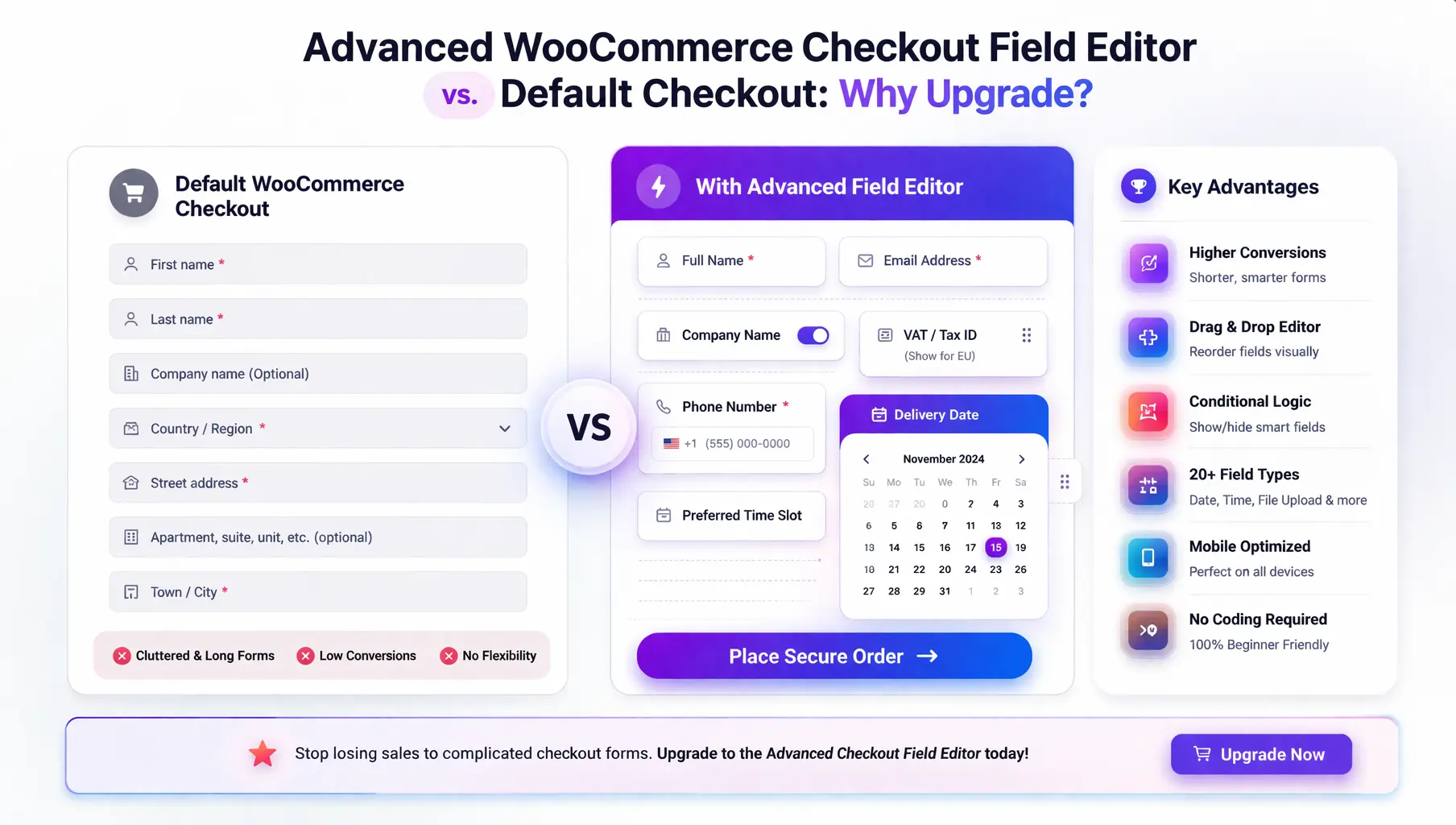
This guide compares the default WooCommerce checkout against a dedicated advanced WooCommerce checkout field editor with full customization capability across every dimension that affects conversion rate, operational efficiency, and customer experience. It is structured as a decision guide for store owners who are evaluating whether an upgrade is worth it. The comparison is honest — including the cases where the default checkout is genuinely sufficient — so you can make the right decision for your specific situation.
An honest comparison starts with credit where it is due. The default WooCommerce checkout has several genuine strengths that any evaluation should acknowledge before cataloguing its limitations. Ignoring these strengths would make the comparison less useful for store owners trying to make a real decision.
WooCommerce’s default checkout works out of the box with no setup. For a new store testing its first products, this matters. The default form collects what is needed to process an order and get it shipped, and it does so without any configuration overhead.
WooCommerce validates postcodes against expected formats for each country automatically. This is a genuinely useful built-in feature that prevents a significant proportion of address entry errors without any configuration.
WooCommerce’s default checkout is the baseline that every payment gateway integration is built against. It is the most compatible checkout implementation with the broadest range of payment processors — a practical advantage for stores with complex payment setups.
For very simple stores with minimal operational complexity, running the default checkout without additional plugins keeps the stack simpler. There are no compatibility risks to manage, no plugin updates to monitor, and no configuration to maintain across WooCommerce version changes.
These strengths are real. They also have a natural expiry date. The zero-configuration advantage disappears the first time a customer asks why your form is asking for information they do not understand. The simplicity advantage disappears the first time you spend an afternoon trying to implement a custom field through PHP hooks and WooCommerce filters. The stack simplicity advantage disappears the first time a WooCommerce update breaks a custom function.php modification someone added six months ago.
The following comparison covers every major checkout customization capability across three implementation paths: the WooCommerce default, custom PHP code, and a dedicated checkout field editor plugin. The custom PHP option is included because it is the alternative many store owners consider before a plugin — and because understanding its real cost is part of making an informed decision.
When store owners discover that the default WooCommerce checkout cannot do what they need, the first instinct is often to find a developer and add the functionality through custom PHP. This works — WooCommerce’s hook system is well-documented and capable — but the total cost of this approach is consistently underestimated, particularly by store owners who are not developers themselves and who therefore cannot anticipate the ongoing maintenance requirements.
Adding a single custom checkout field via PHP hooks — with proper save, display, and order meta functionality — takes an experienced WordPress developer between 1 and 3 hours depending on complexity. Adding conditional logic that responds to field values, cart contents, or shipping method selection requires JavaScript in addition to PHP, and may take 3 to 8 hours per condition set. A comprehensive customization equivalent to what a checkout field editor handles through its UI can represent 20 to 40 hours of development time.
WooCommerce releases major updates several times per year. Each major update can change the hooks, filters, and JavaScript events that custom checkout code relies on. A field that appeared and validated correctly before an update may be broken, invisible, or duplicated after it. Someone — a developer, at development rates — needs to review and test the custom code after every major WooCommerce update. This is recurring maintenance that adds to the total cost of the custom approach every year indefinitely.
Custom PHP code written for the WooCommerce shortcode-based checkout does not automatically work on the WooCommerce Blocks checkout. As WooCommerce continues to move toward Blocks as the primary checkout architecture, stores with custom PHP checkout code will face a growing choice: stay on the legacy checkout architecture indefinitely, or invest in rebuilding all their custom code for the Blocks checkout. A plugin built for both architectures sidesteps this problem entirely.
Custom checkout code creates a dependency on whoever wrote it. If that developer is unavailable, changing or debugging the code becomes difficult for anyone else who picks it up. Store owners who used a freelancer for initial development often find themselves re-paying for the same knowledge on each maintenance cycle. A field editor plugin has documented functionality, a support channel, and a user base — institutional knowledge that belongs to the tool, not to a specific developer relationship.
Rather than making a general case for upgrading, the most useful question is whether your specific store is showing signs that the default checkout has become a constraint. The following seven signals are diagnostic — if your store is experiencing several of them, the case for upgrading is strong.
If your team regularly has to contact customers post-order to collect information that should have been captured at checkout — a VAT number, a delivery instruction, a personalization detail — your checkout is not collecting what your operation needs.
A single static form cannot serve both audiences well. Consumers see business fields that confuse them. Business buyers cannot find the fields they need. Conditional logic is the only clean solution — and the default checkout has none.
Engraving text, monograms, custom color choices, appointment preferences, configuration options — any product that requires the customer to provide specific data at purchase needs a product-linked field that the default checkout cannot create.
A mobile-desktop conversion gap beyond the typical industry range (roughly 2:1) often indicates form friction problems that field ordering, input type correction, and field count reduction — none of which the default checkout supports — could address.
Different tax ID fields, different address formats, different required fields by country — the default checkout treats all markets identically. Country-based conditional logic is the only scalable solution for multi-market compliance, and it requires a plugin to implement without code.
If you already have custom code in your functions.php or a custom plugin, and that code has broken on a WooCommerce update, or you cannot easily make changes to it without developer involvement, or you are dreading the next WooCommerce major release — a plugin-based approach removes that ongoing anxiety.
If your store is on a newer WooCommerce installation using the Blocks checkout, custom PHP code is likely incompatible. A plugin with explicit Blocks support is the only practical path to checkout customization without rebuilding from scratch in the Blocks extension API.
An honest comparison includes the cases where upgrading is not necessary. The default WooCommerce checkout is a reasonable choice for a store that is in its early stages with a simple, homogeneous product catalog, serving a single customer type in a single market, with no personalization requirements, no B2B customers, and no existing custom code to maintain. For stores in this situation — particularly very new stores testing their market — the additional complexity of a field editor plugin adds overhead without proportional benefit.
The practical reality is that most stores outgrow this description within their first year of operation. The moment a business customer asks for a VAT number on their invoice, the moment a customer orders a personalized product and the fulfillment team has no place to collect the personalization data, the moment someone realizes the phone number field is optional and half the orders have no contact number — that is the moment the default checkout’s limitations become a business problem rather than a theoretical one.
Not all checkout field editor plugins are equal. The feature comparison above gives a clear picture of what a capable plugin should offer, but there are additional evaluation criteria that are not visible in a feature list and that matter significantly for long-term reliability.
The decision to upgrade from the default WooCommerce checkout to a dedicated field editor is not primarily a cost decision — though the economics strongly favor the plugin over custom PHP development at almost any order volume above minimal. It is primarily a capability decision: whether the customization ceiling of the default checkout is limiting what your store can do for its specific customers, products, and markets.
For stores serving homogeneous customers with simple products in a single market, that ceiling may not be a constraint yet. For most stores that have been operating and growing for any length of time, it is. The seven diagnostic signs above are the test. The feature comparison shows what is available on the other side of that decision. And the alternative path — custom PHP — has a total cost of ownership that most store owners significantly underestimate before they have lived through their first post-update debugging session.
The Advanced WooCommerce Checkout Field Editor — the complete no-code upgrade for WooCommerce checkout customization covers the full capability stack: every field type, all four conditional trigger types, per-product field assignment, drag-and-drop ordering, label and placeholder editing, custom validation and error messages, WooCommerce Blocks support, and configuration export. The checkout your store needs is configurable from a visual interface. The developer dependency is removed. The maintenance overhead is handled. What remains is the decision about whether your store is ready to stop working around the default checkout’s limitations and start building a checkout that is actually built for your customers.
Advanced WooCommerce Checkout Field Editor gives you the complete checkout customization stack — every field type, all four conditional trigger types, per-product fields, drag-and-drop ordering, Blocks support, and configuration export — all from a visual interface that any store owner can use without writing a single line of code.








Okay so I get that the default WooCommerce checkout does its job it takes orders, no crashes, no drama. but here's my question: my buddy runs a small shop doing custom engravings, and his checkout's a mess with extra notes all over the place.
Just made the jump from custom PHP tweaks to this plugin, and wow the international postcode validation alone has already saved me hours of manual fixes
Finally a plugin that saves me from hacking PHP just to add a simple field