Next-Level Code. Nexuvibe Style ...
Hrs
Min
Sec

The payout moment is when your affiliate program becomes real for the people in it. Everything before it — the referral link, the commission tracking, the dashboard showing accumulated earnings — is abstract until the first payment actually lands. How smoothly, reliably, and predictably that payment arrives determines whether your affiliates remain active or gradually lose interest in promoting your store.
Most guides about WooCommerce affiliate programs treat payouts as an afterthought — a paragraph at the end mentioning PayPal. In practice, payout method selection affects your transaction costs, your administrative workload, your affiliates’ experience, and your compliance obligations. Getting it right from the start saves time and prevents the kind of friction that quietly kills affiliate program engagement.
This guide covers every payout method available for WooCommerce affiliate programs in 2026 — PayPal, Stripe, wallet-based payouts, store credit, and manual bank transfers — with the practical details you need to choose, configure, and run each one. We reference the payout workflow inside Affiliate Engine, a WooCommerce affiliate and payout management plugin, throughout this guide as our configuration reference.
Before choosing a payout method, it is important to understand what the payout workflow looks like end-to-end. The method you choose is the final step in a sequence, and the earlier steps in that sequence determine when and how much an affiliate can actually request.
A visitor clicks an affiliate link or uses a coupon code and completes a purchase. The plugin records the referral, associates it with the affiliate, and creates a pending commission record.
The WooCommerce order reaches the status configured as the commission approval trigger (typically “completed”). The commission status changes from pending to approved — but not yet payable.
The configured hold period passes — typically matching or exceeding the store’s refund window. This protects against paying commission on orders that are subsequently refunded. Once the hold period clears, the commission becomes payout-eligible.
Once the affiliate’s payable balance reaches the minimum payout threshold (configured in payout settings), they can submit a withdrawal request from their dashboard. The request appears in the admin payout panel.
You review the request in the payout dashboard, verify the amount and affiliate details, and process payment via the configured method. The payout record is marked as paid and the affiliate receives a notification.
This five-step workflow is the same regardless of which payout method you use. What changes is what happens at step five — the mechanism of the actual payment. Your choice of payout method determines the cost, the speed, the administrative steps required, and the experience for your affiliates.
Before choosing a payment method, the payout settings panel is where you configure the rules that govern when affiliates can request payment. Getting these right reduces administrative overhead and prevents the kind of small-balance payout requests that create work without meaningful value.
Set a minimum balance an affiliate must accumulate before they can request a withdrawal. A threshold of $30 to $50 is reasonable for most stores. Without a minimum, you will process many small payouts — each requiring your time, and each incurring transaction fees — that create disproportionate administrative overhead. The threshold should be set high enough to make each payout operationally worthwhile, but not so high that it demotivates affiliates from continuing to promote.
Choose a regular payout processing date and communicate it clearly in your affiliate terms and onboarding email. The first Monday of each month works well for most stores. A predictable schedule means affiliates know when to expect payment, which eliminates the most common category of affiliate support question: “when will I get paid?” Consistency here is more valuable than speed — affiliates tolerate a 30-day payment cycle when it is reliable and communicated upfront.
Your payout schedule and your commission hold period interact. If you process payouts on the first of each month and your hold period is 21 days, a commission earned on the 25th of one month will not be payable until the first payout run of the following month at the earliest. Map these two settings against each other before you finalize them, and explain the resulting payment lag clearly to affiliates so there are no surprises about timing.
PayPal is the most commonly used payout method for affiliate programs globally, and for WooCommerce stores it is often the path of least resistance. Most affiliates have a PayPal account, the transfer is fast, and it requires no banking information exchange. But PayPal’s fee structure deserves careful attention before you commit to it as your primary payout method.
For most WooCommerce stores with fewer than 30 affiliates paying out monthly, PayPal is the pragmatic choice. The fees are manageable at that scale, setup is straightforward, and affiliates universally accept it. The calculation changes as programs grow and as the proportion of international affiliates increases. If you expect significant international reach from the start, consider which other methods you will need alongside PayPal.
Stripe is frequently mentioned alongside PayPal as an affiliate payout option, but it is important to understand that Stripe does not work the same way PayPal does for paying affiliates. Stripe was built primarily for accepting payments, not sending them. Paying out to affiliates requires either Stripe Connect — a significantly more complex setup — or a manual process using the Stripe dashboard.
Stripe Connect is most appropriate when you are running a marketplace or partner program with professional participants who are comfortable with identity verification and direct bank account linking. It offers real-time bank transfers in supported regions, strong compliance tooling, and detailed reporting. For WooCommerce stores running influencer programs or agency partnerships where affiliates expect professional-grade infrastructure, Stripe Connect delivers that experience. For customer referral programs or small community affiliate programs, the setup complexity and affiliate onboarding friction rarely justify the infrastructure.
Stripe Connect charges a platform fee plus the underlying payout cost. Standard payouts in the US using ACH are free with a 2-3 business day transfer window. Instant payouts cost 1.5% (minimum $0.50). Cross-border payouts carry additional currency conversion and transfer fees. At the volume of most WooCommerce affiliate programs, the Stripe Connect setup cost and complexity usually outweigh the fee advantages compared to simpler methods like PayPal or manual bank transfer.
A wallet-based payout credits affiliate commissions directly to a store wallet balance rather than sending external payment. The affiliate can then spend that balance on future purchases from your store. This approach has genuine advantages for specific program types and store categories, but it is not the right choice for every situation.
When commissions are credited to a store wallet, the payout happens instantly with no external transaction fees, no PayPal account required from the affiliate, and no banking details to collect. For stores where affiliates are also regular customers — a common scenario in refer-a-friend programs — wallet credit is often the preferred reward because it can be spent on the store immediately. It also keeps value circulating within your ecosystem, which has a real economic benefit for your store versus cash that leaves permanently.
For affiliates who are primarily external promoters — bloggers, YouTubers, podcast hosts promoting your store to their audience — wallet credit is a weak incentive. External affiliates want cash, not store credit. If you build a program primarily around external traffic drivers and offer only wallet payouts, you will struggle to attract or retain quality affiliates. Wallet payouts work best as an option alongside cash methods, or as the primary method for a customer referral program specifically.
For many WooCommerce stores with small to medium affiliate programs, manual bank transfer is the most practical payout method once programs move past the PayPal convenience threshold. The process is straightforward: affiliates provide their banking details (collected during registration or through a secure form), you process a bank transfer on your payout schedule, and mark the payment as completed in the admin dashboard.
Manual bank transfer has one genuine advantage over automated methods: zero transaction fees on the payout itself. Most bank-to-bank transfers within the same country are free or near-free. For domestic affiliate programs where affiliates are comfortable providing banking details and the payout volume is manageable, this can save meaningful money compared to PayPal’s per-transaction fees at scale. The tradeoff is the manual processing step — you are moving money yourself rather than through an automated API call.
Store credit — issuing a WooCommerce coupon or account credit rather than a cash payment — is the simplest possible payout method and it costs nothing in transaction fees. It works well for refer-a-friend programs, customer loyalty programs, or any affiliate setup where participants are primarily existing customers who will use the credit on future purchases.
The practical limitations are significant and worth stating plainly. Store credit only retains value for people who will continue buying from your store. It is not a substitute for cash for external affiliates who are promoting your store to their audience. And there is a psychological difference between a real cash payment and a credit that can only be spent in one place — serious affiliates recognize that difference and will prefer programs that pay cash.
The best use case for store credit payouts is as an option alongside cash methods: let affiliates choose whether they want their balance paid as store credit (which you might offer at a small premium — $55 in credit for every $50 earned, for example) or as cash via PayPal or bank transfer. That choice gives affiliates agency and occasionally costs you less when they select the credit option.
Regardless of which payout method you use, the payout requests panel in the admin dashboard is where you manage the operational side of the payment workflow. This is the screen you open on your payout processing date each month to review what is pending, verify amounts, and mark payments as completed.
The payout requests view shows each pending request with the affiliate’s name, the amount requested, the request date, and the payout method they have specified. You review each request, process the external payment through whatever method you have configured, then mark it as paid in the admin dashboard. The affiliate receives a notification confirming the payment was processed.
This manual verification step — reviewing before paying rather than automating blindly — is actually a feature, not a limitation. It gives you the opportunity to catch errors, flag unusual amounts, verify that the affiliate’s payment details are current, and maintain full visibility over what is going out. At small to medium program volumes, this monthly review takes less than thirty minutes and provides meaningful oversight of your financial exposure.
Paying affiliates is not just an operational question — it has compliance dimensions that are easy to overlook until they become a problem. This section covers the key considerations without providing specific legal or tax advice. For guidance on your specific obligations, consult a qualified accountant or tax professional in your jurisdiction.
In the United States, businesses that pay independent contractors (including affiliates) $600 or more in a calendar year are generally required to issue a Form 1099-NEC. This requires collecting a W-9 from each qualifying affiliate before or at the time of payment. Affiliate program records — your commission records and payout history — are the source data for this reporting. Maintain clean records from launch, not retroactively.
Paying affiliates in other countries introduces withholding tax questions. US businesses paying foreign individuals may be required to withhold tax and file Form 1042-S for certain categories of payments. Tax treaty provisions between countries can reduce or eliminate withholding requirements. The specifics depend on the recipient’s country and tax status. For programs with significant international affiliate participation, formal guidance from an international tax professional is worthwhile before you accumulate a year of un-withheld payments.
Every affiliate you pay should have accepted a written affiliate agreement before receiving commissions. This agreement establishes the nature of the relationship, the commission structure, the payment schedule, and the dispute resolution process. Your payout records — showing who was paid, how much, on what date, and through which method — serve as the financial documentation if any payment is ever questioned by an affiliate or a regulator. Export and archive these records regularly, not just when a dispute arises.
The IRS guidance on independent contractor payments is the starting reference for US-based stores on 1099 obligations. For EU-based stores, the equivalent considerations fall under national income tax regulations and EU payment services directives. Neither is especially complex to comply with once you have clean records — which is exactly what a properly configured affiliate payout dashboard gives you.
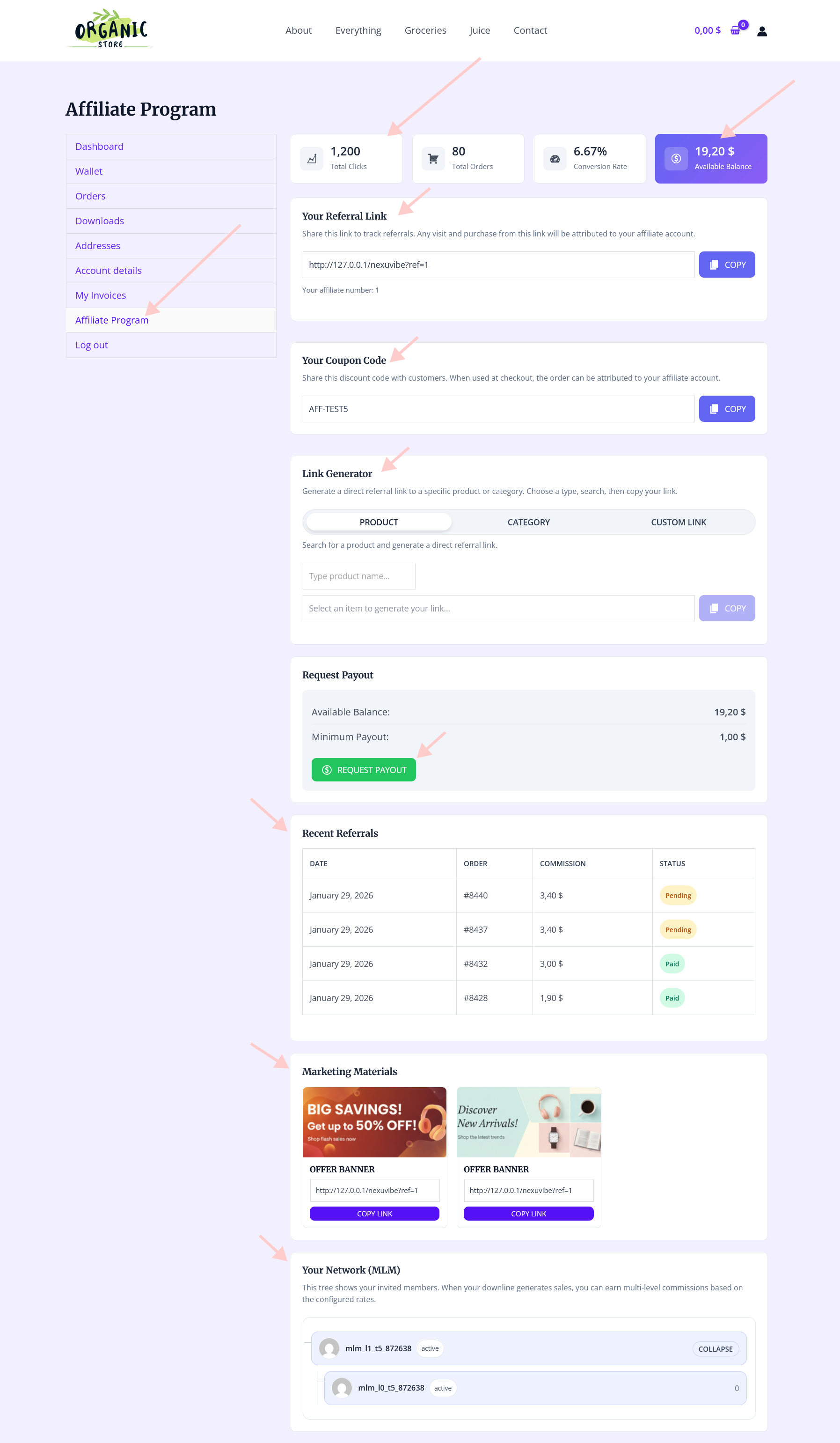
The affiliate-facing payout request experience matters for engagement. When affiliates can clearly see their payable balance, request a withdrawal in a few clicks, and receive timely confirmation that it has been processed, the payout moment reinforces their trust in the program. When it is confusing, slow, or opaque, it creates doubt that is hard to recover.
In Affiliate Engine, affiliates see their pending commissions, approved commissions, and payout-eligible balance clearly differentiated in their dashboard. The payout request button is accessible once the minimum threshold is met. After submitting, they see the request as pending in their dashboard and receive an email notification when it is marked as processed. This closed loop — request submitted, payment confirmed — is what makes payouts feel reliable rather than mysterious.
Payouts are the most concrete part of running an affiliate program. Everything else — the tracking, the dashboards, the commission calculations — is infrastructure. The payout is the moment the program delivers on its promise to the affiliates participating in it. Getting the workflow right from the start, with clear settings, a predictable schedule, and a method that works for your affiliate base, is what keeps a program active and growing beyond the initial launch enthusiasm.
Affiliate Engine’s WooCommerce affiliate program and payout management plugin gives you the payout infrastructure: configurable thresholds, a payout requests dashboard, wallet integration support, notification emails, and payout record history — all within your WordPress installation without third-party platform dependencies or transaction fees on top of what you pay affiliates.
Affiliate Engine includes a complete payout workflow: configurable thresholds, payout requests dashboard, wallet integration support, payment notifications, and full commission history — with no transaction fees beyond your chosen payment method.








The Stripe payout setup was exactly what I needed for my client's program. No more chasing small PayPal transfers just clean, automatic deposits with predictable fees. Worth the $1 per $50 payout tradeoff
PayPal payouts were a safe bet.
Didn't realize how much small payouts add up in admin work. wish I'd set thresholds sooner.
Stripe payouts saved me so much time