With amazing plugins and exceptional support, we guarantee an unparalleled experience taking your success to new heights with every click and celebrating your satisfaction!
Advanced Product Reviews for WooCommerce – Photo, Video & Rewards Plugin
Make reviews feel visual, trustworthy, and easy to manage.
If you sell online, you already know what happens when reviews look “basic”. Customers scroll, they see a few stars, and they still hesitate because they cannot really picture the product in real life. A modern review experience gives people context, reduces doubt, and helps the right product stand out without turning your day into a moderation nightmare.
The goal here is simple: give customers a clean, familiar experience (think marketplace-style), and give you a workflow that feels like a system. Not a pile of scattered settings. That is exactly where a Photo & Video Reviews Plugin for WooCommerce should shine: customers see real proof, and you stay in control.
Why default reviews often fail to build real confidence
Customers are not “lazy readers”. They are trying to make a safe decision. When reviews feel thin, they cannot connect a rating to a real experience. And when that happens, the store loses the moment of trust.
This is where a WooCommerce Product Reviews & Photo Reviews Plugin becomes more than a design upgrade. It becomes a conversion tool that still respects your time as an admin. Better proof, clearer browsing, and a workflow that does not invite spam.
Low context
Stars without context do not answer the real question: “What should I expect when I unbox it and use it?” Photos and videos instantly remove that gap.
Low engagement
When the review area looks old, customers treat it like a footer. A clean layout, visible media, and an easy form makes people actually participate.
Admin friction
If your review system is hard to moderate, it becomes a daily distraction. The best workflow is the one that stays clear: approve, reward, monitor, move on.
What customers actually see on the product page
This plugin replaces the “plain” review experience with a layout that feels familiar to shoppers. The form is clearer, media is visible, and the summary area helps people understand the overall feedback without guessing.
Below is a real example of how a customer can leave a review with a modern, compact upload area. It stays easy on mobile, and it keeps the focus on writing a helpful review rather than wrestling with the form.
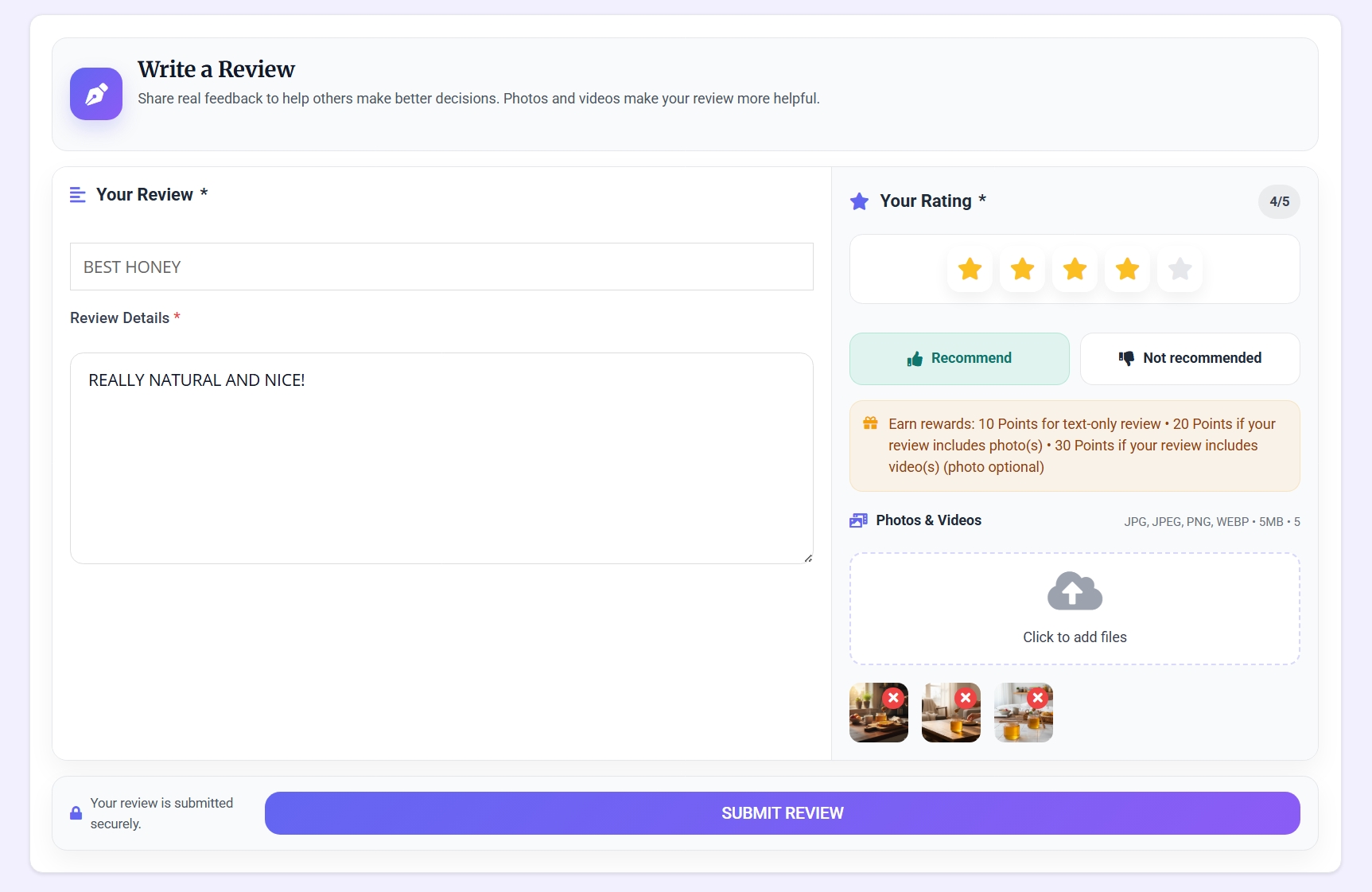
Frontend review form: a clean rating area and a compact photo/video upload section with previews.
When customers can browse real photos from other buyers, they feel the product faster. The media does not have to be “added” into the product gallery database. It can be displayed as a visual continuation, so the product page feels richer without changing your product media library.

Display-only gallery integration: user media can appear as a continuation of the product gallery experience.
If you have ever seen customers asking the same basic questions before buying, you know the real issue is uncertainty. Visual reviews reduce that uncertainty. And because the system supports moderation and reward control, it stays practical for the admin side too.
A dashboard-like view for customer reviews
Customers do not want to hunt for their activity. They want to quickly find what they wrote, check statuses, and understand what happened. This is why the customer-side reviews area is designed like a compact dashboard, not a long messy list.
This is the kind of page that reduces support messages. People can see their own reviews, their statuses, and their reward-related actions (when enabled), all in one place.

Customer “My Reviews” dashboard inside WooCommerce My Account.
Cleaner browsing
People can explore reviews faster, see key signals, and understand the overall sentiment without scrolling through confusion.
Media that feels natural
Customer photos and videos become part of the product’s story. It feels integrated, not like an unrelated attachment section.
A workflow you can trust
If you enable rewards, you can still keep control. Reviews can be moderated, rewards can be tracked, and reports stay available for auditing.
Where we go next
In the next parts, we will focus on what store owners care about most: rules, moderation controls, storage choices (including FTP), and the rewards engine that can work with a wallet or a points-to-coupon workflow.
If you already run WooCommerce, this is built to fit in naturally. Here is the official reference for WooCommerce itself: WooCommerce.
If you also care about clean checkout uplift and revenue flows, you might like: Smart Funnel WordPress Plugin: Ultimate Upsell, Order Bump & Revenue Booster for WooCommerce.
And if referrals are part of your growth, this is a relevant companion tool: Affiliate Engine – Ultimate WooCommerce Referral & Affiliate Marketing Plugin.
Rules and display choices that protect quality
If you have ever enabled reviews and then regretted it, it was not because reviews are bad. It was because you did not have enough control. A review system needs rules that make sense for your store, and display options that make the experience clear for customers.
General settings: keep submissions clean
This is where you decide what customers can upload, how strict you want to be, and what should happen when a review includes media. It is designed to feel like a real Advanced Product Reviews & Ratings Plugin for WordPress setup, not a confusing mix of toggles.
In the screenshot below, you can see the exact place where you configure upload formats, size limits, file counts, and review rules. The goal is to keep things friendly for real buyers while still protecting the store from low-effort noise.

General settings tab: review rules and media upload limits in one place.
Display settings: show proof without clutter
This is where you decide how reviews appear on the product page and how the experience should feel. It is built to behave like a Smart Product Reviews & Star Ratings Plugin that looks modern, stays readable, and works in both RTL and LTR layouts.
The key idea is balance: customers should see helpful signals quickly, and media should be easy to browse. At the same time, nothing should feel like it is fighting the theme or the product layout you already use.

Display tab: control how the review UI appears and how user media is shown on the product page.
The strict approach
If your store sells products where quality matters and you want to keep reviews highly curated, you can set tighter rules. The idea is not to block real buyers. It is to keep the public review area clean and meaningful.
The faster approach
If your store thrives on community participation, you can keep the flow smoother while still using moderation and visibility controls. Customers see clearer signals and media proof, and you still keep operational control.
Related tools you may also use
If you like having clean, controlled admin workflows, these tools can also fit nicely in the same operational mindset: advanced WooCommerce Checkout Field Editor Checkout Field Editor & Manager Plugin for WooCommerce & WordPress, WooCommerce Checkout Map & Location Picker Plugin for WordPress, and B2B & Wholesale Solution WordPress Plugin for WooCommerce.
FTP storage when you want media offloaded
Visual reviews are powerful, but media can also become the part that breaks first if the workflow is not designed well. That is why storage is not treated like a “bonus setting” here. You can keep things on the WordPress media library, or use FTP storage based on how your site is hosted.
Why FTP storage matters for review media
Some stores are fine with local uploads, especially if the product catalog is small. Other stores prefer to keep review media separated from the main media library. The point is not “one best way”. The point is giving you a controlled option that fits your infrastructure and keeps the review experience fast.
In the FTP section, you configure connection details and validate them. That validation step is important because it turns “I hope it works” into “I know it works”, which is exactly how admin workflows should feel.

FTP Storage tab: configure a remote location for customer-uploaded review media.
Storage choice
You can decide whether review media should stay local or go to an FTP destination. The review UI stays the same for customers. The difference is how you manage storage behind the scenes.
Configuration confidence
When you test and validate settings, you reduce surprises later. That matters even more when you run a busy store and want the media flow to stay predictable.
No “hidden magic”
Everything is meant to stay understandable for a store owner. A Reviews for Discount & Loyalty Plugin for WordPress workflow still needs a clear media foundation, and this part keeps that foundation practical.
Related tools you may also use
If your site already uses remote file workflows or you care about admin visibility, you may also like: WordPress FTP Media Library Plugin – Transfer & Manage Files Easily, Activity Log – User Monitoring & Security Audit Plugin for WordPress, and Content Protection & Right-Click Blocker Plugin for WordPress.
Reward reviews without inviting spam
Rewards can be a powerful way to motivate better reviews, but only if the workflow protects you. The idea is not “pay everyone”. The idea is: encourage helpful reviews, keep moderation practical, and track everything in a way you can audit later.
Wallet credit mode (when the wallet plugin is active)
If you prefer wallet-based incentives, you can use a wallet credit flow that is designed for purchases. It is especially useful when you want rewards to stay “inside the store experience” rather than behaving like a cash withdrawal.
In this mode, review rewards can be credited as a dedicated balance type (non-withdrawable) while still being usable for future purchases. This keeps incentives healthy and reduces the risk of rewards being treated like instant payouts.

Rewards tab in wallet mode: configure tiered rewards and approval behavior.
Points mode (earn points, convert to coupons)
If you do not want to use wallet credit, you can run rewards as points. This is a natural fit for stores that prefer loyalty-style incentives. It works well with a tiered conversion into discounts, which is why it fits the mindset of a Reviews for Discount & Loyalty Plugin for WordPress system.
The “tiered” logic is meant to be simple: text-only reviews can have one reward level, reviews with photos can have another, and reviews with videos can have another. You configure the values, and the system follows your rules.

Rewards tab in points mode: configure tiered points for different review scenarios.
Pay after approval
If you want the safest route, you can keep rewards pending until the review is approved. This prevents low-effort submissions from turning incentives into a spam target.
Approve without reward
Sometimes a review is “fine to show” but not “good enough to reward”. The workflow supports that decision, so you can keep quality standards without creating awkward edge cases.
Related tools you may also use
If you run a store that also uses structured credit workflows and admin-friendly records, these can be relevant companions: Smart Wallet, Rewards & Cashback Plugin For WooCommerce, WooCommerce Custom Invoices & Manual Billing WordPress Plugin, and WPML AI Translator Plugin for WordPress.
Coupons, emails, and reports that support real workflows
When reviews become a real system (media, moderation, rewards), you need operational clarity. This part covers the practical side: how points convert into coupons, how email reminders keep participation alive, and how reports help you monitor what is happening without digging through scattered pages.
Points and coupons: keep the conversion simple
If you choose points mode, the points should lead to something real. That is where coupons come in. The system supports tiered conversion rules, so customers can pick a conversion level and generate a coupon that fits their current balance.
From an admin perspective, this matters because it turns rewards into a controlled discount mechanism. It fits well when you want a loyalty-like feel without turning the review area into a “cash machine”.

Points tab: tiered conversion rules and coupon settings for a points-based reward flow.
Emails: gentle reminders that boost participation
Some customers will happily leave a review. Others need a small nudge at the right time. Email reminders and status emails can help, especially when you want to encourage media reviews without sounding pushy.
This is designed so you can keep emails enabled only when they make sense for your store. You control what is sent and when, and the templates stay editable so the message matches your tone.

Emails tab: control reminder emails and review status notifications with editable templates.
Reports: monitor rewards and coupons without guesswork
Once rewards exist, you need visibility. This is where a Review Rewards & Photo Upload Plugin for WordPress becomes operationally safe: you can see reward statuses, review activity related to rewards, and coupon history from points conversions.
The purpose is simple: answer “what is pending, what was paid, what was cancelled, and what happened to coupons” without exporting data or jumping between unrelated pages.

Reports tab: monitoring rewarded reviews and points-generated coupons with filters and overview stats.
Audit-friendly
When rewards are enabled, the store needs traceability. Reports make it easier to monitor what happened without turning moderation into a guessing game.
Clear outcomes
Points conversion and reward status tracking help you keep incentives aligned with store goals. This is how a Smart Product Reviews & Star Ratings Plugin becomes an operational tool, not just a UI change.
Cleaner communication
Emails and customer-facing dashboards reduce “Where is my reward?” messages. Customers can see what happened, and you keep your support queue calmer.
Related tools you may also use
If you also care about message deliverability and content workflows, these may be relevant companions: Mail SMTP – SMTP & Email Log Plugin for WordPress, AI Writer & SEO Content Generator Plugin for WordPress, and Elementor Video Ads: Dynamic Video Advertising Plugin for WordPress.