Next-Level Code. Nexuvibe Style ...
Hrs
Min
Sec

Open your WooCommerce checkout page right now. Not later. Right now. Count the fields. Count them honestly. If your store sells physical products, you are probably looking at somewhere between 15 and 22 form fields. First name, last name, company, country, address line 1, address line 2, city, state, postcode, phone, email. Then the shipping section repeats most of those. Then there is an order notes box at the bottom.
Now ask yourself: how many of those fields do you actually use to fulfill an order? If you are like most WooCommerce store owners, the answer is fewer than you think. You probably do not need the “Company Name” field. You probably do not use the “Address Line 2” data. You might not even call customers, which means the phone field is collecting data that nobody ever looks at.
Every one of those unnecessary fields is a tiny weight on your conversion rate. Individually, none of them seem like a big deal. Collectively, they add up to a checkout experience that feels heavier, slower, and more demanding than it needs to be. And the data is clear: form length directly affects completion rates.
Form fatigue is real and it happens faster than you think. When a customer arrives at your checkout page, their brain does a rapid, unconscious assessment of the form. They do not count the fields. They perceive the form length. And that perception determines their emotional response: “This looks quick and easy” or “This looks like a lot of work.”
Research from the Baymard Institute found that the average checkout contains 11.3 form fields, but a fully optimized checkout can be reduced to as few as 7. That gap of 4 extra fields may not sound like much, but each unnecessary field increases the perceived complexity of the form, adds 10 to 20 seconds of typing time, and creates another opportunity for the customer to reconsider whether this purchase is worth the effort.
The damage is cumulative. A customer who is 90% committed to buying sees a long form and their commitment drops to 80%. They fill in three fields and start wondering if they really need this product. By the time they reach the address section and see “Address Line 2” staring back at them, they are already looking for the browser’s back button.
Not every store is the same, and we are not suggesting a one-size-fits-all field reduction. But there are five default WooCommerce fields that the majority of stores can safely disable without losing any data they actually use for order fulfillment.
Unless you run a B2B store where company identification is essential for invoicing, this field serves no purpose for individual consumers. Most B2C customers leave it blank, which means it is adding visual clutter without collecting data. If you serve both B2B and B2C customers, use conditional logic to show the company field only when the customer indicates a business purchase.
This field confuses a significant number of customers. They are not sure whether their apartment number should go in Line 1 or Line 2. Some type their full address into both lines. Others leave it blank and wonder if their order will arrive. If your customers occasionally need a second address line, consider making it a collapsible field that only appears when clicked, or simply include a note in the Address Line 1 placeholder: “Include apt/suite number if applicable.”
Be honest: do you actually call your customers? Does your shipping carrier need the phone number to deliver? If the answer to both is no, the phone field is collecting data that sits unused in your database. Customers are increasingly privacy-conscious and reluctant to provide phone numbers, making this field a friction point. If you need it for some orders (local delivery coordination, for example), use conditional logic to show it only for those specific shipping methods.
WooCommerce shows a “Ship to a different address?” checkbox that, when checked, reveals a full duplicate set of address fields. For many stores, the vast majority of customers ship to their billing address. Making this checkbox unchecked by default (which WooCommerce already does) hides the duplicate fields from most customers. The key is making sure the checkbox and its behavior are clearly visible and intuitive.
The default “Order Notes” textarea invites freeform input that is often unhelpful. Customers write things like “Please deliver quickly” or “Thanks!” that add no operational value. If you genuinely need order-specific instructions (delivery notes, special handling), replace the generic order notes field with a specific, well-labeled field that asks for exactly the information you need. If you do not need it, disable it.
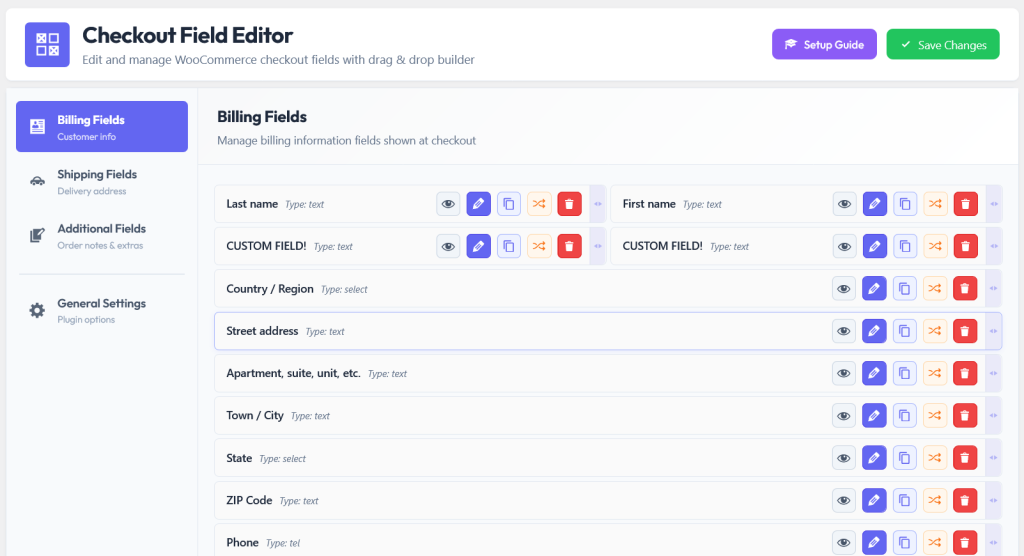
The beauty of using a visual field editor for this cleanup is that disabling a field is not permanent. You are not deleting code that you will need to rewrite later. You are toggling a switch. If you disable the phone field today and realize next month that your new shipping carrier requires it, you toggle it back on. The field definition is preserved. Your change is reversible and risk-free.
Cleaning up your checkout is not just about removing fields. It is also about making the remaining fields work harder. Once you have eliminated the clutter, optimize the order and presentation of what is left.
Move the email field to the very top of the form. This is probably the single highest-impact reorder you can make. The email address is the one piece of data that enables cart recovery. If a customer fills in their email and then abandons the checkout, you can send them a follow-up email. If the email field is at the bottom and they quit halfway through, you have nothing.
Rename labels to match your brand tone. “Billing First Name” is sterile. “Your First Name” is warmer. “Street Address” is generic. “Delivery Address” tells the customer exactly what the information is for. These are small changes but they shift the checkout from feeling like a bureaucratic form to feeling like a conversation.
Add placeholder text to every remaining field. Placeholders like “e.g., 123 Main Street, Apt 4B” reduce errors by showing the expected input format. They also make empty form fields feel less intimidating because the customer can see what kind of information goes in each field before they start typing.
Some fields cannot be removed entirely because they are sometimes necessary. The phone number is needed for local delivery coordination but not for standard shipping. Gift message fields are needed for gift orders but not for self-purchases. Business tax IDs are needed for B2B orders but not for consumer orders.
Conditional logic is the tool that lets you keep these fields available without showing them to every customer. The phone number appears only when the customer selects “Local Delivery” as their shipping method. The gift message appears only when the customer checks a “This is a gift” checkbox. The tax ID field appears only when the customer selects “Business” as their address type.
The result is a checkout form that is always as short as possible for each individual customer, while still being able to collect all the data you need when you need it. The WooCommerce checkout field editor with conditional logic and per-product field assignment lets you set up all of these conditions through a visual builder, not through code.
You do not need to spend an entire afternoon on this. Here is a focused 15-minute plan that addresses the highest-impact items first.
Open your checkout field editor. Disable Company Name, Address Line 2, and any other field you identified as unnecessary. This takes seconds per field with a toggle switch.
Drag the email field to the first position in the billing section. This single change improves your ability to recover abandoned carts significantly.
Rename field labels to friendly language. Add helpful placeholder text to every remaining field. Mark optional fields with “(optional)” in the label.
Before going live, export your new checkout configuration to a JSON file. This is your safety net. If anything does not work as expected, you can import the file and restore your previous setup instantly.
Open your checkout page on your computer and your phone. Walk through the form as if you were a customer. Place a test order. Verify everything works and the form feels noticeably lighter than before.
That is 15 minutes. The impact on your conversion rate will accumulate with every customer who reaches your checkout page from this point forward. Every unnecessary field you removed is one less reason for them to abandon. Every clearer label is one less moment of confusion. Every well-placed placeholder is one fewer input error.
The NEXU WooCommerce checkout field editor with drag-and-drop reordering, conditional logic, and one-click field toggling is built for exactly this kind of cleanup. Disable fields with a toggle. Reorder with drag-and-drop. Rename with inline editing. Export your configuration with one click. The cleanup takes 15 minutes. The revenue impact compounds every day.
Disable unnecessary fields, move email to the top, rename labels, add placeholders, and export your backup. All in 15 minutes, all without code, all reversible with a single click.







I've been a customer for years, but this new checkout is really frustrating. The "Address Line 2" field feels pointless most people I know just skip it or leave it blank. every extra step slows things down, and when you're working fast, those little delays add up. Please simplify this, or you might lose loyal customers like me.
Just read this and had to pause to count my own checkout fields. turns out we've got 19. never really stopped to think about how many of those we actually need versus just keeping them because "that's how it's always been.
I've been running WooCommerce stores for over a decade, and this article finally kicked me into gear. I pulled up my checkout page right then not "later" and counted 19 fields. nineteen! half were pointless, like "Company Name," which maybe 2% of customers ever touch. i cut it down to just the basics that same day, and my abandoned carts dropped in less than a week. That "stop overthinking and just do it" nudge was exactly what I needed no filler, just straight up useful advice.