Next-Level Code. Nexuvibe Style ...
Hrs
Min
Sec

When affiliates join a program, they have the motivation to promote but often lack the practical tools to do it well. They have a referral link, they have a commission rate — but when they sit down to write a social media post, create a blog section, or plan a video mention, they face a blank page. What image should they use? What should they say about the product? Is there a discount to mention? What dimensions do their banners need to be?
When affiliates can answer all of those questions in under two minutes by visiting their creatives section, they promote. When they cannot — when finding a usable product image requires emailing you, or the only banner available is the wrong dimensions for their platform — they get stuck, and a promotion that was going to happen simply does not. Creatives availability is a direct driver of affiliate activity frequency, and activity frequency is what determines whether a program grows or stagnates.
This guide covers what you need to prepare, the specific formats and dimensions that work across every major promotion channel in 2026, and how to publish everything to affiliates through the creatives management system in Affiliate Engine, a WooCommerce affiliate and partner marketing plugin.
The relationship between creatives availability and affiliate promotion frequency is not subtle. It is one of the most consistent patterns across affiliate programs of all sizes: affiliates who have immediate access to high-quality, correctly formatted, ready-to-use promotional materials publish more frequently than those who do not — regardless of the commission rate, the product quality, or how enthusiastic the affiliate was at the point of joining.
The reason is straightforward: promotion requires creative work, and creative work faces friction. When the friction is low — when an affiliate can open their dashboard, download an image that already fits Instagram’s square format, copy a caption template that mentions the coupon code, and post in under ten minutes — they do it. When the friction is high — when they need to find an image, crop it, write copy from scratch, remember the commission rate to mention, and remember where the coupon code is — they procrastinate, and the promotion gets deferred to “when I have more time,” which often means never.
The single most common creative mistake WooCommerce stores make is providing one banner size and expecting affiliates to use it everywhere. Each platform has specific dimension requirements, and an image that looks great in one context looks cropped, pixelated, or distorted in another. Providing the right dimensions for each channel removes the resizing step that stops many affiliates from using your materials at all.
If you are starting from scratch and cannot produce all of these immediately, prioritize the four essential formats: Instagram square (1080×1080), vertical story (1080×1920), landscape blog/YouTube thumbnail (1280×720), and blog header (1200×630). These four dimensions cover the most active promotion channels for most product categories. The remaining formats can be added incrementally as your program grows and as you learn which channels your affiliates actually use.
A technically correct image dimension is necessary but not sufficient. The content of your creatives determines whether affiliates actually want to use them — whether the images look good enough to appear alongside their own content without making their feed or site look worse than it otherwise would.
The best affiliate creatives are high-quality product photographs that affiliates would actually want on their platform. A well-lit product on a clean white or neutral background gives affiliates flexibility — they can use it on any feed without it clashing with their aesthetic. Lifestyle shots showing the product in use are often even more effective because they tell a story. Provide both types and let affiliates choose what fits their content style. Avoid overly promotional or “sale” imagery that looks like advertising — content-native imagery converts far better in the affiliate context.
When affiliates are running a specific promotion — “15% off with code SARAH15” — they need images with space for text overlay or pre-made images with the offer already incorporated. Provide two versions of your key images: one clean (no text) for evergreen use, and one with a discount message for campaign use. The discount-overlay version should be designed so that replacing the code or percentage is straightforward if affiliates want to customize it.
If your store has multiple product categories or customer segments, provide creatives that represent each one. An affiliate whose audience is primarily interested in your premium products should not have to use images featuring your entry-level range. Providing category-specific creatives means every affiliate can show their audience the products most relevant to them — which improves conversion rates for both the affiliate and your store.
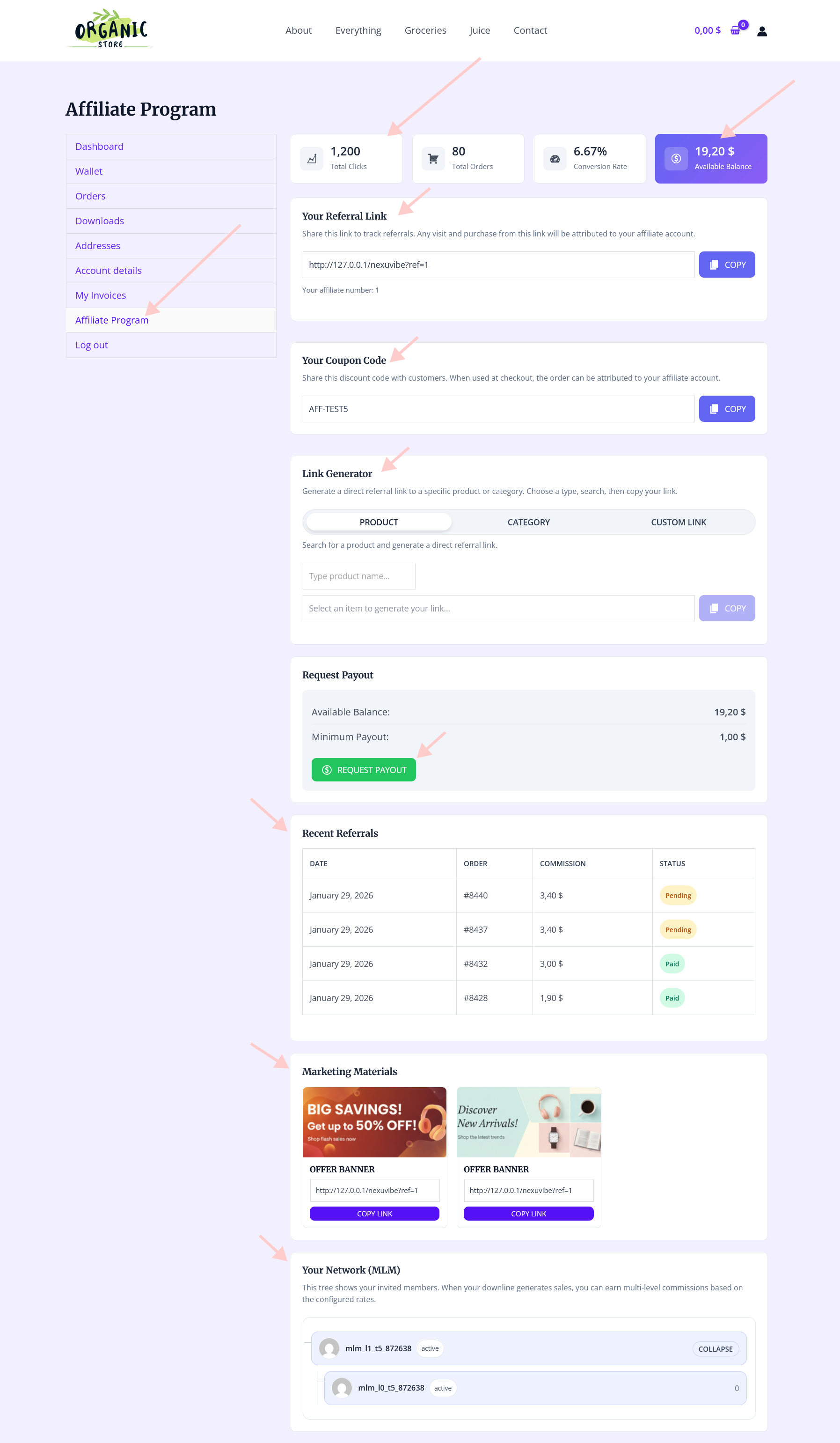
The Creatives tab in the Affiliate Engine admin dashboard is where you publish promotional materials for affiliates to access. Each creative entry can include an image, a title, a description, and associated metadata that helps affiliates understand what the creative is for and where to use it.
To add a creative, navigate to the Creatives tab in the admin dashboard and add a new entry. For each creative, provide a clear title that includes the format or channel — for example “Product Banner — Instagram Square 1080×1080” or “Lifestyle Shot — Blog Header 1200×630.” Clear titles mean affiliates can scan the list and immediately find what they need without opening every entry to check dimensions.
Include a brief description for each creative that explains when and where to use it, any brand guidelines that apply (font colors, logo placement, whether it can be cropped), and whether the creative is evergreen or campaign-specific with an end date. This context is often the difference between a creative that gets used and one that affiliates skip because they are not sure what to do with it.
From the affiliate’s side, the creatives section appears in their dashboard inside the WooCommerce My Account area. They can browse the available creatives, see the title and description you have provided for each one, and download or copy assets for use in their promotions. The experience is seamless — no separate login, no external asset library, no hunting through email attachments for the file you sent six months ago.
Image creatives are necessary but not sufficient. Many affiliate promotion contexts are primarily text-based — social media captions, newsletter copy, video description sections, podcast mentions — and affiliates creating content for these channels need text materials as much as they need images. Providing polished text creatives reduces the creative work required from affiliates in these contexts down to simple personalization rather than creation from scratch.
Provide two or three caption variations in the tone affiliates can adapt: one personal and testimonial-style (“I have been using for three months and the difference in [specific benefit] is real — link in bio to try it, use code {AFFILIATE_CODE} for [X]% off”), one more informational and product-focused, and one question-based that invites engagement. Including space for the affiliate to insert their personal experience makes the template authentic rather than generic.
A short ready-to-paste email copy block — typically 50 to 80 words — that affiliates with newsletters can drop into a future issue. It should include a brief product description, a key benefit statement, the affiliate’s discount code, and a call to action. Pre-written newsletter copy is especially valued by busy newsletter publishers who run regular issues and are always looking for relevant sponsor or recommendation content.
For affiliates who run podcasts, provide a 30 to 60 second sponsor read script. Podcast audiences respond very well to authentic-sounding endorsements, so the script should be written in natural spoken language rather than formal marketing copy. A template that leaves space for the host to insert their own experience (“I use it for [personal use case]”) will sound more genuine when read than a script that has no personalization placeholder.
A concise bullet-point list of three to five key product benefits that affiliates can reference when creating their own content. These are particularly useful for video creators and bloggers who want to mention specific, accurate features without having to research the product spec sheet. Keep each point specific and outcome-focused: “Made from recycled materials — appeals to eco-conscious audiences” rather than generic statements like “high quality.”
If you are launching an affiliate program for the first time and starting from zero, the goal is not a comprehensive creative library — it is a functional minimum that enables affiliates to start promoting immediately. A minimum viable creatives pack can be assembled in a day and will serve most affiliates adequately for the first few months of the program.
Not every WooCommerce store has a graphic designer on staff. Several free and low-cost tools make it practical to create professional-quality affiliate creatives without design expertise, and understanding which tools suit which tasks saves significant time and money.
Canva has built-in templates for every major social media format with the correct dimensions pre-set. Upload your product photography, select the appropriate template (Instagram Post, YouTube Thumbnail, Facebook Post, etc.), drop your image in, add your brand colors and any text elements, and export. For most WooCommerce stores without a design team, Canva produces affiliate creatives that look professional enough to work well across all major channels. The free tier is sufficient for most creative needs.
Remove.bg automatically removes the background from product photos using AI. This is useful when your product photos have a cluttered or inconsistent background and you want to create clean, white-background versions for affiliate use. The free tier processes images at reduced resolution, which is often sufficient for social media use. The paid tier produces full-resolution outputs for print or large-format use.
Squoosh is a free browser-based image compressor that reduces file size without noticeable quality loss. Large image files create friction — affiliates downloading a 12MB image to use in an Instagram post will encounter unnecessary steps. Compressing your creatives to under 2MB before uploading to the plugin makes the download experience faster and less likely to be abandoned mid-process.
A creatives library that never changes is a sign of a program that is not actively managed. Regular updates — for seasonal campaigns, new product launches, sale events, and holiday promotions — give affiliates a reason to return to the creatives section and give them time-relevant materials that are more likely to convert than evergreen content used repeatedly.
Set a calendar reminder every quarter to review your creatives section and add new materials. New product launches, seasonal campaigns (summer, holiday, back-to-school — whatever is relevant to your product category), and any changes to your commission structure or coupon discount should all be reflected in updated creatives. Remove or archive creatives that are outdated to keep the library clean and prevent affiliates from promoting expired offers.
A notification to your active affiliates when new creatives are published is a re-engagement touchpoint disguised as a service update. “We just added holiday campaign materials to your affiliate dashboard — new images and caption templates are available to download” is an email that active affiliates will open, because it is directly actionable. Use the notification email functionality in your affiliate plugin or your email marketing tool to send this update.
Providing affiliates with good creatives is not a luxury feature of well-resourced programs — it is a basic operational requirement for any program that wants affiliates to actively promote rather than passively hold a referral link. The time investment to produce a minimum viable creatives pack is measured in hours, not days. The return on that investment — in affiliate activity, in promotion frequency, and in conversion rates from affiliate-referred traffic — compounds over the entire life of the program.
Affiliate Engine’s WooCommerce affiliate creative assets and partner marketing plugin provides the Creatives tab in the admin dashboard where you publish all promotional materials, and makes them accessible to affiliates directly from their WooCommerce My Account area — no separate login, no external asset portal, no friction between the affiliate wanting to promote and having the materials to do it.
Affiliate Engine includes a Creatives tab where you publish banners, product images, caption templates, and promotional materials — all accessible to affiliates from their WooCommerce My Account area with no separate login required.







This guide drags on for eleven pages about why creatives are important but never just says what dimensions the banners should be. I run a music blog and was just looking for standard sizes sidebar ads, email headers, YouTube thumbnails so my affiliates could start promoting my merch
Hey, just what I needed banner sizes listed
I've been using this for a few months, and the creatives dashboard is such a step up from how I used to manage affiliate assets. Quick question about scaling: the guide says to add formats incrementally as the program grows. But with 50+ affiliates across different niches, how do you recommend prioritizing? Should I focus on what my most active affiliates ask for, or standardize by platform (like Instagram vs. YouTube)? the dashboard makes uploading easy, but I don't want to overwhelm newer folks with too many options right away.
Hey! Does this guide explain how to set