
Word of mouth has always been the highest-converting acquisition channel for e-commerce stores. The problem is that it happens randomly and you have no control over it. A refer-a-friend program changes that. It gives your existing customers a structured reason to share your store with people they know, gives those new buyers an incentive to act on the recommendation, and gives you a trackable system for all of it — so referrals stop being luck and start being a repeatable growth channel.
For WooCommerce store owners in 2026, setting this up does not require custom development or a third-party SaaS platform. It requires the right plugin, the right configuration decisions, and a clear understanding of what you are trying to incentivize. This guide covers all three in the order you need them, starting with what makes a refer-a-friend program genuinely different from a standard affiliate program, and ending with exactly what needs to be in place before your first customer shares a link.
Throughout this guide, we walk through the setup using Affiliate Engine, a WooCommerce referral and affiliate marketing plugin built for exactly this kind of customer-driven program. The principles apply to any serious WooCommerce referral setup, but the screenshots and configuration specifics come from this tool.
Refer-a-friend vs. affiliate program: an important distinction
The terminology gets blurred frequently, and it matters because it shapes how you configure the program, who you are targeting, and what kind of results you should expect. A refer-a-friend program and a standard affiliate program use the same underlying tracking technology — referral links, attribution, commissions — but they are aimed at completely different audiences and produce different kinds of growth.
Participants are your existing customers. They share because they genuinely like your store and want to recommend it. The referral is a personal endorsement, not a commercial promotion. The new buyer knows a friend sent them — which is why the conversion rate is dramatically higher.
Participants are bloggers, influencers, content creators, or marketers who promote your store to their audience — people who may not have ever purchased from you. The promotion is commercial. The new buyer may not know the person sending them.
In practice, most WooCommerce stores benefit from running both simultaneously — a refer-a-friend layer for existing customers and a broader affiliate layer for external promoters. The same plugin infrastructure handles both, but the registration flow, the incentive structure, and the communication approach should be distinct for each audience. This guide focuses on the refer-a-friend layer: the customer-driven side of the program.
According to research published by the Nielsen Consumer Trust Index, 92% of consumers trust recommendations from people they know over any form of advertising. A customer who arrives at your store because their friend specifically told them to try it comes with pre-existing trust that no ad spend can replicate. That trust shortens the consideration phase, reduces cart abandonment, and increases average order value — all simultaneously.
Before you configure anything: define your incentive structure
The incentive structure is the most important design decision in your refer-a-friend program — more important than the plugin you use or the page it lives on. The wrong incentive structure either fails to motivate sharing or attracts the wrong kind of sharing. Get this right before you open a single settings panel.
A refer-a-friend program typically has two sides to the incentive: the reward for the person doing the referring, and the incentive for the new buyer being referred. Both sides matter, and they need to be designed together.
Cash commission paid when the referred friend makes a purchase is the most motivating reward for most refer-a-friend programs. Store credit works well for stores with high repeat purchase rates because it keeps the reward tied to future engagement. A percentage commission — say 10% of the referred order — is a clean, scalable reward that grows with the value of what the friend buys. In the plugin, this is configured as a standard commission rule that applies when a referral sale converts.
The new buyer needs a reason to act now rather than later. A welcome discount (10–15% off the first order) attached to the referral link or coupon code is the most effective mechanism in most categories. This is configured using WooCommerce coupon attribution in the plugin — each referrer’s link is associated with a coupon that applies automatically or is visible in the affiliate’s dashboard for sharing. The new buyer gets a discount, the referrer gets a commission when they use it.
Step 1: Install Affiliate Engine and run the setup wizard
After installing and activating the plugin from your WordPress dashboard, the first step is running the setup wizard. The wizard is specifically designed to get the foundational configuration in place without requiring you to navigate the full settings panel from scratch. For a refer-a-friend program, the wizard walk-through covers the most critical initial decisions: registration mode, basic commission type, and how the affiliate area appears to customers.

During the wizard, set the registration mode to manual approval. For a refer-a-friend program, this is particularly important because you want to ensure the people joining are actual customers — not people who found the registration page through search and want to game the program. Manual approval gives you that filter, and for a customer referral program, reviewing and approving a few applications per week is a manageable task that pays off in program quality.
Step 2: Configure the registration form for customers
The registration settings let you shape what information customers provide when they apply to join the refer-a-friend program. For a customer-facing program, you want this to be simple. Unlike a standard affiliate application that might ask for website URLs and audience demographics, a customer refer-a-friend sign-up should take less than two minutes.

For a refer-a-friend program, the registration form should ask for the minimum required to approve the customer: their name, their email (often pre-filled from their WooCommerce account), and optionally a short field asking how they plan to share — which gives you a quick signal about their intent without being burdensome.
Place the registration form on a dedicated page with a clear, friendly URL — something like your-store.com/refer-a-friend. The page should explain the program in plain terms before the form: what the customer gets for sharing, what their friend gets when they buy, and how the process works. Keep this explanation to three or four sentences. The shorter and clearer it is, the higher the sign-up rate.
The registration form embeds on any WordPress page using a shortcode provided by the plugin, or with an Elementor widget if your store uses the Elementor page builder. Either approach takes a few minutes to implement.
Step 3: Review and approve your first customer referrers
Once the registration page is live and you have started telling your customers about the program, incoming applications appear in the Requests tab of the admin dashboard. For a refer-a-friend program targeted at existing customers, the approval process is simpler than a standard affiliate review: you are primarily checking that the applicant has a purchase history with your store before approving them.

When you approve a customer, they receive a notification email (configured in the Notifications settings) and their referral tools become active in their WooCommerce My Account area. Their unique referral link and coupon code are ready to share immediately. The speed of approval matters here — customers who apply and wait a week before getting approved lose momentum. Check the Requests tab at least twice a week and aim to approve within 48 hours.
Step 4: What your customers see when they log in
The customer experience inside the refer-a-friend program lives in the WooCommerce My Account area — the same place they check their orders, manage their address, and update their account details. This is one of the key advantages of a WooCommerce-native plugin for customer referral programs: the referral tools are where the customer already is, without a separate login to a different platform.
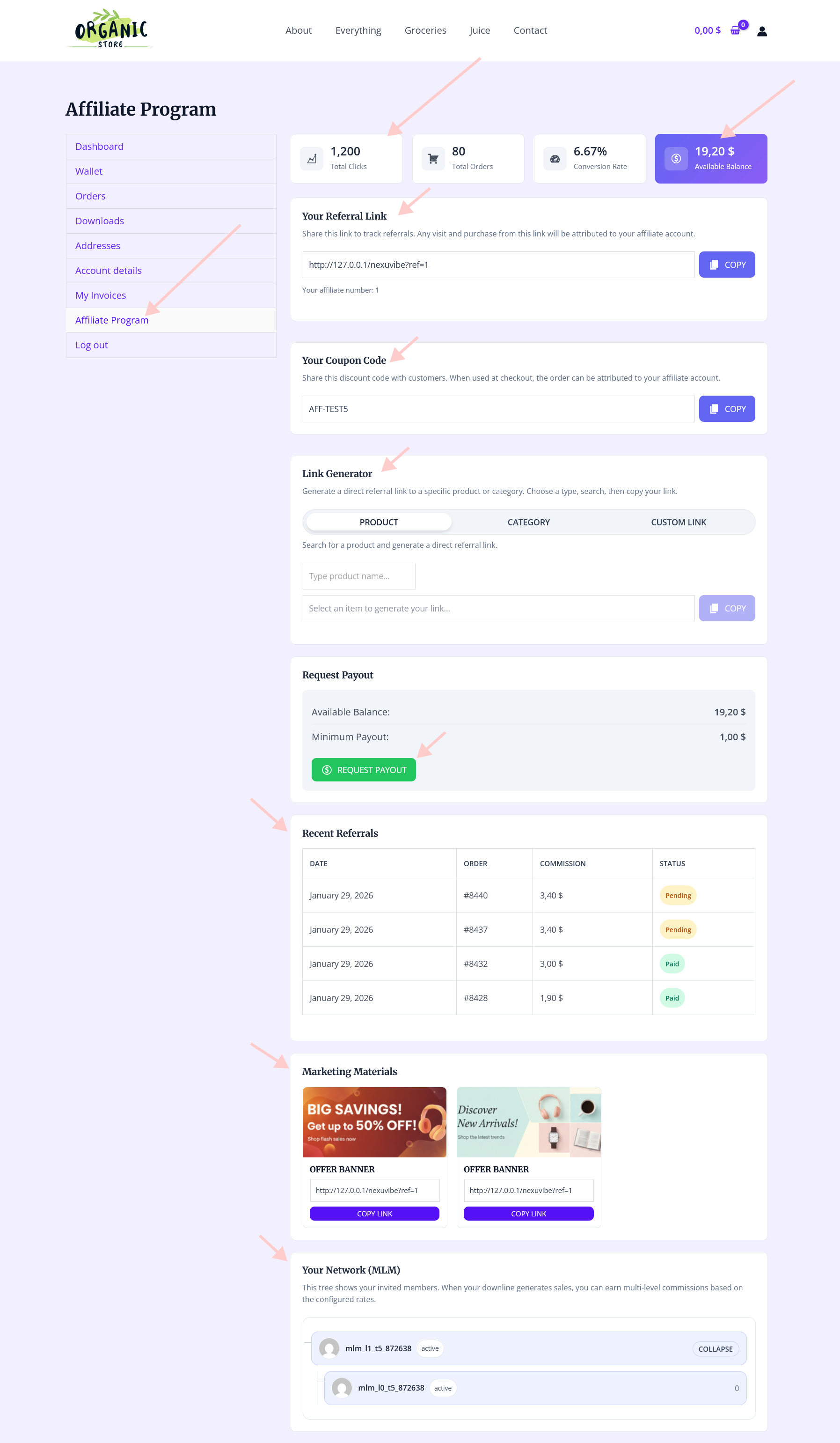
Once approved, customers see their unique referral link, a link generator for creating tracking URLs to specific product pages, their coupon code, their commission earnings summary broken down by status (pending, approved, paid), and their payout request tools. Everything is visible, labeled clearly, and requires no explanation from you.
The link generator deserves particular attention for a refer-a-friend program. Instead of just sharing a generic homepage link, customers can generate a tracking link to a specific product they love and want to recommend. A customer who recently bought your flagship product and wants to tell their friend about exactly that item can create a direct link to it — which is both more relevant and more likely to convert than a link to the store homepage.
Step 5: Set up coupon tracking for frictionless sharing
Referral links work well in contexts where clicking a link is natural — email, messaging apps, direct social sharing. But there are important sharing contexts where links are awkward: spoken recommendations, Instagram bios, podcast mentions, handwritten notes on packaging. For all of these cases, a referral coupon code is what makes attribution possible.
When a customer can share a personal coupon code — say, SARAH15 for 15% off — the recommendation becomes tangible and memorable in a way a URL never is. The friend asking “what was that code you told me about?” is a conversion moment that a generic link would have lost. Personal-feeling codes like a customer’s name with a discount appended work significantly better than random alphanumeric strings for refer-a-friend programs specifically.
In the commission settings panel, enable coupon attribution and configure the coupon code format. For a refer-a-friend program, choose a format that feels personal — the customer’s username or first name as a prefix is ideal if your customer base uses recognizable usernames. Set the coupon as visible to the customer in their dashboard so they can see and copy it easily without contacting you.
When both a referral link and a coupon code are used on the same order, set the coupon to take attribution priority. The coupon represents the active, deliberate sharing moment — it is the signal that the customer actually promoted your store and the friend actually acted on it. Set this priority in the commission settings and document it in your program terms so it is never a point of confusion.
Step 6: Configure notifications so the loop stays closed
One of the reasons refer-a-friend programs lose momentum is that customers forget they are participating. They sign up, get their link, share it a few times, and then move on with their lives. The program becomes something they set up once and never think about again. Notifications are the mechanism that keeps the program active in their minds.

The most impactful notification in a refer-a-friend program is the one that fires when a referral converts — when someone used the customer’s link or code and completed a purchase. That moment is when the referring customer feels the reward becoming real. A well-timed “Your friend just made a purchase using your referral code — you earned $X” email is both a thank-you and a subtle re-activation: it reminds the customer that their referrals are working and motivates them to share again.
In the Notifications settings tab, configure at minimum: the approval notification (confirming the customer is in the program), the referral conversion notification (confirming a commission was earned), and the payout confirmation (confirming a withdrawal was processed). Each notification should be written in your store’s voice, not the plugin’s default template text. A friendly, genuine tone here reinforces the customer relationship rather than making the program feel automated.
Step 7: Promote the program to customers who do not know it exists
A refer-a-friend program that customers do not know about does not generate referrals. This sounds obvious but it is the most consistent failure point for otherwise well-configured programs. Store owners spend significant time on the technical setup, then mention the program once in a footer link and wonder why nobody is sharing.
The highest-intent moment to invite a customer to refer a friend is shortly after they have received their order and had a chance to experience it. A follow-up email sent 7 to 10 days after delivery — when the positive experience is fresh — with a clear, friendly invitation to share and earn is where most refer-a-friend sign-ups come from. Include the program page link and a one-line summary of what they get.
A small card inside every order package that says “Love what you got? Share it and earn cash” with a QR code to the refer-a-friend page is one of the most cost-effective promotion methods for physical goods stores. The customer sees it at the exact moment they are most enthusiastic about their purchase. Cost: a few cents per card. Conversion: measurably higher than most digital touchpoints.
Add a visible banner or call-to-action on the WooCommerce My Account dashboard page pointing to the refer-a-friend sign-up. Customers who log in to check their order status see it every time. This is passive but accumulates meaningfully over time — customers often join programs they have seen mentioned several times before they act on it.
When a customer leaves a 5-star review, that is your highest-intent signal that they are satisfied enough to share. An automated follow-up that thanks them for the review and invites them to join the refer-a-friend program converts at a high rate because the customer is already in an advocacy mindset. This sequence can be set up in most email marketing tools connected to WooCommerce review triggers.
Monitoring referral performance in the admin dashboard
Once the program is running and customers are sharing, the admin dashboard is where you understand what is actually happening. The overview gives you a program-level summary. The individual tabs let you drill into the details that matter for a refer-a-friend program specifically.

The Visits tab shows how much traffic your customers are generating through their referral links. The Referrals tab shows which of those visits converted into actual purchases. The ratio between visits and conversions is your referral conversion rate — a number that tells you a great deal about how well your incentive structure is working and whether the landing experience for referred visitors is effective.

Pay particular attention to which customers are generating visits but not conversions versus those generating both. If a customer sends significant traffic but none of it converts, there may be a mismatch between the audience they are sharing with and what your store sells. If a customer rarely shares but has a high conversion rate when they do, they are an extremely valuable referrer — consider reaching out personally to encourage more sharing. The data in the dashboard makes these distinctions visible without requiring manual tracking.
What to measure in the first 60 days
The first 60 days of a refer-a-friend program are the diagnostic period. You are not trying to maximize results yet — you are trying to understand whether the program is configured correctly and what adjustments will improve performance. Here are the specific metrics worth tracking and what they tell you.
Most stores find that the share rate is the biggest lever in the first 60 days. Plenty of customers sign up, receive their referral link, and then do nothing with it. The fix is usually communication: a follow-up email one week after approval reminding them how easy it is to share, including their link directly in the email body, and giving them a specific sharing suggestion — “Know someone who would love our
Keeping the program clean: fraud prevention for customer referrals
Refer-a-friend programs are generally less susceptible to fraud than open affiliate programs, because the participants are verified customers with purchase histories. But a small number of patterns still need watching, and setting up the fraud detection from launch protects you before problems develop rather than after.

The fraud patterns most relevant to a refer-a-friend program are: self-referral (a customer using their own code on their own purchase — disable this in commission settings), household referrals (a customer referring people at the same IP address or shipping address — worth flagging for review), and fake account creation (someone creating multiple customer accounts to generate referral commissions). The fraud settings panel lets you configure detection rules for these patterns, and flagged activity appears in the Fraud tab for review.
The approach should be detection and review, not automatic blocking. Automatic blocking can catch legitimate referrals — a student sharing with a roommate who has the same IP address, or a parent sharing with an adult child at the same address — that would be unfair to deny. Flag, review, and decide. The Fraud tab in Affiliate Engine’s WooCommerce referral management panel makes this review workflow straightforward.
Quick-start checklist: everything to do before the first referral
A refer-a-friend program is one of the few growth channels where the quality of the result is built into the structure of the channel itself. When customers refer friends, the trust that comes with the recommendation is already in place before the new buyer ever sees your store. Your job is to give that trust a structured path to follow — a system that makes sharing easy, reward earning clear, and the experience smooth on both sides of the referral.
Affiliate Engine’s WooCommerce customer referral and partner program plugin gives you that system: referral link tracking, coupon attribution, a customer-facing dashboard inside My Account, commission management, fraud detection, and notification tools — everything needed to run a refer-a-friend program that grows reliably without requiring constant manual involvement.
Turn your happiest customers into your best growth channel
Affiliate Engine gives you everything to run a WooCommerce refer-a-friend program: referral link tracking, coupon attribution, My Account dashboard, commission management, fraud detection, and customer notifications — all in one plugin.






The referral rewards section saved me hours.
Got the referral setup working smooth, but the guide kinda glosses over how to actually get the word
Oh my gosh, I was so worried about setting up a referral program that actually worked, but this guide made it so simple!