Next-Level Code. Nexuvibe Style ...
Hrs
Min
Sec

The conversation about AI models in 2026 mostly revolves around benchmarks — reasoning scores, coding ability, how well each model does on standardised tests designed by researchers who have very little in common with the average WordPress site owner. ChatGPT scores higher on X, Claude is better at Y, Gemini integrates with Google’s ecosystem, Grok is fast and opinionated. All of this is true and almost entirely irrelevant to the question you are actually trying to answer.
The question for a WordPress or WooCommerce site owner is not “which model is the most intelligent in general?” It is: which model, when connected to my actual site content, gives my visitors the most accurate, helpful answers about my specific products, policies, and services? And that question has a completely different answer — one that depends much more on how you connect the model to your content than on which model you choose.
This guide covers the real differences between ChatGPT (GPT-4o), Claude 3.5, Gemini 1.5, and Grok for WordPress use — what each one is genuinely good at, where each one falls short, and why the model choice matters far less than most people think once you have the right WordPress infrastructure underneath it.
We will also cover why the most practical answer for most WordPress sites is not to argue about models at all, but to use a WordPress AI chatbot plugin that supports all four and lets you switch between them with one click — so you are never locked into a model decision that ages badly.
Most people approaching this comparison are asking: “which AI model should I use for my WordPress chatbot?” That is a reasonable question but it contains a hidden assumption — that the model is the primary variable determining how well your chatbot performs. For a creative writing assistant or a coding tool, that is true. For a WordPress site chatbot answering questions about your specific content, it is not.
A chatbot answering questions about your WooCommerce store gets its accuracy from two things: the quality of the information it has access to (your content), and the quality of the mechanism that retrieves that content before generating a response (RAG). The model’s raw intelligence matters at the margins — for how naturally it phrases an answer, how well it handles an ambiguous question, how gracefully it says “I don’t know.” But the difference between a GPT-4o answer and a Claude 3.5 answer to “what is your return policy?” is negligible if both are grounded in the same indexed content. Neither will hallucinate a return policy you actually wrote.
With that framing in place, here is an honest assessment of each model — including the things the marketing pages do not emphasise.
GPT-4o is the most capable model in the OpenAI line and handles conversational nuance, product recommendations, and support queries well. For WooCommerce chatbots, GPT-4o mini is the more practical choice — it is significantly cheaper per token, fast enough that response times feel immediate, and accurate enough for the vast majority of product and policy questions when backed by good RAG infrastructure.
Claude distinguishes itself through genuinely careful communication. It is less likely than GPT to confidently state something it is not certain about, which makes it particularly well-suited for support chatbots where accuracy matters more than confidence. Claude Haiku is the affordable tier — fast, cheap, and surprisingly capable for straightforward support queries and product questions.
Where Claude particularly shines for WordPress is in handling large chunks of content. If your product descriptions are long or your documentation is detailed, Claude’s ability to work with extended context means it retrieves and synthesises more nuance from indexed content than models with tighter context windows.
Gemini’s headline feature is its context window — 1 million tokens in the Pro version, which is enormous. In theory, this means you could pass your entire product catalogue as context without chunking. In practice, very long contexts introduce their own retrieval accuracy problems — models tend to lose focus on information buried in the middle of extremely long inputs. For typical WooCommerce catalogues, this advantage rarely comes into play.
Gemini Flash is genuinely cheap and fast. For high-volume support automation where cost per conversation is the primary concern and query complexity is low, it is worth benchmarking. That said, Gemini’s instruction-following for complex support scenarios trails GPT-4o and Claude 3.5 Sonnet in head-to-head testing as of early 2026.
Grok is genuinely impressive as a general assistant and has real-time web access as a notable differentiator. For a WordPress chatbot answering questions about your site content, real-time web access is irrelevant — you want the model answering from your indexed data, not from the internet. The internet does not know your return policy.
Grok’s practical limitation for WordPress is ecosystem maturity. WordPress plugin support for the xAI API is thinner than for OpenAI and Anthropic. If you want to use Grok today for a production WooCommerce chatbot, you will likely be doing more manual integration work than with any of the other options. That balance may shift — xAI is moving fast — but as of 2026 it is not the pragmatic choice for WordPress sites that want to ship quickly.
Here is the thing nobody says in model comparison articles: the right answer for a WordPress site owner in 2026 is not to pick one model and commit to it. Models improve, prices drop, capabilities shift. GPT-4o mini is the best value today. Claude 3.5 Haiku may be better value next quarter. Gemini Flash may catch up on instruction-following within six months. Grok will eventually have mature WordPress tooling.
Any decision you make today that locks your WordPress site into a single AI provider is a decision you will want to undo within twelve months. The correct approach is to use a WordPress AI infrastructure that supports all the major providers and lets you switch between them without rebuilding anything.
Switch models in one click · Same RAG pipeline · Same indexed content · No rebuilding
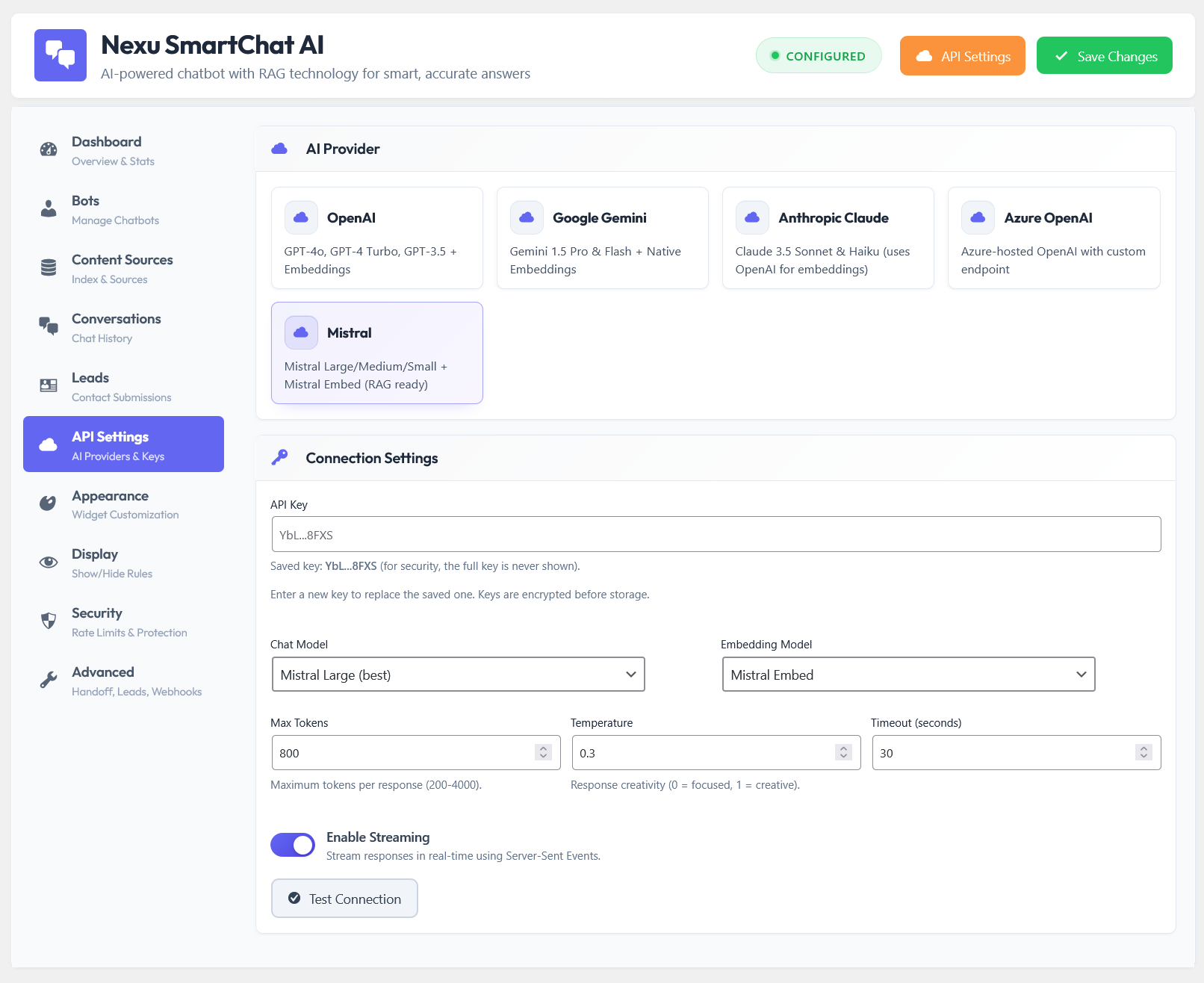
SmartChat’s API settings panel connects to OpenAI (GPT-4o and GPT-4o mini), Anthropic Claude (Sonnet and Haiku), Google Gemini (Pro and Flash), Mistral, and Azure OpenAI. Your RAG knowledge base — the indexed WooCommerce products, pages, and policies — is completely independent of the model. You build it once and it works with any provider you connect.
The practical workflow: start with GPT-4o mini (cheapest, most reliable, best supported). If you find a specific need — long documents, cheaper per-call, better tone for your audience — switch to Claude Haiku or Gemini Flash for a week and compare the conversation transcripts. Switch back if needed. Your content stays indexed, your widget stays live, your customers never notice the change.
| Criteria | GPT-4o mini | Claude Haiku | Gemini Flash | Grok 2 |
|---|---|---|---|---|
| Cost per 1M tokens | ~$0.15 in / $0.60 out | ~$0.25 in / $1.25 out | ~$0.075 in / $0.30 out | Varies |
| Instruction-following | Excellent | Excellent | Good | Good |
| Hallucination tendency (with RAG) | Very low | Very low | Low | Low |
| WordPress plugin support | Best | Good | Growing | Limited |
| Response tone quality | Natural | Very natural | Variable | Informal |
| Speed | Fast | Fast | Very fast | Very fast |
| Recommended for | Default choice — start here | Detailed content, careful tone | High volume, simple queries | Watch for future releases |
Pricing as of early 2026 — API rates change frequently. Hallucination scores assume a properly configured RAG pipeline with accurate indexed content. Without RAG, all models hallucinate freely about site-specific content.
The model wars are real but mostly irrelevant to WordPress site owners in 2026. GPT-4o mini, Claude Haiku, and Gemini Flash are all capable enough to handle the support queries, product questions, and recommendation tasks that make up a WooCommerce chatbot’s daily job. The difference between them, once RAG is properly configured, is marginal. The difference between having RAG and not having it is enormous.
The right move is not to pick the best model and hope it stays best — it is to use a WordPress AI chatbot plugin with native RAG, automatic content indexing, and multi-model support so that when the landscape shifts — and it will — you switch providers in sixty seconds and your chatbot keeps running.
Native WordPress RAG pipeline. Auto-indexes your WooCommerce products and pages. Supports GPT-4o, Claude, Gemini, and Mistral from a single API panel. Switch models in one click. Knowledge base stays intact. From $89 one-time — no subscription.






Hey, this saved me so much time!
Setup's a little rough for WordPress right now, but the speed is solid. maybe next year
So my buddy swore by this guide for picking an AI for his WooCommerce store, and okay, I get the logic most of the magic is in the setup, not the model itself. But here's what I don't get: how do you actually know if you nailed that setup? Like, is there a way to test whether the AI's pulling from my actual site content or just hallucinating answers? The guide mentions accuracy, but how am I supposed to verify that before my customers start noticing?