With amazing plugins and exceptional support, we guarantee an unparalleled experience taking your success to new heights with every click and celebrating your satisfaction!
Nexu AI Chatbot for WordPress – SmartChat Assistant Plugin with Auto-Indexing & RAG
Turn your website content into a 24/7 smart assistant that drives sales and handles support instantly.
If you run a WordPress site or WooCommerce store, you already know the frustration of generic, standard chatbots. They hallucinate answers, frustrate your customers, and cannot suggest the right products. You need an AI that actually understands your specific business.
This plugin creates a Custom AI Knowledge Base for WordPress by automatically indexing your posts, pages, and products. The result? A smart agent that reads your data, never guesses, and provides accurate answers based strictly on what you have published.
Why most AI plugins fail to deliver real value
Most AI chat tools are simply blank windows connected to OpenAI. They do not know your shipping policies, your current stock levels, or the specific features of your WooCommerce products. When a customer asks for a recommendation, they give a generic, unhelpful response.
We solved this by building a true AI Shopping Assistant for WooCommerce. When a visitor asks about an item, the bot immediately retrieves your indexed store data and responds with rich product cards featuring actual images, prices, and direct checkout links.
Frontend chat interface displaying smart product recommendations with images and prices directly in the conversation.
This creates an interactive, engaging shopping experience that guides visitors toward making a purchase without requiring human intervention. It functions as a Smart Sales & Product Recommendation Chatbot that works tirelessly for your business.
Full control over your AI data and insights
You do not need to be a data scientist to run an advanced RAG system. The administrative area is designed for store owners and marketers, giving you instant visibility into what the bot is doing and how your users are interacting with it.
From the main dashboard, you can see exactly how many conversations are happening, the total tokens used across multiple providers, and how users rate their chat experience, all organized beautifully inside your WordPress admin.
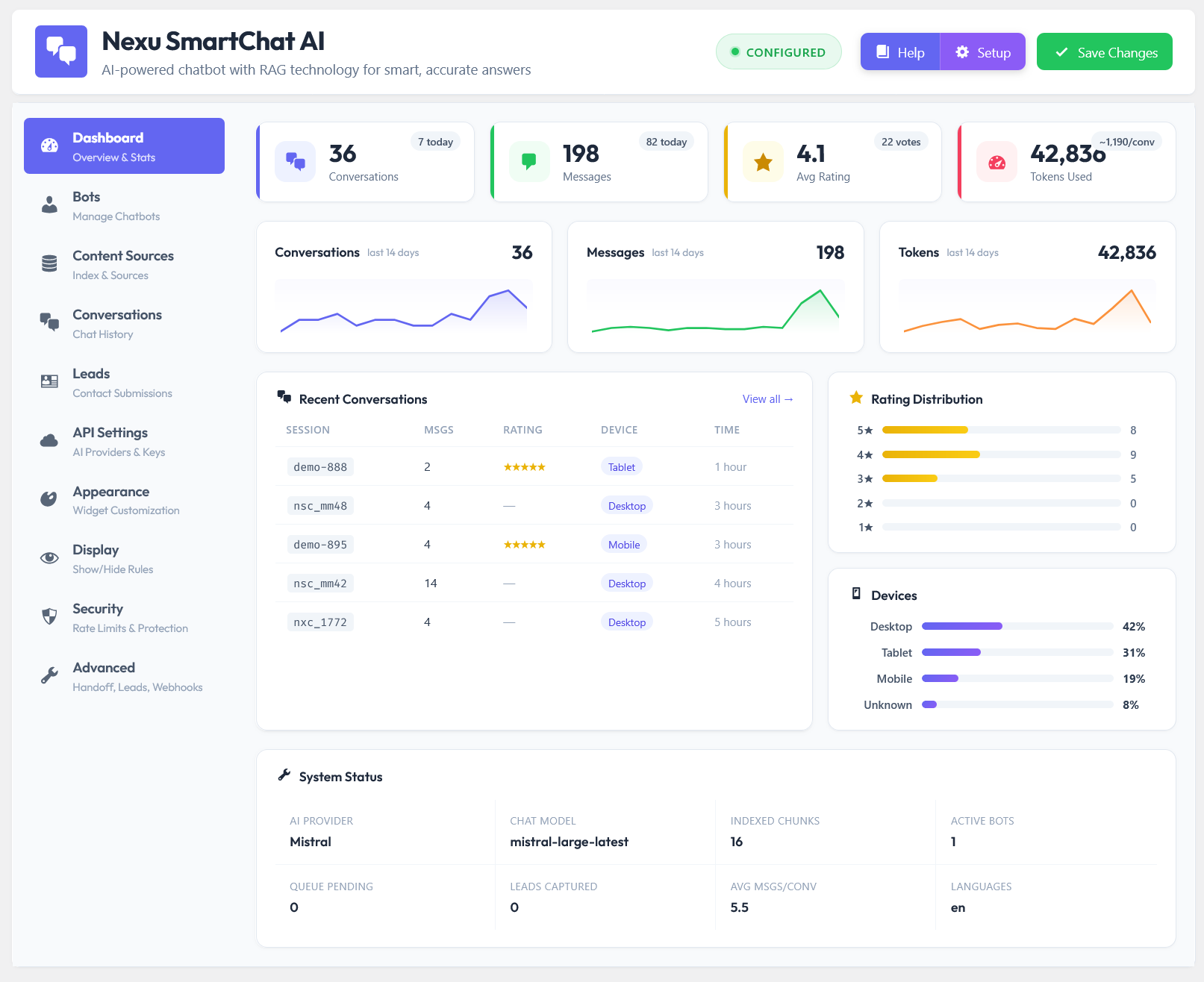
Admin dashboard overview showing real-time statistics, token usage, and recent user chat ratings.
Simplified Setup
Follow a simple setup wizard to connect your preferred provider, choose your content sources, and start generating responses in minutes.
Clear Analytics
Monitor performance metrics visually. Track user satisfaction through ratings and understand the volume of automated support requests.
Your site, your rules, your data
Just like you might use Activity Log – User Monitoring & Security Audit Plugin for WordPress to keep track of human interactions on your site, Nexu SmartChat ensures you have full visibility over every automated conversation. By combining deep context with an intelligent chat interface, you finally get an AI that works specifically for your unique content layout.
And if you regularly use tools like AI Writer & SEO Content Generator Plugin for WordPress to create rich articles, this chatbot instantly indexes that new knowledge, keeping its answers fresh and completely up-to-date.
How the AI actually learns about your business
If you want an AI to give accurate answers, you have to feed it accurate information. Traditional bots require you to manually type out hundreds of Q&A pairs. That takes hours, and the moment you change a price or update a policy, the bot becomes outdated and starts giving wrong answers.
Instead, Nexu SmartChat operates as a true Context-Aware RAG Assistant Plugin. You simply select which parts of your website it should read—like your WooCommerce products, blog posts, or standard pages. It automatically breaks this content down, indexes it, and creates a searchable vector database without any manual data entry from you.
This screen is where the magic happens. You choose your content types, adjust the chunk sizes if you want more precision, and hit start. The plugin handles the entire background synchronization process automatically.
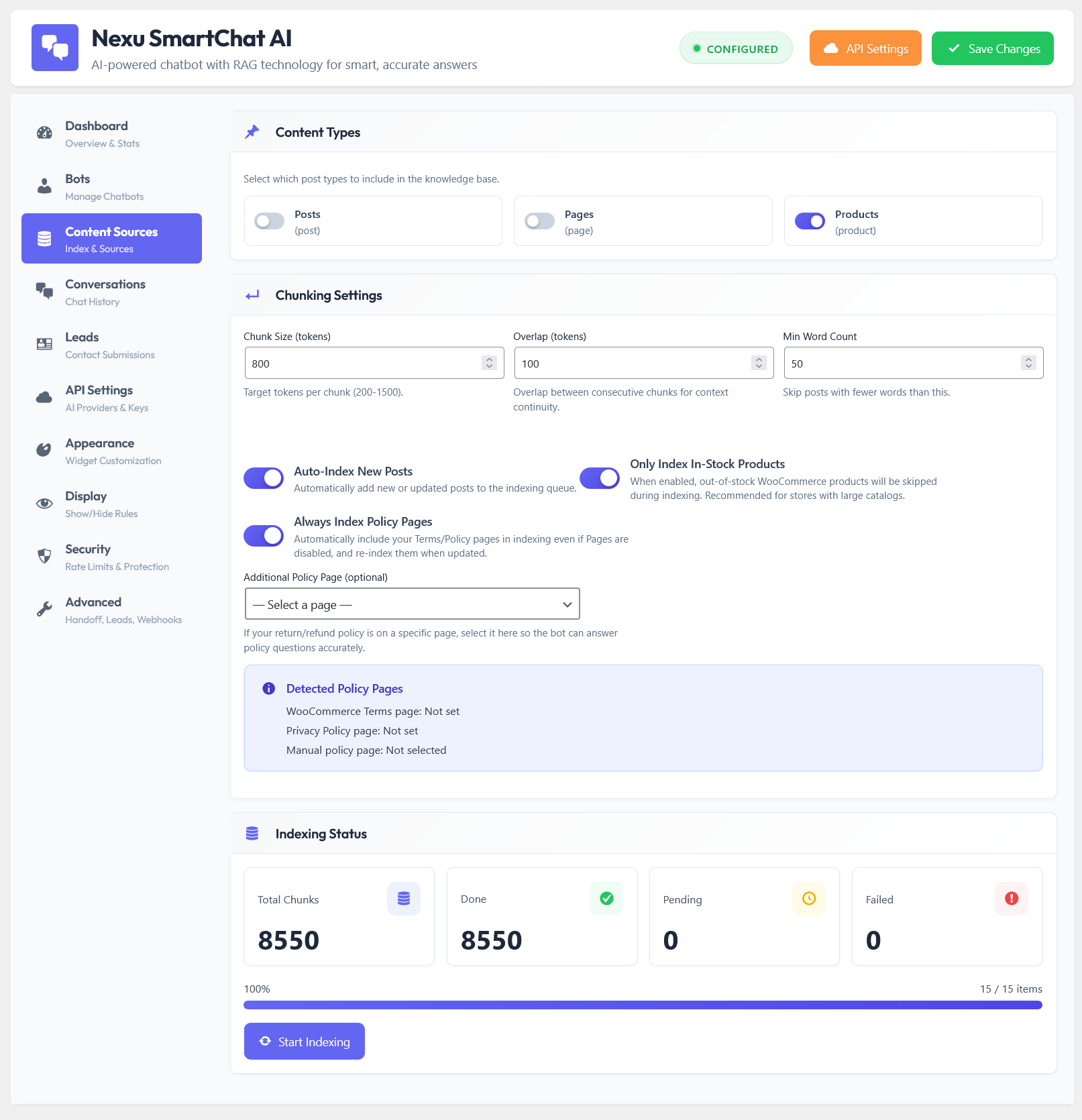
The Content Sources interface where you select post types and monitor the automated vector indexing progress.
Multilingual Ready
If you use tools like WPML AI Translator Plugin for WordPress to run a global store, our indexing system seamlessly handles multiple languages, filtering answers based on the user’s current context.
Auto-Update
Whenever you publish a new product or edit a page, the system automatically re-indexes those changes. Your chatbot is never out of date.
Freedom to choose your AI engine
Being locked into a single AI provider is risky. Prices change, better models get released, and sometimes APIs go down. You need flexibility to switch engines whenever you want.
This is why we built a complete Multi-Model AI Chat Integration. Right from this setup screen, you can connect to multiple world-class providers. Want to use GPT-4o today and switch to Claude 3.5 tomorrow? It takes exactly one click.
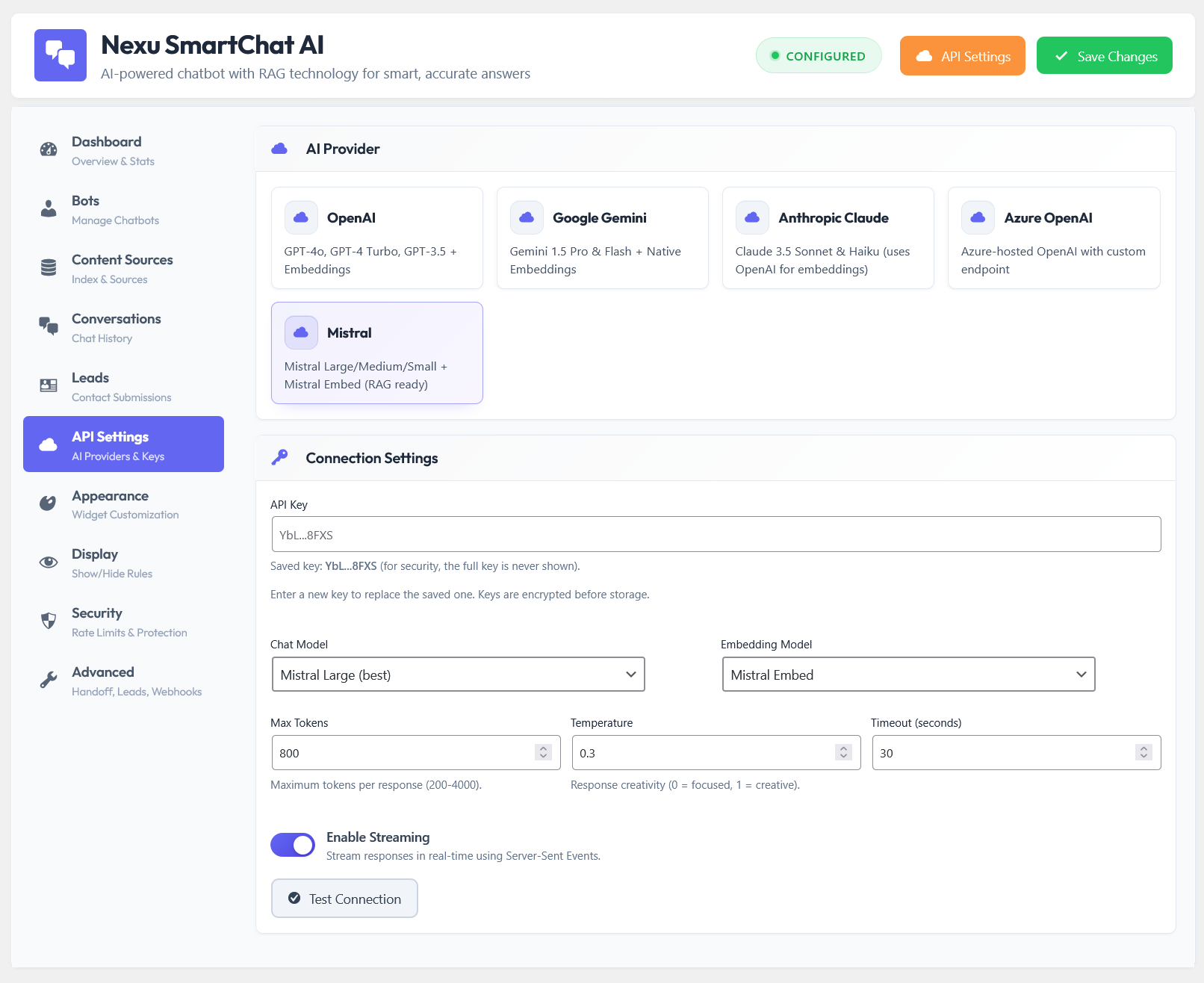
The API configuration panel supporting OpenAI, Gemini, Claude, Mistral, and Azure.
Beyond just switching providers, you have full control over the technical details. You can adjust the “Temperature” to make responses more creative or more strict, and manage token limits so you never overspend on API costs.
Give your chatbot a specific job description
A chatbot that handles technical support needs to sound very different from one that tries to sell fashion items. The tone, the rules, and the instructions must be customizable.
With our persona manager, you are deploying a highly specialized, Trainable GPT Agent for Websites. You can define exact system prompts that tell the bot exactly how to behave. Tell it to be funny, strictly professional, or instruct it to always ask for clarification before recommending a product.
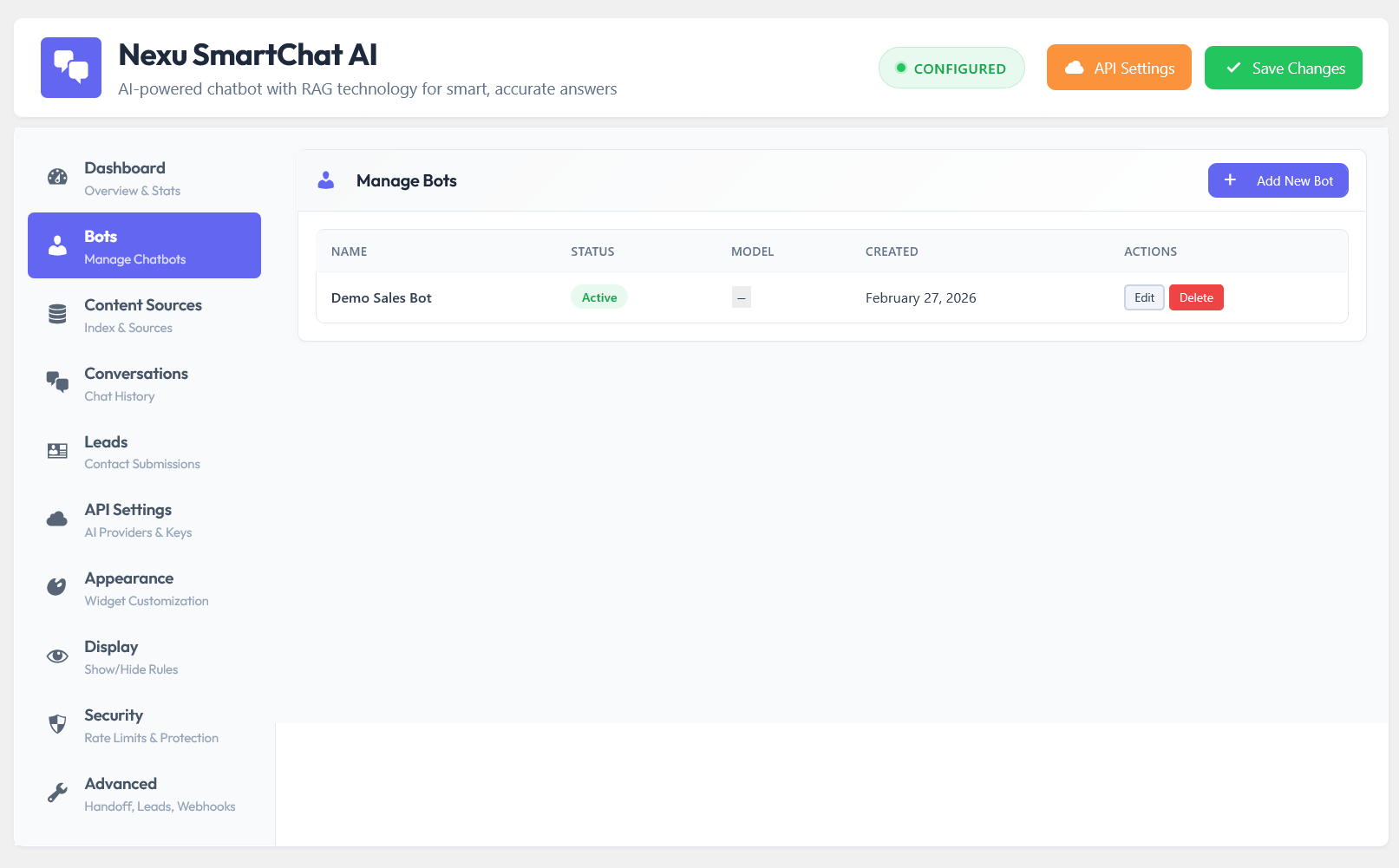
The Bot management screen where you create distinct personas with custom system instructions and rules.
Complete Traceability
Because these bots run on your server, you can pair them with Mail SMTP – SMTP & Email Log Plugin for WordPress to instantly email yourself full transcripts of every completed conversation, keeping you perfectly in the loop.
B2B & Sales Integration
Train your bot to act as a preliminary sales rep. It can answer pre-sale questions and seamlessly hand off the conversation to a human right before the client needs a WooCommerce Custom Invoices & Manual Billing WordPress Plugin.
Get started without reading a manual
Complex plugins usually sit deactivated because the setup is too overwhelming. When you decide to implement AI, you want to see it working on your site today, not next week.
That is why we built this as a true ChatGPT, Claude & Gemini Wrapper Plugin with a beautiful, guided setup wizard. It walks you through connecting your API, selecting the data you want to index, and launching your bot in under five minutes. If you can manage a tool like Affiliate Engine – Ultimate WooCommerce Referral & Affiliate Marketing Plugin, setting up this AI assistant will feel incredibly simple.
The interactive setup wizard opens immediately upon installation, ensuring you never stare at a confusing settings page wondering what to do first.
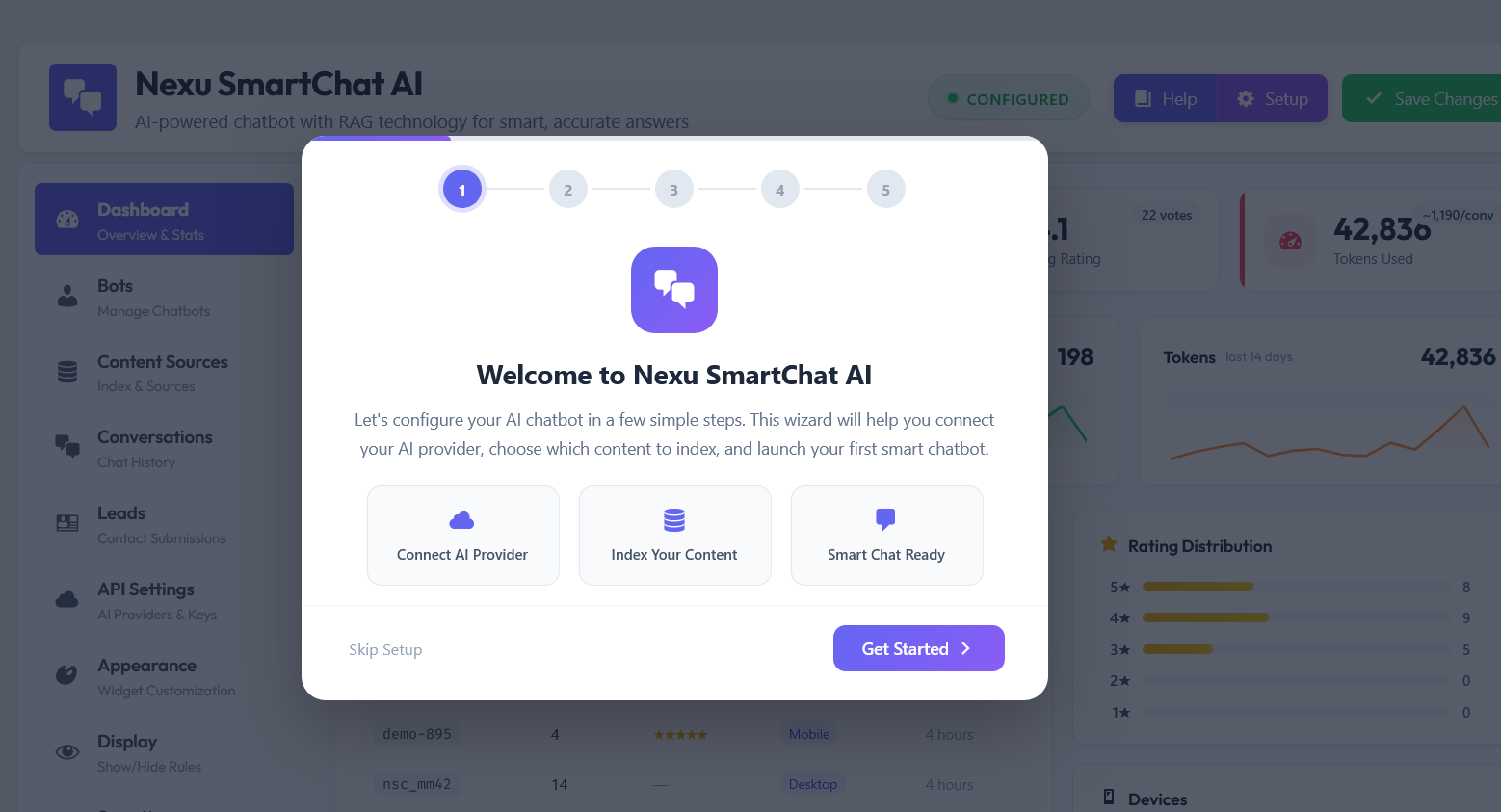
The intuitive step-by-step setup modal that guides you through the initial configuration effortlessly.
Show up exactly when your customers need help
A chat widget should not be an annoying popup that distracts users from buying. It needs to be contextual. You need the power to decide if the bot opens automatically after a few seconds, when the user scrolls down, or when they are about to leave the page (exit intent).
More importantly, you can restrict visibility based on user roles. For instance, if you run a wholesale business using the B2B & Wholesale Solution WordPress Plugin for WooCommerce, you can configure the chatbot to only appear for logged-in B2B customers, providing them with a dedicated Automated Lead Generation AI Bot tailored just for bulk ordering queries.
The display settings give you granular control. You can hide the widget on mobile devices, exclude it from specific pages (like your checkout or terms page), and enable conversation ratings so users can leave 1 to 5 stars after chatting.
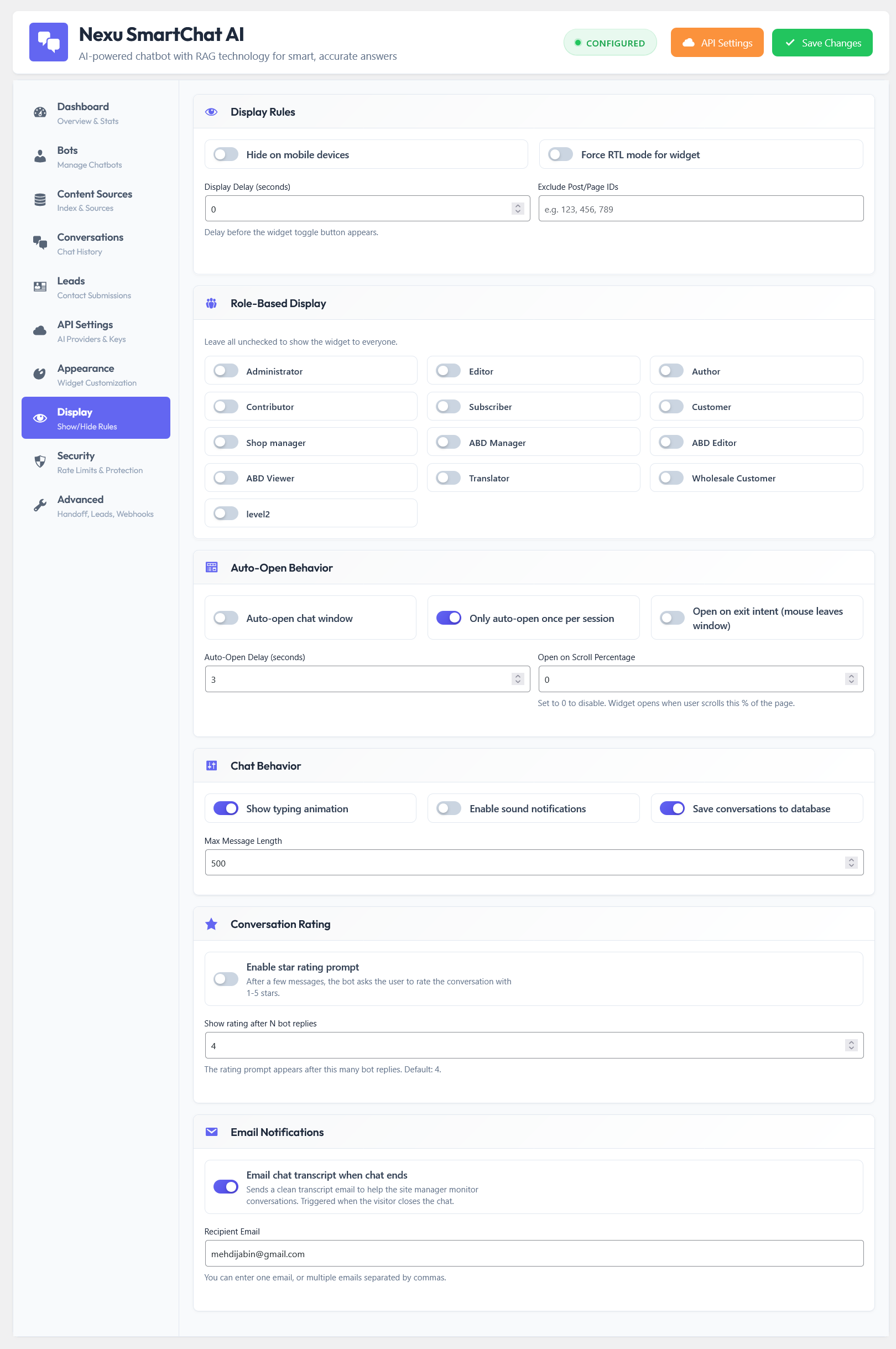
The Display & Behavior rules panel, where you define triggers, exclusions, and rating prompts.
Role & Page Targeting
Easily decide which WordPress user roles see the chat, and specify page IDs where the widget should be entirely hidden to keep the interface clean.
Feedback Loop
Enable automated conversation rating. After a set number of messages, the bot politely asks the user to rate their experience, giving you direct feedback.
Match your brand identity perfectly
Your website has a specific look and feel, and third-party widgets often ruin it by enforcing their own branding. We made sure the chat interface can adapt to any design system instantly.
Through the live preview panel, you can adjust the primary colors, change the font family, upload custom bot avatars, and set custom toggle icons. Everything updates in real-time. Whether you are using a security tool like Content Protection & Right-Click Blocker Plugin for WordPress behind the scenes or fine-tuning your frontend, this 24/7 Smart Support & Human Handoff System ensures your interactive elements look completely native and professional.
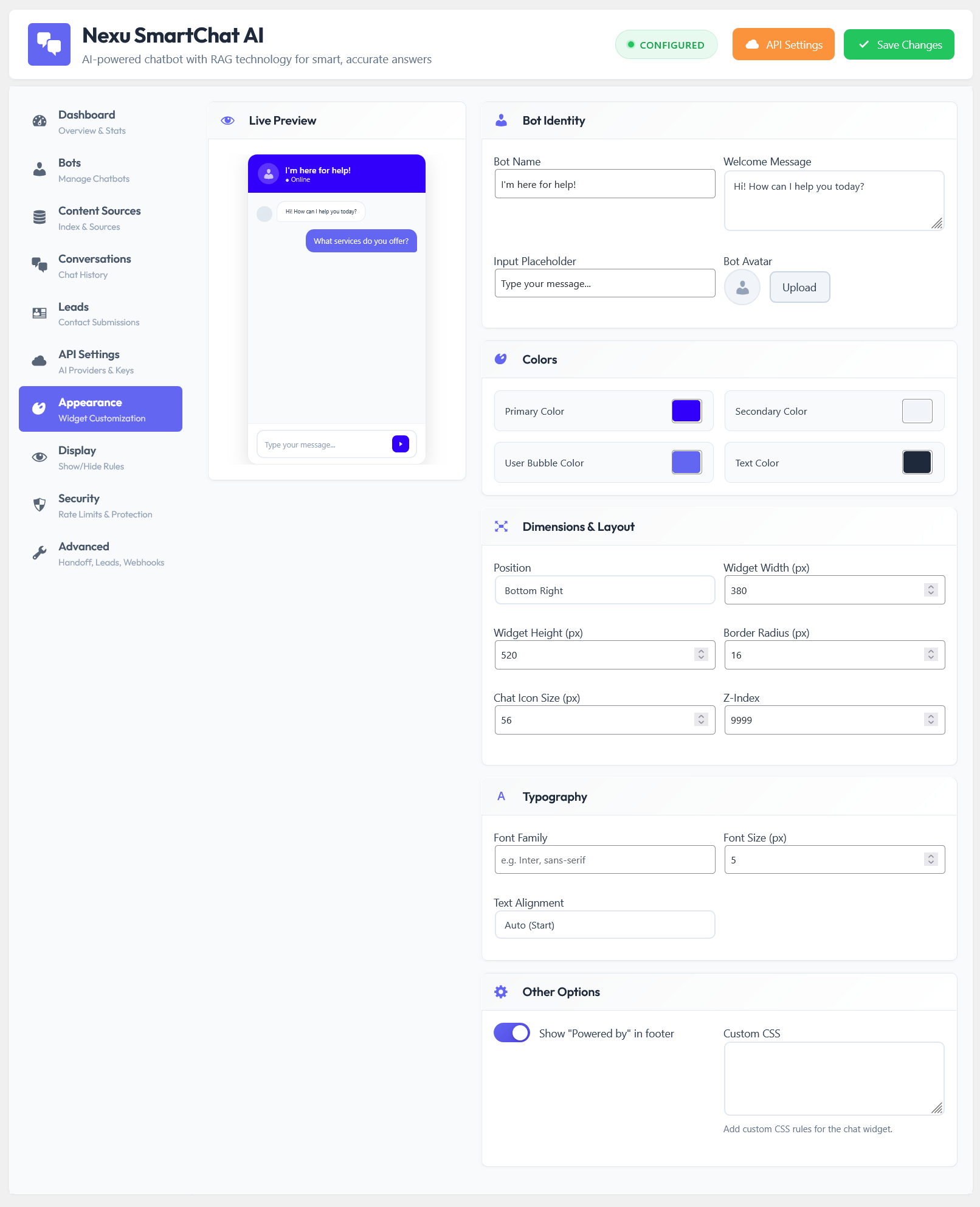
The interactive Appearance tab with a real-time live preview for adjusting colors, dimensions, and typography.
Review every conversation in detail
An AI agent is only as good as the insights you gather from it. It’s crucial to understand what your customers are asking, where they get stuck, and how the bot responds. This isn’t just about providing support; it’s about discovering new sales opportunities and identifying missing information on your website.
We built a comprehensive conversation history panel directly into your WordPress dashboard. You can review full chat transcripts, see user ratings, and analyze the context of each interaction. When paired with tools like the WooCommerce Sales Report WordPress Plugin – DAILY – WEEKLY – MONTHLY, these insights allow you to continuously refine your product offerings based on real user demands, turning your bot into a true Smart Sales & Product Recommendation Chatbot.
The conversations tab provides a clear, organized view of all interactions. You can filter chats, view the total token usage per session, and read the exact dialogue between the user and your AI.
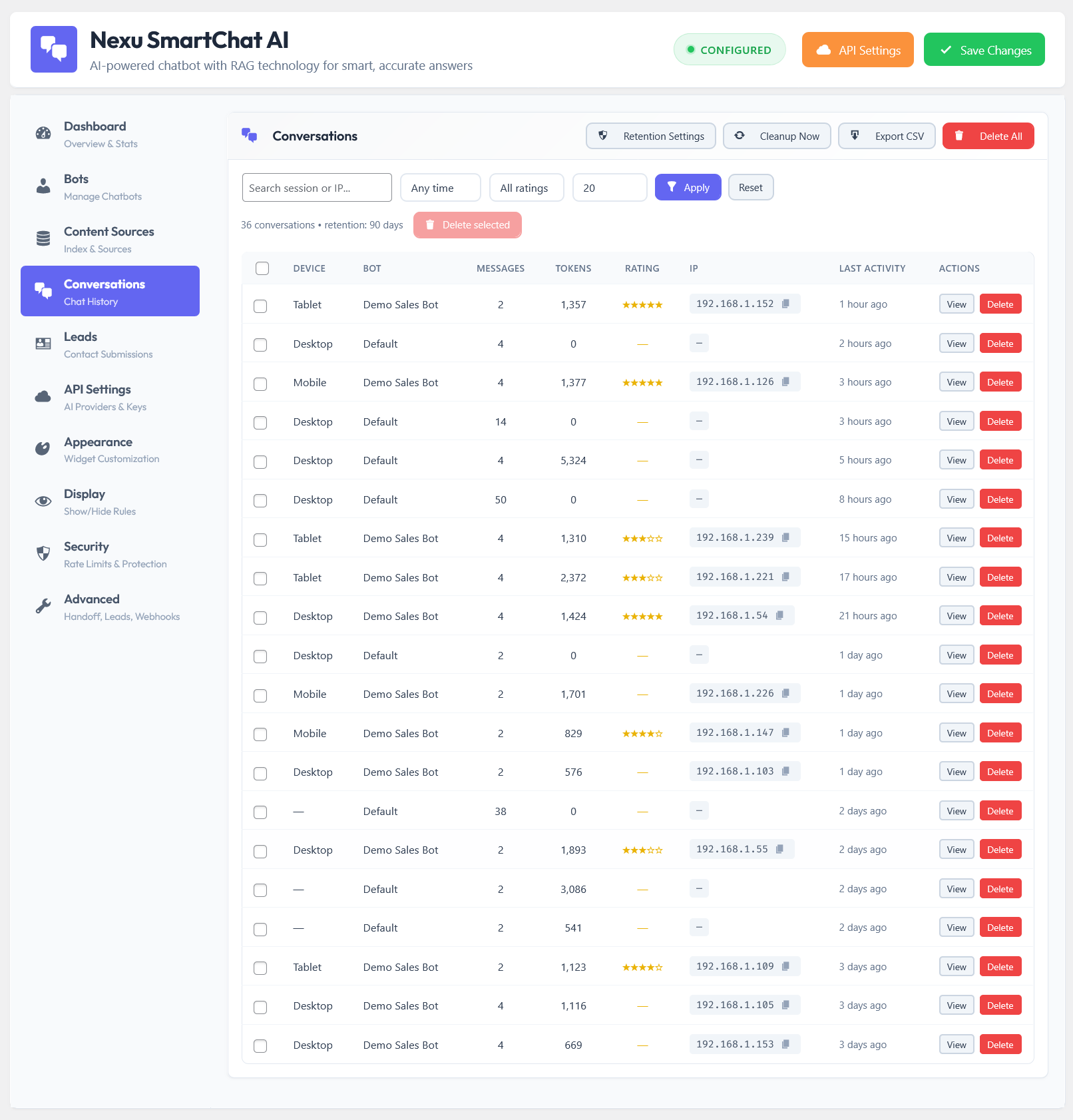
The detailed Conversations page where you can monitor, filter, and review every chat transcript.
Advanced configurations for power users
While the plugin is designed to be plug-and-play, we know that developers and agency owners need deeper control. The advanced and security settings provide exactly that, ensuring your bot performs optimally while protecting your resources.
You can adjust caching mechanisms, manage RAG chunk sizes, and configure security limits to prevent abuse. If you are already optimizing your site’s conversion rates with the Smart Funnel WordPress Plugin: Ultimate Upsell, Order Bump & Revenue Booster for WooCommerce, you will appreciate this level of fine-tuning. This ensures your Custom AI Knowledge Base for WordPress remains fast, secure, and cost-effective.
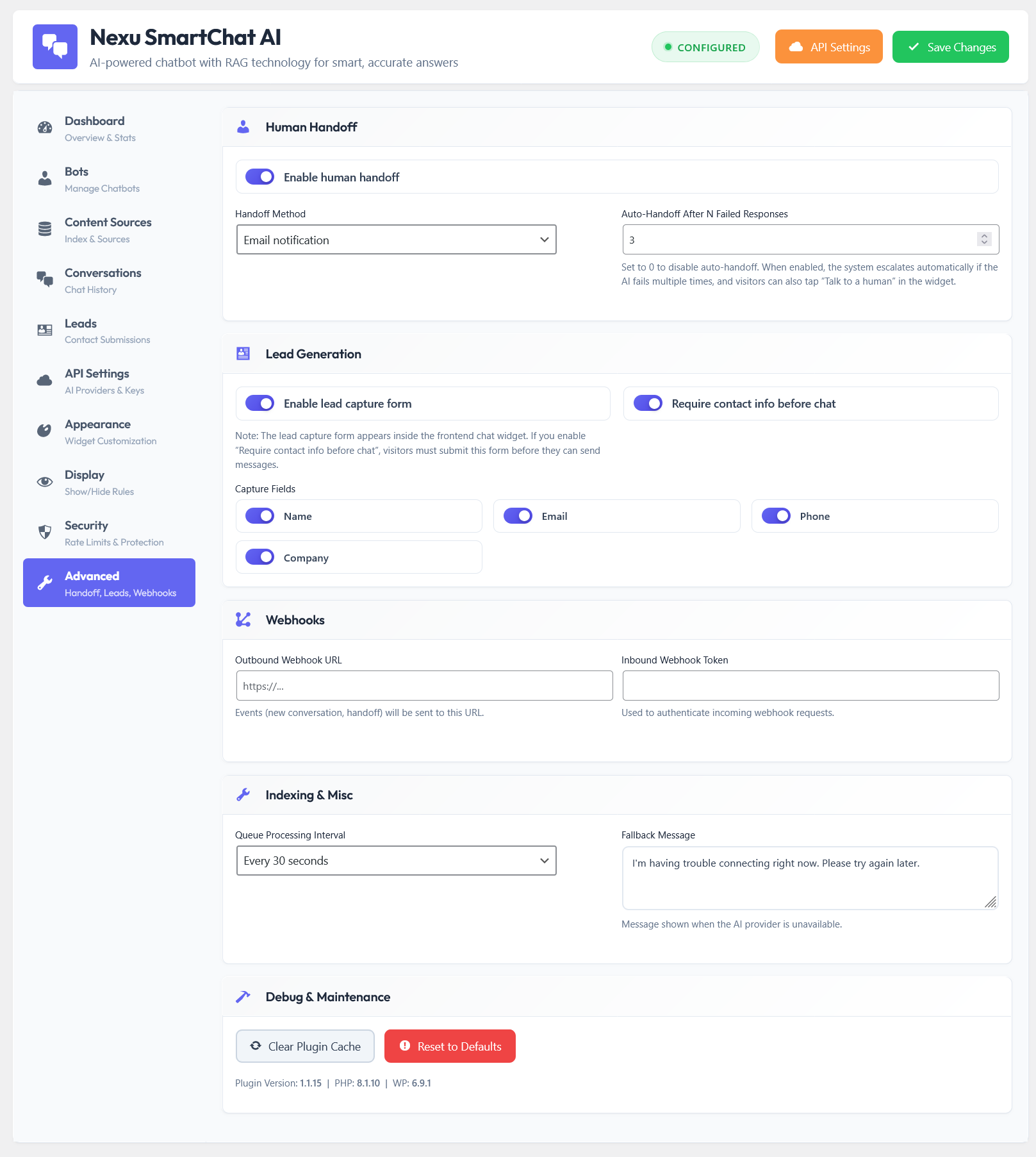
The Advanced Settings panel gives you precise control over caching, chunking, and system performance.
Help is always just one click away
We hate it when plugins force you to leave your WordPress dashboard, search through external websites, and read outdated articles just to figure out a setting. You shouldn’t have to hunt for answers.
That is why the Nexu AI Chatbot for WordPress – SmartChat Assistant Plugin with Auto-Indexing & RAG includes a comprehensive, interactive help guide directly within the admin interface. Whether you are setting up complex bot personas or collaborating with colleagues using the Nexu Internal Team Messenger Chat & Project Tasks for WordPress + Telegram Integration to discuss the implementation, all the documentation you need is instantly accessible via a sleek modal window.
The built-in help guide is neatly categorized, covering everything from initial setup to advanced prompt engineering. It provides concrete examples, tips, and explanations for every single feature, ensuring you never feel lost.
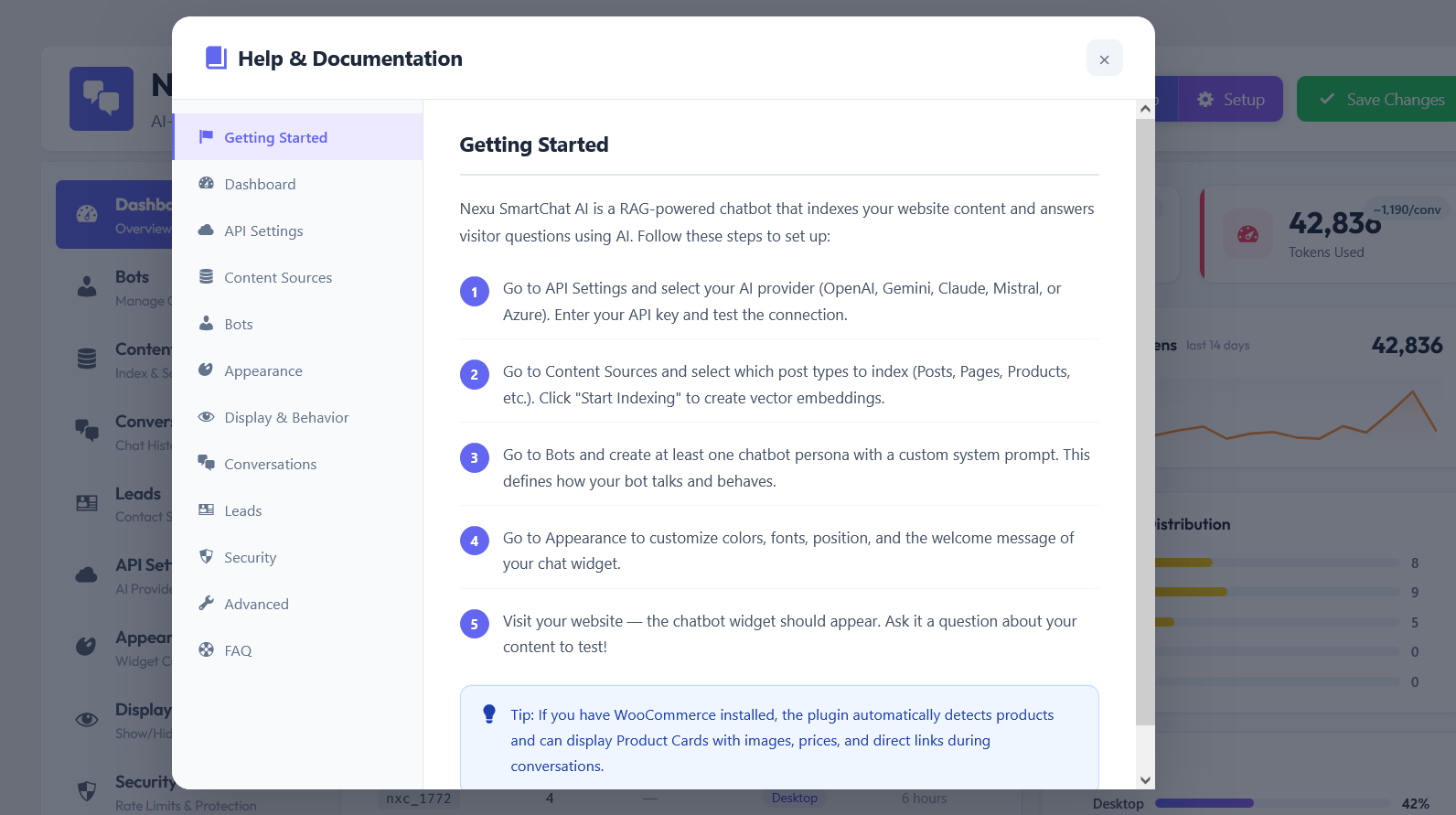
The smart Help Guide modal offers instant, searchable documentation without ever leaving your dashboard.
Protect your API budget from abuse
When integrating an AI model on a public website, the biggest fear for most business owners is unexpected API costs due to spam or malicious use. A smart chatbot shouldn’t leave you vulnerable to botnets exhausting your credits overnight.
The Nexu AI Chatbot for WordPress – SmartChat Assistant Plugin with Auto-Indexing & RAG includes built-in rate limiting and permission controls. You can easily define exactly how many messages a guest user or a logged-in member can send within a specific timeframe. If you already prioritize security in your payment flows with tools like the advanced WooCommerce Checkout Field Editor & Manager Plugin for WooCommerce & WordPress, you understand the importance of strict validation.
Through the dedicated security panel, you can instantly block specific IP addresses, enforce cooldown periods, and apply strict token usage limits per conversation. This ensures your Automated Customer Success AI Agent remains a helpful tool rather than an expensive liability.
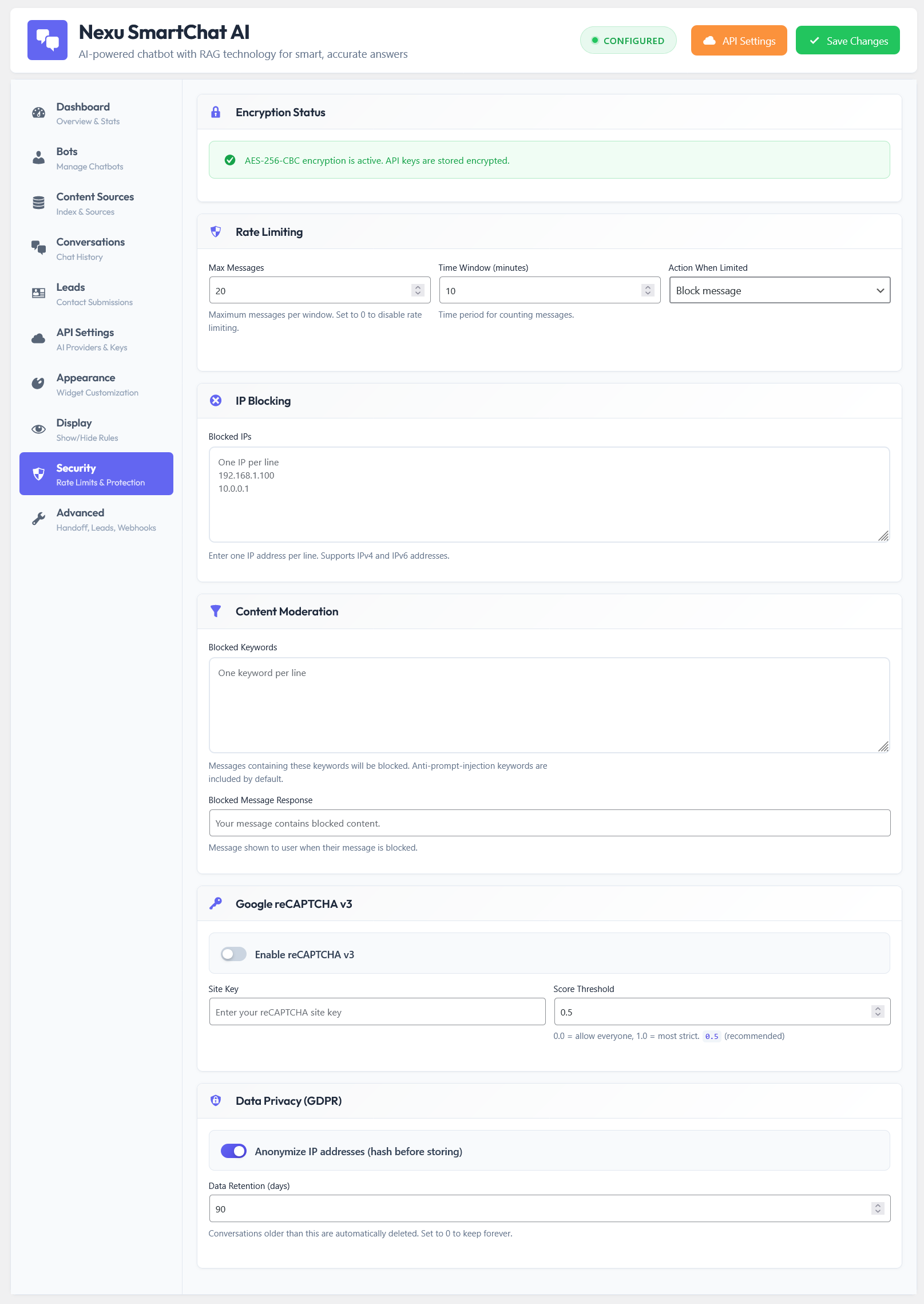
The comprehensive Security settings tab, allowing you to configure rate limits, token usage, and user access restrictions.
Craft highly specialized bot personas
Not all conversations require the same tone. The bot that answers technical documentation questions should behave differently than the bot trying to close a sale on your product pages.
Our interface allows you to easily add new bot personas. You can define specific system prompts for each agent, dictating how they greet users, what data they emphasize, and their overall personality. For example, if you run a membership site utilizing the LearnDash to WooCommerce Integration & Course Selling Plugin for WordPress, you can create a dedicated “Tutor Bot” that only references your lesson materials and uses an encouraging, academic tone.
Alternatively, an AI Shopping Assistant for WooCommerce might focus on prompting users about their budget or offering loyalty incentives, perfectly complementing a strategy built around the Smart Wallet, Rewards & Cashback Plugin For WooCommerce.
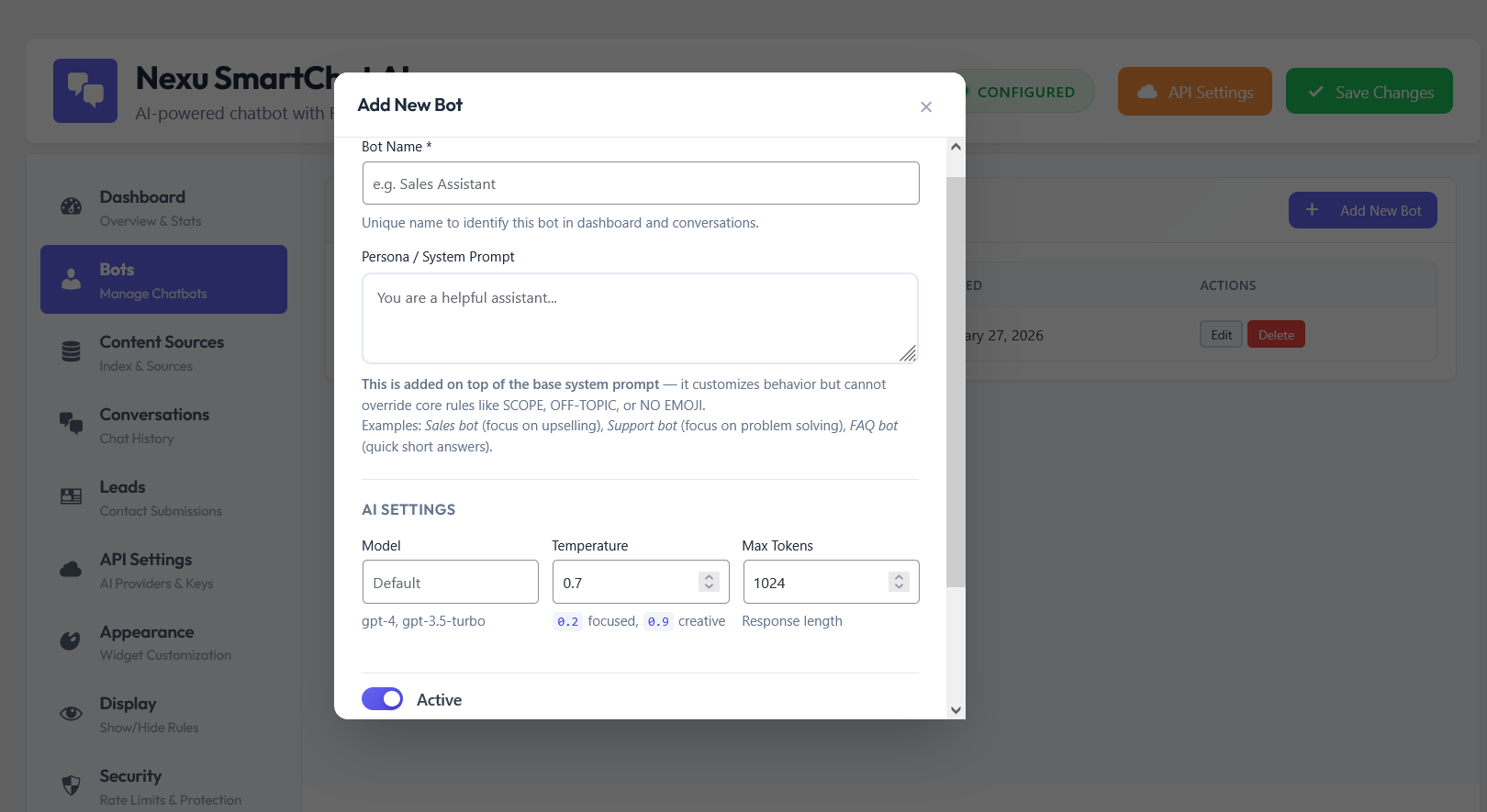
The intuitive interface for adding and configuring new bot personas with unique system instructions.
Role-Specific Prompts
Tell the AI exactly who it is. “You are an aggressive sales rep” or “You are a patient support agent.” The model adapts instantly.
Tone Control
Dictate the length of responses and the formatting style. Ensure your bot always replies in concise, readable bullet points instead of walls of text.
Quick Switch
Maintain a library of bots in your dashboard and seamlessly switch the active one globally with just a single click.
Recommend products like a real human clerk
When a customer asks “What is the best running shoe you have?”, they don’t want a long paragraph containing a messy URL. They want to see the product, look at the price, and click a button. Standard AI bots fail here because they only output text.
We engineered our AI Shopping Assistant for WooCommerce to detect when it should recommend an item. Instead of raw text, it instantly renders beautiful, horizontal product cards directly inside the chat interface. It pulls the live price, image, and stock status from your database. Once the AI suggests the perfect item, displaying authentic customer feedback via the Advanced Product Reviews for WooCommerce – Photo, Video & Rewards Plugin and encouraging larger orders with the Nexu Free Shipping Bar: Multi-Zone Progress & Cart Booster can drastically multiply your conversion rates.
This visual approach keeps users engaged in the conversation while giving them direct pathways to checkout, removing the friction from product discovery.
The clean, user-friendly frontend widget that engages visitors and seamlessly handles complex product inquiries.
Speak to your customers in their native language
The internet has no borders, and your customer support shouldn’t either. The underlying language models natively understand and translate dozens of languages in real-time. If a user asks a question in Spanish, the bot searches your English database, understands the context, and replies fluently in Spanish.
Whether your customers are navigating localized checkout forms with the WooCommerce Checkout Map & Location Picker Plugin for WordPress or discovering your international brand through engaging Elementor Video Ads: Dynamic Video Advertising Plugin for WordPress, your bot is ready to assist them. This flexible Multi-Model AI Chat Integration ensures you never lose a sale due to a language barrier.
Furthermore, all the static text within the widget itself—such as the placeholder text, the send button tooltip, and the initial greeting—can be easily customized and translated directly from the appearance settings to perfectly match your target audience.
The appearance customizer where you can edit and translate all widget labels to support international users.
Stop losing sales while you sleep
Think about how many potential customers leave your website simply because they couldn’t find the answer to a quick question. Or think about the hours your team spends every single day answering the exact same repetitive queries. It’s exhausting, and it limits your ability to scale.
By deploying a Trainable GPT Agent for Websites, you instantly hire an employee who knows your entire product catalog, understands all your documentation, speaks every language, and never asks for a break. It turns your passive website into an active, conversational sales engine.
Unlike expensive third-party SaaS platforms that charge you hundreds of dollars a month just to host a basic bot, this solution lives entirely within your WordPress environment. You control the data, you choose the API provider, and you own the experience. It is the ultimate 24/7 Smart Support & Human Handoff System designed specifically for modern entrepreneurs.
Take complete control of your automated support from a centralized, beautifully designed dashboard.
Transform interactions into revenue
Every chat interaction is a potential lead. Instead of forcing users to fill out static contact forms that they hate, engage them naturally. A conversational interface feels personal, lowering friction and increasing the chances of capturing vital information.
When operating as an Automated Lead Generation AI Bot, the plugin doesn’t just answer questions; it guides users toward taking action. Whether you are managing large digital assets with the WordPress FTP Media Library Plugin – Transfer & Manage Files Easily or optimizing your e-commerce flow, having an intelligent assistant bridging the gap between curiosity and checkout is a game-changer.
Are you ready to stop managing support tickets and start managing growth? The Nexu AI Chatbot for WordPress – SmartChat Assistant Plugin with Auto-Indexing & RAG is more than just a widget; it is the strategic upgrade your business needs right now.
Deliver instant, accurate, and human-like interactions to every visitor, exactly when they need it.
Join the thousands of smart business owners who are automating their workflows and supercharging their sales. Explore this and other essential WordPress Plugins in our catalog to build the ultimate digital ecosystem today.