Next-Level Code. Nexuvibe Style ...
Hrs
Min
Sec

The store sells handmade ceramic homeware: mugs, bowls, plates, and a range of seasonal collections that rotate through the year. It has 214 active products, a catalog that changes regularly, and a loyal customer base that asks very specific questions. Does this mug fit a standard coffee machine? Is this glaze food-safe? What is the lead time on the Christmas collection? Will this size fit in my dishwasher? The answers exist. They are on the product pages, in the FAQ, in the care guide. But finding them takes time the owners did not have.
The store is run by two people. One handles production and sourcing. The other handles everything else: orders, marketing, social media, and support. Support was an email queue. The average response time had drifted to around six hours, and on weekends it stretched to 18 or 20. The backlog on a busy Tuesday morning had reached 340 emails, a mix of product questions that could have been answered instantly and genuine issues that required human judgment. Both were getting the same six-hour wait.
This is the story of what changed. We are writing it with the store owner’s permission but using a composite profile to protect their specific business details. The numbers, the sequence of events, the mistakes, and the outcomes are real. The specifics of product names and store branding are not.
It is also worth being direct: this case study is written by the team behind Nexu SmartChat, a WordPress AI chatbot plugin. This store used Nexu SmartChat as part of their solution. We have written this as honestly as we can, including the parts that did not work immediately. Read it as an implementation story, not as a sales pitch.
The obvious cost of slow support is customer satisfaction. Visitors who wait six hours for an answer to “does this come in blue?” are not happy customers. But the hidden costs were more significant for this store, and understanding them is what made the case for change compelling enough to act on.
The first hidden cost was pre-purchase abandonment. When a visitor has a specific question before buying, and there is no immediate way to get an answer, they do one of three things: they buy anyway and hope for the best, they look for the answer on a competitor’s site, or they leave and do not come back. For a ceramics store where fit questions — will this size work for my purpose, is this glazing technique food-safe — are common and materially affect the purchase decision, a meaningful portion of the pre-purchase email queue represented sales that either did not happen or happened at a competitor.
The second hidden cost was the nature of what was actually in the queue. When the owner analyzed the 340 emails on that Tuesday morning, she found that 62 percent of them were questions that could be answered entirely from existing site content: product dimensions, material specifications, shipping timelines, return policies. These were not questions that required human judgment. They required information that was already written down. Answering them was consuming roughly four hours per day of the one person who handled support, leaving less than four business hours for the questions that actually needed a person.
The third hidden cost was stress accumulation. Running a small business with a permanently growing support backlog creates a specific kind of operational anxiety. Every day starts with a number: how many emails are there this morning? That number sets the emotional tone of the day before any production or creative work begins. This is not a soft cost. Sustained operational anxiety affects decision quality and creative output in ways that compound over time.
The owner looked at three options before deciding. She evaluated Tidio, which came up frequently in her searches. She looked at a simple live chat plugin to just add a human chat option. And she evaluated a self-hosted WordPress RAG plugin. The decision logic was worth documenting because it reflects a thought process that many small WooCommerce stores will recognize.
Tidio was appealing because it was well-known and easy to install. But when she worked through the real cost, the math did not work. She estimated around 600 support conversations per month based on her current email volume. Tidio’s Lyro AI for 600 conversations, plus the base plan, plus branding removal came to approximately $150 to $180 per month. That was more than she was comfortable spending on tooling at her store’s scale. She also noted that Tidio would not have access to her actual product catalog through RAG, meaning it would answer from whatever she manually wrote into the knowledge base, which would require ongoing maintenance every time she launched a new collection.
A live chat plugin without AI was not what she needed. The problem was not that no one was available to chat. The problem was that 62 percent of the questions did not need a human. Adding live chat without AI would have meant being available for conversations she did not have capacity for, at hours she was not working.
The self-hosted RAG plugin won on three criteria: it would index her actual product pages automatically, including every new collection she launched, without manual knowledge base updates. It would store everything in her own WordPress database, keeping data ownership with her. And the API cost model, where she paid OpenAI directly per token with no intermediary margin, meant the monthly cost would scale with actual usage rather than jumping in subscription tier increments.
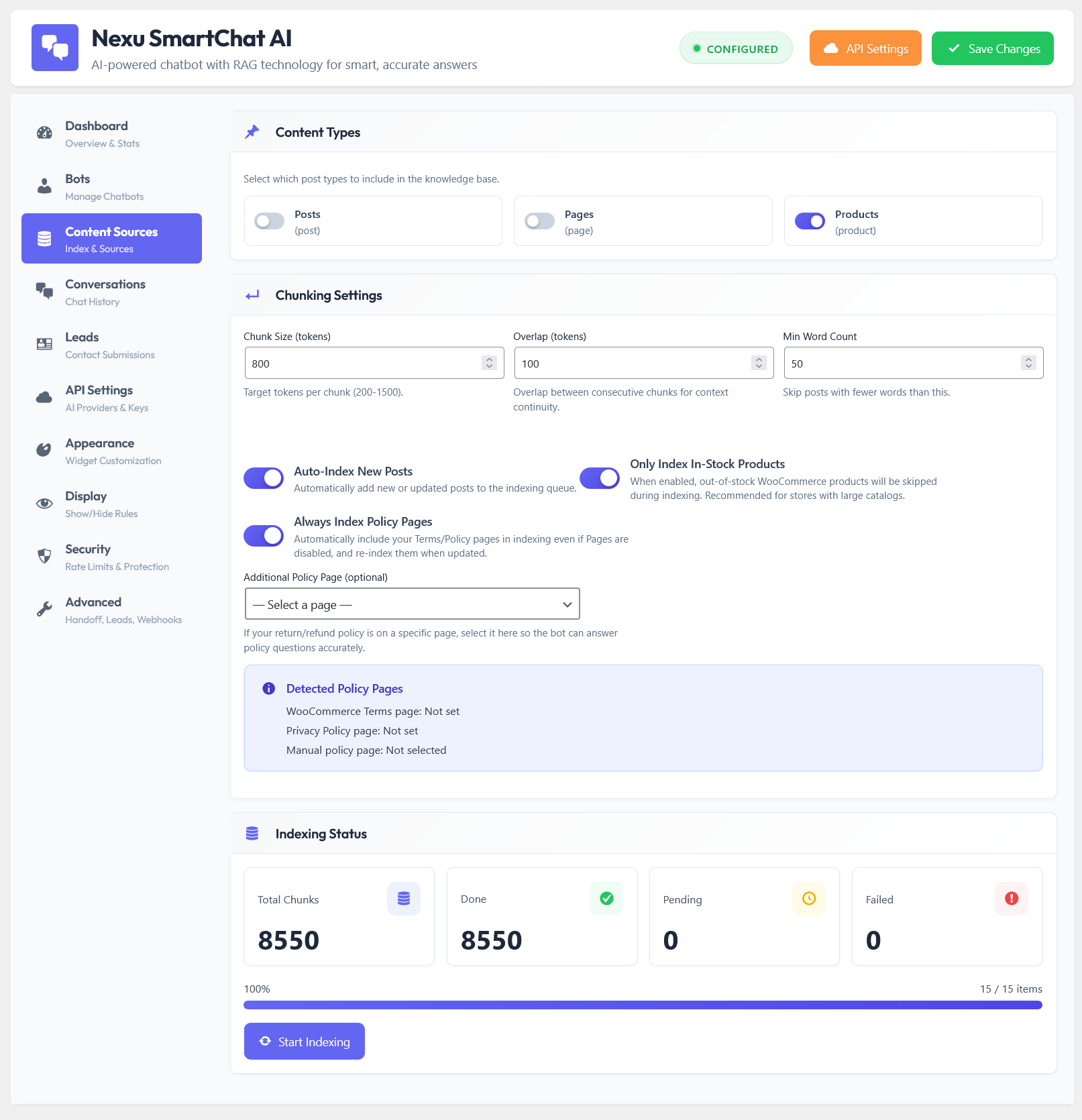
The indexing decisions turned out to matter more than expected. Getting this right required more deliberate thinking than the owner initially anticipated, but it also produced most of the quality improvement.
All 214 active product pages with descriptions, specifications, and care instructions. The main FAQ page covering shipping, returns, gift wrapping, and wholesale inquiries. The care guide, which is a standalone page with detailed instructions for specific glaze types and dishwasher safety by product category. The shipping policy page. The about page, because a significant number of questions were about the production process and materials sourcing. Two blog posts about the ceramic production process that contained detailed technical information visitors asked about regularly.
The privacy policy and terms and conditions pages. These contain legal language that should not be paraphrased or quoted by an AI. The checkout and account pages, which have no relevant informational content. Archived product pages for discontinued items, because having the chatbot answer questions about products that are no longer available creates a bad experience. Any page that was under construction or contained placeholder content. The owner also excluded two older blog posts that had outdated pricing information that had not been updated, to prevent the chatbot from quoting incorrect prices.
The system prompt was written carefully. The owner spent about 45 minutes on it, which she said was the most valuable 45 minutes of the entire setup. Key instructions included: answer only from the provided content and do not speculate; if a question is about a specific order or account issue, direct the visitor to email support with their order number; keep answers concise but complete; never mention competitor products; and if a visitor mentions they want to speak to a human, provide the support email immediately without further AI conversation.
The appearance configuration took about 20 minutes. The chatbot was named after the store’s fictional customer service persona, given a warm avatar that matched the brand’s visual style, and positioned in the bottom right corner. The welcome message was written to feel like the store’s voice: warm, specific, and not generically corporate.
The first week produced three problems that required immediate attention. None of them were catastrophic, but they were each specific and instructive, and they are worth documenting because similar issues are likely to appear in any first deployment.
Two product pages for items that had been removed from sale were still technically live on the store, just unlisted from the shop archive. The chatbot indexed them and answered questions about them as if they were available. Visitors were asking “can I order the matte black version?” and the chatbot was saying yes.
The shipping policy page said “3 to 5 business days.” Several product pages mentioned “ships within 48 hours.” The care guide mentioned “allow extra time during peak season.” The chatbot was retrieving whichever of these appeared most relevant for each query and producing different answers to essentially the same question depending on which content got retrieved.
A significant number of conversations were opening with “I ordered last Thursday, where is my package?” The chatbot had no access to order data and was trying to answer these questions by explaining the general shipping timeline, which was not what the visitor needed. This produced frustrated follow-up messages and some visitors leaving negative comments about the chatbot being unhelpful.
All three problems were identified within the first week by reading the conversation logs. The logs were the most valuable diagnostic tool in the entire deployment. The owner spent about 20 minutes each morning for the first two weeks reviewing conversations, flagging the ones that had gone poorly, and making a corresponding fix. This review-and-fix loop is the difference between a chatbot that improves over time and one that stays at whatever quality it had on launch day.
The results across the three-month period tell the story more clearly than any summary can. Here is what the data looked like at each milestone.
The 19 percent conversion rate improvement was the result that surprised the owner most. She expected the time saving. She did not expect the revenue impact to be that visible in the data. Understanding what drove it is useful for any WooCommerce store considering a similar deployment.
The primary driver was pre-purchase question resolution speed. Before the chatbot, a visitor who had a question about a specific product before buying either emailed and waited six hours, or did not buy that day. Many of them did not come back after waiting. With the chatbot, the same visitor types the question into the chat widget and gets an accurate answer in six seconds while still on the product page in an active browsing session. The gap between “I have a question” and “I have an answer I trust” went from six hours to six seconds, and a significant portion of those visitors bought rather than left.
The second driver was the chatbot’s availability outside business hours. A significant portion of the store’s traffic occurs in the evenings, when the owner is not working. Before, evening visitors with questions either emailed (and waited until the next day) or did not buy. The chatbot answered those questions immediately regardless of time, turning evening browsing sessions into evening purchases in a way the email queue never could.
This case study contains lessons that generalize beyond ceramics homeware to any WooCommerce store dealing with similar dynamics. Here is what the experience most clearly demonstrated.
Categorize 50 to 100 recent support emails. If 50 percent or more are answerable from existing site content, you have a strong case for a RAG chatbot. If the majority require account access or human judgment, your problem is different and the solution will be different. The audit also reveals which content gaps are driving the most unanswerable questions.
The most impactful improvement in this deployment came from content consolidation and standardization, not from changing the AI model or adjusting retrieval settings. If your product pages have inconsistent information, outdated copy, or missing specifications, the chatbot will surface that inconsistency to your visitors. Cleaning up your content is not just good for SEO. It is directly good for chatbot answer quality.
A chatbot that you deploy and do not review for two weeks will have developed a reputation with your visitors before you have fixed its most obvious problems. Plan for 20 minutes per day of log review in the first two weeks. The problems you find in the logs are always fixable, and they reveal content gaps you did not know you had.
The system prompt defines the chatbot’s behavior at every boundary case. What does it do when it does not know the answer? What does it do when someone asks about an order? What tone does it use? Spending 45 minutes writing a careful system prompt produces more benefit than any other configuration decision in the deployment.
Do not expect conversion rate improvement in week one. Week one is still a fixing period. The conversion impact appears after the chatbot has stabilized and visitors are getting consistently accurate answers. Set a 60 to 90 day window for evaluating the revenue impact, not a 7-day window.
The owner’s summary of the experience was simple: “I stopped being a search engine for my own website. The chatbot does that. I do the things that actually need a person.” That division of labor, an AI that handles what information retrieval can handle and a human who focuses on what judgment and relationships require, is the outcome a well-implemented WooCommerce AI chatbot with RAG-powered product knowledge can deliver for a store at any scale.
Nexu SmartChat indexes your WooCommerce product catalog automatically, answers product questions accurately from your real content, and gives you the conversation logs to keep improving. Start with the questions your customers actually ask.





The case study sold me on the self hosted RAG plugin. We run a small shop too and SaaS fees add up fast. Being able to keep everything in house for $9/month is huge.
Saved my sanity 340 emails poof.
Hey, as a dentist with a small practice, this case study really spoke to me.