Next-Level Code. Nexuvibe Style ...

Hrs
Min
Sec

Sub-Affiliate Tracking · Parent Commissions · WooCommerce


How to Track Sub-Affiliates and
Parent Commissions in WooCommerce

Running a multi-tier affiliate program is only half the job. The other half is knowing — at any given moment — who is in your network, what they are generating, and what every parent affiliate has earned from the activity of the people below them. This is the practical guide to managing that operational reality inside WooCommerce.

12 min read
Updated 2026
WooCommerce
How to track sub-affiliates and parent commissions in WooCommerce – complete guide to monitoring downline activity, upline earnings, and multi-tier network performance using Affiliate Engine plugin in 2026

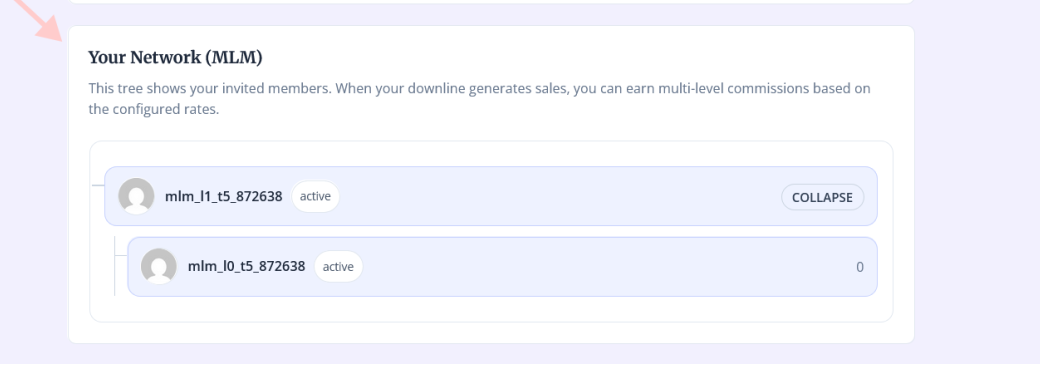
Affiliate Engine WooCommerce affiliate My Account frontend – sub-affiliate downline network view showing sponsor chain, recruited affiliates and parent commission earnings inside WordPress

The affiliate network view in Affiliate Engine — affiliates see their sponsor chain and recruited downline directly inside WooCommerce My Account.

Building a multi-tier affiliate network is a growth strategy. Managing one is an operational discipline. The moment your affiliate program has a second level — affiliates who were recruited by other affiliates — you have new questions that a flat affiliate program never asked: who recruited this affiliate? How much has this parent earned from their downline’s activity this month? Which sub-affiliate accounts are active, and which are sitting dormant? If a commission record is pending, is it from a direct referral or from an upline relationship?

These are not exotic questions. They are the routine operational requirements of any program with a network layer — and if your plugin cannot answer them from the admin, the work of answering them falls on you, manually, in spreadsheets. This guide is about how to avoid that: what sub-affiliate and parent commission tracking looks like when it is working correctly, what data you should expect to see and where, and how Affiliate Engine – Ultimate WooCommerce Referral & Affiliate Marketing Plugin handles this inside WordPress.

Start with the terminology, because the words matter for understanding what the data means.

Sub-affiliates, parent affiliates, and sponsor chains: what the terms mean in practice

A sub-affiliate is any affiliate who was recruited into the program by another affiliate. The recruiting affiliate is their parent or sponsor. This relationship is established once — at the time the sub-affiliate registers — and is permanent. It determines which affiliates receive upline commissions every time the sub-affiliate generates a sale.

The chain of parents above a sub-affiliate is their upline. In a three-level program: the sub-affiliate makes a sale; their direct parent (Level 1 sponsor) earns a commission; that parent’s parent (Level 2 sponsor) earns a smaller commission; and that affiliate’s parent (Level 3 sponsor) earns a smaller commission still. Each of these is a separate commission record in the system — all derived from the same original order, all linked to the same base referral.

The two tracking questions every multi-tier program needs to answer
From the admin side: who is in the network, who recruited them, and how much has each level earned? From the affiliate side: who have I recruited, what are they generating, and how much am I earning from their activity? A well-implemented WooCommerce sub-affiliate tracking system answers both sets of questions from within WordPress — no external dashboard, no manual reconciliation.
Admin perspective
  • See every affiliate’s sponsor assignment
  • Filter referrals by source: direct vs MLM
  • View all pending parent commissions
  • Identify dormant sub-affiliate accounts
  • Manually assign or update sponsor relationships
  • Track payout history per affiliate level
Affiliate perspective
  • See their own recruitment (downline) list
  • Track earnings from direct referrals separately
  • Track earnings from sub-affiliate activity
  • View their position in the sponsor chain
  • Request payouts for total accumulated balance

How sub-affiliate tracking works in Affiliate Engine

In Affiliate Engine, sub-affiliate relationships are stored persistently in the database — in user meta for quick access and in the dedicated naff_mlm_sponsors table for structural consistency. When a new user registers after arriving through an affiliate’s tracking link or coupon, the system records that affiliate as the new user’s permanent sponsor. This happens automatically — no manual action from the admin is required for affiliates who join via tracked links.

The sponsor relationship is not session-dependent. It does not expire when the tracking cookie expires. Once recorded at registration, it is the permanent definition of that affiliate’s position in the network. Every sale that affiliate makes for the rest of their time in the program will generate the same upline commission chain — to the same parent, grandparent, and great-grandparent affiliates — regardless of how much time has passed.

🔗Once you’ve identified active sub-affiliates and their earnings, the next step is to automate WooCommerce affiliate payouts to eliminate manual errors and delays. →


Affiliate Engine affiliates admin tab – WooCommerce sub-affiliate tracking showing parent sponsor assignments, affiliate accounts and network relationships for multi-tier commission program management

The Affiliates tab in Affiliate Engine — view every affiliate account with its sponsor assignment and network position.

Tracking parent commissions: what the Referrals tab shows you

Every time a sub-affiliate makes a sale, the system creates multiple referral records for that order: one Base Referral for the sub-affiliate (the direct commission), and separate MLM referral records for each upline level. These MLM referral records are the parent commissions — and they live in the same Referrals tab as every other commission record, but with a source field set to mlm rather than the standard referral source.

This source field is the key to filtering and understanding the data. From the Referrals tab, you can see at a glance which commission records are direct referrals (earned by the affiliate themselves) and which are parent commissions (earned because a sub-affiliate made a sale). Each MLM record also carries a reference back to its parent Base Referral — meaning you can trace any upline commission record directly back to the original order that generated it.

🔗For stores scaling beyond a flat structure, the best WooCommerce MLM plugin setup ensures seamless tracking of parent commissions and sub-affiliate performance. →

What the Referrals tab data means for sub-affiliate tracking
source: direct
This affiliate referred a customer themselves — via their tracking link or coupon code. Standard commission. No upline involved.

source: mlm
This is a parent commission — earned because a sub-affiliate in this affiliate’s downline made a referral. The record links back to the original Base Referral. The affiliate did not make this sale themselves.

source: mlm_leader
This is a Leader Bonus — a milestone reward triggered when this affiliate’s team crossed a cumulative revenue threshold. A one-time bonus, not a per-sale commission.


Affiliate Engine referrals tab – WooCommerce parent commission tracking showing direct and MLM source referral records for sub-affiliate network commissions with status and amount per level

The Referrals tab in Affiliate Engine — direct and MLM parent commission records per sale, each with source, level, status, and linked base referral.

What affiliates see: the downline view inside My Account

From an affiliate’s perspective, the most important sub-affiliate tracking question is: “who have I recruited, and what are they generating?” In Affiliate Engine, affiliates answer this from their own dashboard inside the WooCommerce My Account area — no login to a separate system, no external affiliate portal.

The affiliate dashboard shows the network view: their downline list, the sponsor chain above them, and their accumulated earnings broken down by source. An affiliate can see their direct referral commissions separately from their MLM parent commissions — understanding not just their total balance, but where each part of it came from. This transparency is important for the behavioural motivation the multi-tier structure is designed to create: an affiliate who can see exactly how much their downline is generating for them is an affiliate with a concrete financial reason to recruit more actively.

Managing sponsor assignments: automatic and manual

In a healthy running program, sponsor assignments happen automatically: every affiliate who registers via a tracked link is assigned the appropriate sponsor without any admin intervention. But programs are never perfectly clean. You will encounter situations where sponsor assignments need to be managed manually — and understanding when and how to do this is part of the operational discipline of running a multi-tier program.

Automatic assignment — when it works

A prospective affiliate clicks on an existing affiliate’s tracking link, arrives at your site, and registers as a new affiliate. The tracking cookie is present at the time of registration. Affiliate Engine records the recruiting affiliate as the new affiliate’s permanent sponsor. No admin action needed. This covers the majority of cases in a well-structured program.

Manual assignment — when you need it

An affiliate joined before the MLM add-on was activated and has no sponsor recorded. Or someone registered directly without a tracking link but you know which affiliate recruited them. Or you are migrating existing affiliates from another program. In these cases, sponsor assignments can be made manually from the Affiliates tab in the Affiliate Engine admin — select the affiliate, assign their sponsor, save. The relationship takes effect immediately for all future sales.

🔗Implementing WooCommerce tiered commission structures transforms passive promoters into active recruiters, driving exponential growth in your affiliate network. →

Self-referral rule — why it matters for sponsor chains

If the self-referral rule is enabled, an affiliate cannot earn a commission from their own purchases. This applies to the Base Referral. The MLM upline records follow the Base Referral — so if the Base Referral is blocked by the self-referral rule, no upline commissions are created for that transaction either. Enabling the self-referral block protects not just direct commissions, but the entire upline chain from a single manipulated purchase.

Auditing your sponsor chain before launch
Before activating the MLM Matrix add-on on a program with existing affiliates, it is worth auditing which affiliates have no sponsor recorded. Any existing affiliate without a sponsor will generate only a Base Referral when they make a sale — no upline commissions will be created. If those affiliates were verbally recruited by other affiliates in your network, assigning the correct sponsors before go-live ensures the commission chain reflects your actual network structure from day one.

Payout management for parent commissions: what the Payouts tab handles

Parent commissions accumulate in each affiliate’s balance exactly like direct referral commissions — there is no separate payout pool or special handling required. When a parent affiliate’s approved balance reaches the minimum payout threshold, they request a payout from their My Account dashboard. The admin sees this request in the Payouts tab alongside all other payout requests and processes it in the same workflow.

What this means operationally: a Level 2 sponsor who accumulates £8 in parent commissions from ten small sales across their downline has that £8 sitting in their balance, pending alongside any direct referral commissions they have also earned. When they hit the minimum payout threshold (whatever you have configured), they submit a single payout request that covers everything — direct and parent commissions combined. The admin does not need to process separate payouts for different commission types.


Affiliate Engine WooCommerce payouts tab – direct and parent MLM commissions from sub-affiliates accumulate in single affiliate balance with unified payout request workflow

The Payouts tab in Affiliate Engine — direct and parent commissions accumulate in a single balance; all payout requests managed in one admin view.

What happens when a sub-affiliate’s sale is refunded

This is the operationally critical question that separates a well-built multi-tier system from a leaky one. When a sub-affiliate’s order is refunded, the following sequence occurs automatically in Affiliate Engine:

1

The WooCommerce order status changes to Refunded or Cancelled.

2

The Base Referral (the sub-affiliate’s direct commission) is automatically set to Rejected.

3

All MLM parent commission records linked to that Base Referral — Level 1, Level 2, Level 3 — are automatically set to Rejected, provided they have not already been paid.

4

No parent commissions from that order are deducted from any affiliate’s balance. No money is paid out for the refunded sale at any level. The refund protection works across the entire chain, not just the direct affiliate.

The hold period is your primary protection tool
The refund cascade only protects parent commissions that have not yet been paid. Once a commission is marked paid, it is not reversed. This is why the hold period configuration is essential: set it to extend past your refund window. If your store offers 30-day refunds, configure the hold period to 35 days minimum. This ensures that no parent commission — at any level in the chain — can be paid out before the refund window closes on the original order.

A practical checklist for sub-affiliate tracking setup

Before going live with a multi-tier program, work through this list to confirm that your sub-affiliate tracking will be complete and accurate from day one.

Sub-affiliate tracking setup checklist

MLM Matrix add-on is activated — confirm the add-on is enabled in Affiliate Engine settings before any affiliate recruits begin joining.

Depth and level rates are configured — decide how many levels deep your chain goes and set a rate for each level. Verify the total payout per order is within your margin before launching.

Existing affiliates have sponsors assigned — audit the Affiliates tab for accounts without a sponsor. Assign sponsors manually where appropriate before activating multi-tier commissions.

Hold period covers your refund window — go to General Settings and confirm the hold period is set to at least the length of your longest refund window, plus a few days buffer.

Self-referral rule is enabled — prevent affiliates from earning commissions (direct and upline) from their own purchases. Enable this in the core plugin settings.

Affiliates can see their downline in My Account — test the frontend by logging into a test affiliate account and confirming the network view is visible with sponsor chain and downline display.

Test a parent commission end-to-end — place a test order via a sub-affiliate’s link. Confirm the Base Referral is created for the sub-affiliate and separate MLM records are created for each upline level. Then cancel the order and confirm all unpaid upline commissions are rejected.

Frequently asked questions


How do I know which referral records in the Referrals tab are parent commissions vs direct commissions?
The source field on each referral record tells you this directly. Records with source mlm are parent commissions generated by a sub-affiliate’s sale. Records with source mlm_leader are Leader Bonus milestone rewards. All other records are direct commissions from that affiliate’s own referrals. You can filter the Referrals tab by affiliate to see all commission types for a specific account.

Can I see a list of which affiliates each parent has recruited?
Yes. The Affiliates tab in the Affiliate Engine admin shows sponsor assignments — you can identify which affiliates have the same sponsor to see a parent’s direct recruits. From the affiliate’s own My Account dashboard, they can view their downline directly. The network view shows the sponsor chain above them and the affiliates they have recruited below them.

If I change a sponsor assignment, does it affect historical commissions already paid?
No. Changing a sponsor assignment affects only future sales made after the change. Historical referral records — including already-paid parent commissions — are not retroactively altered. This means sponsor reassignment is safe to do for operational corrections without creating a need to recalculate past payouts.

Can a sub-affiliate see how much their parent is earning from their activity?
No. Each affiliate’s dashboard shows only their own earnings — direct commissions they have generated and parent commissions they have earned from their own downline. A sub-affiliate cannot see what their parent affiliate is earning from the sub-affiliate’s activity. The network view shows the structural chain (who their sponsors are) but not the commission amounts earned by others in the chain.

What happens to parent commissions if a sub-affiliate’s account is deactivated?
Deactivating a sub-affiliate account stops them from generating new referrals going forward. Historical commission records — including parent commissions already created from their past sales — are not affected. Any approved parent commissions already in a parent affiliate’s balance remain there and can be paid out normally. Only future sales from that deactivated account stop generating commissions for the upline chain.

Tracking sub-affiliates and parent commissions is not a technical luxury — it is the operational foundation that makes a multi-tier affiliate program trustworthy to the affiliates running it. An affiliate who cannot verify what their downline is generating and what they have earned from it will not stay motivated to recruit. An admin who cannot see which accounts have sponsors, filter commission records by source, or confirm that refunded orders cancelled the full upline chain is running a program that will develop errors at scale.

Affiliate Engine covers both sides of this equation inside WordPress — without an external platform, without separate admin panels for MLM vs standard affiliate management, and without per-seat pricing as your network grows.

Sub-affiliate tracking · Parent commissions · Downline management

Affiliate Engine — Complete Sub-Affiliate & Parent Commission Tracking for WooCommerce

Persistent sponsor relationships. Automatic upline commission creation. Source-filtered referral records. Status synchronisation on refunds. Affiliate-facing downline view inside My Account. Free MLM Matrix add-on. Flat one-time site licence.


Affiliate Engine WooCommerce sub-affiliate tracking and parent commission management

Affiliate Engine by NEXU WP
WooCommerce plugin · MLM Matrix free · Flat one-time licence


Get Affiliate Engine

🔗While sub-affiliate networks focus on individual promoters, WooCommerce B2B agency referral tracking ensures agencies receive accurate commissions for client referrals. →

Picture of Mahdi Jabinpour

Mahdi Jabinpour

As a sales-driven developer and the founder of NexuWP, Mahdi focuses on building WordPress solutions that don't just work—they convert. From AI-powered bulk translation engines to high-efficiency media offloading, he helps business owners automate the "grind" so they can focus on global growth. He is a pioneer in integrating advanced LLMs into the WordPress workflow.

RELATED POSTS

RELATED POSTS

3 Reviews
Linda Martinez 3 months ago

Ugh, this is such a pain to track. I followed the setup guide to the letter, but sub

mehdiadmin 3 months ago

I'm sorry you're having trouble with this. please check the "Affiliate Network View" section in your Affiliate Engine

Linda Smith 3 months ago

Finally a plugin that doesn't lose referrals when cookies do. Saves me so much manual work!

Mahdi Jabinpour 3 months ago

This is exactly what we hoped the tool would do for your team, and I'm so pleased to

Linda Martin 3 months ago

Honestly didn't think this would work as well as it did. My upline was a total mess before, but now I can actually see who recruited who and how everything flows up. Saved me hours of spreadsheet heck.

Mahdi Jabinpour 3 months ago

I'm really That's exactly what we hoped it would do.

Please log in to leave a review.