Next-Level Code. Nexuvibe Style ...
Hrs
Min
Sec

HubSpot occupies an interesting position in the WooCommerce chatbot conversation. It is a genuinely impressive platform, one of the most mature all-in-one marketing and CRM tools available, and its chatbot functionality is a credible part of that platform. But a lot of WooCommerce store owners encounter HubSpot in a comparison article or a search result and evaluate it as a standalone chatbot option without understanding that its value is almost entirely dependent on context: specifically, whether you are already running HubSpot as your core CRM.
For stores already living in the HubSpot ecosystem, the chatbot is a natural extension of existing infrastructure. For stores that are not, HubSpot’s chatbot carries a heavy entry cost, a CRM commitment, and a WooCommerce integration gap that makes it a poor fit for the specific use case of answering product questions, checking order status, and guiding shoppers through purchase decisions. That use case is where dedicated WooCommerce AI chatbot plugins actually deliver.
This guide is written for WooCommerce store owners who are genuinely evaluating both options. We reference Nexu SmartChat as a dedicated WooCommerce AI chatbot plugin with RAG throughout, but the analysis of HubSpot’s strengths and limitations is as fair as we can make it. The goal is a genuine decision framework, not a straw-man comparison.
Let’s start with what HubSpot’s chatbot actually is, because this is frequently misunderstood.
HubSpot’s chatbot is not a single product. It is a set of features embedded within the HubSpot platform at different tiers, and understanding which tier gives you what is essential before you can evaluate it fairly. Many businesses discover this the hard way: they install the free HubSpot WordPress plugin expecting AI-powered answers and find themselves with a rule-based decision-tree bot that requires them to write every possible conversation path manually.
The free HubSpot WordPress plugin and the Starter plan give you HubSpot’s visual Chatflows builder: a drag-and-drop interface for creating scripted conversation trees. You define the questions, the options, and the paths. The bot follows your script. There is no natural language understanding. A visitor who types something your script does not anticipate gets a fallback message. This is a capable lead capture tool but it is not an AI chatbot in any meaningful sense. Starter plans begin at around $20 per seat per month and add branding removal, but the bot remains rule-based. The free tier includes the HubSpot branding in the chat widget.
Professional tier unlocks Breeze Customer Agent, HubSpot’s actual AI-powered chatbot. This is where natural language understanding and knowledge-base-powered answers become available. Breeze reads from your HubSpot knowledge base articles and CRM data to answer questions. The Service Hub Professional starts at $90 per seat per month, and Marketing Hub Professional at $800 per month. Each AI conversation via Breeze Customer Agent costs 100 HubSpot Credits, which at $10 per 1,000 credits works out to approximately $1.00 per AI conversation. Professional plans include roughly 30 AI conversations per month. Every conversation beyond that costs $1.00 each at the standard rate. And that is before a mandatory $1,500 onboarding fee that applies to Service Hub Professional.
Enterprise tier adds custom objects, advanced lead scoring, and the full Breeze AI suite across all hubs. At this level HubSpot is a genuinely powerful platform for large organizations with complex sales and support operations. For a WooCommerce store owner evaluating chatbot options, this tier is not in the relevant price range unless the business is already operating at a scale where the full HubSpot platform is justified on its own merits.
HubSpot does integrate with WooCommerce. There is an official integration that syncs order data, customer data, and product purchase history into the HubSpot CRM. For marketing automation, email sequences, and CRM-based customer segmentation, this integration is genuinely useful. But for the chatbot specifically, this integration creates an important misunderstanding.
The WooCommerce data that syncs to HubSpot CRM is historical transaction data: past orders, customer lifetime value, purchase dates. It is not a live product catalog feed. HubSpot’s Breeze Customer Agent answers questions from your HubSpot knowledge base articles, not from your live WooCommerce product database. This means the chatbot cannot answer “is this item currently in stock?” from live inventory data. It cannot answer “what are the exact dimensions of the Pro model versus the Standard model?” from your product catalog unless you have manually created knowledge base articles covering that information. It cannot check real-time shipping estimates based on current order volume.
This gap is not a minor limitation for a WooCommerce store chatbot. The most common visitor questions on an ecommerce site are product-specific: what are the dimensions, does it come in this color, what is the difference between these two models, is this compatible with my existing equipment, what is the return window for this category. Every one of these questions requires access to your actual product catalog data.
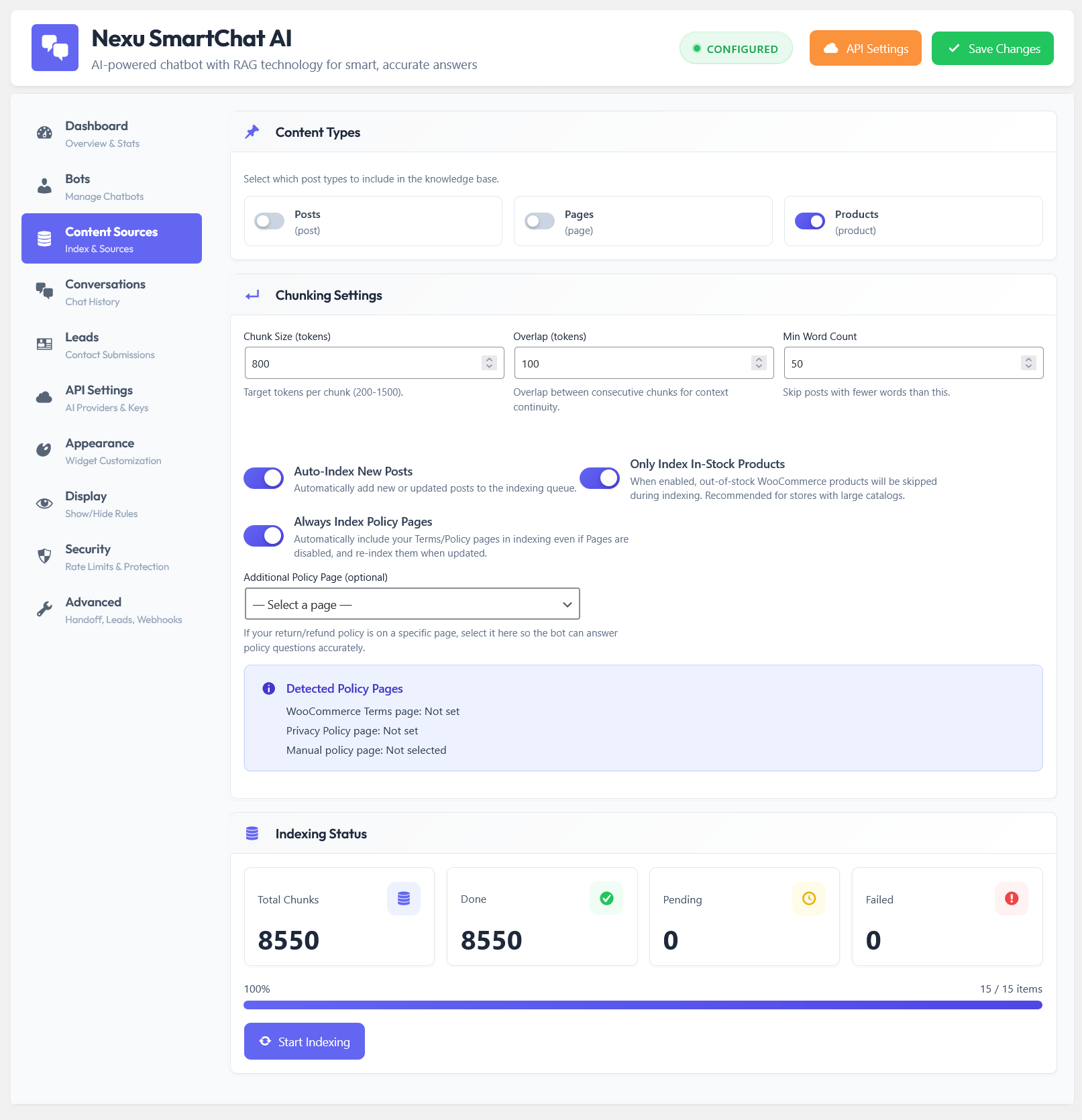
A dedicated WordPress RAG chatbot indexes your WooCommerce product catalog directly into a vector knowledge base, including product descriptions, attributes, variations, specifications, and any custom fields you have populated. When a visitor asks about a specific product, the retrieval layer finds the relevant product data and passes it to the AI model. The answer is drawn from your actual product database, not from a manually maintained document you have to keep up to date every time you add or modify a product.
A fair comparison has to identify where HubSpot’s chatbot genuinely outperforms dedicated plugins, not just where it falls short. There are specific scenarios where HubSpot is the correct choice for a WooCommerce business, and being clear about those scenarios avoids wasted evaluation time.
If your sales and marketing team is already running HubSpot, adding the chatbot as a layer on top of that infrastructure has real value. Every chatbot conversation is automatically logged to the contact timeline, which means your sales team has full context when they follow up. The chatbot can personalize greetings using CRM contact data, qualifying conversations can route directly into HubSpot pipelines, and meeting bookings go straight to the integrated calendar. None of this requires additional integration work because HubSpot owns all the connecting pieces. For a WooCommerce business that has already invested in HubSpot for B2B or high-value B2C sales, the chatbot adds genuine value as an extension of that investment.
HubSpot’s chatbot flows excel at structured lead qualification and appointment booking because these are rule-based processes that map cleanly to the Chatflows builder. If your WooCommerce store sells high-value products that typically require a consultation before purchase, and your chatbot’s job is to qualify potential customers and book discovery calls rather than answer product questions, HubSpot’s integration with its calendar tool and lead pipeline is more capable than most dedicated chatbot plugins at this specific use case.
Platform consolidation has genuine operational value. If managing multiple tools and their integrations is a pain point for your team, and you are willing to accept HubSpot’s pricing structure in exchange for a single interface that covers marketing automation, email, CRM, and chat, the trade-off may make sense. The chatbot’s limitations on product-specific answers become more acceptable when the platform is delivering value across multiple other functions simultaneously.
A dedicated WordPress AI chatbot plugin is built from the ground up to operate within the WordPress and WooCommerce environment. This native relationship with the platform is the source of its advantages, and it creates a fundamentally different architecture for knowledge retrieval.
Rather than pulling answers from a separately maintained knowledge base like HubSpot does, a RAG-based WordPress plugin indexes your existing WordPress content directly. Your product pages, category descriptions, blog posts, FAQs, shipping policies, and custom post types all enter the vector knowledge base as they are, without you having to duplicate content into a separate documentation system. When you update a product’s specifications or add a new item to your catalog, you trigger a re-index and the chatbot knows about the change in minutes. There is no knowledge base article to write, no HubSpot content to sync, and no gap between what is on your store and what the chatbot knows about.
The security and cost control layer is another area where dedicated plugins differ meaningfully from HubSpot. A WordPress-native plugin with built-in rate limiting and IP blocking lets you cap API costs precisely. HubSpot’s credit system works in the opposite direction: costs scale automatically with usage, and the default configuration auto-upgrades your credit allocation when you hit limits, which means surprise charges are a documented, common experience for growing stores.
Deep appearance customization is also more accessible in dedicated plugins. HubSpot’s chatbot widget appearance is constrained by the platform’s design system and is only fully customizable at higher tiers. A dedicated WordPress plugin with a full appearance settings panel lets you match the widget color, typography, position, avatar, and behavior to your store’s brand from the start, with no tier restrictions.
The following scenario represents a mid-sized WooCommerce store: approximately 10,000 monthly visitors, around 400 chatbot conversations per month, a single store manager who also handles support, and a product catalog of 80 to 200 items.
After laying out the full picture, the decision comes down to three questions.
If yes: Use HubSpot’s chatbot. The CRM integration is the whole value proposition and you already have the infrastructure. The per-conversation cost is real but you are paying for a unified platform, not just a chatbot. If no: Do not buy HubSpot for the chatbot. You would be paying $1,500 in onboarding fees and $1,080+ per year in seat costs before a single AI conversation fires, for a chatbot that cannot read your live product catalog. The economics make no sense for a chatbot-only purchase.
If yes: A dedicated WooCommerce RAG plugin is the right choice regardless of HubSpot status. A chatbot that indexes your product catalog directly and answers from live content will serve your visitors better and cost dramatically less than one that answers from a manually maintained knowledge base. If no and your primary job is lead qualification and meeting booking: HubSpot’s Chatflows do this well, but evaluate whether a simpler booking tool plus a separate chatbot would be cheaper and more effective.
HubSpot Professional is a real investment that delivers real value across its entire platform. If your store is at a stage where the marketing automation, email sequences, lead scoring, and CRM pipeline management are all worth that investment independently, the chatbot is a meaningful addition. If you are evaluating it primarily as a chatbot and the other HubSpot features are secondary, a dedicated WooCommerce AI chatbot plugin that costs a fraction of the price while delivering better product-specific accuracy is almost certainly the better choice.
HubSpot is an excellent platform for the businesses it is designed for. For a WooCommerce store evaluating chatbot options without an existing HubSpot commitment, it is the wrong starting point. The right starting point is a plugin that lives inside WordPress, reads your actual product catalog, and answers product-specific questions accurately without a five-figure annual platform investment. The decision should follow the use case, not the brand recognition.
Nexu SmartChat indexes your entire WooCommerce product catalog directly, answers product-specific questions from live data, and costs a fraction of the price of a CRM platform chatbot.






So if I'm already paying for HubSpot's Marketing Hub, does their chatbot actually pull live inventory or order data from WooCommerce without extra setup?
Hey everyone! Just finished reading this guide, and wow it really breaks down the pricing in a way that's super clear. i didn't realize you'd need the Service Hub Pro at $90 a month per seat just to unlock AI responses, and that's on top of whatever CRM or Marketing Hub plan you're already paying for
Hey everyone, My friend raved about this guide for choosing a chatbot, but it totally missed the biggest problem HubSpot's chatbot can't actually pull live product or order details from WooCommerce.