Next-Level Code. Nexuvibe Style ...
Hrs
Min
Sec

The conversation about WooCommerce popups often treats all notification formats as interchangeable. They are not. A sticky notification bar at the top of your store and a centered modal popup that overlays the page are fundamentally different tools that serve fundamentally different purposes. Using a modal popup where a notification bar would be more effective, or a notification bar where you need a modal’s attention-grabbing power, means getting weaker results from a campaign that could have performed better with the right format choice.
This guide provides a clear comparison of both formats, not to declare a winner but to help you understand when each one is the right choice for your specific promotional campaign. The answer depends on the campaign type, the urgency of the message, the page context, and the visitor segment you are targeting.
We will look at this through the lens of real WooCommerce campaign scenarios, because the format decision is always a function of what you are trying to achieve, not a general preference.
The core distinction between notification bars and modal popups is not visual. It is behavioral. They interact with the visitor’s attention in completely different ways, and understanding this difference is what makes format selection a strategic decision rather than an aesthetic one.
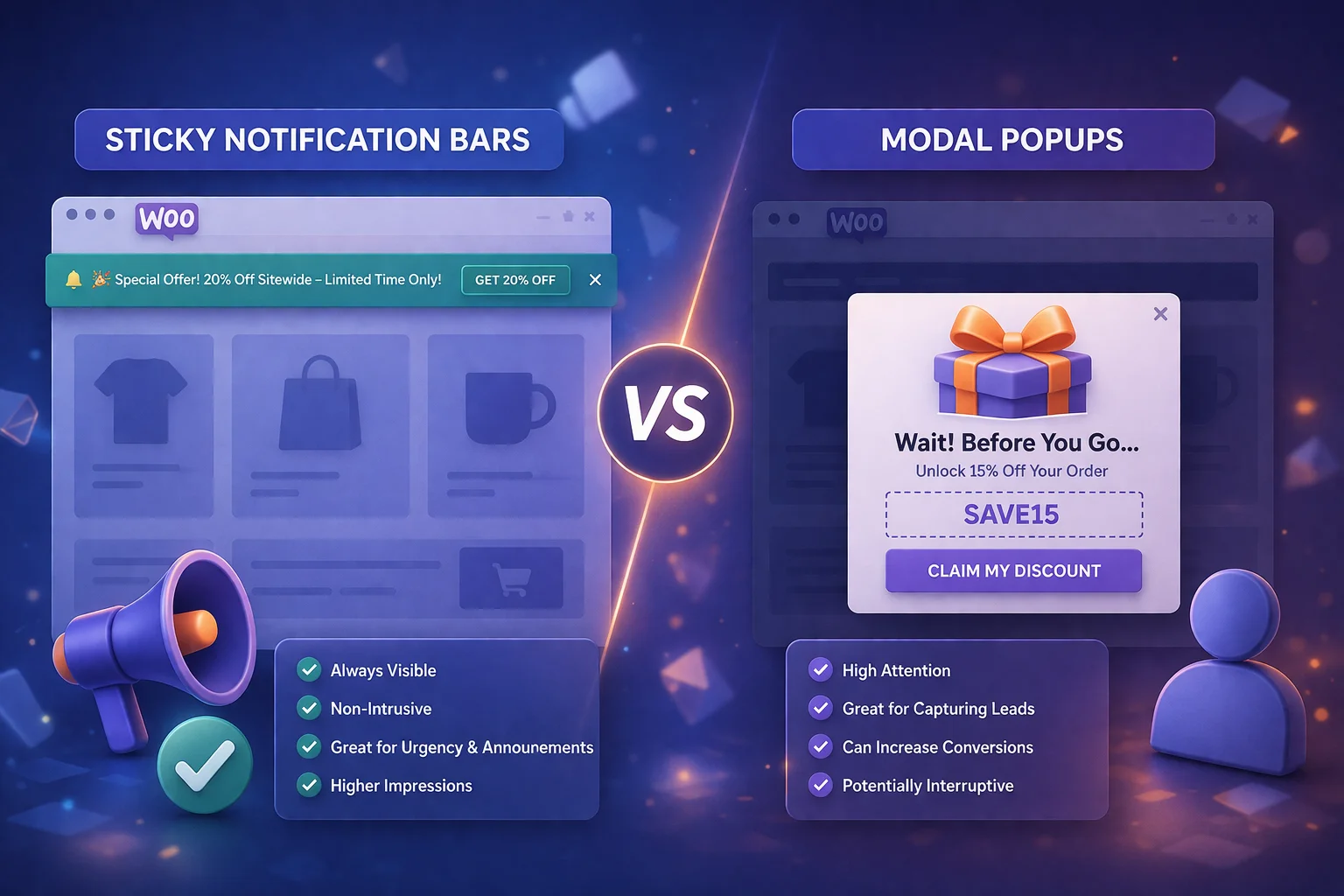
A notification bar sits at the top or bottom of the page as part of the page layout. It does not interrupt the visitor’s activity. It does not require dismissal. It simply exists as a persistent element that the visitor can read and act on whenever they choose. This makes notification bars ideal for messages that benefit from sustained visibility throughout a browsing session: free shipping thresholds, ongoing sale announcements, and store-wide promo codes. The tradeoff is lower immediate attention impact. A bar can be scrolled past or mentally filtered if the visitor is focused on something else.
A modal popup overlays the page content, dims the background, and demands a response before the visitor can continue browsing. This forced attention pattern makes modals extremely effective for messages that need to be seen and processed immediately: last-chance cart recovery offers, time-sensitive flash sale announcements, and important promotions that justify interrupting the shopping flow. The tradeoff is visitor irritation. Every modal interruption costs a small amount of visitor goodwill, which means modals need to earn their interruption with a message that is genuinely worth the pause.
To make the format decision concrete, here is how notification bars and modal popups compare across the dimensions that matter most for WooCommerce campaigns.
Notification bars excel in scenarios where the message benefits from continuous visibility rather than a single moment of high attention. Here are the specific campaign types where bars consistently outperform modals.
A “Free shipping on orders over $75” message needs to be visible throughout the entire browsing session, not shown once in a popup and then forgotten. A notification bar delivers this message persistently without interruption, keeping the threshold in the visitor’s awareness as they add and remove items from their cart. This consistent visibility directly influences average order value by encouraging visitors to reach the threshold.
When you have a sale running for a week or a weekend, a notification bar announcing “Spring Sale: 20% off everything with code SPRING20” serves as a constant ambient reminder. The visitor sees it on every page, does not need to remember it, and can act on it whenever they decide to purchase. A modal popup showing this same message once per visit and then vanishing is a weaker delivery mechanism for a multi-day promotion.
If more than 50% of your traffic comes from mobile devices, notification bars should be your default format. They are fully compatible with Google’s guidelines on mobile interstitials, they do not cover content, and they do not require precise tap targets for dismissal. Google has been clear since its intrusive interstitial penalty that popups covering the main content on mobile can negatively affect search rankings. Notification bars avoid this risk entirely.
Delivery delay notices, holiday shipping deadlines, new product launch announcements, and other informational messages that need wide visibility but do not demand immediate action are perfectly suited to notification bars. These messages are useful context for the visitor’s decision-making but do not require the forced attention of a modal popup.
Modal popups earn their place when the message is important enough, urgent enough, or valuable enough to justify interrupting the visitor’s browsing experience. The key word is “earn.” Every modal interruption is a withdrawal from the visitor’s patience. The offer needs to be worth that cost.
When a visitor with items in their cart is about to leave your checkout page, the stakes are high: you are about to lose a sale to someone who was close to buying. This is the scenario where a modal popup’s attention-forcing capability is exactly right. The discount offer needs to stop the visitor in their tracks and give them a concrete reason to complete the purchase right now. A subtle notification bar would not create enough friction to interrupt their departure.
When a promotion ends in 24 hours and the discount is substantial, a modal popup communicates the urgency and value that the situation warrants. The interruption is justified because the visitor needs to know that this specific offer will not be available tomorrow. The key is that the time pressure is genuine and the offer is significant enough to warrant the visitor’s full attention.
A new visitor’s first impression of your store includes determining whether the prices feel right. A modal popup with a meaningful welcome discount (10 to 15% off the first order) reframes the price perception early in the browsing session. This is one of the few scenarios where interrupting a new visitor is worth it, because the alternative is that they browse, judge your prices without the context of the available discount, and leave without purchasing.
When you want to showcase a product alongside the discount, include product imagery, or present a visually rich promotional message, the content capacity of a modal popup is necessary. Notification bars are limited to a single line of text. Modals can include images, formatted text, prominent coupon codes with copy buttons, and clear call-to-action elements. For campaigns where visual presentation is part of the conversion mechanism, modals are the right format.
The mobile experience consideration deserves its own section because it significantly affects the format decision for any WooCommerce store that receives substantial mobile traffic, which in 2026 means nearly all of them.
Google’s stance on intrusive mobile interstitials is clear and has been consistently enforced since 2017: popups that cover the main content on mobile pages can negatively impact that page’s ranking in mobile search results. This does not mean all popups are penalized. Google specifically exempts small banners that use a reasonable amount of screen space, which is exactly what notification bars do.
For WooCommerce stores, the practical implication is that modal popups should be used sparingly on mobile, with careful attention to their trigger conditions and close-button accessibility. Notification bars, by contrast, can be used freely on mobile without any SEO risk, making them the safer default for stores where organic search traffic is a primary acquisition channel.
The most effective WooCommerce promotional strategies do not choose between notification bars and modals. They use both, simultaneously, for different purposes and on different pages. The key is that each format handles a different campaign type, creating a layered system where visitors receive relevant messages in appropriate formats without any overlap or collision.
This layered approach works because notification bars and modals occupy different visual spaces and serve different attention functions. A notification bar at the top of the page does not conflict with a modal popup triggered by exit-intent on the checkout page. The visitor sees the bar throughout their session (ambient awareness), and only encounters the modal if they are about to leave the checkout with items in their cart (targeted intervention). Two different tools serving two different purposes on two different pages.
The format decision comes down to three questions about each specific campaign you are planning to run. Answering these three questions will point you to the right format every time.
If yes, use a notification bar. Free shipping reminders, ongoing sale announcements, and promo codes that visitors need to remember throughout their browsing session benefit from persistent visibility. If the message only needs to be delivered once (a welcome offer, a cart recovery discount), a modal popup is more appropriate.
If the discount is 5% or the announcement is purely informational, a modal popup’s interruption cost exceeds its value. Use a notification bar. If the offer is substantial (15%+ discount, significant promotion, last-chance recovery) and the visitor is in a high-intent state (checkout page, exit-intent), the interruption is justified and a modal is appropriate.
If you need to show a product image, present a longer message, or include a prominent copy-to-clipboard coupon element, you need the content capacity of a modal or a slide-in notification. Notification bars are limited to short, single-line messages. If your message fits comfortably in one line, a bar is usually the better default.
Neither format is universally superior. The best WooCommerce promotional setups use notification bars for persistent, low-pressure messaging and modal popups for targeted, high-value interventions. The WooCommerce notification popup plugin supporting both sticky bars and modal formats lets you assign the right format to each campaign independently, creating a complete promotional layer on your store that is both effective and respectful of the visitor experience.
The format is the vehicle. The targeting, the timing, and the offer are the payload. Getting the format right ensures the payload reaches the visitor in a way that feels appropriate to the moment. Getting it wrong means even a great offer can be received as an annoyance instead of an opportunity.
Sticky notification bars for ambient awareness. Modal popups for targeted interventions. Slide-in notifications for contextual nudges. Each campaign gets its own format, targeting, and schedule.







Hey guys, just tried the sticky notification bar for my Woo store's week long sale and wow, what a difference! No annoying popups blocking the shoppers just a clean little bar at the top that stays put
Finally, someone gets it. they're not the same.
These don't have that issue
Hey everyone! Just wanted to share how much this guide helped me pick the right tool for my store's Black Friday promo. I was torn between a popup and a notification bar, but after reading the breakdown on ambient awareness, I went with the sticky bar at the top.