
Gravity Forms handles most form-building scenarios well. Contact forms, simple registrations, feedback surveys, and basic order forms work flawlessly out of the box. But once your data collection needs move beyond “simple,” you start hitting walls. Some are architectural limits in the plugin itself. Others are server-level restrictions that Gravity Forms exposes when forms grow large. And some are UX problems that make technically functional forms practically unusable.
This guide identifies the seven limitations that Gravity Forms users encounter most often when building large or complex data collection systems, and provides practical solutions for each one. Some solutions use built-in Gravity Forms features that are underutilized. Others require third-party plugins. And some require server configuration changes that your hosting provider can help with.
The goal is not to criticize Gravity Forms. It is one of the best form builders available for WordPress, and its core architecture is solid. The goal is to help you build the forms you actually need by working around the specific points where the plugin’s built-in features run out.
Limitation 1: No practical way to repeat a group of fields
You need users to add multiple rows of grouped fields, like team members, line items, or attendees. The List field only supports text columns. The native Repeater field is beta-only with no UI. You are stuck duplicating fields manually and guessing how many copies the user will need.
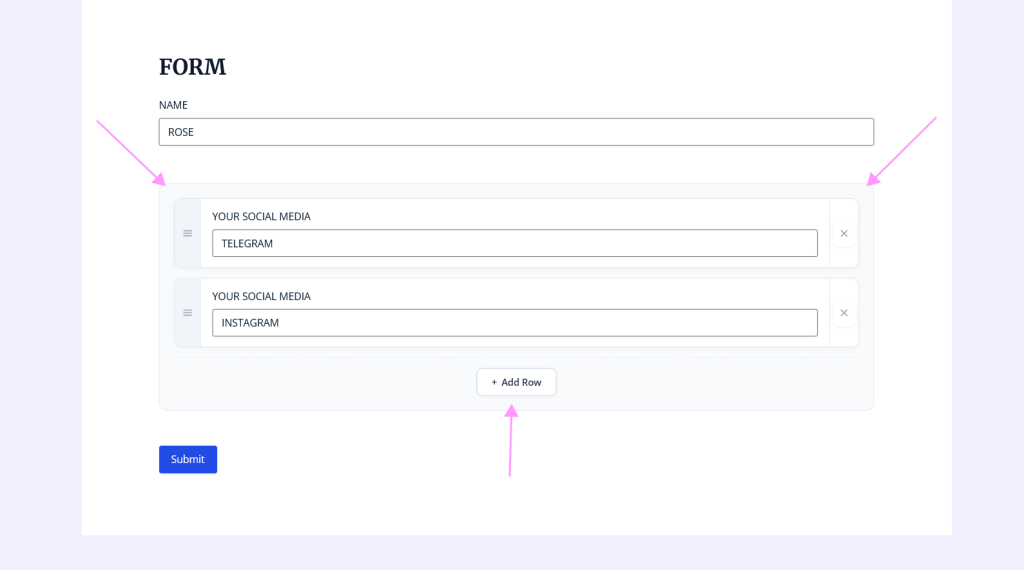
Use a repeater plugin that adds this capability through the visual form editor. The NEXU Advanced Repeater for Gravity Forms with dynamic repeatable field groups lets you define a repeatable section using start and end markers. Any Gravity Forms field type works inside the section: dropdowns, numbers, dates, file uploads. Users add and remove rows as needed. The form adapts to each user’s actual data rather than forcing a fixed structure.

Limitation 2: Forms with many fields trigger server-level errors
Gravity Forms itself has no limit on the number of fields per form. But your server does. PHP has a max_input_vars setting (default: 1000) that limits how many POST variables can be submitted. A large form with 80+ fields can exceed this limit, causing silent data loss where some field values are not saved. Hosting-level mod_security rules can also block submissions from forms with many fields, returning 403 errors.
First, increase max_input_vars in your PHP configuration. A value of 3000 or 5000 handles most large forms comfortably. You can do this in your php.ini, .htaccess, or through your hosting panel. Second, contact your hosting provider to whitelist your site from mod_security rules that block large POST submissions. Third, use multi-step forms (Page fields) so that only one page of fields is validated per step, reducing the per-request field count. And fourth, consider using a repeater plugin instead of duplicating fields. A repeater stores all row data as a single structured value, dramatically reducing the number of POST variables compared to dozens of individually duplicated fields.
Limitation 3: Long forms overwhelm users and kill completion rates
A form that works technically can still fail practically. When users see a form with 40 visible fields, many abandon it before starting. The perceived complexity kills motivation, even if the actual data entry is straightforward. This is especially true on mobile devices where a long form means extensive scrolling.
Use a combination of three strategies. First, break the form into multi-step pages using Gravity Forms’ native Page field with a progress indicator. Users see one manageable section at a time. Second, use conditional logic aggressively to hide fields that are not relevant to the current user. A form with 50 fields where conditional logic hides 30 of them feels like a 20-field form. Third, use a repeater for any section where users need to enter a variable number of items. A repeater that starts with one visible row and lets users add more on demand is always perceived as shorter than a form pre-loaded with ten empty rows. These three strategies together, multi-step, conditional logic, and repeatable fields, turn a visually overwhelming form into one that feels focused and adaptive.
Limitation 4: No built-in per-row calculations for repeated data
Gravity Forms has a powerful calculation engine for individual fields. But when you need per-row calculations inside repeated data, such as quantity times price equals line total for each row in an order form, neither the List field nor the native beta Repeater supports this. You end up either forcing manual calculations onto your users or processing calculations on the admin side after submission.
A repeater plugin that supports Gravity Forms’ native Number field with calculation formulas inside each repeated row. The NEXU Advanced Repeater plugin with per-row calculations for Gravity Forms order and quote forms handles this: each row computes its own values independently, and a summary field outside the repeater can aggregate across all rows. The user sees running totals that update as they modify quantities or add new rows.
Limitation 5: Entry data becomes unreadable at scale
When forms have many fields or duplicated field groups, the entry detail view in the WordPress admin becomes a long, scrollable list that takes minutes to review. The entries list table becomes impossibly wide when every duplicated field adds its own column. For teams processing dozens or hundreds of submissions daily, this admin-side UX problem slows operations significantly.
Replace duplicated field groups with a repeater that stores all rows as a single structured value. Instead of 30 individual fields cluttering the entry view, you see one repeater field displayed as a clean table with rows and columns. The entries list shows a compact summary rather than dozens of columns. For advanced entry display and management, GravityKit’s GravityView can display entries on the frontend with custom layouts, filtering, and search capabilities that go far beyond the default admin view.
Limitation 6: File uploads fail on large or numerous files
Large data collection forms often include file uploads: documents, images, certifications, or supporting materials. PHP has upload limits (upload_max_filesize, post_max_size, max_execution_time) that cause uploads to fail silently or time out. When uploads are inside repeated sections, the native repeater does not support them at all.
Increase your PHP upload limits through server configuration. Set upload_max_filesize and post_max_size to at least 64M for forms with multiple file uploads. Increase max_execution_time to 300 seconds. For uploads inside repeated sections, use a repeater plugin that properly handles file upload fields per row. The NEXU Advanced Repeater with file upload support inside repeatable row groups processes the file upload pipeline correctly so each file stays associated with its specific row through submission, entry display, and export.
Limitation 7: Exports produce unusable data from complex forms
When you export entries from forms that use List fields, the repeated data appears as serialized strings that are not usable in spreadsheets without manual parsing. When you export entries from forms with many duplicated field groups, the CSV has so many columns that it becomes unwieldy. Neither format works for teams that need clean, structured data in their spreadsheets, CRMs, or reporting tools.
Use a repeater that stores data in a structured format (JSON rather than serialized PHP arrays) so exports maintain row structure. For advanced export needs, GravityKit’s GravityExport provides flexible export formats including Excel and CSV with customizable column layouts. If you need to push form data directly to Google Sheets, a connector like NEXU G-Sheets for Gravity Forms can send entry data to a spreadsheet automatically on submission, bypassing the export process entirely.
A practical server configuration checklist for large forms
If you are building forms with more than 50 fields or collecting file uploads, review these server settings before going live. Many “broken form” issues that appear to be Gravity Forms bugs are actually server-level limits that can be adjusted.
The plugin stack that makes large data collection work
Most large data collection scenarios in Gravity Forms benefit from a small, focused set of plugins rather than one monolithic solution. Here is the stack that addresses the most common limitations.
The NEXU Advanced Repeater for Gravity Forms handles the most common limitation: repeatable field groups with calculations, file uploads, and structured entry storage. This solves limitations 1, 4, 5, and 6 in this guide.
GravityKit GravityExport provides flexible export formats with customizable columns, scheduled exports, and direct-to-Dropbox delivery. This addresses limitation 7 for teams that need polished export workflows.
Gravity Forms includes native Save and Continue functionality that lets users save their progress and return later. For forms that take more than a few minutes to complete, this is essential. Users receive a link they can use to resume the form with all previous data intact.
Build forms that match your data, not the other way around
Every limitation in this guide has a solution. Some are configuration changes that take five minutes. Others require a focused plugin that costs less than a single hour of manual data processing. The common theme is that Gravity Forms becomes dramatically more capable when you understand where its built-in features end and choose targeted tools to extend them.
The key insight is that large data collection is not about making forms bigger. It is about making forms smarter. A form that adapts to the user’s actual data needs, breaks complex collection into manageable steps, and stores submissions in a structured format will outperform a larger form built with brute-force field duplication every time.
Stop fighting Gravity Forms limitations. Extend them.
NEXU Advanced Repeater adds the repeatable field groups, per-row calculations, file uploads, and structured entry storage that Gravity Forms needs for large data collection. From $19/year.






Hey y'all, this guide was a lifesaver during our busy season
Look, I've been using Gravity Forms for years and usually love it, but this guide didn't actually solve my biggest headache: field duplication. I'm building a form for musicians to submit track details, and since every user will have a different number of entries, I'm stuck. The workaround here still means I either manually duplicate fields or cap how many tracks they can add which totally misses the point. Why isn't there just a dynamic way to handle this? It's wild that in 2026, this is still an issue.
The repeater workaround here actually solves the "no native UI" problem better than most third party plugins I've tried. Still wish it was built in, but this method's cleaner than expected