Next-Level Code. Nexuvibe Style ...
Hrs
Min
Sec

If you run a multilingual WordPress site on WPML, you already know the pain: translation credits are expensive, manual translation is slow, and the built-in automatic translation options lock you into WPML’s own pricing tiers. The obvious solution is connecting your own AI API key from OpenAI, Claude, Mistral, or Grok and letting an addon handle the translations automatically.
The problem is choosing which addon to trust with your live site. There are three serious contenders in this space right now: NEXU AI Auto Translator for WPML, AutoMLP (Automatic Multilingual Posts), and LATW (Language Addon for Translation Workflow). Each one takes a different approach to the same problem, and the differences matter more than you might expect.
We installed all three on a test site running WPML with WooCommerce and Elementor, connected the same OpenAI API key to each, and translated the same set of pages into five languages. Here is what we found.
Before we get into the details, here is a quick overview of what each plugin is and where it comes from. All three are WPML addons, meaning they require WPML to be installed and active. None of them replace WPML. They extend it by adding AI-powered automatic translation as a translation engine option.
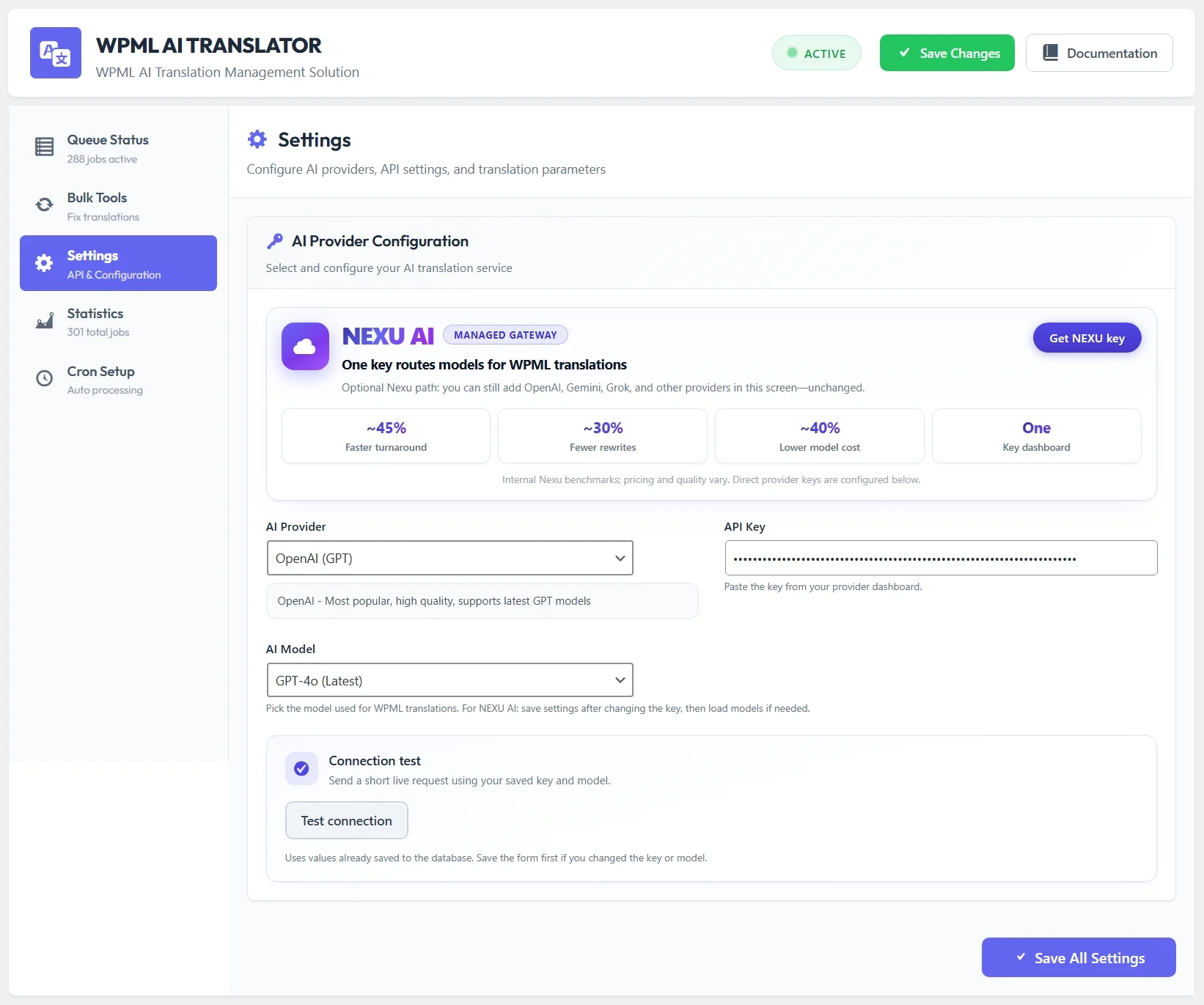
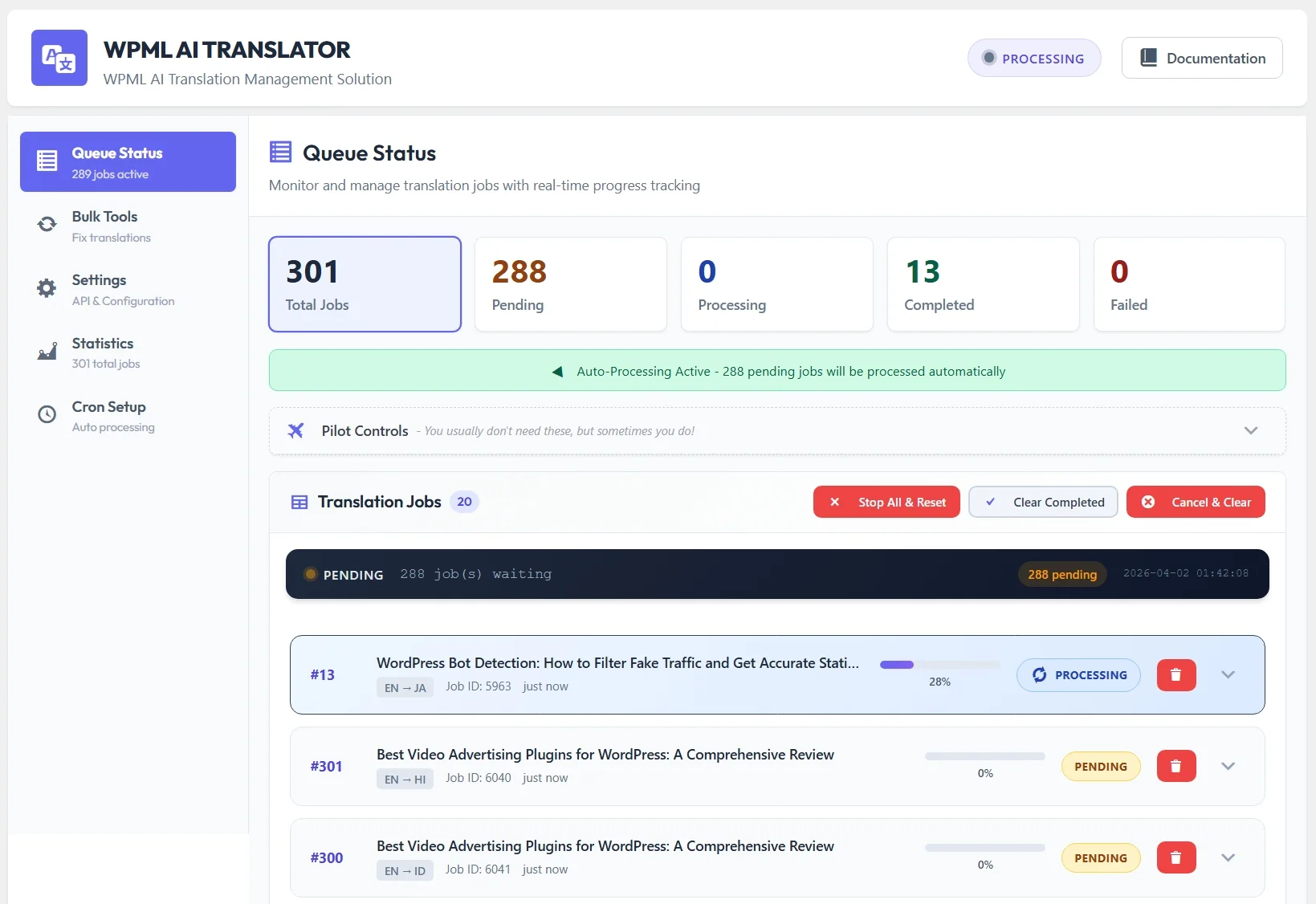

Supports four AI providers: OpenAI (GPT-4o, GPT-4.1), Anthropic Claude (Sonnet 4.6, Opus 4.6, Haiku 4.5), Mistral, and Grok. Handles background processing through WordPress cron, includes intelligent content chunking with a resume system, bulk re-translation tools, WPML string translation, Elementor template translation, queue monitoring dashboard, and detailed statistics. Pricing starts at $39/year for a single site.
Primarily focused on OpenAI integration. Translates posts and pages through WPML’s translation management. Provides basic queue management and status tracking. Simpler feature set compared to the other two options, which can be an advantage if you want a lightweight solution that does one thing. Limited page builder support.
Supports OpenAI and has added basic Claude support. Focuses on translation workflow automation with WPML. Includes batch processing and some custom field support. Has been around longer than the other two options, which means a larger existing user base but also older architecture in some areas.
The single biggest differentiator between these three plugins is which AI translation engines they let you connect. This matters because different AI models produce noticeably different translation quality depending on the language pair, the content type, and the tone you need.
In our testing, Claude (specifically Sonnet 4.6) consistently produced the most natural-sounding translations for European languages like French, German, and Spanish. OpenAI’s GPT-4o was strongest for Asian languages and technical content. Mistral performed surprisingly well for French and Arabic. Grok delivered solid results across the board with faster response times than the others.
The practical implication is straightforward: if you are locked into a single AI provider, you are stuck with whatever that provider does well and whatever it does poorly. If you can switch between providers, you can match the best model to each language pair or content type. Only one of these three plugins gives you that flexibility across all four major providers.
Translating a 500-word blog post is easy. Every plugin handles that without issues. The real test comes when you throw a 5,000-word guide or a detailed WooCommerce product with dozens of custom fields at these tools. That is where architectural differences become visible.
We tested each plugin with a 7,200-word article that included HTML formatting, internal links, embedded images, and multiple heading levels. The results were telling.
The plugin automatically split the article into chunks at natural paragraph boundaries, translated each chunk sequentially, and reassembled them into the complete translated article. When we deliberately killed the cron process mid-translation to simulate a server interruption, it picked up exactly where it left off on the next cron cycle. No content was lost or duplicated. The HTML structure, all internal links, and image references came through intact.
AutoMLP attempted to send the entire article to the API in a single request. For our 7,200-word test article, this resulted in a timeout error on the first attempt. It did not retry automatically, and there was no partial progress saved. We had to manually reset the job and try again. On a shorter test (2,000 words), it worked without issue. This is a fundamental limitation for sites that publish long-form content.
LATW does split content into chunks, which is a step up from AutoMLP. However, it does not save progress between chunks. If the process is interrupted, the entire translation starts over from the beginning. For our test article, it completed the translation successfully when left uninterrupted, but the lack of a resume mechanism means that on busy servers with frequent cron interruptions, long articles may never complete.
This is a dealbreaker category for a large portion of WordPress sites. If you build pages with Elementor, your translation plugin needs to understand Elementor’s data structure. Elementor stores content as JSON in post meta, with nested widget structures that contain text fields at varying depths. A plugin that only translates the standard WordPress content field will miss most of your page content.
We built an Elementor page with headings, text editors, icon lists, testimonial widgets, a pricing table, and a call-to-action section. Then we translated it with each plugin.
NEXU translated every text field inside the Elementor JSON structure, including nested widgets, and the translated page rendered identically to the original with zero layout issues. AutoMLP did not translate Elementor content at all, leaving the translated page showing original-language text inside an otherwise empty translation. LATW translated some Elementor widgets but missed nested content inside sections and columns, resulting in a partially translated page that looked broken.
All three plugins handle basic WooCommerce product translation through WPML, which is expected since WooCommerce products are just a custom post type that WPML already manages. The differences appear in how each plugin handles product-specific fields.
NEXU translates product titles, descriptions, short descriptions, and custom fields (including Yoast SEO meta descriptions and titles) in a single pass. This means your translated product pages have proper SEO metadata in the target language from the moment they go live. AutoMLP and LATW both translate the core product content but leave custom fields and SEO meta untranslated, which means you need to handle those separately or accept that your translated products will show English meta descriptions in search results for other languages.
All three plugins use annual subscription pricing, which is standard for premium WordPress plugins. The costs are for the plugin licenses only. You still pay your AI provider separately based on your API usage, which is the entire point of using these addons instead of WPML’s built-in translation credits.
On a per-site basis, NEXU is the most affordable for single-site users. LATW is the most expensive at the single-site tier but offers a competitive agency plan. AutoMLP sits in the middle but does not offer an agency-level license, which limits its appeal for development shops managing multiple client sites.
When you factor in the feature differences, the price gap becomes more significant. NEXU at $39/year includes four AI providers, Elementor support, WPML string translation, bulk tools, and content chunking with resume. To get comparable functionality from the other two plugins, you would need additional tools or workarounds that add complexity and potential failure points to your workflow.
Translation quality depends primarily on the AI model, not the plugin. All three plugins pass your content to the API and return whatever the model produces. The difference is in how they handle the prompt engineering and whether they preserve context across chunked content.
We had a native French speaker and a native Arabic speaker review the same article translated by all three plugins using the same OpenAI model. The French translations were virtually identical across all three. The Arabic translations showed a noticeable difference: NEXU’s output maintained consistent right-to-left formatting and preserved the natural sentence structure better than LATW’s output, which occasionally produced awkward phrasings at chunk boundaries. AutoMLP’s Arabic output was decent but lacked the paragraph separator preservation that the other two handled.
The real quality advantage comes from NEXU’s multi-provider support. When we switched from OpenAI to Claude for the same French content, the translation improved noticeably in idiomatic accuracy. When we used Mistral for Arabic, the output read more naturally than any of the OpenAI translations. Being able to match the best model to each language is a genuine quality advantage that only one plugin in this comparison offers.
We want to be fair here. Each plugin has scenarios where it could be the right choice for a specific user.
You only use OpenAI, your content is short-form (under 2,000 words per post), you do not use Elementor, and you want the simplest possible plugin with the fewest settings to configure. It does one thing and does it adequately for basic use cases.
You need an agency license for many sites and your primary requirement is basic OpenAI translation with some Claude support. Its longer track record may also be a factor if stability of a known product matters more to you than feature breadth.
You want access to multiple AI providers (OpenAI, Claude, Mistral, Grok), you use Elementor, you publish long-form content, you need WPML string and menu translation, you want bulk re-translation tools, or you run a WooCommerce store where translated SEO metadata matters. It is the most complete solution and also the most affordable at the single-site level.
We tested these three plugins thoroughly, and the results point clearly in one direction. For the majority of WordPress sites running WPML that need AI-powered automatic translation, NEXU AI Auto Translator offers the most complete feature set, the widest AI provider support, and the most robust handling of real-world content challenges like long articles, Elementor layouts, and WooCommerce products.
It is not a perfect plugin. No plugin is. The settings panel has a learning curve if you want to configure everything optimally, and the documentation could be more detailed in some areas. But in terms of what actually matters when you are running a production multilingual site, the combination of four AI providers, reliable content chunking, Elementor support, and bulk tools at $39/year is difficult to argue against.
The fact that you can switch between Claude, OpenAI, Mistral, and Grok from a single settings panel, without reinstalling anything, is not just a convenience feature. It is a genuine competitive advantage that no other WPML AI translation addon currently offers. As AI models continue to improve at different rates for different languages, that flexibility becomes more valuable over time, not less.
Four AI providers, Elementor support, intelligent content chunking, bulk tools, and WPML string translation. One plugin, $39/year.







The NEXU plugin worked perfectly on my Elementor pages no messed up layouts or missing text after translation. Unlike other tools I've tried, this one actually saved me hours of manual fixes.
This pricing setup is way more confusing than other services. nEXU hits you with both a per batch fee and a monthly charge, while other places just do a simple flat rate.
Too many failed batch jobs