Next-Level Code. Nexuvibe Style ...
Hrs
Min
Sec

There is a question that comes up constantly in WordPress multilingual communities: is it possible to use WPML’s automatic translation features without buying their translation credits? The short answer is yes. The longer answer involves understanding what WPML credits actually are, why they cost what they cost, and what alternatives exist that let you achieve the same result through a different path.
WPML’s credit system is a convenience layer. It bundles access to machine translation engines (primarily Google Translate, DeepL, and Microsoft Translator) into a per-word pricing model managed directly from your WPML dashboard. You buy credits, assign content for translation, and it gets translated. It works. But it is not the only way to automate your WPML translations, and for many sites it is not the most cost-effective way either.
This guide covers every viable method for getting automatic WPML translations in 2026 without using the credit system: from connecting your own AI API keys through addon plugins to hybrid workflows that combine AI translation with human review. We will be specific about costs, tradeoffs, and which approach fits which type of site.
Before looking at alternatives, it helps to understand what you are replacing. When you buy WPML translation credits, your money covers three things: the underlying translation engine cost (what Google, DeepL, or Microsoft charges per word), the integration layer that connects that engine to WPML’s translation management system, and a platform margin that covers WPML’s development and maintenance of the feature.
This bundled approach has genuine advantages. It is simple. You do not need to manage API keys, configure external services, or troubleshoot connection issues. Everything works from inside WPML’s interface. For some users, that convenience is worth the premium. But for users who are comfortable managing an API key (which takes about five minutes to set up), the alternatives offer significantly lower per-word costs while delivering equal or better translation quality.
The quality difference matters more than you might think. WPML credits typically use traditional machine translation engines. The credit-free alternatives we will cover use modern large language models like GPT-4o, Claude, and Mistral, which generally produce more natural, context-aware translations. You are not just saving money by skipping credits. In many cases, you are getting better output.

This is the most popular and most practical credit-free approach in 2026. You install an addon plugin that integrates between WPML’s translation job system and an AI provider’s API. You bring your own API key from OpenAI, Anthropic (Claude), Mistral, or xAI (Grok). The addon handles everything else: detecting WPML translation jobs, sending content to the API, receiving translations, and delivering them back to WPML.
The best option in this category right now is NEXU AI Auto Translator for WPML supporting OpenAI, Claude, Mistral and Grok. It supports four AI providers from a single plugin, handles long content through intelligent chunking with a resume system, translates Elementor templates and WPML string translations, and includes bulk re-translation tools for updating existing content. At $39/year for a single site, the plugin license pays for itself within the first batch of translations compared to credit costs.
Translation costs drop by 80% to 95% compared to WPML credits. You get access to the latest AI models (GPT-4o, Claude Sonnet 4.6, Mistral Large, Grok) which produce more natural translations than traditional machine translation. You can switch AI providers at any time without changing plugins. There are no word limits or credit balances to monitor. You pay only for what you actually translate.
You need to manage an API key and a separate billing account with the AI provider. There is a one-time setup process that takes about 10 minutes. The addon plugin has an annual license cost ($39/year for NEXU). WordPress cron needs to be working properly on your server for background processing. These are minor technical requirements, but they are requirements.
The cost math is what makes this method so compelling. Translating 100,000 words through WPML credits costs approximately $30 to $40. Translating the same 100,000 words through your own OpenAI API key costs approximately $1.50 to $2.00. Through Claude, it is similar. Mistral is slightly cheaper. The $39 plugin license is a fixed annual cost regardless of volume, which means the more you translate, the more dramatic the savings become.
For developers who prefer a custom approach, WPML provides hooks and filters that allow external code to interact with its translation management system. You can write a custom plugin or mu-plugin that listens for new translation jobs, sends content to an AI API, and writes the translation back to WPML’s database structure.
This approach gives you maximum control. You can customize the system prompt sent to the AI, implement your own chunking logic, add terminology glossaries, and handle edge cases specific to your content. The downside is that it requires significant development time upfront, ongoing maintenance as WPML updates its internal structure, and thorough testing to avoid data corruption in WPML’s translation tables.
We estimate the development time for a production-ready custom integration at 40 to 80 hours, depending on how many edge cases you need to handle (Elementor content, custom fields, WooCommerce products, string translations). At typical developer rates, this costs $4,000 to $8,000 to build and requires ongoing maintenance. For agencies with many sites and specific requirements, this can make economic sense. For individual site owners, it almost never does.
The third approach combines AI translation with human review for content where accuracy matters most. You use an AI addon plugin to translate everything automatically, then have a human reviewer check and refine the translations for your highest-value pages: homepage, product pages, legal content, and key landing pages.
This is not really a separate method. It is the API key method (Method 1) combined with a content review workflow. But it deserves its own section because it addresses the most common objection to fully automated translation: “what about quality for important pages?”
The workflow looks like this. Install and configure the AI translation addon. Translate all content automatically. Then, for the 10 to 20 pages that matter most to your business, have a native speaker review the translation and make adjustments through WPML’s translation editor. The AI handles 95% of the work. The human reviewer polishes the final 5% that has the highest impact on conversions and trust.
This hybrid approach costs a fraction of full human translation because the reviewer is editing an already-good AI translation rather than translating from scratch. Most freelance translation reviewers charge $0.02 to $0.04 per word for post-editing, compared to $0.08 to $0.15 per word for full translation. And they only review the pages you select, not your entire site.
Here is what each method costs for a typical WordPress site translating 200,000 words into three languages in its first year. The numbers include all costs: translation processing, plugin licenses, and any fixed fees.
The numbers speak for themselves. For most WordPress sites, the AI addon approach is the best balance of cost, quality, and convenience. The hybrid approach makes sense for businesses where translation accuracy on key pages directly affects revenue. The custom development approach makes sense only for agencies managing many sites with very specific requirements. And full human translation, while still the gold standard for quality, is economically viable only for sites with substantial translation budgets.
The right choice depends on your content volume, your budget, and how critical translation precision is for your specific use case.
AI addon with your own API key is the clear winner. Blogs publish frequently, content volume is high, and the per-word cost savings compound quickly. AI translation quality for blog content is excellent in 2026, especially with models like Claude and GPT-4o that handle natural language well. Most blog content does not need human review unless you are publishing in highly specialized fields.
AI addon for bulk product translation, with optional human review for your top 20 to 30 products that drive the most revenue. The addon approach is especially strong here because it translates product metadata (SEO titles, descriptions) alongside the product content, which means your translated products rank properly in search engines for each target language. The cost savings on product catalogs are dramatic.
Hybrid approach. Use AI translation for the initial pass on all content, then have a professional translator review your homepage, about page, services pages, and any content that directly affects trust and conversions. This gives you full coverage at a fraction of full translation cost while ensuring your most important pages meet professional standards.
AI addon with a multi-site license. NEXU offers a 20-site license at $399/year, which comes to under $20 per site. For agencies that manage multiple multilingual client sites, this is the most economical approach by a wide margin. Each client site gets its own API key and configuration, and the agency maintains a standardized workflow across all sites.
For the majority of readers, the AI addon approach is the right choice. Here is the quick-start setup.
Go to platform.openai.com (or console.anthropic.com for Claude, or console.mistral.ai for Mistral). Create an account, add a payment method, generate an API key, and set a monthly spending limit. Copy the key.
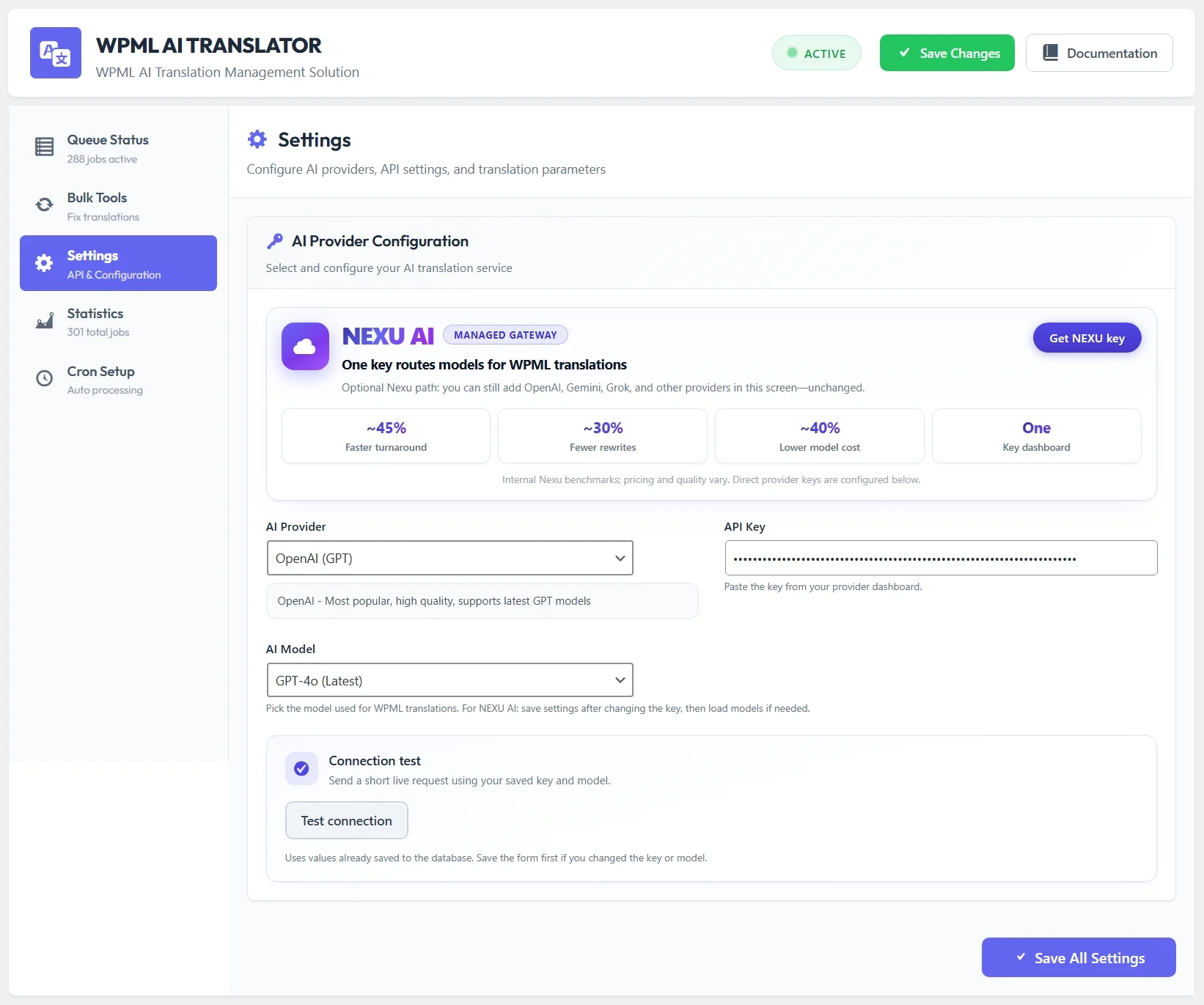
Download NEXU AI Auto Translator for WPML. Upload through WordPress dashboard, activate, navigate to settings. Select your AI provider, paste your API key, choose a model (GPT-4o or Claude Sonnet 4.6 recommended), and save.
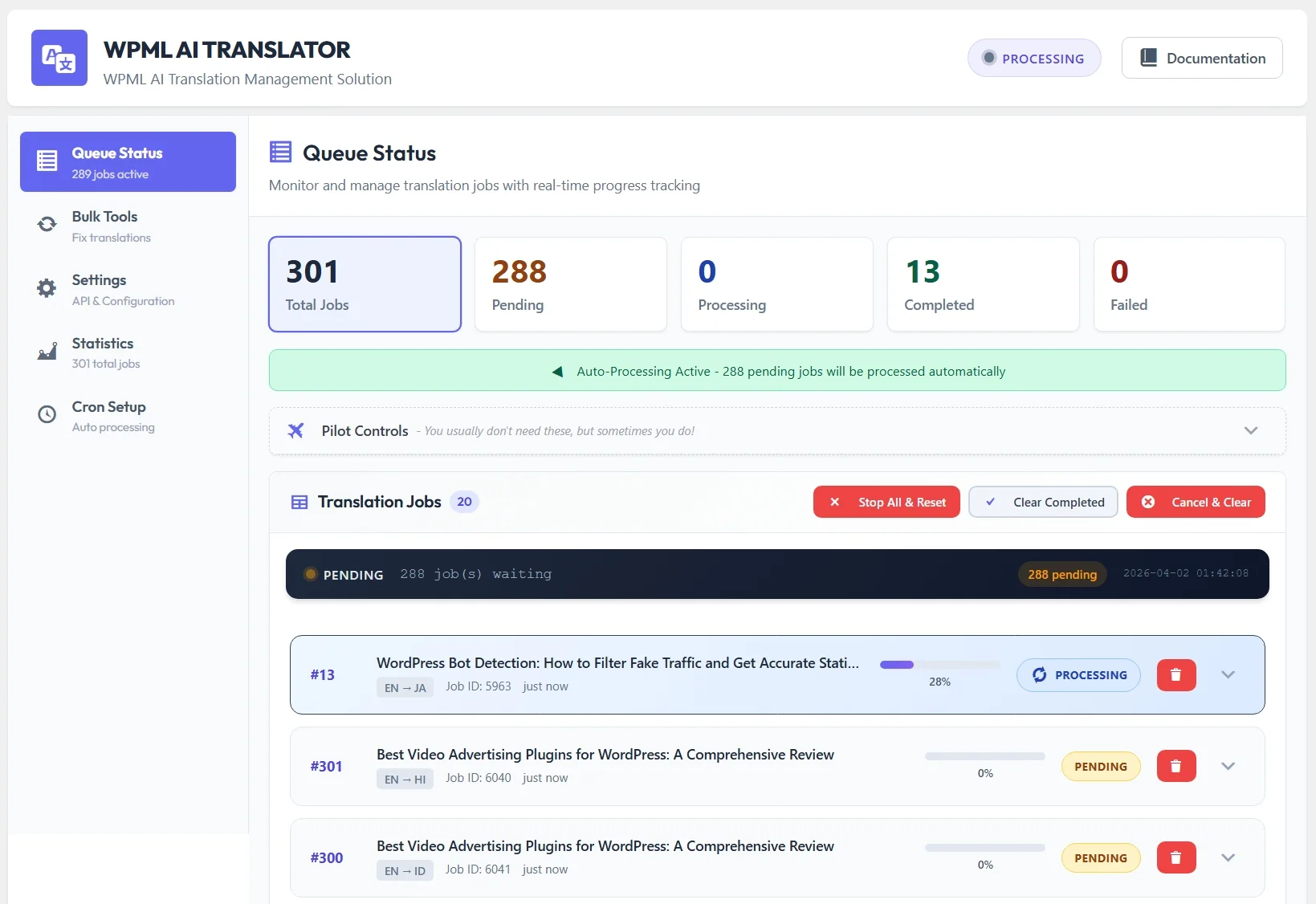
Go to WPML Translation Management, select a post, choose your target languages, assign the AI Translator, and send the job. Switch to the plugin’s queue page and watch the translation process in real time. Within a minute or two, your first credit-free automatic translation will be complete.
Check the translated post in WPML’s editor. Verify the quality meets your standards. If it does, start sending your remaining content for translation. If you want to try a different AI model for better results, switch it in the plugin settings and run the same test again. You can compare outputs from different providers before committing to a full translation run.
A reasonable concern is whether skipping WPML credits means accepting lower translation quality. The answer, perhaps surprisingly, is no. In most cases the quality is equal or better.
WPML’s credit-based translations use traditional machine translation engines like Google Translate and DeepL. These engines produce functional translations but often miss nuance, context, and natural tone. Modern AI language models like GPT-4o and Claude Sonnet 4.6 are trained on vastly larger datasets and use contextual understanding to produce translations that read more like a human wrote them.
The difference is most noticeable in marketing copy, product descriptions, and any content where tone matters. Traditional machine translation tends to produce grammatically correct but stilted output. AI translation maintains the voice and flow of the original while adapting it naturally to the target language. For technical documentation and straightforward informational content, the difference is smaller but still present.
Having access to multiple AI models through a plugin like NEXU means you can experiment. Try Claude for your European language translations, OpenAI for Asian languages, Mistral for French content. Find the model that produces the best results for each language pair on your specific content type, and use it.
WPML translation credits are a convenience product. They simplify the translation workflow by handling everything internally. But they are not the only way, and for the majority of WordPress sites in 2026, they are not the most cost-effective way to get automatic translations.
Using your own AI API key through an addon like NEXU AI Auto Translator for WPML – credit-free automatic translation gives you lower costs, better translation quality from modern AI models, the flexibility to switch between providers, and complete control over your translation workflow. The setup takes ten minutes, and the savings start with the first translation job.
If you have been hesitating to translate your site into more languages because of the ongoing credit costs, this is the practical solution. Your content, your API key, your translations. No word limits, no credit balances, no per-word markups.
Connect your own AI API key. Choose from OpenAI, Claude, Mistral, or Grok. Automatic background translation with intelligent chunking and full HTML preservation. From $39/year.






Hey! just tried the NEXU AI Auto Translator for my WooCommerce store and wow so much smoother than WPML credits. Set it up with my OpenAI key, and translations actually sound natural. perfect for product pages
The credit system actually works like it says drop in a post or product, and boom, the translations just show up without me lifting a finger. for my coaching site with mostly static pages and the odd blog update here and there, it's solid enough that I don't even double check the results anymore. Only downside? the per word pricing starts to hurt when you're refreshing older content, and honestly, it'd be nice to get some kind of break for bigger jobs.
Bought this guide last minute for a client who was freaking out about translation costs. the whole "pay as you go" thing was a really helpful no more guessing how many credits to buy ahead of time. Ended up saving them a good amount by using their own API keys instead of WPML's credit system. Definitely worth it if you're juggling multiple sites.
Hey everyone! got this guide as a gift for my buddy who runs a multilingual blog, and wow that "short answer is yes" section alone saved him hours of digging. no fluff, just straight up useful options. totally worth it!