Next-Level Code. Nexuvibe Style ...
Hrs
Min
Sec

There is a quiet failure mode in every RAG-powered WordPress chatbot deployment that most site owners do not notice until a visitor complains. The chatbot confidently quotes a price that changed three weeks ago. It describes a product that is now out of stock as available. It references a shipping timeframe that was updated after a carrier change but not re-indexed. The knowledge base has drifted from the live site, and the chatbot has no way of knowing.
Content drift is the gap between what your WordPress site currently says and what your chatbot’s vector knowledge base contains. It starts the moment you deploy the chatbot and begins growing with every content update you make without a corresponding re-index. For a store with regular price changes, seasonal content, or a frequently updated product catalog, content drift can make the chatbot functionally inaccurate within days of each update.
This guide covers the full spectrum of sync approaches — from manual on-demand re-indexing as a disciplined workflow step, through scheduled bulk re-indexing, to the most advanced approach of event-triggered automatic re-indexing when specific content changes. We reference the auto-indexing capabilities of Nexu SmartChat’s WordPress AI chatbot throughout, since this is the layer where sync configuration actually lives in a native WordPress plugin architecture.
By the end of this guide you will have a complete picture of which sync approach is appropriate for your specific content update patterns, and a concrete setup that keeps your chatbot’s knowledge current without requiring a manual re-index every time you update a product page.
Content drift is not a single event. It accumulates in layers each time you update your WordPress site without updating the chatbot’s knowledge base. Understanding the drift rate for your specific site helps calibrate how aggressive your sync strategy needs to be.
Static blog or brochure site. Content updates a few times per month. Prices and product availability do not change. Scheduled weekly re-indexing is adequate.
WooCommerce store with regular product updates, occasional pricing changes, and seasonal content. Daily or triggered re-indexing is the right approach.
Store with live inventory updates, flash sales, frequent price changes, or a high-volume blog. Event-triggered instant re-indexing is essential.
The most damaging drift is not in content that simply updates — it is in content that becomes contradictory. A product page that says “Ships in 2-3 days” in the description but was manually updated to say “Ships in 5-7 days” in a recently added notice is being indexed inconsistently depending on which version was captured at the last re-index. The chatbot may retrieve either version, producing unpredictable answers. Systematic sync prevents this class of contradiction from ever accumulating.
The four approaches below form a progression from full manual control to full automation. Most sites will use a combination: typically approach two or three as the base, with approach four for high-priority content types that cannot tolerate any lag.
You manually trigger a re-index for specific pages or for the entire knowledge base through your plugin’s dashboard. This approach is completely reliable if you remember to do it. The problem is human memory: re-indexing is easy to forget, especially for quick content edits that feel minor. A price correction made in 30 seconds may not feel significant enough to trigger a re-index, but it is exactly the kind of change that produces harmful chatbot responses if left un-synced.
WordPress cron jobs can trigger a full or partial re-index of your knowledge base on a defined schedule — hourly, daily, or weekly depending on your content update frequency. This approach ensures that even if you forget to re-index after a manual update, the chatbot’s knowledge will be current within the schedule window. For most WooCommerce stores that update content a few times per week, a daily overnight cron re-index is sufficient. For stores with daily price or inventory changes, hourly is more appropriate.
This approach adds a re-index step to every content update workflow as a mandatory action, not an optional one. In practice, it means your content update checklist or internal documentation explicitly states: “After saving any product page, trigger re-index for that page.” Some teams build this into their WordPress editor workflow by keeping the plugin’s indexing panel open in a separate browser tab. Others use a simple internal checklist. The key is making re-indexing as habitual as clicking “Update” — not a separate task that requires active decision-making.
The most advanced approach: when a specific WordPress event fires — a post is saved, a WooCommerce product is updated, a price changes, an item goes out of stock — the plugin automatically triggers a re-index of the affected page without any human action. This is what “auto-sync” means in the strongest sense. The chatbot’s knowledge of that specific page is updated within seconds of the WordPress content being saved. No scheduling lag, no human memory requirement, no drift window.
save_post, woocommerce_update_product, woocommerce_product_set_stock_status, and others. A chatbot plugin with auto-sync capability hooks into these events and queues a re-index for the affected post ID. The re-index runs either immediately or in a background queue that processes within seconds to minutes of the save event, depending on implementation. Plugins with this capability explicitly advertise “auto-indexing” or “real-time sync” in their feature documentation.
Not all content types have the same drift risk. Understanding which types of content drift causes the most harm helps you make targeted decisions about where to invest in faster sync methods rather than applying the same approach to everything.
Re-indexing is not free in the API cost sense. When content is indexed into a vector knowledge base, each chunk of text must be sent to an embedding model (typically OpenAI’s text-embedding models) which converts the text into a vector. This embedding API call has a cost, typically measured in tokens, and very frequent re-indexing of large content sets can generate meaningful embedding costs on top of the inference costs from chatbot conversations.
Understanding the cost structure helps calibrate sync frequency decisions. OpenAI’s text-embedding-3-small model, commonly used for RAG indexing, is priced at $0.02 per million tokens. A typical WooCommerce product page with a full description and specifications contains approximately 500 to 800 tokens. Indexing 200 products therefore costs roughly 0.002 cents per product page, or about $0.02 cents for a full 200-product catalog re-index. This is negligible for scheduled re-indexing.
For sites that cannot use event-triggered auto-sync yet — either because their current plugin does not support it, or because they need to implement it gradually — a workflow-integrated manual approach is the most reliable alternative. The key is making re-indexing structurally impossible to forget rather than relying on remembering it.
The simplest habit enforcement: pin your chatbot plugin’s indexing panel in a browser tab that you keep open whenever you are in the WordPress admin. After saving any product or page update, switching to that tab and triggering the re-index takes about 30 seconds. The visual presence of the tab is a physical reminder that the step exists.
If you use any kind of content update checklist — even a mental one — add “Re-index this page in chatbot” as a line item alongside “check images,” “update meta description,” and “preview on mobile.” Making it a named step rather than a remembered habit significantly reduces the skip rate, especially for team members who did not set up the chatbot and may not think of it as their responsibility.
Even with a workflow-integrated manual approach, configure a scheduled overnight full re-index as a fallback. This means that even if the workflow step is missed for a particular update, the chatbot will be fully current by the next morning. The combination of “try to re-index immediately after every update” plus “full re-index every night regardless” produces near-zero harmful drift without requiring perfect human execution every time.
If you are reading this guide and realizing your chatbot has been operating from an outdated knowledge base, the fix is straightforward and fast. A full re-index of your entire knowledge base scope takes a few minutes on most stores and costs a fraction of a cent in embedding API fees. It is not a project. It is a 10-minute task.
Content sync is one of the most operational aspects of running an AI chatbot — it is not glamorous and it does not produce visible improvements when it is working correctly. The absence of problems is its output: no visitors receiving wrong prices, no confusion about availability, no mismatch between what the page says and what the chatbot says. The investment in setting up a reliable sync workflow pays for itself the first time it prevents a single customer from receiving misinformation at a critical point in their purchase decision.
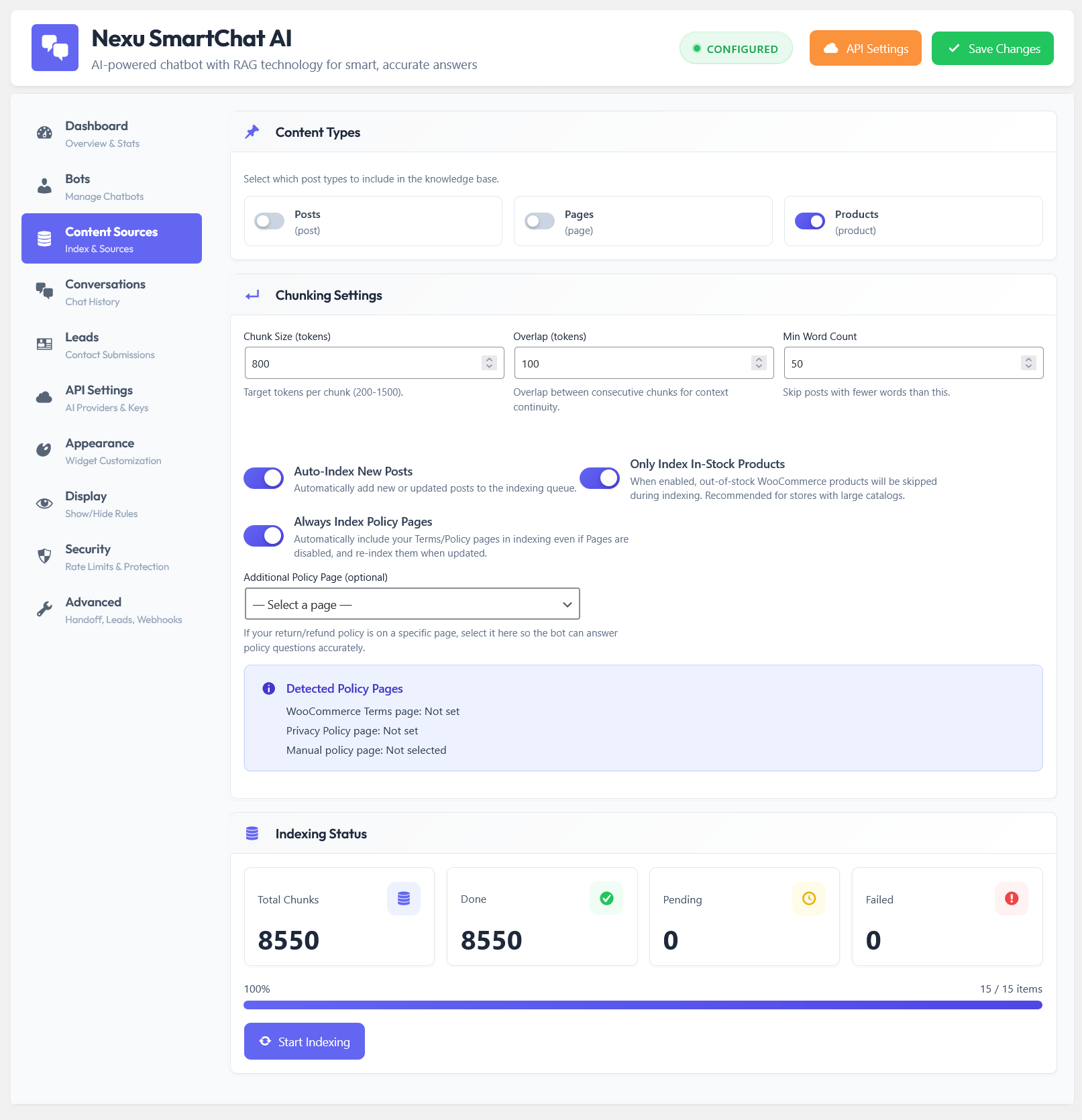
The auto-indexing capability in Nexu SmartChat’s WordPress chatbot plugin is designed to handle this at the plugin level — both manual on-demand re-indexing from the dashboard and scheduled batch re-indexing so the knowledge base stays current with your live content regardless of how frequently you update.
Nexu SmartChat auto-indexes your WordPress content and gives you on-demand re-indexing controls so your chatbot’s knowledge base never drifts from what your site actually says — keeping prices, availability, and product details accurate for every visitor.






Got this after a friend raved about it for their holiday shop. the instant re index for shipping times bailed me out twice last month when carriers got backed up
Oh my gosh this saved me!
Just ran the on demand reindex and wow chatbot stopped quoting last month's prices right away