
In early 2025, Drift quietly ended its self-serve plans and moved entirely to enterprise sales, effectively pricing out thousands of small and mid-sized businesses overnight. It was not the first time a major AI chat platform reshaped its product around a different market. Intercom has raised prices. OpenAI has restructured its model tiers. Google has deprecated API versions with shorter notice windows than developers expected. The AI tooling market in 2026 is still moving fast enough that treating any single provider as a permanent, stable infrastructure choice is a planning mistake.
For WordPress site owners and WooCommerce store operators, this market volatility has a specific operational consequence: a chatbot plugin that is hardwired to a single AI provider is a dependency that someone else controls. When that provider changes pricing, deprecates a model version, has an outage, or pivots its product strategy, your chatbot either adapts on their schedule or breaks. You are not a partner in that relationship. You are a customer with no leverage.
Multi-model WordPress AI chatbot plugins solve this problem by decoupling your chatbot’s architecture from any single provider’s decisions. We build this argument in the context of Nexu SmartChat, a WordPress AI chatbot plugin that supports OpenAI, Claude, and Gemini without tying you to any one of them. But the principle applies broadly: model flexibility is a risk management decision, not just a feature comparison point.
This article makes the case for why that matters, what real vendor lock-in costs look like, and what genuine multi-model flexibility requires from a plugin architecture.
The four real costs of AI vendor lock-in for WordPress sites
Lock-in is not an abstract risk. It manifests in specific, operational ways that affect your chatbot’s availability, cost, and quality. Understanding the four forms it takes helps clarify why multi-model flexibility is worth building into your stack from the start rather than retrofitting later.
When your chatbot plugin is hardwired to OpenAI, and OpenAI raises the price of gpt-4o by 30%, your operating costs go up by 30%. You have no ability to switch to a cheaper equivalent model from Anthropic or Google without replacing the entire plugin. Historically, this is not a theoretical scenario. OpenAI restructured its model pricing tiers in both 2024 and 2025. Google introduced Gemini Flash at a price point significantly below its earlier Gemini Pro pricing to compete. A site owner with model flexibility could respond to each of these shifts by adjusting their model selection. A site owner locked to one provider could only absorb them.
OpenAI has had multiple documented service disruptions affecting API availability. These incidents lasted from minutes to several hours. For a WooCommerce store that depends on its chatbot for pre-sales support and product questions, a multi-hour chatbot outage during peak traffic is a real revenue event. A multi-model plugin that can fail over to a different provider during an outage, or that lets you quickly switch your API key to an alternative, converts a hard dependency into a manageable contingency. A single-provider plugin has no such option. The provider is down and so is your chatbot.
AI providers regularly deprecate older model versions. OpenAI has retired gpt-3.5-turbo variants, gpt-4 base variants, and several davinci and curie completions models over the past two years. When a model is deprecated, the API calls that target it either fail or get silently redirected to a different model with different behavior. A plugin that has hardcoded a specific model version string breaks or behaves unexpectedly at deprecation. A plugin that uses a configurable model field, where you can update the model name in a settings panel, takes about 30 seconds to adapt. That is the difference between a crisis and a minor administrative task.
The AI model rankings have changed significantly every six to nine months since GPT-4 was released. Anthropic’s Claude 3 Sonnet outperformed GPT-4 Turbo on several relevant benchmarks when it launched. Gemini 2.0 Flash Thinking surprised many developers with its reasoning capabilities at a low cost point. GPT-5 shifted the performance frontier again. A business locked to one provider cannot respond to these releases. They are permanently on whatever model their plugin supports. A business with model flexibility can test new releases and upgrade when the quality improvement justifies it, without any infrastructure change.
A documented record of AI provider disruptions that affected chatbot users
The abstract risk of vendor disruption becomes much more concrete when you look at what has actually happened in the AI chatbot market over the past 24 months. This is not speculation about future risks. These are events that already affected WordPress site owners who had built on single-provider plugins.
Drift discontinued self-service plans and transitioned to enterprise-only sales, with starting prices around $2,500 per month. Thousands of businesses that had integrated Drift’s WordPress widget and built workflows around it faced an immediate choice: pay enterprise rates or find a replacement. The migration cost for affected businesses included rebuilding chatbot training data, updating integrations, and retraining staff. Plugin architecture that depends on a specific platform’s infrastructure carries exactly this kind of platform risk.
Tidio, one of the most widely used WordPress chatbot plugins, doubled pricing for existing customers in December 2024. Reviews on Capterra and G2 document customers discovering automatic charges at the new rate before they received adequate communication about the change. This is a direct example of cost lock-in: the switching cost of migrating a live chatbot to a different platform is high enough that many customers absorb the price increase rather than rebuild. Platforms know this, which is why unilateral price increases are a persistent pattern in the SaaS chatbot market.
OpenAI retired several model identifiers that plugins had used as defaults, including variants of gpt-3.5-turbo and earlier gpt-4 releases. Plugins that had hardcoded these model strings began returning errors or silently switching to different behavior when the deprecation took effect. Site owners with flexible, user-configurable model fields could update their settings in minutes. Site owners whose plugins managed the API connection transparently were dependent on the plugin developer releasing an update before their chatbot worked correctly again.
All major AI providers have experienced documented API degradation events where response times increased significantly or requests began failing at scale. These events affect different providers at different times and are rarely simultaneous. A chatbot that can fall back to a secondary provider during a primary provider’s degradation period maintains availability while a single-provider chatbot simply becomes unavailable. Regional availability differences also matter: Google’s infrastructure performs better in some geographic markets while Anthropic’s and OpenAI’s perform better in others. Multi-model flexibility lets you match provider selection to where your audience actually is.
What genuine multi-model flexibility actually requires
“Multi-model support” has become a marketing phrase that different plugins use to mean very different things. Some plugins that claim multi-model support route all API calls through their own server infrastructure regardless of which model you select, which means your data flows through a third party you did not choose. Others support multiple models from a single provider, which provides some version flexibility but no provider diversification. Still others give you a dropdown menu of providers but require the same system prompt format regardless of which provider you select, producing suboptimal results when the model changes.
Genuine multi-model flexibility has specific requirements that are worth checking before committing to a plugin.
The plugin should connect directly to the AI provider’s API using your own API key, not route through the plugin developer’s infrastructure. When you use your own key, your data flows directly from your WordPress server to the AI provider. There is no intermediary. There is no plugin vendor margin on top of the API cost. There is no risk of the plugin vendor’s infrastructure becoming a point of failure or a data handling concern. Any plugin that says “no API key required” is routing your chatbot conversations through their servers. That is a privacy and cost consideration worth understanding before you deploy.
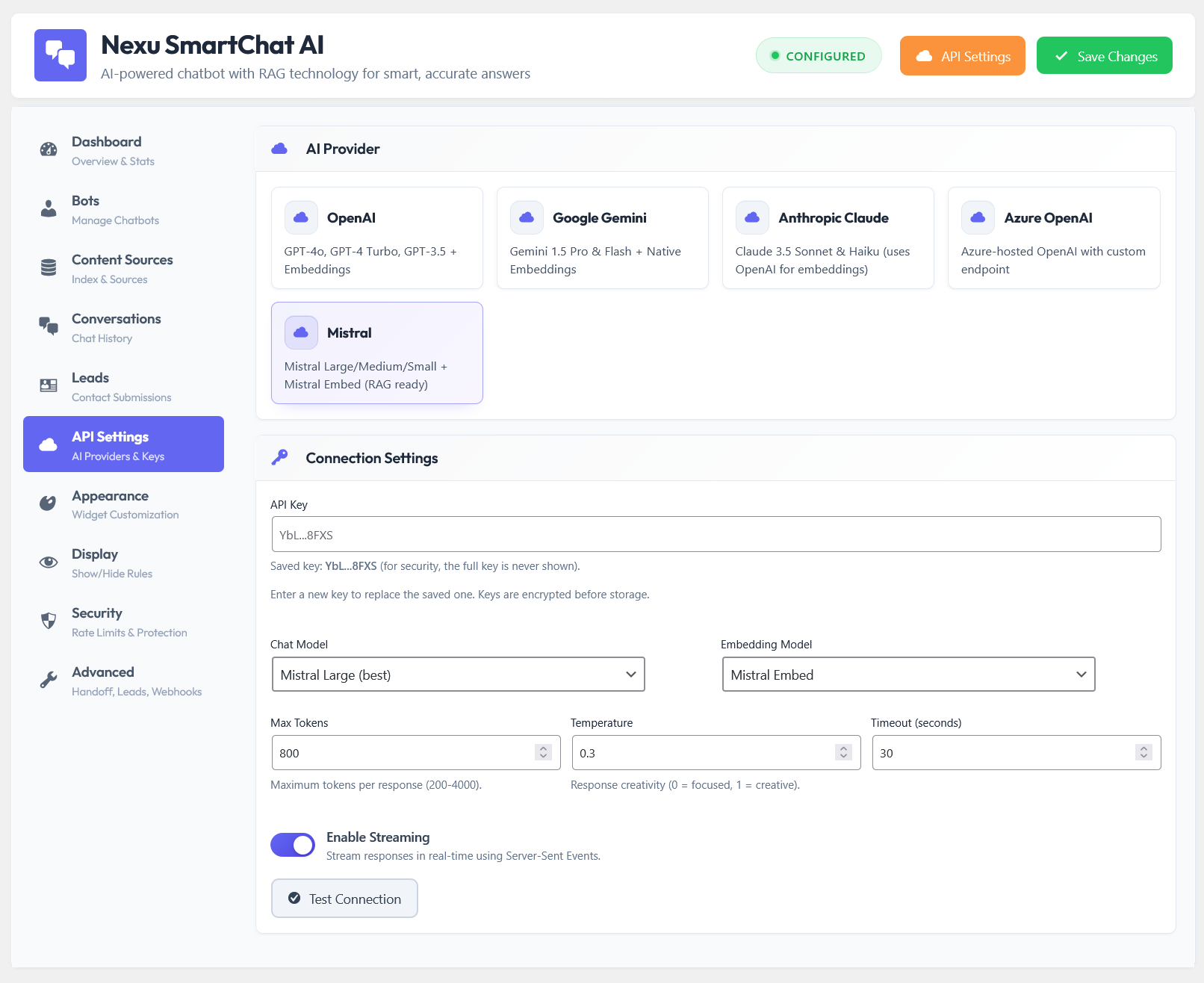
True provider flexibility means you can switch between OpenAI, Anthropic, and Google (or other providers) without changing anything else about your chatbot setup. Your RAG index, your system prompt, your appearance settings, your security configuration: all of it stays the same. You change the API key and model name in the settings panel and the chatbot continues operating against the same knowledge base. Plugins that require different configuration structures for different providers, or that make you rebuild your bot when you switch, are not genuinely flexible. They are just offering multiple separate implementations of the same feature.
The model name that gets sent to the API should be a text field you can update, not a dropdown with a limited set of options maintained by the plugin developer. Dropdown-based model selection means the plugin developer has to release an update every time a new model is available or an old one is deprecated. Text-field model configuration means you can type in a new model identifier the day it releases and your chatbot is using it immediately, without waiting for the plugin developer’s update cycle. This is a small architectural detail that has real operational consequences when model turnover is happening every few months.
The most sophisticated implementation of multi-model flexibility allows different bots on the same site to use different models. Your high-volume FAQ bot on the homepage uses the cheapest capable model to keep costs low. Your pre-sales qualification bot on the pricing page uses a more capable model because the conversations there directly affect conversion. Your technical documentation bot uses a model with particularly strong reasoning. This per-bot model configuration turns provider flexibility from a risk management tool into a cost and performance optimization tool simultaneously.
The strategic advantages that go beyond risk mitigation
Multi-model flexibility is primarily framed as a defensive capability, a way to protect your chatbot from provider disruptions. But it has significant offensive advantages too. The ability to choose and switch models freely creates optimization opportunities that single-provider deployments simply do not have.
High-traffic bots that handle simple, repetitive questions can run on the cheapest capable model. Low-traffic but high-stakes bots can justify a premium model. Without multi-model flexibility, you either over-pay for cheap traffic or under-serve important conversations. With it, you match cost to value at the individual bot level.
When a new model releases and benchmarks suggest it is significantly better for conversational use cases, you can test it on one bot before committing the whole site to it. This is trivial with multi-model support and impossible with a locked plugin. The ability to run A/B style evaluations across your own real traffic is the most accurate benchmark you can run.
API response latency varies by provider and by region. If your audience is primarily in Southeast Asia, Google’s infrastructure may deliver lower latency than OpenAI’s in that market. Multi-model support lets you align provider selection to your audience geography rather than accepting one provider’s global performance profile.
Different models have meaningfully different strengths across languages. Google Gemini leads on several Asian language pairs. Claude is notably strong on European languages. GPT-4o is broadly capable but not uniformly best across all language pairs. A site serving a multilingual audience can route to the highest-quality model for each language context rather than accepting one model’s uneven multilingual performance.
How to evaluate a plugin’s model flexibility claims before committing
Before installing any WordPress AI chatbot plugin, there are specific questions worth asking to understand whether its multi-model support is genuine or cosmetic. These questions distinguish between plugins where model flexibility is a core architectural principle and plugins where it is a marketing checkbox.
The market trajectory that makes flexibility increasingly important
Everything about the AI model market in 2026 points toward more disruption, not less. OpenAI, Anthropic, Google, Meta, and xAI are all investing heavily in competing models, and the competitive pressure among them is creating a pace of model releases, price cuts, and capability improvements that shows no sign of stabilizing. According to OpenAI’s published pricing history, capable model costs have dropped by more than 90% per token over the past three years as competition intensified. That trajectory is good for users overall, but it means the model you chose as the best cost-performance option 12 months ago is almost certainly not the best option today.
For a WordPress chatbot that is a live, revenue-affecting part of your business, being locked to a specific provider’s cost and quality curve by a plugin’s architecture is a real constraint. The businesses that will get the most value from AI chatbots over the next three years are the ones that can respond to market changes with a settings change rather than a platform migration. The plugin infrastructure makes that possible or impossible. This is why choosing a multi-model plugin is not a feature preference. It is a strategic decision about who controls your chatbot’s future operating costs and performance ceiling.
The Nexu SmartChat plugin built for WordPress without AI vendor dependency is designed around this principle from the architecture up: your API key, your provider, your choice, updated whenever the market shifts without requiring you to rebuild your chatbot configuration or migrate to a new platform.
A WordPress chatbot that stays current regardless of which AI provider wins
Nexu SmartChat connects directly to OpenAI, Anthropic Claude, or Google Gemini using your own API key. Switch providers in seconds. No rebuild. No data migration. No dependency on any single provider’s pricing or availability decisions.





I bought this plugin thinking I'd finally have a future proof chat solution, but the so called "multi model flexibility" is just marketing fluff. when OpenAI restructured their pricing again for the second time in 18 months my chatbot costs nearly doubled overnight because this plugin doesn't actually let you switch models without reconfiguring everything from scratch
This guide doesn't even cover the actual setup struggles. Total waste of time
Running a small business site means I've dealt with my fair share of AI provider curveballs. this guide was a real eye opener about the dangers of putting all your eggs in one basket like when those chatbot costs spiked out of nowhere last year.