
The conversation about AI chatbots for WordPress tends to focus on how much the AI can handle. That framing misses something important. Even the most capable RAG-powered chatbot running on the best available AI model will reach scenarios it genuinely cannot resolve well: emotionally charged complaints, requests requiring account-level access the chatbot does not have, complex multi-step problems that need judgment rather than information retrieval, or visitors who simply do not trust a bot with their question and will not engage further unless a human is available. When any of these situations hit a chatbot with no escalation path, the visitor’s experience ends badly.
The human handoff is not a fallback for a bad chatbot. It is a core architectural feature of a good one. Research from Social Intents published in 2026 found that 82% of consumers prefer an instant chatbot response to waiting for a human agent on straightforward questions. The same research found that the moment conversations become complex, those same consumers expect a smooth path to a person. The tension between these two preferences defines what a well-designed hybrid support system needs to do.
This guide covers both the strategy and the specific plugins. We look at what a properly implemented handoff requires, which WordPress plugins include a handoff capability and how their implementations differ, and the situations where each approach works best. We also discuss how Nexu SmartChat’s RAG architecture for WordPress fits into a hybrid support strategy when live agent capability is handled by a complementary tool.
Let’s start with the strategy before the plugin list, because choosing a handoff plugin without a handoff strategy produces a technically capable system that confuses visitors anyway.
The five situations where AI genuinely cannot substitute for a human
Understanding exactly when AI fails is more useful than the general statement that it sometimes does. These five scenarios are specifically where AI chatbots fall short regardless of how well they are configured, and where human handoff directly prevents lost business or damaged relationships.
When a visitor is genuinely frustrated, a technically correct AI response can make things worse. A customer who received a damaged product and is writing in all caps does not need accurate information about your return policy. They need acknowledgment, empathy, and a human being who can make an exception if the situation warrants it. AI can recognize sentiment markers and escalate, but it cannot deliver the interpersonal de-escalation that resolves the emotional component of a complaint. Every serious customer-facing chatbot deployment needs a clear trigger for negative sentiment that routes to a human immediately.
A RAG chatbot answers from your site content. It cannot look up a specific customer’s order number, check the status of an individual shipment, issue a refund, modify an order, or access any data that requires authentication to a back-end system. Questions like “where is my order #47823?” or “can you cancel my subscription?” require system access that a content-based chatbot does not have. These are among the most common support requests on WooCommerce stores, which is why having a clear path to a human or a help desk integration is essential for ecommerce deployments specifically.
Some support situations require decision-making under uncertainty: a customer whose order was partially damaged, who wants a partial replacement but also wants to keep the undamaged items, and who is asking whether a discount on a future order would be acceptable instead. There is no indexed page on your site that covers this exact situation. Resolving it requires human judgment, authority to make business decisions, and the flexibility to negotiate an outcome. AI can hold this conversation up to a point and then must recognize it has reached the boundary of what information retrieval can resolve.
A visitor considering a $2,000 B2B software subscription or a $800 custom product configuration is not well served by information retrieval. They want to talk to someone who understands their situation, can answer questions that are not in your documentation, and can offer the kind of flexibility that a salesperson with authority can offer. The AI’s job in this scenario is to qualify the visitor, understand their intent, and connect them with a human who can close the deal. An AI that tries to substitute for consultative selling at this level loses the sale.
Visitors asking about medical, legal, financial, or regulatory matters require a level of accountability that an AI cannot provide. A chatbot can point to a FAQ article, but it cannot accept liability for advice. Visitors in these contexts are often explicitly uncomfortable with automated responses and will disengage if they cannot escalate to a human. For industries like healthcare, financial services, insurance, or legal services, having a prominently accessible human path is not optional. It is a trust signal that affects whether the conversation continues at all.
What a properly designed handoff architecture requires
A button that says “Talk to a human” is not a handoff architecture. It is an emergency exit. The difference between a handoff that resolves visitor frustration and one that adds to it comes down to three specific requirements that most plugins satisfy partially but few satisfy completely.
A handoff system needs at least three trigger types: explicit (the visitor clicks “talk to a human”), keyword-based (the visitor types “agent,” “manager,” “complaint,” “refund request,” or similar), and sentiment-based (the AI detects frustration signals like repeated failed attempts, negative language, or rate of capitalization). A system that only responds to explicit requests misses the many visitors who need help but express it through behavior rather than a direct ask. Keyword and sentiment triggers are what catch the situations where things are going wrong before the visitor gives up.
When a conversation is escalated to a human agent, the agent must receive the full transcript of what the visitor already said and what the chatbot already answered. Requiring a visitor to repeat themselves after escalation is one of the most common sources of escalated frustration in support interactions. It signals that the AI conversation was a dead end, not a starting point. The handoff should feel like handing the baton in a relay race, not starting the race over. Every platform reviewed in this guide handles context transfer differently, and the quality of that transfer is one of the most important evaluation criteria.
Most WordPress sites do not have agents available around the clock. A handoff system needs to handle the case where no human is available without stranding the visitor. The right behavior is: acknowledge that no one is available, collect contact information, summarize the conversation context, and commit to a follow-up within a specific timeframe. A chatbot that triggers a handoff at 2am and then displays “No agents available” with no further action has created a worse experience than the visitor having never tried to escalate. Offline handling is where the majority of handoff implementations fall down.
The main WordPress plugins with human handoff capability
The WordPress ecosystem has several distinct approaches to human handoff. They differ significantly in architecture, cost, and who they serve best. Here is an honest breakdown of the main options available in 2026.
The async handoff: what to do when no agents are available
Most WordPress sites do not have agents available around the clock. A visitor who needs human help at 11pm on a Sunday is a real scenario, and how your system handles it determines whether you recover that visitor’s trust or lose them permanently. The async handoff is the answer to this problem, and it requires specific design decisions to work well.
How Nexu SmartChat fits into a hybrid support strategy
Nexu SmartChat is a dedicated RAG-powered WordPress AI chatbot. It does not include a built-in live agent inbox in the same way that Tidio or LiveChat does. What it does is the AI layer of a hybrid support system: accurate, product-aware, well-configured automated responses that handle the 70 to 85 percent of conversations that do not require a human. The remaining 15 to 30 percent that do require escalation can be directed to a complementary live chat tool or a well-configured async email capture flow.
For many WooCommerce stores, the optimal hybrid stack looks like this: Nexu SmartChat for product-accurate RAG answers covering the majority of visitor questions, combined with tawk.to (free) or Tidio as the human escalation layer that activates when the AI reaches its limits. This approach gives you best-in-class answer quality for the automated layer, at a fraction of the cost of an all-in-one SaaS platform, while maintaining a genuine human escalation path for the scenarios that need it.
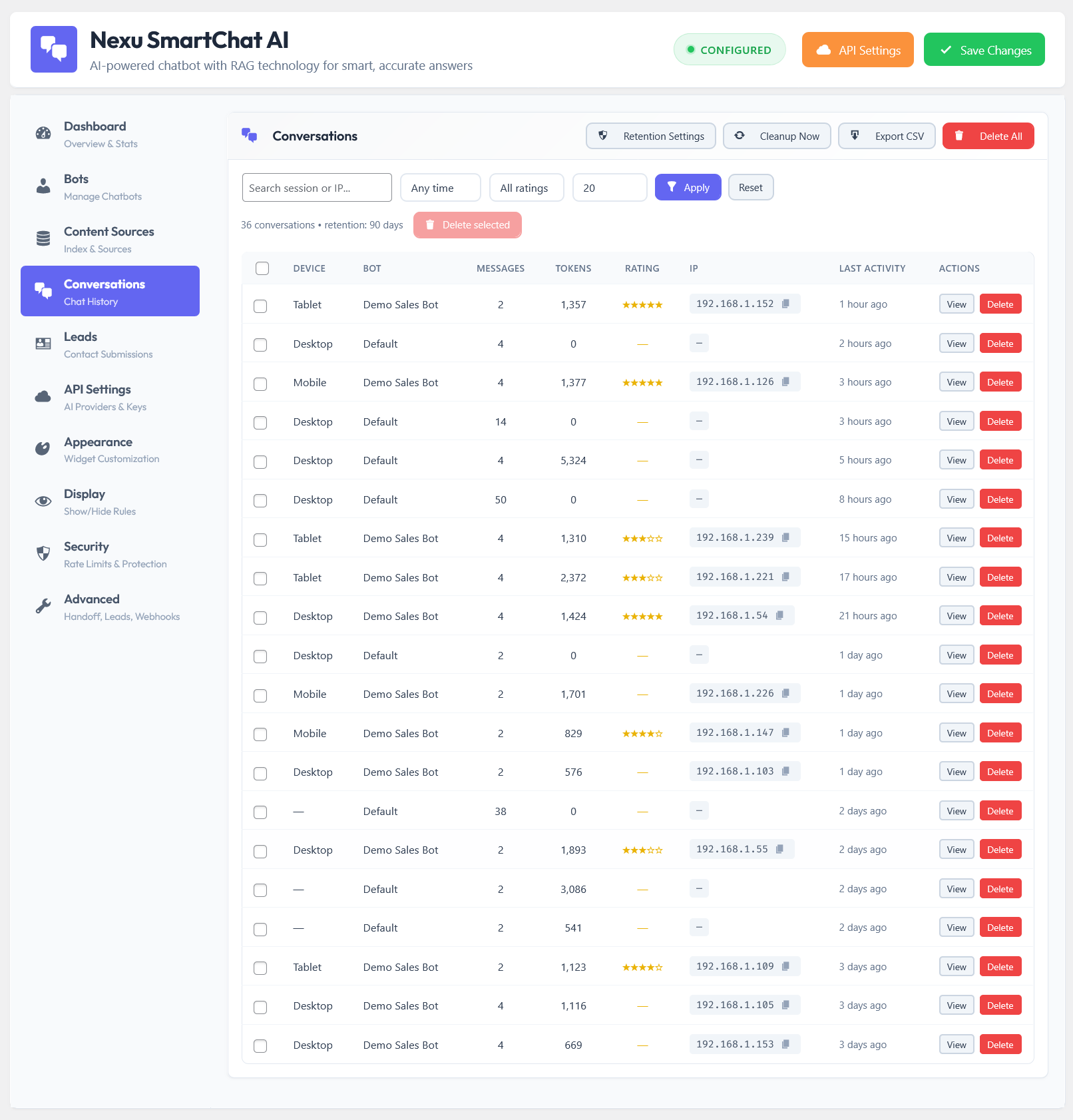
The conversation logs in Nexu SmartChat give you visibility into exactly what visitors are asking and where the AI’s answers may be falling short. This is the data that lets you both improve the AI layer over time and identify the categories of question that should be routed directly to a human without the AI attempting to answer them. Using your conversation history strategically is how a hybrid support system gets better over time rather than staying static at its initial configuration.
The best chatbot setup is not the one with the most features. It is the one where the AI handles what AI handles well, the human handles what humans handle well, and the transition between them is invisible to the visitor. Getting that transition right is what separates a hybrid support system from a chatbot with an emergency exit button.
The AI layer your hybrid support system needs to actually work
Nexu SmartChat handles the 80% of conversations that do not need a human — accurately, from your real content, with full conversation logs that show you exactly where the AI falls short so you can improve both the chatbot and your escalation strategy.





Just had to share how blown away I am by this chat plugin's human handoff feature. As a farmer working with suppliers and ag services all the time, I've lost count of how many bots I've hit that just spin in circles until I give up. but this one?
No human option, just frustration
Okay, so I'm setting this up for our department's public facing site, and I'm trying to figure out how the handoff part actually works in practice. The guide mentions triggers, context transfer, and availability but what does a good handoff look like when things get messy? Like, if someone's already frustrated and the bot hits its limit, what's the least the plugin needs to do to avoid making it worse? Do most of these just kick you to a ticket system, or is there a way to keep it live?
Hey! Finally a plugin that gets escalation right