
An affiliate program that launches with incomplete setup does not fail dramatically or immediately — it fails gradually, in ways that are difficult to diagnose. Affiliates share links that do not track correctly. Commission amounts are calculated on the wrong base. Approval emails do not include the referral link. Fraud detection is off and self-referrals accumulate quietly. The program dashboard shows confusing data because the settings were never validated against real orders.
By the time these problems become visible, they have already affected real affiliates, created real commission disputes, and damaged the first impressions that are extraordinarily difficult to repair. The repair work — retroactively fixing tracking, explaining incorrect commissions to affiliates, overhauling a landing page that is not converting — takes significantly more time and effort than getting the setup right before anyone is using the program.
This checklist covers every setup element that should be complete, tested, and verified before your first affiliate application is approved. Each item includes what it is, why it matters if it is missing or misconfigured, and what the verification step looks like. Use it as a working document — go through it in sequence and mark each item only when you have verified it, not just when you think you have configured it. This checklist is built around the features and configuration flow in Affiliate Engine, a WooCommerce affiliate program management plugin, but the principles apply universally.
ASection A — Core plugin configuration
Set the default commission rate and confirm it is based on your gross margin analysis and competitive benchmarking — not an arbitrary number. Configure per-category overrides if your product catalog has meaningfully different margins across categories. Set the commission base to post-discount, pre-tax order value.
Set the commission hold period to at least match your store’s refund policy window — ideally add 5–7 days of buffer. If your refund policy is 14 days, set the hold period to 19–21 days. This prevents commissions from becoming payable before the refund risk has passed, which is the mechanism behind commission-before-refund abuse.
This toggle should be on by default. It prevents affiliates from earning commission on their own purchases made while logged in with their affiliate account. No legitimate affiliate loses anything from this setting being on — it only affects self-referral, which is definitionally not a genuine promotion.
Set the minimum payout threshold ($30–$50 is typical), enable the payout methods you will support (PayPal, bank transfer, wallet credit), and decide on your payout schedule. Document the schedule — it should appear on your program page and in the approval email. A payout minimum that is not configured defaults to zero, which would allow affiliates to request individual payouts of any amount, creating administrative overhead for every small commission.
Set the cookie lifetime (30 days minimum, 60–90 days recommended for most products). Configure the referral URL parameter name. If your store uses a page caching plugin (WP Rocket, LiteSpeed, W3 Total Cache), enable AJAX-based cookie setting — otherwise cached pages may not set the affiliate cookie on the first visit, silently losing tracking for any affiliate who sends traffic to a cached page.
BSection B — Tracking verification
Create a test affiliate account, copy their referral link, open it in a private browser window (logged out), add a product, and complete the purchase. Then check three places: (1) Visits tab — a visit record should appear for this affiliate, (2) Referrals tab — a commission record should appear linked to the test order, (3) Test affiliate’s My Account dashboard — the pending commission should be visible. If any of these three are missing, there is a tracking configuration problem to diagnose before launch.
This test must be done without clicking the affiliate’s referral link first — the purpose is to confirm coupon attribution works as a standalone method. Open the store directly (no referral link), browse and add a product, apply the test affiliate’s coupon code at checkout, and complete the purchase. Check the Referrals tab — the order should be attributed to the affiliate via coupon, not via cookie. This confirms the coupon tracking pathway works independently.
Place a test order through an affiliate link. Then refund the order in WooCommerce (Orders → select order → Refund). Check the Referrals tab — the associated commission should change status to rejected or reversed. If commissions do not reverse on refund, your program will accumulate approved commissions on returned orders, creating manual reconciliation work and financial exposure.
CSection C — Affiliate-facing experience
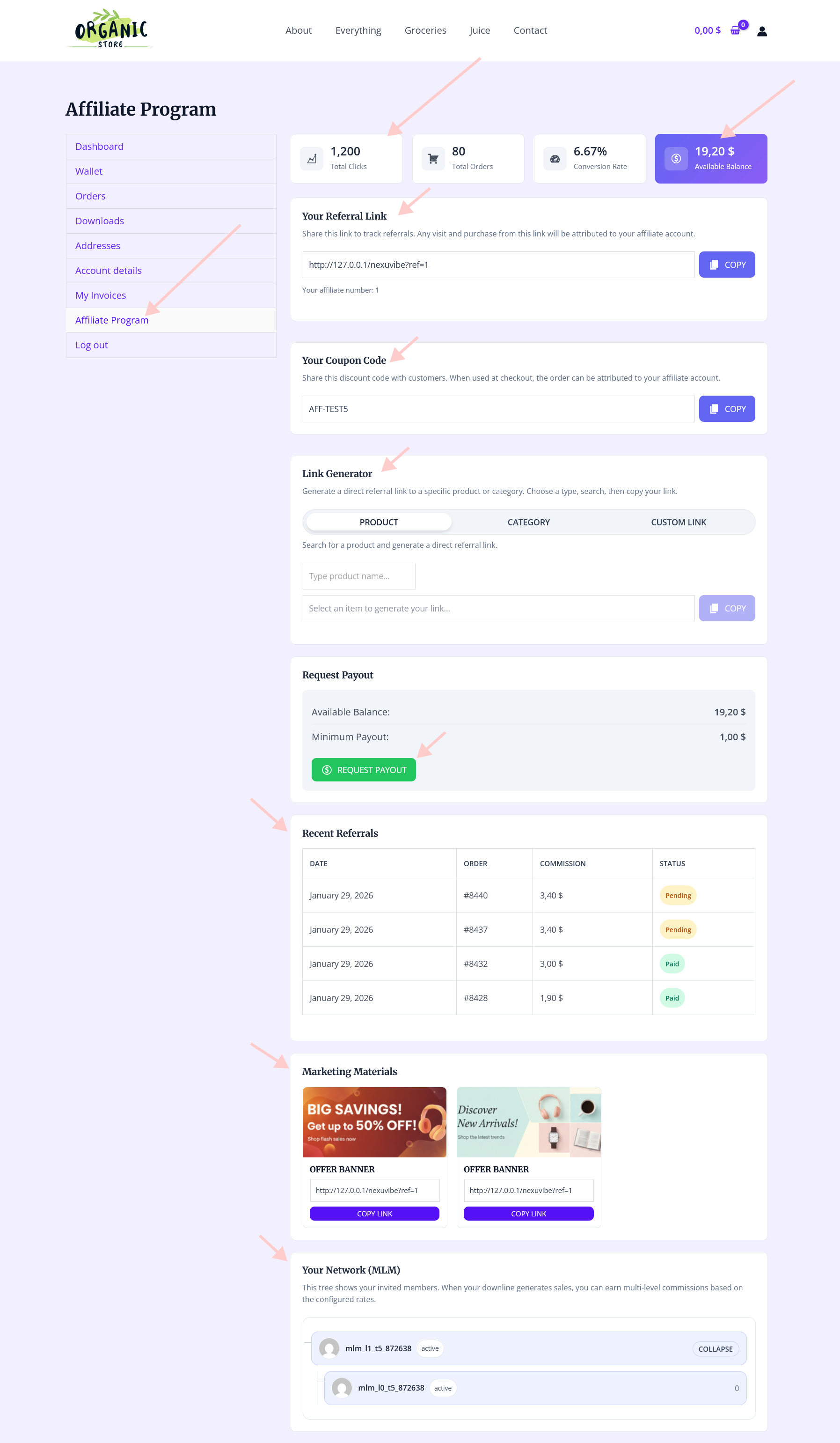
Log in as your approved test affiliate account and check every element of their dashboard. The referral link should be visible and the copy button should work. The coupon code should be visible and copyable. Commission history should show the test order. The payout section should show current balance and threshold. The creatives section should display any assets you have uploaded. The link generator should produce working tracking links.
Trigger every affiliate notification manually or via the test flow and review what arrives in the inbox. Check the submission confirmation, the approval email (does it contain the referral link? coupon code? commission rate? payout schedule?), the new referral notification, the commission approved notification, and the payout processed confirmation. Check each on mobile as well as desktop — many affiliates will read emails on their phone.
Open your affiliate program page in a private browser window where you are not logged in as admin. The registration form should be visible and accessible. Fill in all fields and submit. Verify the submission confirmation message appears, the submission confirmation email arrives in the test inbox, and the application appears in the admin Requests tab. Check the admin new application alert email also arrived.
DSection D — Program content & compliance

Your program page must be live with a clean URL (/affiliate-program or /affiliates), the commission rate visible in the headline or first screenful, a brief description of how the program works, the program details (payout schedule, cookie duration, minimum threshold), product images, and the registration form embedded directly on the page. Check it on mobile — many applicants arrive on their phones. Check the SEO title includes your product niche and “affiliate program.”
Create a dedicated affiliate terms page covering: commission rate and base calculation, payout schedule and minimum, cookie duration, self-referral prohibition, household purchase policy, fraud consequences, commission reversal policy (refunds and chargebacks), attribution priority (coupon vs cookie), and acceptable promotion methods. Link to this from the registration form (checkbox: “I agree to the affiliate terms”). Without documented terms, every disputed commission is a judgment call with no contractual basis.
Upload a minimum viable creatives pack before approving affiliates: at least two product images in square format (1080×1080), one landscape image (1200×630), and two social media caption templates with coupon code placeholder. An empty creatives section signals a poorly managed program and forces affiliates to produce their own materials from scratch — reducing both promotion quality and promotion frequency. Files should be under 2MB each.
Configure IP address matching in the fraud settings to flag (not block) referrals where the buyer’s IP matches the affiliate’s registration IP. Enable the coupon self-purchase check so that coupon-attributed orders placed by the affiliate themselves are blocked. Set a minimum order amount threshold to filter out implausibly low-value fake order schemes. Test that the Fraud tab is accessible and check how a flagged record appears before any real program activity begins.
The quick-reference launch checklist
The 15 items on this checklist are not suggestions — they are the minimum required for a program that functions correctly from day one. Working through them in sequence, with the verification step completed for each item before moving to the next, typically takes three to four hours for a new program. That investment prevents the far more expensive and time-consuming work of diagnosing and fixing problems that surface after real affiliates are active and real commissions have been earned, disputed, or incorrectly paid.
Every item on this checklist maps directly to a specific feature or setting in Affiliate Engine’s WooCommerce affiliate program plugin — commission settings, fraud detection, notification templates, creatives management, payout configuration, tracking settings, and the registration and approval workflow that the checklist covers from end to end.
Every setting on this checklist lives in one plugin — configured once, running correctly from day one
Affiliate Engine covers all 15 pre-launch checklist items — commission configuration, tracking, fraud detection, notification emails, registration workflow, payout settings, affiliate dashboard, and creatives management — in a single WooCommerce plugin with no monthly fees.






Quick question about the refund hold period in your affiliate setup guide. you mention setting it to 19 to 21 days even if the refund policy is 14 days what's the reason for that extra buffer? Is it for processing delays or something I'm not thinking of?
This checklist saved me hours of headaches setting up my affiliate program. The part about calculating commission bases? Total lifesaver I'd have totally missed that.
Saved my launch!