Next-Level Code. Nexuvibe Style ...
Hrs
Min
Sec

Content audits are among the most valuable activities a WooCommerce store owner can do, and among the least frequently done. The traditional audit involves manually crawling through product pages, checking description quality, identifying thin content, and trying to guess at what information visitors actually need. The word “guess” is the problem. Traditional content audits are informed by keyword data and internal assumptions, not by what your actual visitors tried to find and could not.
Chat analytics change this completely. Every time a visitor asks your AI chatbot a question, they are telling you exactly what information they were looking for. Every time the chatbot gives a vague, incomplete, or uncertain answer, it is flagging a content gap or a content quality problem. The combination of what visitors asked and how the chatbot responded is the most accurate content audit you will ever run — and it updates automatically every day your store is live.
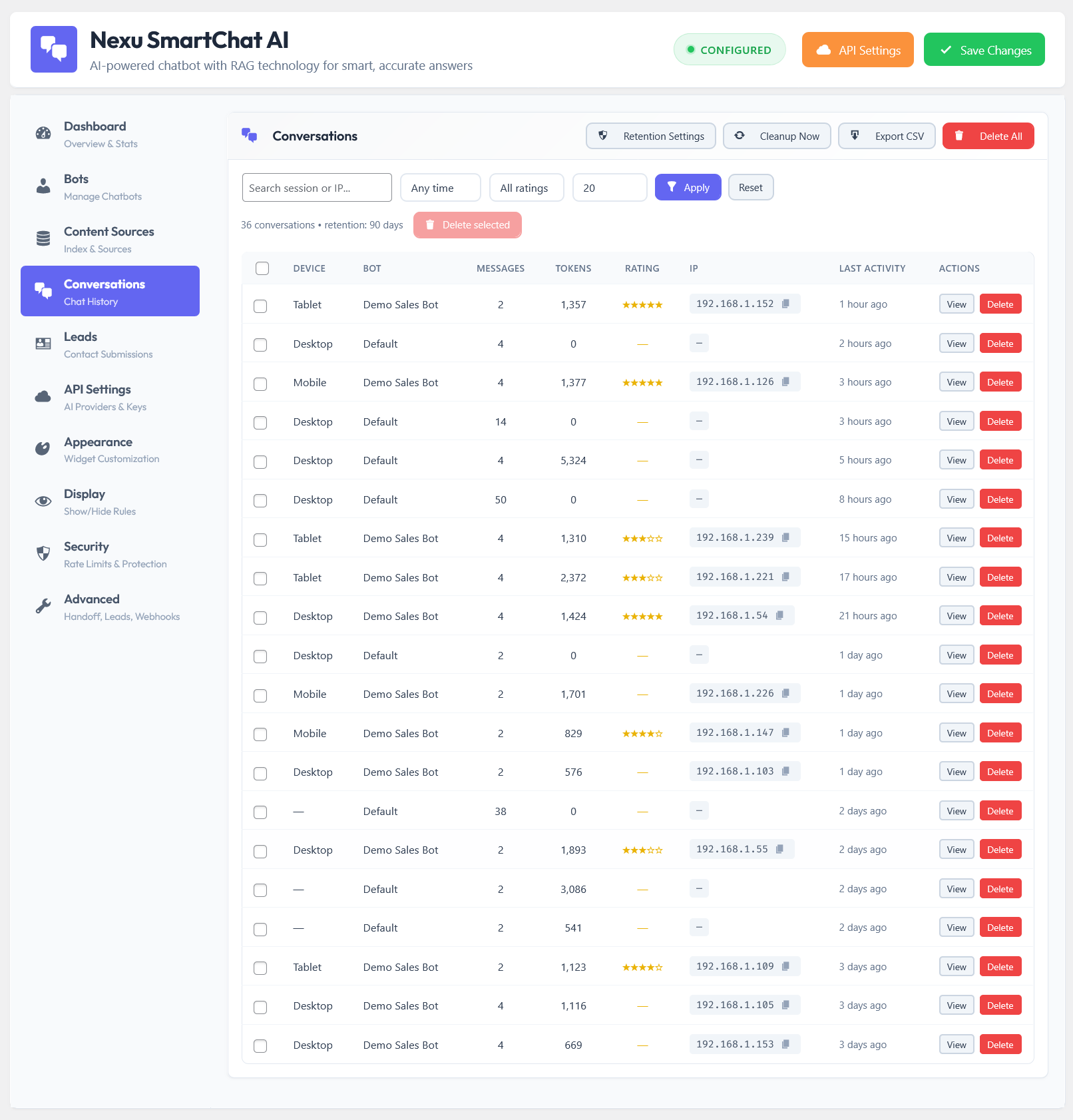
This guide covers how to systematically extract content intelligence from your chatbot data. The analysis framework here is more structured than a weekly log review — it is designed to produce a prioritized content improvement backlog that you can work from over weeks or months. We reference the conversation log system in Nexu SmartChat’s WooCommerce AI chatbot throughout, since searchable, product-linked conversation history is the raw data this analysis depends on.
The output of this process is not just a better chatbot. It is a better store — one where the information visitors need to buy with confidence is present, structured, and easy to find whether they use the chatbot or not.
Chat analytics for content intelligence are not about raw conversation volume or average session length. The signals that reveal content gaps are qualitative and contextual. Learning to read them is a skill that gets faster with practice, but the four signal types below cover almost everything you will find in your logs.
When a well-configured RAG chatbot says something like “I don’t have that specific information — I’d recommend contacting our team,” it is almost always because the indexed content does not contain the answer. This is the clearest content gap signal your data will produce. The question the visitor asked is something they needed to know, and your store did not have an answer for it anywhere in its pages.
When the chatbot produces a response that is technically on-topic but lacks specific detail, or when it answers with a general description rather than a precise specification, this usually means one of two things: the content on your product page exists but is thin, or the content exists but is buried in a format that produces poor vector embeddings (such as a long unstructured paragraph rather than a clearly labeled specification). Both are addressable content quality issues, not just chatbot settings.
When a visitor asks a variant of the same question two or three times in a single conversation, they are telling you the first answer did not satisfy them. They rephrased, hoping for a more specific or useful response. This is a strong quality signal because the visitor was persistent enough to try again rather than simply leaving. The failure here might be content quality (the page does not have the detail they need) or retrieval precision (the chatbot is finding the wrong content chunk for this specific question).
When a visitor specifically asks to be connected to a human despite the chatbot being available and functional, they have decided the chatbot cannot help them with their specific need. Sometimes this is because the question genuinely requires human judgment or account access. But a significant proportion of these escalations happen because the visitor asked a reasonable content question and the chatbot could not answer it credibly — and the visitor interpreted that as “I need a person,” when the actual solution was “this information needs to be on the product page.”
Weekly log reviews identify individual improvements. Monthly content gap analysis identifies patterns — the systematic gaps in your store’s content that require new pages, restructured sections, or content types you have not yet created. The monthly analysis takes longer (approximately 90 minutes) and produces a higher-level view of your content weaknesses.
Filter your conversation logs for the past 30 days using the two most reliable quality filters available in your plugin: conversations where the chatbot used “I don’t know” or escalation language, and conversations where the visitor asked more than two follow-up questions after an initial response. These are your two highest-signal data pools. Export them or copy the questions into a working document.
Visitors ask the same underlying question in many different ways. “What are the dimensions?” “How big is it?” “Will it fit in a standard cabinet?” “What are the measurements?” are all the same underlying question. Group by the information need, not the exact wording. Attach each group to the specific product or page category it relates to. A spreadsheet with columns for question group, representative phrasing, related product or page, and frequency works well for this step.
Some content gaps are not product-specific. They are category-wide or store-wide. If visitors ask about lead times across multiple different products, and the chatbot cannot answer reliably for any of them, you have a lead time content gap across your entire product catalog, not just on one page. These cross-product patterns reveal systematic content weaknesses that a single FAQ page or a dedicated content section can address more efficiently than product-by-product updates.
Not all content gaps are equally worth fixing. Prioritize by multiplying how often the gap appeared in the month’s data by the revenue importance of the product or category it relates to. A gap that appeared once on a low-margin accessory ranks below a gap that appeared three times on your highest-margin product. This scoring produces an objective priority order that reflects business impact rather than the ease of fixing or your personal interest in certain pages.
Different gap types require different content actions. A missing specification goes into the product page. A missing comparison between two products might become a comparison table or a dedicated comparison page. A missing use-case explanation might become a blog post or a product page “Who this is for” section. A missing category-wide policy explanation might become a standalone FAQ page. Matching gap type to content action type makes the backlog more actionable because each item has a clear content format attached.
Google Search Console shows you what visitors typed into Google to find your store. Chat analytics show you what those visitors were still trying to find once they arrived. The gap between these two data sources is your best source of long-tail SEO opportunity.
Standard keyword research tools surface search volume for standardized, aggregated query patterns. They miss the specific, natural-language questions that make up the long tail of search. “Are [Brand X] products compatible with [specific setup]?” is almost certainly searched by some portion of your potential customers, but it will not appear in a keyword tool’s output at any significant volume. It will appear repeatedly in your chat logs if your products have any compatibility considerations.
The natural language in your chat logs is also a source of customer vocabulary that improves every piece of content you write. Visitors do not use the same terminology as product manufacturers or industry insiders. If your customers consistently ask about “the bag strap length” when your product page says “carry handle dimensions,” your product page is using a term your buyers do not recognize. Chat data reveals this vocabulary mismatch, and fixing it improves both findability and comprehension.
According to Google’s helpful content guidelines, content should demonstrate first-hand expertise and satisfy the visitor’s actual informational need. Chat data is the most direct evidence you can gather of what those informational needs actually are — which makes content built from chat data analysis one of the best-positioned content types to perform well in search.
After several months of running this analysis across WooCommerce stores, patterns emerge in what chat data consistently reveals as missing. These content types appear in the gap analysis of almost every store that runs the process, which makes them a useful starting point for any store beginning to use chat analytics for content improvement.
When you make content improvements based on chat data, the way you structure the new content determines how much benefit you get on both dimensions — chatbot accuracy and organic search performance. Content that is written as flowing prose is harder for both systems to extract specific facts from. Content that uses clear formatting produces better results from both.
The principle here is that both a RAG chatbot’s retrieval layer and a search engine’s indexing system are looking for the same thing: clearly bounded, explicitly labeled pieces of information that answer specific questions. Specification tables with row labels like “Weight: 1.2 kg” are indexed and retrieved well by both systems. A paragraph that mentions weight in passing within a product story is indexed and retrieved poorly by both.
Re-indexing after every content improvement is the step that captures the chatbot benefit. As covered in previous guides, after making a product page change, trigger a re-index of that page in your chatbot’s knowledge base. The next visitor who asks the question that prompted the improvement should receive a significantly better answer. Verifying this improvement by testing the question yourself closes the feedback loop and confirms the content change was effective.
Running this process consistently — monthly analysis feeding a weekly improvement cadence — produces a store whose content is systematically shaped by what real visitors actually need. After six months, the improvement is visible in multiple metrics simultaneously: fewer chatbot escalations, better chatbot answer quality, increased organic traffic on the content pieces created from chat data, and a measurable reduction in pre-purchase support emails. The Nexu SmartChat conversation log system is the raw data source that makes this entire process possible — every conversation stored, searchable by product, filterable by outcome, available for exactly this kind of analysis.
Nexu SmartChat stores every conversation with full product context and searchable history, so your monthly content gap analysis always has a complete, accurate data set to work from — and on-demand re-indexing means every content improvement immediately improves chatbot accuracy too.






This guide totally nailed my chatbot frustrations and gave me clear fixes. really helpful for my WooCommerce store
Hey everyone! just finished reading this guide, and wow it's like having a crystal ball for my WooCommerce store. The part about prioritizing content gaps based on revenue importance? Absolute gold. i used to waste hours guessing what customers needed, but now I can see exactly which product pages are leaking sales because of unclear info. the chat analytics breakdown is so actionable, especially the tip about rephrased questions signaling weak content. if you're running a store and not using this, you're basically flying blind. Worth every second of the read!
I've been using the AI chat analytics for my vet supply store, and it's eye opening how many questions pop up that I never thought to address on product pages. The guide mentions logging questions exactly as asked do you recommend a specific tool or method for tracking these verbatim?
This guide really opened my eyes to how much my chatbot's weak answers were hurting me