Next-Level Code. Nexuvibe Style ...
Hrs
Min
Sec

You sent 50 posts for AI translation yesterday. This morning you check and 47 are done. Three are stuck on “Processing” with no progress. Or one shows “Failed” with a cryptic error message. Or worse, you do not check at all and discover weeks later that a batch of translations never completed, leaving gaps in your multilingual site that visitors have been hitting the whole time.
Failed translation jobs are an inevitable part of running automated WPML translation. AI APIs have rate limits. They have occasional outages. WordPress cron gets interrupted by server maintenance, heavy traffic, or hosting provider throttling. Network connections between your server and the API drop momentarily. These are not bugs in your translation plugin. They are realities of running an automated system that depends on external services and background processing.
The difference between a translation workflow that works reliably and one that creates ongoing headaches is not whether failures happen. It is whether the system detects failures, reports them clearly, and either fixes them automatically or gives you a one-click path to fix them manually. This guide covers the most common failure modes, how to diagnose them, and how a well-designed translation system handles them.
After running thousands of automated translations across multiple sites, these are the failure causes we encounter most frequently. Understanding them helps you prevent some and quickly diagnose the rest.
Every AI provider enforces rate limits on how many requests you can make per minute. When you send a large batch of translations, the plugin processes them sequentially, and if the processing rate exceeds your API tier’s limit, the provider returns a 429 “Too Many Requests” error. This is temporary. A well-designed plugin waits and retries. A poorly designed one marks the job as failed permanently. The fix is either waiting for the rate limit window to reset (usually one minute) or upgrading your API tier for higher limits.
WordPress cron runs on page load. If no one visits your site for a period, cron does not fire and translation processing pauses. More critically, shared hosting providers frequently kill long-running PHP processes, which can terminate a cron job mid-translation. The result is a job stuck in “Processing” state indefinitely. The fix is setting up a real server cron job (through cPanel, Plesk, or your host’s scheduler) that triggers wp-cron.php independently of site traffic.
Your API key has been revoked, your billing expired, or you hit your spending limit. All translation jobs fail with a 401 or 403 error. This will not resolve automatically because the underlying cause requires your intervention: adding a payment method, generating a new API key, or increasing your spending cap. The error message from the API usually tells you exactly what happened, but only if the plugin surfaces it clearly.
AI providers have content safety policies. Certain content, even if perfectly legitimate in context, can trigger refusal responses from the API. Medical content discussing medications, legal content discussing criminal acts, or product descriptions for items like knives or alcohol accessories occasionally get flagged. The API returns a refusal instead of a translation. The fix depends on the provider: sometimes rephrasing the source content resolves it, sometimes switching to a different AI provider for that specific content works.
Articles over 3,000 words can exceed PHP execution time limits or API response timeouts. The translation request is sent but the response never arrives because the connection drops. With content chunking and resume enabled, this is handled automatically: the timed-out chunk retries on the next cron cycle. Without chunking, the entire translation fails and needs to be restarted manually.
The most important tool for managing translation failures is a queue dashboard that shows you the status of every translation job in real time. Without it, you are flying blind. Failed jobs accumulate silently while you assume everything is working.
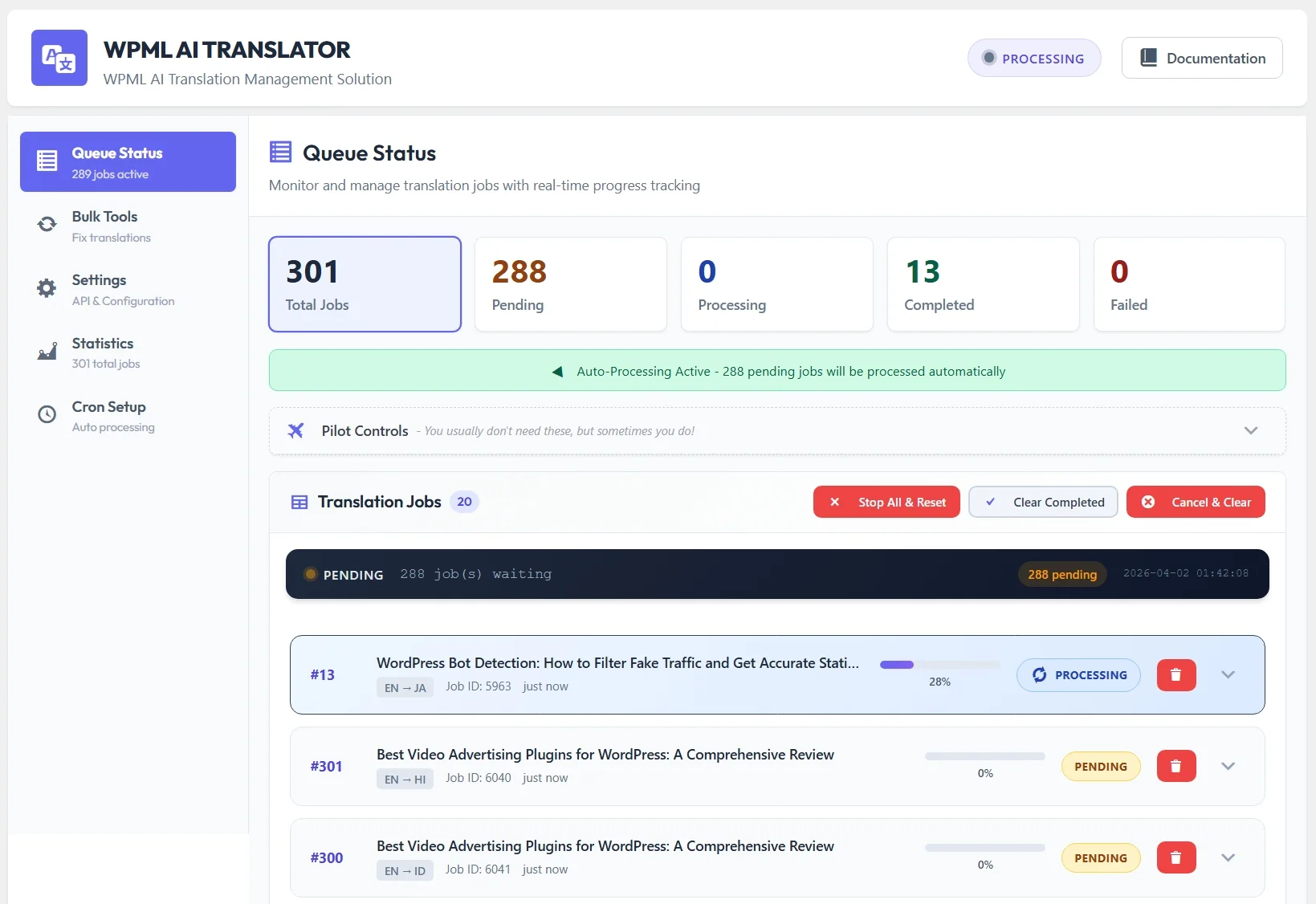
A good queue dashboard shows you four things at a glance: how many jobs are pending (waiting to be processed), how many are currently processing, how many have completed successfully, and how many have failed. It lets you filter by status so you can quickly see just the failed jobs, read the error details for each one, and take action.
The NEXU AI Auto Translator for WPML queue dashboard provides exactly this. Each job shows its current status, the content title, the target language, processing progress (for chunked content), and for failed jobs, the specific error message from the API. Failed jobs have a one-click retry button. Stuck jobs (showing “Processing” for longer than expected) can be reset and requeued with one click.
The best translation system is one you do not have to babysit. Here is what automatic recovery looks like for each failure type.
Out of seven common failure types, five are handled automatically without any intervention. The two that require manual action (authentication errors and content safety filters) are situations where the plugin genuinely cannot fix the underlying problem because it requires a human decision. But even for those cases, having clear error messages and one-click retry after you have fixed the cause makes the recovery process fast.
Beyond handling individual job failures, a good translation system monitors its own health. This means checking whether the background processing is actually running, whether the API connection is functional, and whether there are jobs that have been stuck in an intermediate state for too long.
The NEXU plugin includes active health monitoring that runs alongside the translation processing. It checks for jobs that have been in “Processing” state for longer than a configurable threshold (default is 15 minutes, which is far longer than any single translation should take). If it finds stuck jobs, it automatically resets them to “Pending” so they get picked up and processed again on the next cron cycle.
It also includes diagnostic tools that test the API connection, verify cron functionality, and check that the database tables are intact. If you are troubleshooting why translations are not processing, the diagnostics page tells you exactly what is working and what is not. This eliminates the guessing game that makes troubleshooting translation issues so frustrating on other plugins.
You do not need to watch your translation queue constantly. But you do need a routine that catches problems before they affect your visitors. Here is the monitoring approach we recommend for sites with active translation workflows.
Open the queue dashboard once a day. Look at the failed job count. If it is zero, everything is working. If there are failed jobs, check the error messages. Rate limit errors and timeouts will usually have auto-resolved by the time you check. Authentication errors need your attention immediately because nothing will translate until you fix them.
Check the statistics dashboard weekly. Look at the success rate percentage. A healthy translation workflow runs above 95 percent success rate. If you see the rate dropping, it usually indicates a systemic issue: a cron problem, an API billing issue, or a hosting change that affected connectivity. Catching a trend early prevents a backlog of failed translations from accumulating.
After sending a large batch of translations (20 or more items), check back within a few hours to verify everything completed. Large batches are where rate limiting and cron interruptions are most likely to cause issues. A quick check confirms that your entire batch went through and catches any stragglers that need a manual retry.
While you cannot eliminate all translation failures, you can minimize their frequency with a few preventive measures.
This single change eliminates the most common failure category (cron interruptions on shared hosting). A real cron job that fires every minute ensures consistent, reliable background processing. Most hosting control panels make this a two-minute configuration. It is the highest-impact preventive measure you can take.
Set a monthly spending limit that is high enough to cover your translation volume with a comfortable margin. If your typical monthly API spend is $5, set the limit at $20. An expired payment method or a hit spending limit causes all translations to fail simultaneously with no automatic recovery. Set a calendar reminder to check your API billing monthly.
Instead of sending 200 posts for translation at once, send them in batches of 20 to 30. This keeps the queue manageable, makes it easier to spot failures, and reduces the chance of hitting rate limits. Each batch completes in a predictable timeframe, and you can verify completion before sending the next batch.
The difference between a translation workflow you trust and one you worry about comes down to three things: a queue dashboard that shows you what is happening, automatic recovery for the failures that can be fixed without human intervention, and clear error reporting for the failures that need your attention.
When your translation system handles failures gracefully, you stop worrying about it. You send content for translation, check the queue once a day, and trust that the system is doing its job. The rare failure that needs manual intervention gets caught quickly and resolved with a single click. Your multilingual site stays current, complete, and consistent across all languages without translation management becoming a daily chore.
That is what a mature translation workflow looks like. Not one that never fails, because that is unrealistic in any system that depends on external APIs and background processing. But one that handles failures intelligently, recovers automatically where possible, and gives you the tools to fix the rest in seconds rather than hours.
Queue dashboard. Automatic retry. Health monitoring. Stuck job detection. One-click recovery. Four AI providers. From $39/year.






Hey everyone, this guide was a lifesaver during the holiday rush! I had three translations stuck for days and didn't even realize it
Got this to handle stalled WPML jobs after a client complained about missing translations. does what it says caught a few stuck in "Processing" that I'd never have noticed. not flashy, but saved me a headache
Hey guys, just gotta say this plugin's retry logic is solid. saved me hours failed jobs used to sit there forever, now it just handles them. no more checking manually. Works like it should.
Didn't realize how often WPML jobs just stall until this guide. Saved me hours!